
D³Nav: Data-Driven Driving Agents for Autonomous Vehicles in Unstructured Traffic

Project description
d3nav





D³Nav: Data-Driven Driving Agents for Autonomous Vehicles in Unstructured Traffic.
This repo is my implementation of D3Nav using CommaAI's video world model, fine tuning it using the D3Nav methodology on NuScenes.
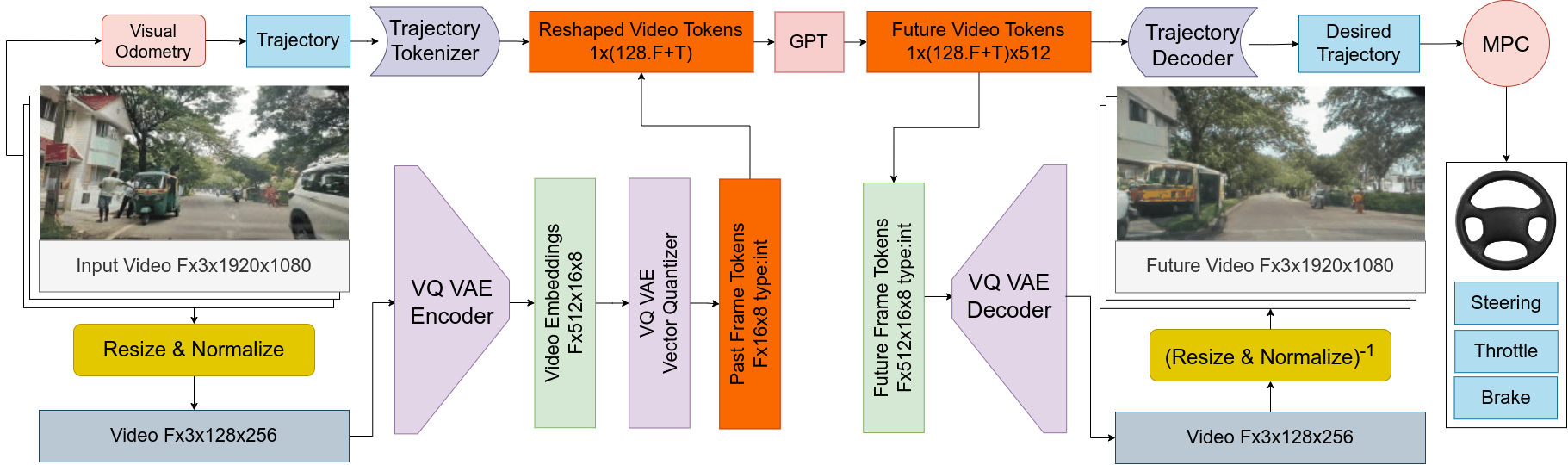

Abstract Navigating unstructured traffic autonomously requires handling a plethora of edge cases, traditionally challenging for perception and path-planning modules due to scarce real-world data and simulator limitations. By employing the next-token prediction task, LLMs have demonstrated to have learned a world model. D³Nav bridges this gap by employing a quantized encoding to transform high-dimensional video data (Fx3x128x256) into compact integer embeddings (Fx128) which are fed into our world model. D³Nav's world model is trained on the next-video-frame prediction task and simultaneously predicts the desired driving signal. The architecture's compact nature enables real-time operation while adhering to stringent power constraints. D³Nav's training on diverse datasets featuring unstructured data results in the model's proficient prediction of both future video frames and the driving signal. We make use of automated labeling to generate importance masks accentuating pedestrians and vehicles to aid our encoding system in focusing on objects of interest. These capabilities are an improvement in end-to-end autonomous navigation systems, particularly in the context of unstructured traffic environments. Our contribution includes our driving agent D³Nav and our embeddings dataset of unstructured traffic. We make our code and dataset\footnote{Please refer to the supplementary material} public.
Video Demos
Below is a demo of D³Nav generating video frames

Below is a demo of D³Nav generating the control signal (desired trajectory) on a subset of our dataset. Note that the point cloud and semantic segmentation are not generated by D³Nav and are only used to visualize the trajectory in 3D with respect to other objects.

Cite
Cite our work if you find it useful
@article{NG2024D3Nav,
  title={D³Nav: Data-Driven Driving Agents for Autonomous Vehicles in Unstructured Traffic},
  author={Aditya NG and Gowri Srinivas},
  journal={The 35th British Machine Vision Conference (BMVC)},
  year={2024},
  url={https://bmvc2024.org/}
}
Install it from PyPI
pip install d3nav
You can run the video demo as follows
python3 -m d3nav --video_path input_video.mp4
Usage
Following is an example usage of the planner. Look at d3nav/cli.py for more details.
from d3nav import load_d3nav, center_crop, d3nav_transform_img, visualize_frame_img

# Load the model
model = load_d3nav(args.ckpt)
model = model.cuda()
model.eval()

# Create a buffer of 5 seconds
buffer_size = int(5 * fps)
buffer_full = int(4.5 * fps)
frame_history = deque(maxlen=buffer_size)

# Load a video and populate the buffer
for index in tqdm(range(frame_count), desc="Processing frames"):
    ret, frame = cap.read()
    frame = center_crop(frame, crop_ratio)
    frame_history.append(frame.copy())

    if len(frame_history) >= buffer_full:
        break

# Construct the input of 8 frames at FPS
history_tensors = []
step = len(frame_history) // 8
for i in range(0, len(frame_history), step):
    if len(history_tensors) < 8:  # Ensure we only get 8 frames
        frame = frame_history[i]
        frame = d3nav_transform_img(frame)
        frame_t = torch.from_numpy(frame)
        history_tensors.append(frame_t)

# Stack the tensors to create sequence
sequence = torch.stack(history_tensors)
sequence = sequence.unsqueeze(0).cuda()  # Add batch dimension

# Get trajectory prediction
with torch.no_grad():
    trajectory = model(sequence)
    trajectory = trajectory[0].cpu().numpy()  # Remove batch dimension

# Process trajectory for visualization
traj = trajectory[:, [1, 2, 0]]
traj[:, 0] *= -1
trajectory = np.vstack(([0, 0, 0], traj))  # Add origin point

img_vis, img_bev = visualize_frame_img(
    img=frame.copy(),
    trajectory=trajectory,
    color=(255, 0, 0),
)
You can train on the comma dataset using the following script
# Train the VQ-VAE for trajectory encoding
python3 -m d3nav.scripts.train_traj

# Fine tune the video model for trajectory prediction
python3 -m d3nav.scripts.train
Model Predictive Control
Checkout our Model Predictive Controller for computing steering angle and acceleration.
# TODO: implement MPC to show steering
# pip install model_predictive_control

import numpy as np

from model_predictive_control.cost.trajectory2d_steering_penalty import (
    Traj2DSteeringPenalty,
)
from model_predictive_control.models.bicycle import (
    BicycleModel,
    BicycleModelParams,
)
from model_predictive_control.mpc import MPC

# Initialize the Bicycle Model
params = BicycleModelParams(
    time_step=time_step,
    steering_ratio=13.27,
    wheel_base=2.83972,
    speed_kp=1.0,
    speed_ki=0.1,
    speed_kd=0.05,
    throttle_min=-1.0,
    throttle_max=1.0,
    throttle_gain=5.0,  # Max throttle corresponds to 5m/s^2
)
bicycle_model = BicycleModel(params)

# Define the cost function
cost = Traj2DSteeringPenalty(model=bicycle_model)

# Initialize MPC Controller
horizon = 20
state_dim = 4  # (x, y, theta, velocity)
controls_dim = 2  # (steering_angle, velocity)

mpc = MPC(
    model=bicycle_model,
    cost=cost,
    horizon=horizon,
    state_dim=state_dim,
    controls_dim=controls_dim,
)

# Define initial state (x, y, theta, velocity)
start_state = [0.0, 0.0, 0.0, 1.0]

# Define desired trajectory: moving in a straight line
desired_state_sequence = [[i * 1.0, i * 0.5, 0.0, 1.0] for i in range(horizon)]

# Initial control sequence: assuming zero steering and constant speed
initial_control_sequence = [[0.0, 1.0] for _ in range(horizon)]

# Define control bounds: steering_angle between -0.5 and 0.5 radians,
bounds = [[(-np.deg2rad(400), np.deg2rad(400)), (-1.0, 1.0)] for _ in range(horizon)]

# Optimize control inputs using MPC
optimized_control_sequence = mpc.step(
    start_state_tuple=start_state,
    desired_state_sequence=desired_state_sequence,
    initial_control_sequence=initial_control_sequence,
    bounds=bounds,
    max_iters=50,
)
Development
Read the CONTRIBUTING.md file.
Getting Started
Docker Environment
To build, use:
DOCKER_BUILDKIT=1 docker-compose build
To run the interactive shell, use:
docker-compose run dev
Future Video Prediction
D³Nav takes 6 frames as input context and produces the next 6 frames. In the prompt columns, we show the last frame of the input and on the Prediction column, we have an animation of D³Nav's prediction of what it thinks will happen next.
Trajectory Demo
We have put together a demo video of D³Nav operating on a subset of our dataset. In the video, D³Nav takes the video frames as input and produces the control signal (desired trajectory) as output which is plotted out as a red strip on the 3D and 2D views. We have a parallel system which produces 3D semantic occupancy. The 3D semantic occupancy is not produced by D³Nav and is only plotted to help visualize the trajectory in 3D with respect to other objects. The semantics are highlighted in both the 2D and 3D views (Vehicles in Blue and Pedestrians in Red). All other objects are colored by a height map on the 3D view.
The video is placed at DEMO_3_control_signal_trajectory.mp4
Dataset
We have provided a subset of our dataset in the BengaluruDrivingEmbeddings folder for review. We have ensured that there is no personally identifyable information (faces, number plates, etc.) in our dataset.
Dataset Structure
BengaluruDrivingEmbeddings/
├── 1658384924059                       # Dataset ID
│   ├── embeddings                      # Folder of embeddings
│   ├── embeddings_features_quantized   # Folder of quantized embeddings
│   ├── embeddings_index.npy            # Integer indices of the embeddings
│   ├── input_video.mp4                 # Raw video
│   └── reconstructed_video.mp4         # Video Reconstructed by VQ-VAE
├── calibration                         # Camera Intrinsics
│   ├── calibrationSession.mat
│   ├── calib.txt
│   └── calib.yaml
└── weights                             # VQ-VAE weights
    ├── decoder.onnx
    ├── decoder.onnx.dynanic_quant.onnx
    ├── decoder.pth
    ├── encoder.onnx
    ├── encoder.onnx.dynanic_quant.onnx
    ├── encoder.pth
    ├── quantizer_e_i_ts.npy
    ├── quantizer.onnx
    ├── quantizer.onnx.dynanic_quant.onnx
    └── quantizer.pth


Download files
Download the file for your platform. If you're not sure which to choose, learn more about installing packages.
Source Distribution
Built Distribution
Filter files by name, interpreter, ABI, and platform.
If you're not sure about the file name format, learn more about wheel file names.
Copy a direct link to the current filters






