
DACLhound
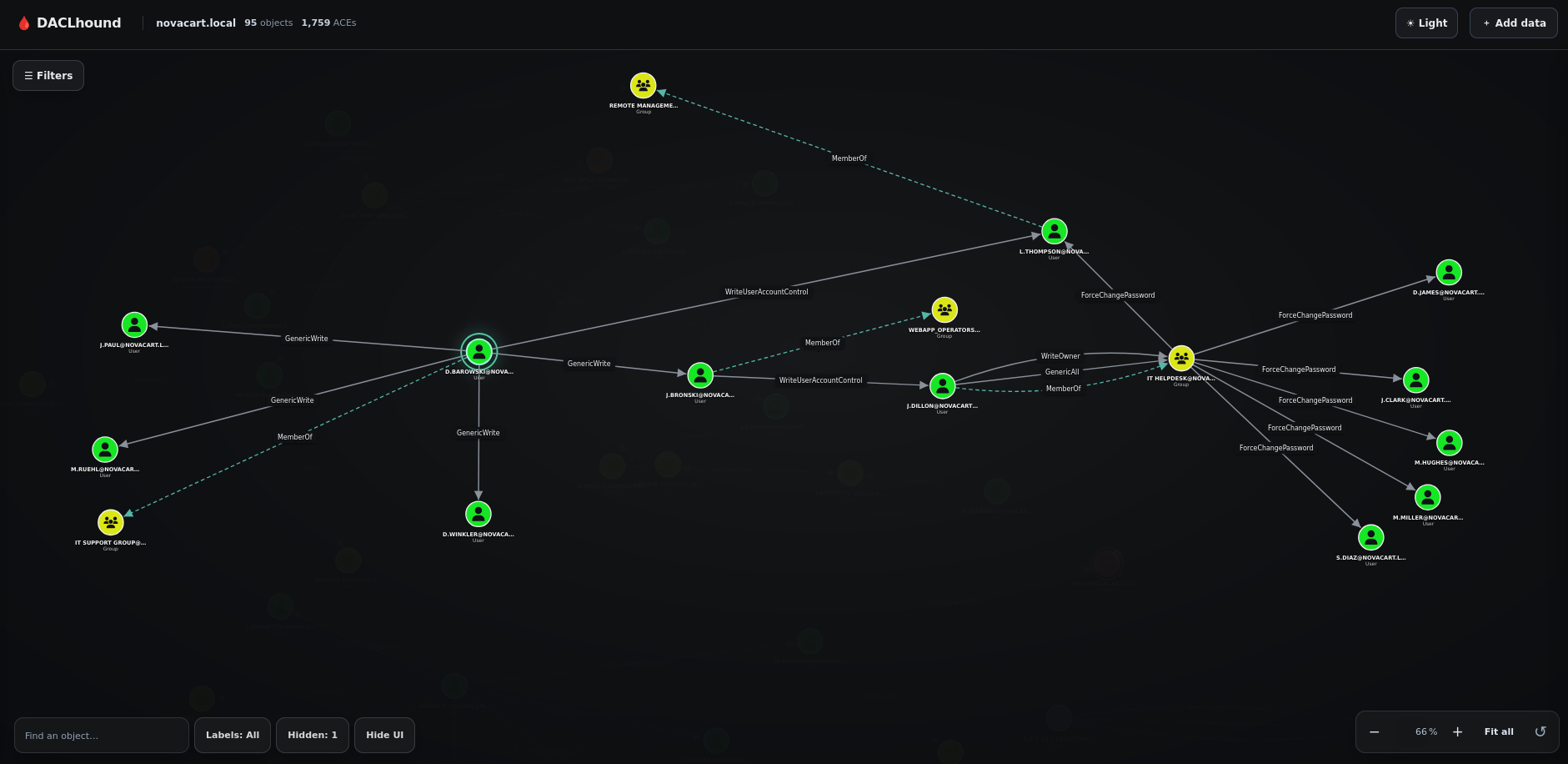
DACLhound collects Active Directory security descriptors over LDAP and turns the results into a graph you can inspect in a browser. The collector uses bloodyAD as a Python library; it does not run the bloodyAD command.
It is primarily intended for Hack The Box (HTB) and similar hands-on labs, and works best with lab-sized or otherwise moderate Active Directory environments. It is not designed or performance-tested for very large enterprise domains.
Unlike BloodHound CE's modeled graph edges, DACLhound preserves the collected DACL details and exposes individual Write-Property rights by attribute (for example, WriteLogonHours or WriteUserAccountControl, etc.). This helps inspect the specific property and ACE behind a relationship.
Demo
https://github.com/user-attachments/assets/06d60c32-a3a0-4773-8ddf-86e0b5aa1485
The demo walks through collecting a domain and opening the graph viewer. It also shows selecting an object to focus on its permission paths, hiding objects, and setting start and end nodes to reveal a path.
Install
Python 3.10 or newer is required.
pipx install DACLhound
Upgrade later with:
pipx upgrade DACLhound
Collect a graph
DACLhound.py collect --host "$FQDN" -d "$DOMAIN" -u 'user' -p 'password' --dc-ip "$IP" --output "$DOMAIN.json"
The collector is read-only. By default it collects users, groups, computers, OUs, containers, GPOs, the domain, and ADCS data. Use --types to limit directory object types:
DACLhound.py collect --host "$FQDN" -d "$DOMAIN" -u 'user' -p 'password' --types users,groups --output users-and-groups.json
Use --no-adcs to skip ADCS collection. The normalized graph is written to --output. Add --raw-output to keep the bloodyAD response as well.
Authentication
NTLM password
DACLhound.py collect --host "$FQDN" -d "$DOMAIN" -u 'user' -p 'password' --dc-ip "$IP" -o "$DOMAIN.json"
NTLM pass-the-hash
Use LMHASH:NTHASH; if you only have the NT hash, leave the LM field empty:
DACLhound.py collect --host "$FQDN" -d "$DOMAIN" -u 'user' -hashes ':<NTHASH>' --dc-ip "$IP" -o "$DOMAIN.json"
Kerberos
Kerberos supports a password, pass-the-hash, or an existing ccache. When using a
ccache, -u is optional; the identity is taken from the ticket. -no-pass is
an explicit flag for ccache authentication.
Password:
DACLhound.py collect --host "$FQDN" -d "$DOMAIN" -u 'user' -p '<password>' -k --dc-ip "$IP" -o "$DOMAIN.json"
Pass-the-hash (NT hash used as the Kerberos RC4 key):
DACLhound.py collect --host "$FQDN" -d "$DOMAIN" -u 'user' -hashes '<LMHASH>:<NTHASH>' -k --dc-ip "$IP" -o "$DOMAIN.json"
If only the NT hash is available, use -hashes '<NTHASH>'.
Existing ccache:
# Use the current KRB5CCNAME
DACLhound.py collect --host "$FQDN" -d "$DOMAIN" -k -no-pass --dc-ip "$IP" -o "$DOMAIN.json"

# Or provide a ccache file directly
DACLhound.py collect --host "$FQDN" -d "$DOMAIN" -k user.ccache -no-pass --dc-ip "$IP" -o "$DOMAIN.json"
An AES key enables Kerberos automatically: use -aesKey '<AESKEY>' (with -u). Add -s to use LDAPS.
Open the graph
Run the viewer in the foreground and stop it with Ctrl+C:
DACLhound.py graph --input "$DOMAIN.json"
Or run it in the background:
DACLhound.py graph start --input "$DOMAIN.json"
DACLhound.py graph status
DACLhound.py graph stop
The server listens on 127.0.0.1:8765 by default. Uploaded JSON files stay in memory while the server is running and are discarded when it stops. Use --bind and --port to change the listener. Run DACLhound.py collect --help or DACLhound.py graph --help for all options.
License
MIT. See LICENSE.
1 maintainer

Metadata
1 maintainer
Release files for DACLhound 0.1.6
For a detailed explanation of source distributions (sdists) and built distributions (wheels), please see the package formats documentation.
Built distribution (wheel)
| File | Interpreter | ABI | Platform | Reset |
|---|---|---|---|---|
| daclhound-0.1.6-py3-none-any.whl | Python 3 | none | any | Details |
Release files / daclhound-0.1.6-py3-none-any.whl
| Download URL | daclhound-0.1.6-py3-none-any.whl |
|---|---|
| Size | 77.1 kB |
| Tags | Python 3 |
|
SHA-256 checksum How to use checksums |
1f4067e633b530c2b952377719cfb902c65cb968e773389b08a20941511682a2
|
|
BLAKE2b-256 checksum How to use checksums |
324c55c88ce2a7060ec7a8e7d0116169712414756bd16d9d51076a788cff7ce2
|
| Upload date | |
|
Uploaded using Trusted Publishing? What is trusted publishing? |
No |
| Uploaded via |
twine/7.0.0 CPython/3.12.3
|
Security for DACLhound 0.1.6
Provenance
Provenance describes where a file came from. On PyPI, provenance is shared via attestations, which provide a verifiable record of the build or publishing details. View details, limitations and caveats.
No provenance found
None of the files in this release were uploaded with provenance metadata.
A note on package security
PyPI is a repository for distributing packages, not a service for auditing them. While third-party security researchers and our staff do their best to detect and remove malicious packages, PyPI cannot guarantee the quality, security or suitability of any given package.
To learn more about protecting yourself from malicious actors, visit our package security documentation.














