
Package that allows user to define lazy evaluated dag pipeline.

Project description
dagpipe
TOC
Overview
dagpipe - ducktape on your data flow!
Package that allows the user to define lazily evaluated DAG (directed acyclic graph) pipeline.
Setup
- This library uses Graphviz library for visualization. If you want to plot created pipes, install it on your computer. If not, rest of the functionalities works without it.
- Install package via pip with visualization (note: you still have to do step 1):
pip install dagpipe[viz]
or without it (that version is written in pure python so no additional dependencies would be added during installation process)
pip install dagpipe
Tutorial
Quick start
Create pipeline task with task decorators:
import dagpipe


@dagpipe.task()
def run_a(param):
    return f"Output of A with {param}"

@dagpipe.task()
def run_b(a):
    return f"Output of B with {a}"

@dagpipe.task()
def run_c(b):
    return f"Output of C with {b}"
Link them:
a = run_a(param="Initial input for A")
b = run_b(a)
c = run_c(b)
Define pipeline:
simple_pipeline = dagpipe.Pipeline(
  input=a,
  outputs=[c]
)
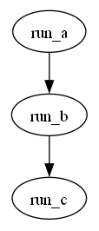
Visualize:
Note: This step would only works if you will have properly installed Graphviz on your computer.
dagpipe.visualize(simple_pipeline)
Run the whole pipeline
simple_pipeline.run()
>>>> ['Output of C with Output of B with Output of A with Initial input for A']
Functionality overview
Task
Two types of tasks are supported:
- Function task defined with
taskdecorator
@dagpipe.task()
def A(param):
    return f"Output of A with {param}"

@dagpipe.task()
def B(a):
    return f"Output of B with {a}"

@dagpipe.task()
def C(b):
    return f"Output of C with {b}"

@dagpipe.task()
def D(a, c):
    return f"Output of D with {a} and {c}"
- Method tasks defined with
method_taskdecorator
class ExampleClass:
    @dagpipe.method_task()
    def E(self, d):
        return f"Output of E with {d}"

    @dagpipe.method_task()
    def F(self, e):
        return f"Output of F with {e}"

    @dagpipe.method_task()
    def G(self, inp):
        return f"Output of G with {inp}"

    @dagpipe.method_task()
    def __call__(self, inp):
        return f"Output from Exampleclass with {inp}"
Tasks flow is defined in very intuitive way (like normal functions execution).
Note that:
- You can mix tasks and method tasks in a single pipeline.
- You can use more than one task as an input to single task (as shown for d task).
example = ExampleClass()

a = A(param="Initial input for A")
b = B(a)
c = C(b)
d = D(a, c)
e = example.E(d)
f = example.F(e)
g = example.G(c)
ec = example(g)
Pipeline
To define a pipeline simply pass input and outputs to the Pipeline.
You can define as many outputs as you want, but only one input.
pipeline = dagpipe.Pipeline(input=a, outputs=[f, ec])
You can run the same pipeline with different parameters. Your result would be a list with values for each defined output.
result = pipeline.run()
print(result)

new_result = pipeline.run(param="## New input for A ##")
print(new_result)

new_result2 = pipeline.run(param="@@ New input for A @@")
print(new_result2)
>>>> ['Output of F with Output of E with Output of D with Output of A with Initial input for A and Output of C with Output of B with Output of A with Initial input for A', 'Output from Exampleclass with Output of G with Output of C with Output of B with Output of A with Initial input for A']

>>>> ['Output of F with Output of E with Output of D with Output of A with ## New input for A ## and Output of C with Output of B with Output of A with ## New input for A ##', 'Output from Exampleclass with Output of G with Output of C with Output of B with Output of A with ## New input for A ##']

>>>> ['Output of F with Output of E with Output of D with Output of A with @@ New input for A @@ and Output of C with Output of B with Output of A with @@ New input for A @@', 'Output from Exampleclass with Output of G with Output of C with Output of B with Output of A with @@ New input for A @@']
But be aware, that when you run it again without parameters it will use last defined parameter
result = pipeline.run()
print(result)
>>>> ['Output of F with Output of E with Output of D with Output of A with @@ New input for A @@ and Output of C with Output of B with Output of A with @@ New input for A @@', 'Output from Exampleclass with Output of G with Output of C with Output of B with Output of A with @@ New input for A @@']
Visualization
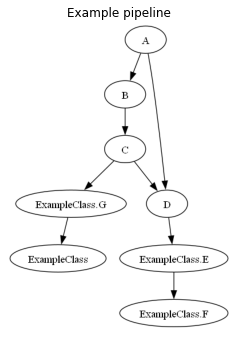
visualize function creates matplotlib plot that you can customize.
Alternatively you can save visualization fo file instead of plotting, by specifying parameter to_file: dagpipe.visualize(pipeline, to_file="path/to/file")
Tasks are named with theirs functions names. Method tasks like ClassName.function_name, but there is one special case: __call__ method is named only with class name.
import matplotlib.pyplot as plt


dagpipe.visualize(pipeline)
plt.gcf().set_size_inches(4, 6)
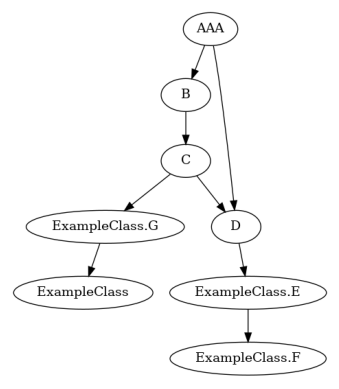
You can change displaying name in visualization in decorator Task instance name property (eg a.name = "AAA").
pipeline.tasks[0].name = "AAA"
dagpipe.visualize(pipeline)
Output split
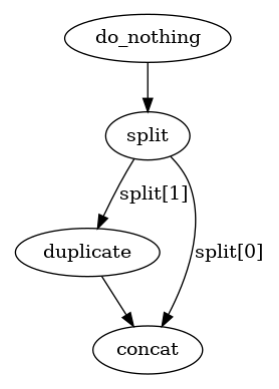
You have to specify outputs_num in Task decorator if you want to return more than one output
from typing import Any

@dagpipe.task()
def do_nothing(inp):
    return inp

@dagpipe.task(outputs_num=2)
def split(inp):
    print("runnin")
    return inp[0], inp[1]

@dagpipe.task()
def duplicate(inp):
    return inp*2

@dagpipe.task()
def concat(inp1, inp2):
    return inp1 + inp2

x1 = do_nothing(Any)
x2, x3 = split(x1)
x5 = duplicate(x3)
x6 = concat(x2, x5)

p = dagpipe.Pipeline(x1, [x6])

dagpipe.visualize(p)
p.run(["*first element*", "@second element@"])
>>>> runnin
>>>> ['*first element*@second element@@second element@']
Set name
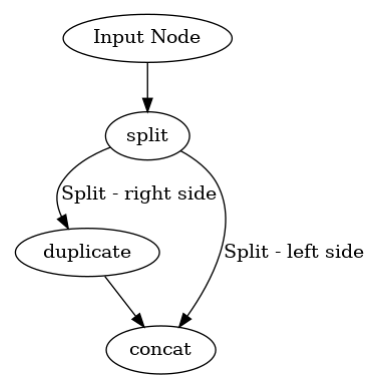
you can set name during flow definition with set_name Task method. If you need to name more than one task, just pass list of names.
x1 = do_nothing(Any).set_name("Input Node")
x2, x3 = split(x1).set_name(["Split - left side", "Split - right side"])
x5 = duplicate(x3)
x6 = concat(x2, x5)

p = dagpipe.Pipeline(x1, [x6])

dagpipe.visualize(p)
Sequential pipe
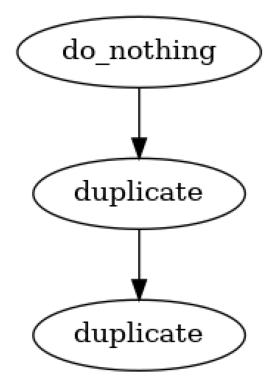
if your flow is really straightforward you can define it as sequence
p = dagpipe.Pipeline.sequential([
    do_nothing,
    duplicate,
    duplicate,
])

dagpipe.visualize(p)
conditional_stops
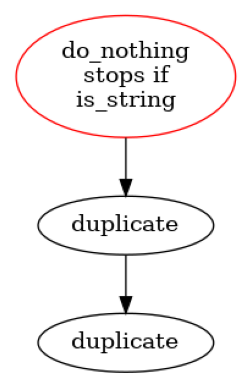
You can stop pipeline execution conditionally at any step if you specify conditional_stops argument in pipeline definition. It is a dict where key is Task.name and value is function that would take Task output and will convert it to boolean value. If True returned pipeline execution would be stopped and given task output returned with StoppingTaskHolder as second list element.
def is_string(x):
    return isinstance(x, str)

p = dagpipe.Pipeline.sequential(
    tasks_sequence=[do_nothing, duplicate, duplicate],
    conditional_stops={"do_nothing": is_string}
)

print("noramlr run", p.run(5))
print("stopped run", p.run("5"))


dagpipe.visualize(p)
>>>> noramlr run [20]
>>>> stopped run ['5', STOPPED AT do_nothing]
StoppingTaskHolder
you can easily filter out runs that stopped early with StoppingTaskHolder.in_ method.
outputs = p.run("5")
if dagpipe.StoppingTaskHolder.in_(outputs):
    print("wrong input format")
>>>> wrong input format
Dig deeper
dagpipe.task decorator changes function behavior so that when it is called it saves the base function with its arguments to Task object instead of calling it.
@dagpipe.task
def foo(x):
  return x

x = 1
print(f"x type before foo processing - {type(x)}")
x = foo(x)
print(f"x type after  foo processing - {type(x)}")
>>>> x type before foo processing - <class 'int'>
>>>> x type after  foo processing - <class 'dagpipe.task_core.Task'>
You can check values that are stored by Task x:
print("Stored function:", x.func)
print("Stored args: \t", x.args)
print("Stored kwargs: \t", x.kwargs)
Stored function: <function foo at 0x000001CBE13D7B50>
Stored args: 	 (1,)
Stored kwargs: 	 {}
If you want to run stored function, it is possible with run method, but normally Pipeline object would do it for you.
x.run()
1
Task stores information about input arguments that that are provided to it, so when you put another Task as input to your task, it will have information about the function that should be run before.
@dagpipe.task
def foo2(x):
  return x

inp = 1
x = foo(inp)
x2 = foo2(x)

print(f"input arg for x2 is '{x2.args[0]}' which type is {type(x2.args[0])}")
input arg for x2 is 'foo' which type is <class 'dagpipe.task_core.Task'>
Basically, the (task, task argument) tuple is an edge of directional computing graph. dagpipe.Pipeline collects information about all edges, and sorts them in right execution order. After that you can run whole pipeline.
pipeline = dagpipe.Pipeline(input=x, outputs=[x2])
pipeline.run()
[1]
Release history Release notifications | RSS feed


Download files
Download the file for your platform. If you're not sure which to choose, learn more about installing packages.
Source Distribution
Built Distribution
Filter files by name, interpreter, ABI, and platform.
If you're not sure about the file name format, learn more about wheel file names.
Copy a direct link to the current filters
File details
Details for the file dagpipe-0.2.21.tar.gz.
File metadata
- Download URL: dagpipe-0.2.21.tar.gz
- Upload date:
- Size: 18.0 kB
- Tags: Source
- Uploaded using Trusted Publishing? No
- Uploaded via: twine/5.1.0 CPython/3.10.14
File hashes
| Algorithm | Hash digest | |
|---|---|---|
| SHA256 |
fd37c4f97765e878cd0235b55561a06b0c7ca8be75987c77587423c8d379b642
|
|
| MD5 |
2cb2a0c5f2bca5747b9b7bdd5db5e7bd
|
|
| BLAKE2b-256 |
1ac39c0feed71a423e4ad9a064f177937d0c656df4b39415fc76819fd7c10143
|
File details
Details for the file dagpipe-0.2.21-py3-none-any.whl.
File metadata
- Download URL: dagpipe-0.2.21-py3-none-any.whl
- Upload date:
- Size: 17.8 kB
- Tags: Python 3
- Uploaded using Trusted Publishing? No
- Uploaded via: twine/5.1.0 CPython/3.10.14
File hashes
| Algorithm | Hash digest | |
|---|---|---|
| SHA256 |
d1dbe2f6add9b4a752275cd2ff668f340628ee8c7d2ff0de783ff6dc16d03c83
|
|
| MD5 |
28d4552c7371f68a662ea83b1ea622d2
|
|
| BLAKE2b-256 |
c5264f7428e67eac9815799f9661612de5e2eb58bc738654d07673aff2e23286
|






