
dagster-dataframely
Dataframely validates Polars frames against a schema.
Dagster has two built-in places to show a schema: the Columns tab and asset checks.
dagster-dataframely attaches a Dataframely schema to a Dagster asset, so you declare a table once and Dagster shows it in both places.
import dataframely as dy
import polars as pl

import dagster_dataframely as dd


class Customers(dy.Schema):
    """A storefront customer account."""

    customer_id = dy.String(primary_key=True, description="Account identifier.")
    email = dy.String(nullable=False, description="Where receipts are sent.")
    lifetime_value = dy.Float64(nullable=False, min=0.0, description="Spend to date.")


@dd.asset(Customers)
def customers(raw_customers: pl.DataFrame) -> pl.DataFrame:
    """Validate the storefront's customer accounts."""
    return raw_customers
That is the whole integration.
Every Python block on this page comes from the demo pipeline, and every image is a screenshot of it.
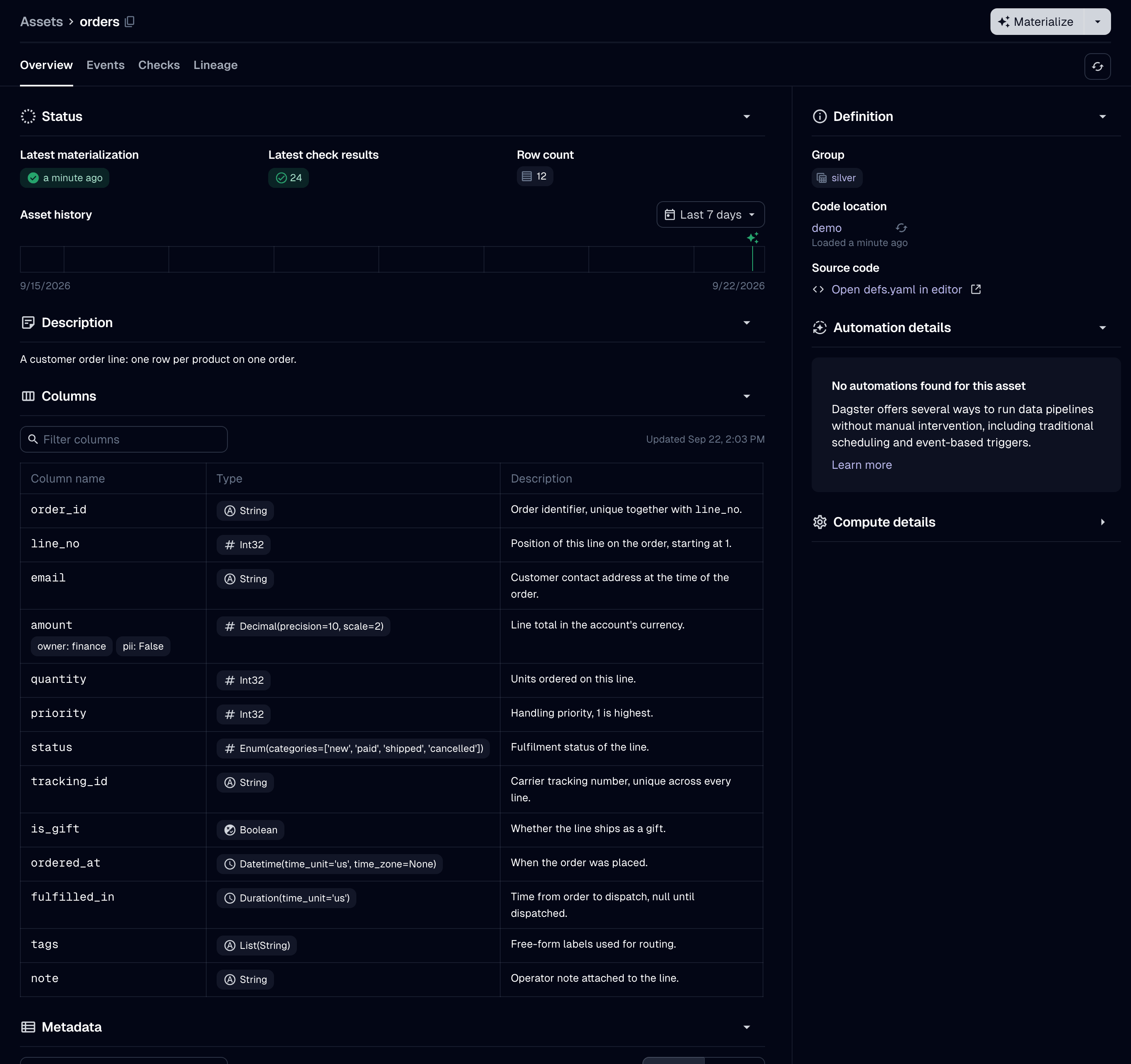
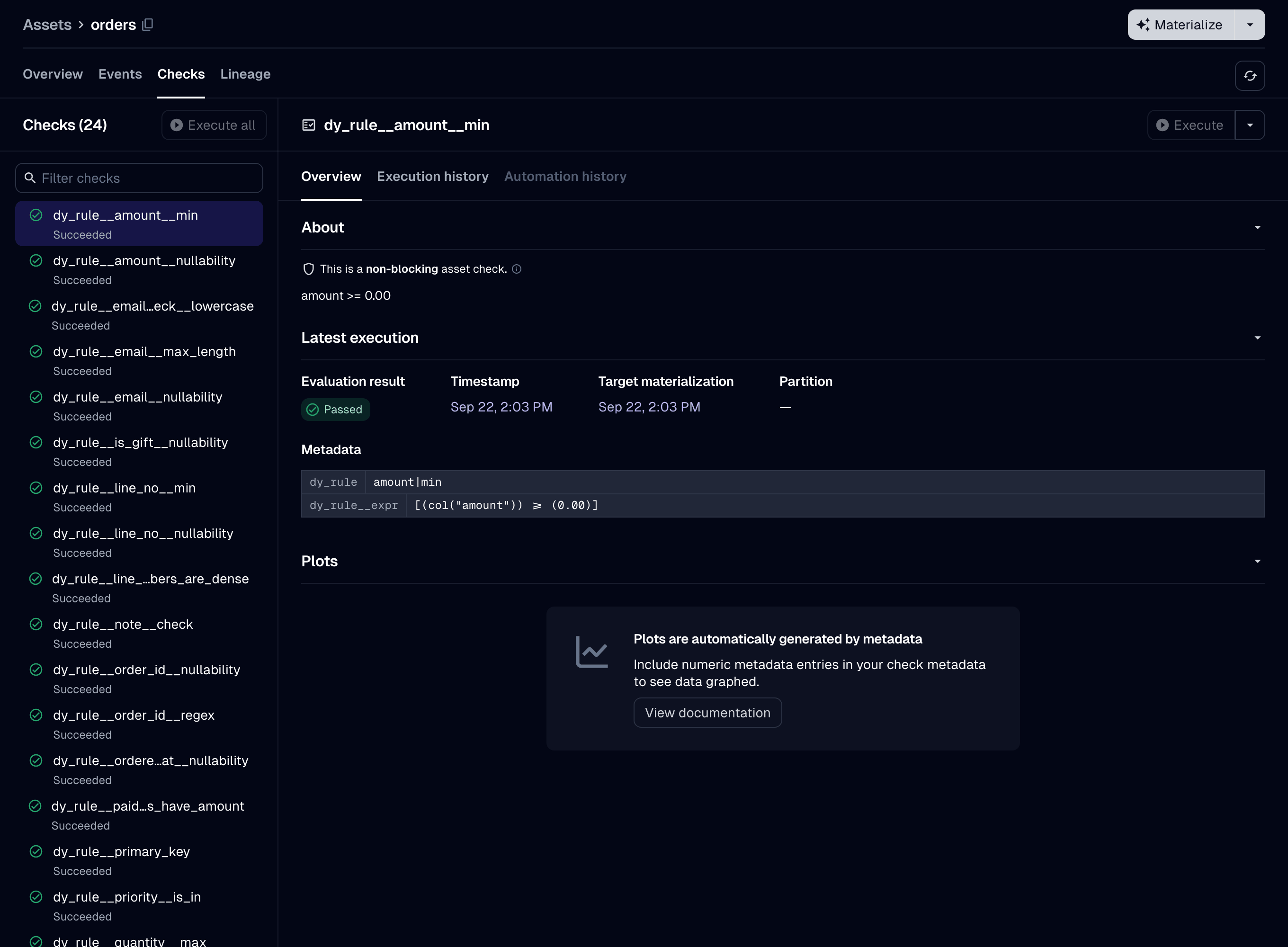
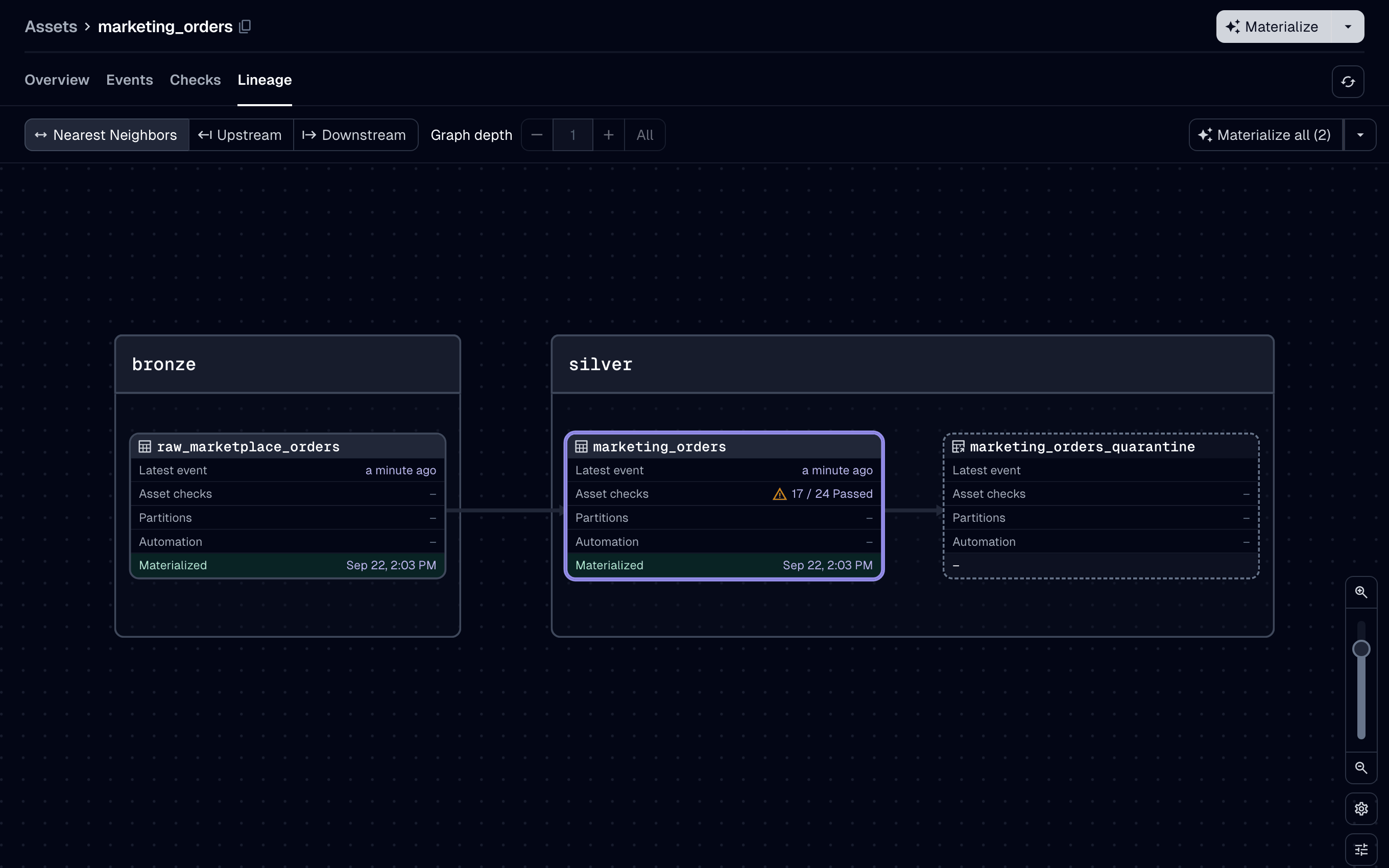
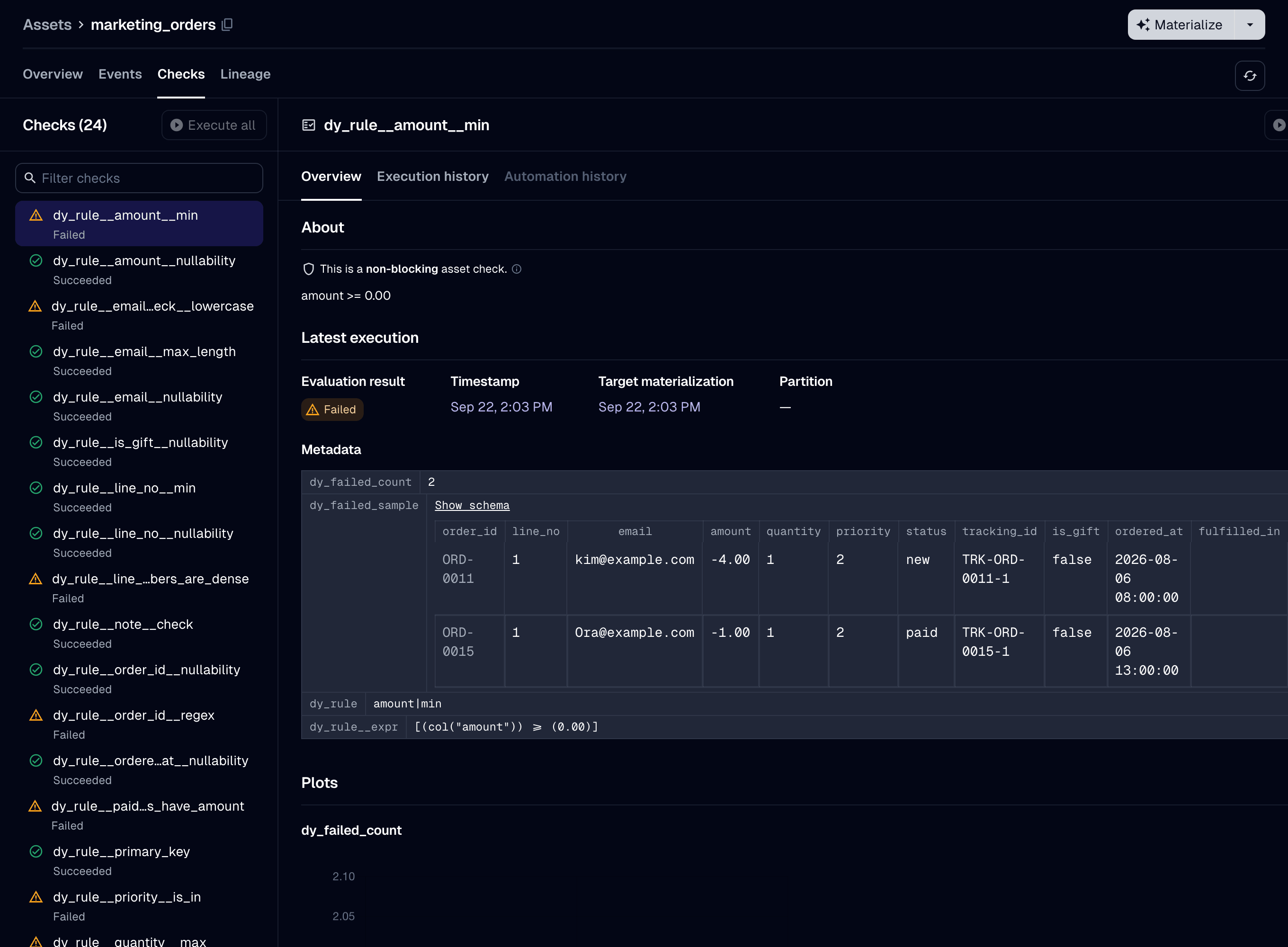
The images show assets that use its thirteen-column Orders schema.
From that one declaration you get:
-
The catalog's Columns tab, filled in before the asset first runs: dtypes, descriptions, nullability, uniqueness, the primary key at table level, and every other column constraint beside its column.
-
One asset check per Dataframely rule, and each check has its own pass/fail history.
-
A blocking column-schema check that compares the frame's columns and dtypes with the schema's, before
Schema.filterruns. -
A quarantine for invalid rows, if you declare one. With
quarantine=True, a run with invalid rows writes them to a quarantine next to the table, writes the valid rows to the table, and succeeds. The run still fails when every row is invalid.

The decorated function is a normal Dagster asset function.
Dagster passes upstream assets to it as parameters.
It can also declare a context parameter.
It returns one of five things: a pl.DataFrame, a pl.LazyFrame, a dg.MaterializeResult of either, or None.
dd.asset builds a @dg.asset and accepts its parameters under the same names.
It leaves out six, which it sets itself or does not support.
The user guide lists them.
A test fails if @dg.asset adds a parameter that dd.asset lacks, or removes one that dd.asset passes on.
Package philosophy
Schema on write. Validation happens when an asset writes a table, never when it reads one. The checks run before the IO manager receives the frame, so it never writes a failing row to the table.
Use this package after ingestion, from bronze to silver to gold, to check that data is fit to publish.
Load raw records with a permissive loader such as dlt, and declare a schema on the first table that other people query.
Use another tool for ingestion-scale or larger-than-memory data.
The decorated function must return the schema's dtypes.
A dtype that differs from the schema's fails the run, and the package never casts it.
There is no lenient mode.
Extra columns and column order need no extra work: Schema.filter drops the columns the schema does not declare and returns the rest in the schema's order.
So dtypes are the only thing you have to fix.
Partial data needs a declaration, not a setting.
The only parameter for it is quarantine=True.
No environment variable sets it.
Without it, one failing row fails the run and the package writes nothing, so your last-known-good table is unchanged.
The decorator is strict, but you can use its parts without it.
The package builds dd.asset from parts that it also exports under dd.wiring.
Each part adds one feature to an asset that dd.asset cannot build: the Columns tab for an asset that writes its own storage, or the checks for a table that something else already wrote.
Quick start
uv add dagster-dataframely
You need Python 3.12 or newer.
The dependencies are dagster, dataframely and polars, plus universal-pathlib, which dagster already installs.
This package does not include an IO manager.
dagster-polars writes Polars frames to a filesystem or object store, and dagster-duckdb-polars writes them to a warehouse.
Any IO manager that stores by asset key works.
Pre-1.0. A characterization test covers the public surface, so it never changes by accident. It can still change: a
0.xminor release can include breaking changes. If that matters to you, pin to one minor version:>=the version you installed,<the next minor. If you are upgrading from 0.6 or 0.7, read the changelog first.
Declare the schema and the asset as above, then bind an IO manager.
In a dg project, Dagster loads every module under defs/ automatically, so the IO manager needs one more file:
import dagster as dg
from dagster_polars import PolarsParquetIOManager


@dg.definitions
def resources() -> dg.Definitions:
    """Bind the Parquet IO manager the pipeline writes through."""
    return dg.Definitions(
        resources={"io_manager": PolarsParquetIOManager(base_dir="storage")}
    )
customers reads raw_customers, so the asset that produces raw_customers goes under defs/ too.
Run dg dev and materialize both from the UI.
Four things now exist that did not before:
- The catalog's Columns tab, filled from
Customers, before the first run. - One asset check per rule, each with its own history, evaluated on every run.
- A materialization that has the row count, a row sample and statistics for each dtype group.
- A table, written by your IO manager.
To write the rows that fail to a quarantine instead of failing the run, declare @dd.asset(Customers, quarantine=True).
The same IO manager writes them, under the asset's key with _quarantine appended.
Each of those rows has one added column per rule, which shows whether the row failed that rule.
The checks then fail at WARN and the run succeeds, so downstream assets read the valid rows.
Documentation
https://ozanozbeker.com/dagster-dataframely has the guide, the API reference and the changelog.
The site is for users.
Contributor documentation stays in the repository: CONTEXT.md is the glossary, and docs/pre-1.0.md records the decisions and the measurements the package was built on.
License
Apache 2.0.
See LICENSE.
1 maintainer

Metadata
1 maintainer
Release files for dagster-dataframely 0.9.0
For a detailed explanation of source distributions (sdists) and built distributions (wheels), please see the package formats documentation.
Source distribution (sdist)
| File | Size | Uploaded | |
|---|---|---|---|
| dagster_dataframely-0.9.0.tar.gz | 32.0 kB | Details |
Built distribution (wheel)
| File | Interpreter | ABI | Platform | Reset |
|---|---|---|---|---|
| dagster_dataframely-0.9.0-py3-none-any.whl | Python 3 | none | any | Details |
Total release size: 72.4 kB
Release files / dagster_dataframely-0.9.0.tar.gz
| Download URL | dagster_dataframely-0.9.0.tar.gz |
|---|---|
| Size | 32.0 kB |
| Tags | Source |
|
SHA-256 checksum How to use checksums |
e4e96a99a32cd734e5f9aa15b8aa499a7399006562aa52593049b3d3465203aa
|
|
BLAKE2b-256 checksum How to use checksums |
cf333bae0f0cd58076121f846ea4959c5b4da9e97db3da80e05f59cc4f3f8ef0
|
| Upload date | |
|
Uploaded using Trusted Publishing? What is trusted publishing? |
Yes |
| Uploaded via |
twine/7.0.0 CPython/3.13.14
|
Provenance
Provenance describes where a file came from. On PyPI, provenance is shared via attestations, which provide a verifiable record of the build or publishing details. View details, limitations and caveats.


PyPI Publish Attestation
PyPI verified that this artifact, at this checksum, originated from the publisher listed below.
Signed by GitHub Actions, verified by PyPI on Sep 22, 2026.
Transparency logRelease files / dagster_dataframely-0.9.0-py3-none-any.whl
| Download URL | dagster_dataframely-0.9.0-py3-none-any.whl |
|---|---|
| Size | 40.4 kB |
| Tags | Python 3 |
|
SHA-256 checksum How to use checksums |
76ea9a265739c694d806df22f95bee2d4db23439cec2b00bd035c22a12a32359
|
|
BLAKE2b-256 checksum How to use checksums |
19fe1940d7c291d81f8441000a7db68da5a3f9d9502c74dbef89974b1f55f2ec
|
| Upload date | |
|
Uploaded using Trusted Publishing? What is trusted publishing? |
Yes |
| Uploaded via |
twine/7.0.0 CPython/3.13.14
|
Provenance
Provenance describes where a file came from. On PyPI, provenance is shared via attestations, which provide a verifiable record of the build or publishing details. View details, limitations and caveats.
PyPI Publish Attestation
PyPI verified that this artifact, at this checksum, originated from the publisher listed below.
Signed by GitHub Actions, verified by PyPI on Sep 22, 2026.
Transparency log













