
Dagwick

Setup
1. Install it where Airflow runs:
pip install dagwick
Using Docker? Add dagwick to your Airflow image's requirements.txt.
2. Restart the Airflow api-server.
3. Open Airflow. You now have:
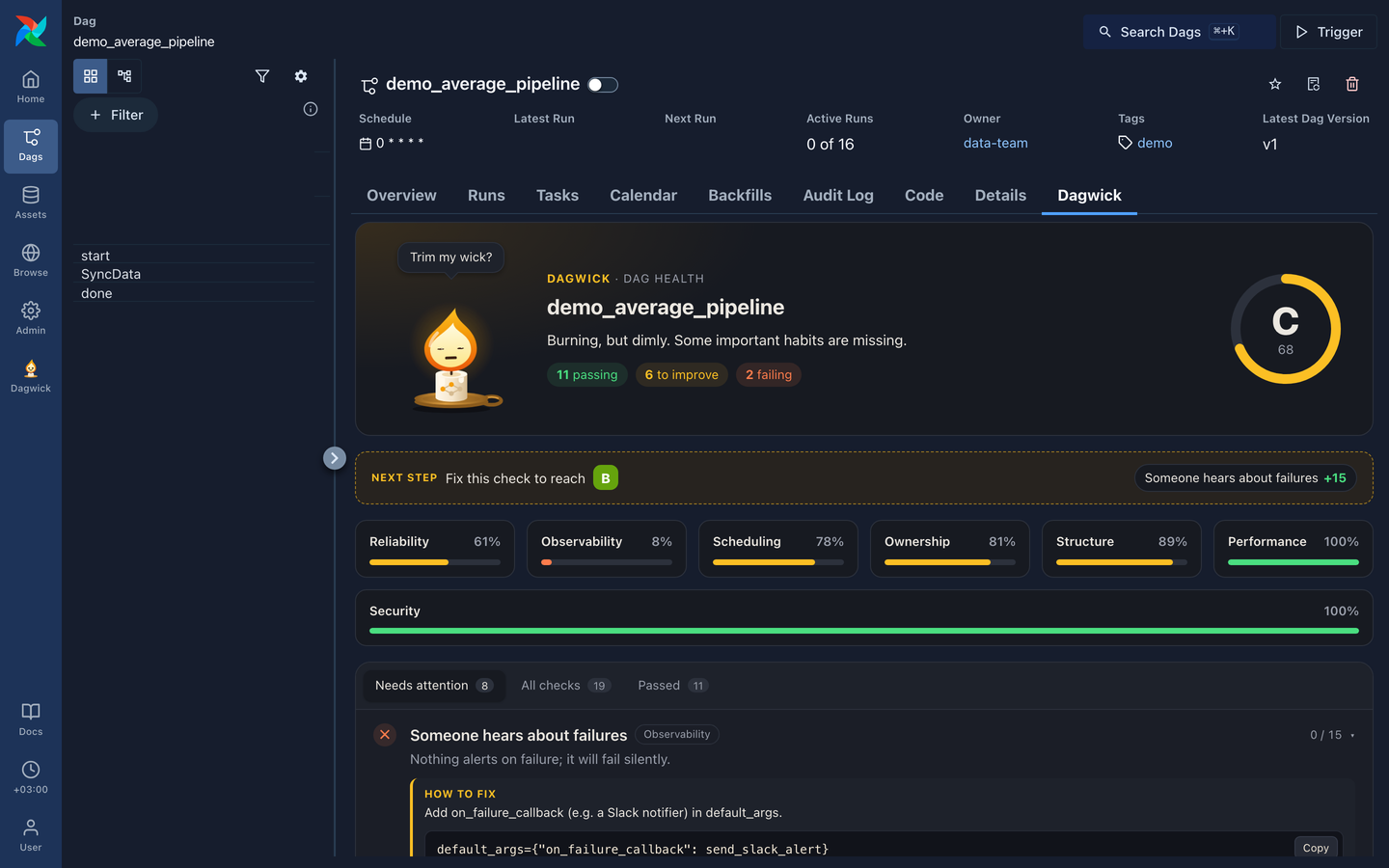
- a Dagwick tab on every DAG page, and
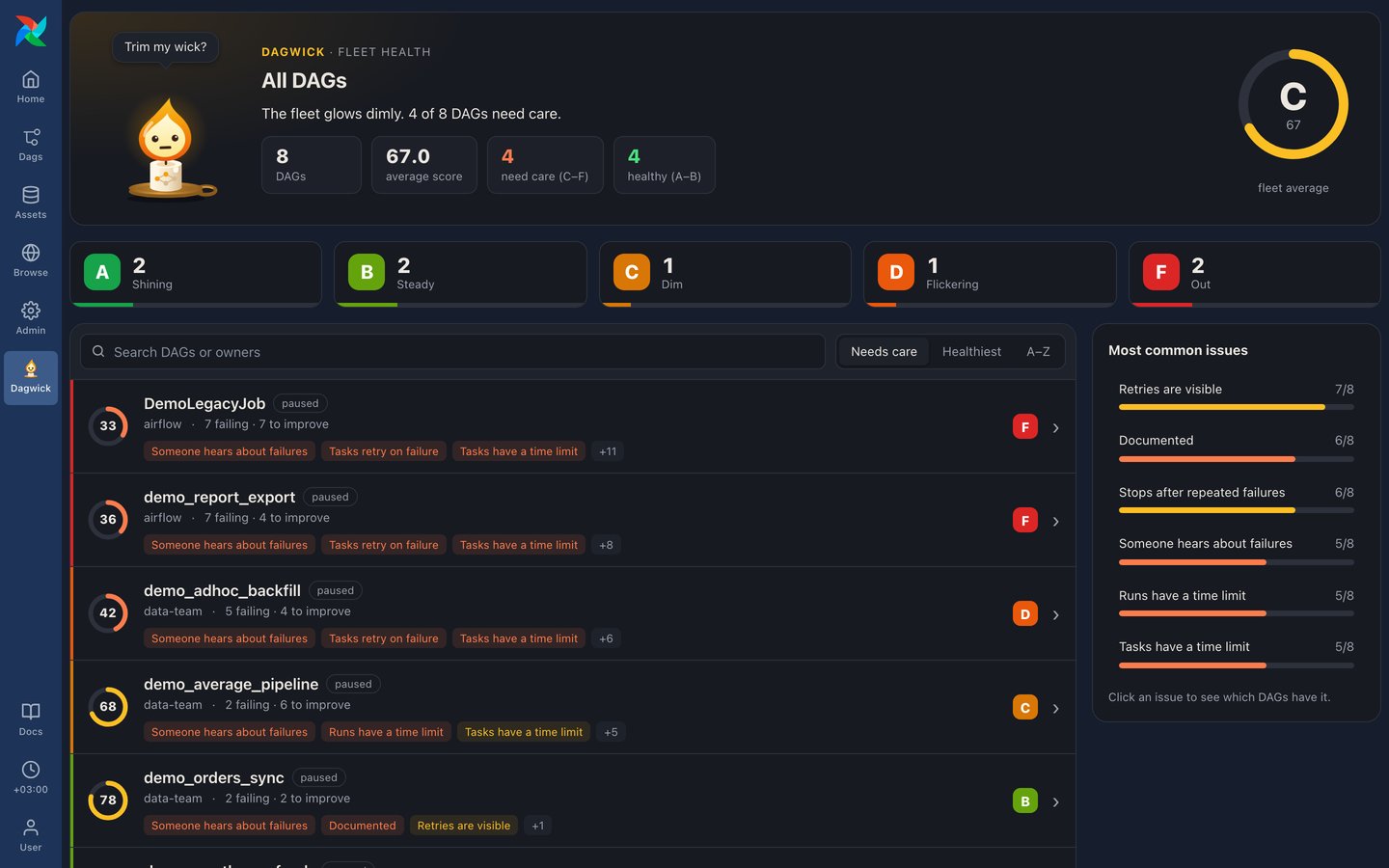
- a Dagwick page in the sidebar that grades all your DAGs.
That's it. There is nothing to configure.
What you get
- A score and a grade for every DAG. 20 checks in 7 categories: reliability, observability, ownership, scheduling, structure, performance and security. Each check that doesn't pass tells you how to fix it. See what it checks.
- Checks that read your DAG file without running it:
Variable.getat parse time, deprecated Airflow imports, hard-coded secrets (the value is never shown), and sensors that hold a worker slot while they wait. - Run health next to the score: success rate, retries, typical run time and its trend over the last 30 days. It never changes the score.
- Score history: the score of each of the last 20 versions of a DAG, and which checks started or stopped passing at each step.
- A fleet page that grades all the DAGs you can see and shows the most common issues.
dagwick checkand a pre-commit hook to grade DAG files before they are merged. See Check DAGs before they are merged.- Break a check on purpose, with a reason. Some DAGs need
catchup=Trueor no retries. See Acknowledge a check on purpose.
Experimental and off by default: the lantern can dress up for holidays like Newroz, Eid, Christmas and Halloween (seasonal moods).
Acknowledge a check on purpose
Some DAGs break a check for a good reason: an ingest DAG uses catchup=True to
backfill the days it missed during an outage, or a task that inserts without
de-duplicating must never retry. Tell Dagwick with a comment in the DAG file:
# dagwick: ack <check> -- <reason>
For example:
DAG(
    "daily_ingest",
    catchup=True,  # dagwick: ack catchup -- backfills one file per missed day
    default_args={"retries": 0},  # dagwick: ack retries -- inserts are not idempotent
)
After Airflow parses the file again, the check is shown greyed out with your reason, and it no longer counts toward the score. It is never hidden, and the fleet page counts it as "acknowledged". To score the check again, delete the comment.
- Put the comment anywhere in the file. It applies to every DAG in that file.
- One comment can name several checks:
# dagwick: ack retries, catchup -- <reason>. - The reason after
--is required. Without it the comment is ignored. - Dagwick reads the comment from the DAG's source code; it never runs the file.
Checks you can acknowledge (use the id in the comment):
| Check | Id | The reason must say |
|---|---|---|
| Tasks retry on failure | retries |
why the DAG breaks it on purpose |
| Retries are visible | retry_alerts |
why the DAG breaks it on purpose |
| Has a schedule | schedule |
why the DAG breaks it on purpose |
| No surprise backfills | catchup |
why the DAG breaks it on purpose |
| Bounded parallel runs | max_active_runs |
why the DAG breaks it on purpose |
| Split into steps | decomposition |
why the DAG breaks it on purpose |
| Someone hears about failures | failure_alerts |
where failures are alerted instead, e.g. a central listener or a Grafana rule |
| Stops after repeated failures | auto_pause |
what stops the DAG when it keeps failing, e.g. on-call pausing it by hand |
| Sensors free their worker slot | sensor_slots |
why the sensor must keep its worker slot, e.g. it needs sub-minute reaction |
Every other check (owner, docs, tags, timeouts, naming, file name, imports,
parse time, Variable.get and secrets) can't be acknowledged: each one
protects something every DAG needs. A comment for one of them is ignored, and
the Dagwick tab says so. Run ./dev/run.sh from a clone of this repository to
see a demo DAG (demo_acknowledged_ingest) with every case.
Check DAGs before they are merged
dagwick check grades DAG files with the same checks as the UI and can fail a
pull request below a chosen grade:
dagwick check dags/ --min-grade C     # exit 1 if any DAG is below C
dagwick check dags/my_dag.py --json   # machine-readable report
It needs Airflow installed next to it, and it imports the DAG files, so their top-level code runs, the same as in Airflow's DAG processor. Use it on a developer machine or in CI. The Airflow plugin itself never runs DAG code.
Exit codes: 0 all good, 1 a DAG is below --min-grade, 2 a file failed
to load.
pre-commit
- repo: https://github.com/ardalan-jalal/dagwick
  rev: v0.2.0
  hooks:
    - id: dagwick
      args: [--min-grade, C]   # default: D
The hook uses language: system, so run pre-commit from an environment where
Airflow and Dagwick are installed.
Requirements
- Apache Airflow 3.1 or newer
- Python 3.10 – 3.15
Dagwick has no dependencies of its own, so installing it never changes your other packages. It is read-only and only shows each user the DAGs they can already see.
Remove
pip uninstall dagwick
Then restart the api-server.
More
1 maintainer

Metadata
1 maintainer
Release files for dagwick 0.2.0
For a detailed explanation of source distributions (sdists) and built distributions (wheels), please see the package formats documentation.
Source distribution (sdist)
| File | Size | Uploaded | Provenance | Actions |
|---|---|---|---|---|
| dagwick-0.2.0.tar.gz | 110.7 kB | With provenance | Details for dagwick-0.2.0.tar.gz |
Built distribution (wheel)
| File | Interpreter | ABI | Platform | Actions Reset |
|---|---|---|---|---|
| dagwick-0.2.0-py3-none-any.whl | Python 3 | none | any | Details for dagwick-0.2.0-py3-none-any.whl |
Total release size: 165.8 kB
Release files / dagwick-0.2.0.tar.gz
| Download URL | dagwick-0.2.0.tar.gz |
|---|---|
| Size | 110.7 kB |
| Tags | Source |
|
SHA-256 checksum How to use checksums |
081358820ba82fc2dd70ce7c3a0ec11a6639aeae0a86f5f616a518bb1ce461cd
|
|
BLAKE2b-256 checksum How to use checksums |
b3762e30d37bec931c3e4e9561484de79e788bf4944357baae94411c750aa47c
|
| Upload date | |
|
Uploaded using Trusted Publishing? What is trusted publishing? |
Yes |
| Uploaded via |
twine/7.0.0 CPython/3.13.16
|
Provenance
Provenance describes where a file came from. On PyPI, provenance is shared via attestations, which provide a verifiable record of the build or publishing details. View details, limitations and caveats.


PyPI Publish Attestation
PyPI verified that this artifact, at this checksum, originated from the publisher listed below.
Signed by GitHub Actions, verified by PyPI on Nov 9, 2026.
Transparency logRelease files / dagwick-0.2.0-py3-none-any.whl
| Download URL | dagwick-0.2.0-py3-none-any.whl |
|---|---|
| Size | 55.0 kB |
| Tags | Python 3 |
|
SHA-256 checksum How to use checksums |
48e145af84206de1d9c9e5459373d5fcd57192616e88914a3c0120ccdc2eb05b
|
|
BLAKE2b-256 checksum How to use checksums |
46dc220c93dc79782754803e802b403adbb74543c92f9a36688c2b4d76bad187
|
| Upload date | |
|
Uploaded using Trusted Publishing? What is trusted publishing? |
Yes |
| Uploaded via |
twine/7.0.0 CPython/3.13.16
|
Provenance
Provenance describes where a file came from. On PyPI, provenance is shared via attestations, which provide a verifiable record of the build or publishing details. View details, limitations and caveats.
PyPI Publish Attestation
PyPI verified that this artifact, at this checksum, originated from the publisher listed below.
Signed by GitHub Actions, verified by PyPI on Nov 9, 2026.
Transparency logSecurity for dagwick 0.2.0
Provenance
Provenance describes where a file came from. On PyPI, provenance is shared via attestations, which provide a verifiable record of the build or publishing details. View details, limitations and caveats.
Full provenance
Both files in this release have been uploaded with provenance metadata.
Attestation for dagwick-0.2.0.tar.gz
PyPI Publish Attestation
PyPI verified that this artifact, at this checksum, originated from the publisher listed below.
Signed by GitHub Actions, verified by PyPI on Nov 9, 2026.
Transparency logA note on package security
PyPI is a repository for distributing packages, not a service for auditing them. While third-party security researchers and our staff do their best to detect and remove malicious packages, PyPI cannot guarantee the quality, security or suitability of any given package.
To learn more about protecting yourself from malicious actors, visit our package security documentation.














