
Daily Writing
This repo hosts an open source project that let you create a website presenting daily writings, it was created with challenges like Writober or Writever in mind, but it's not tied to a specific challenge.
Daily Writing mainly turns a bunch of markdown files (one per writing, at most one per day), a configuration file, and a directory of static files into a static HTML website that can be deployed.
|
|
|
|
|
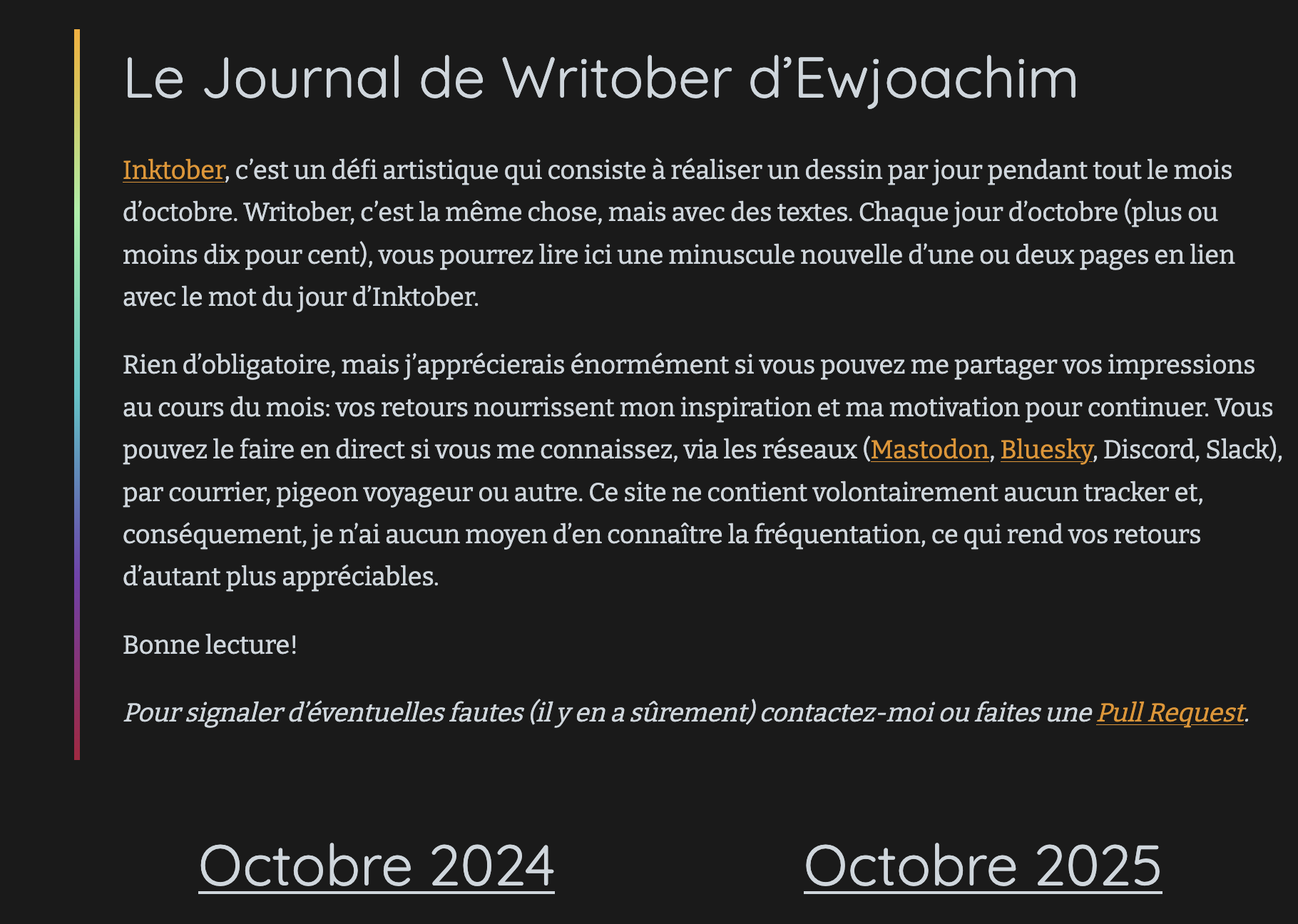
The homepage, with each month's colors. |
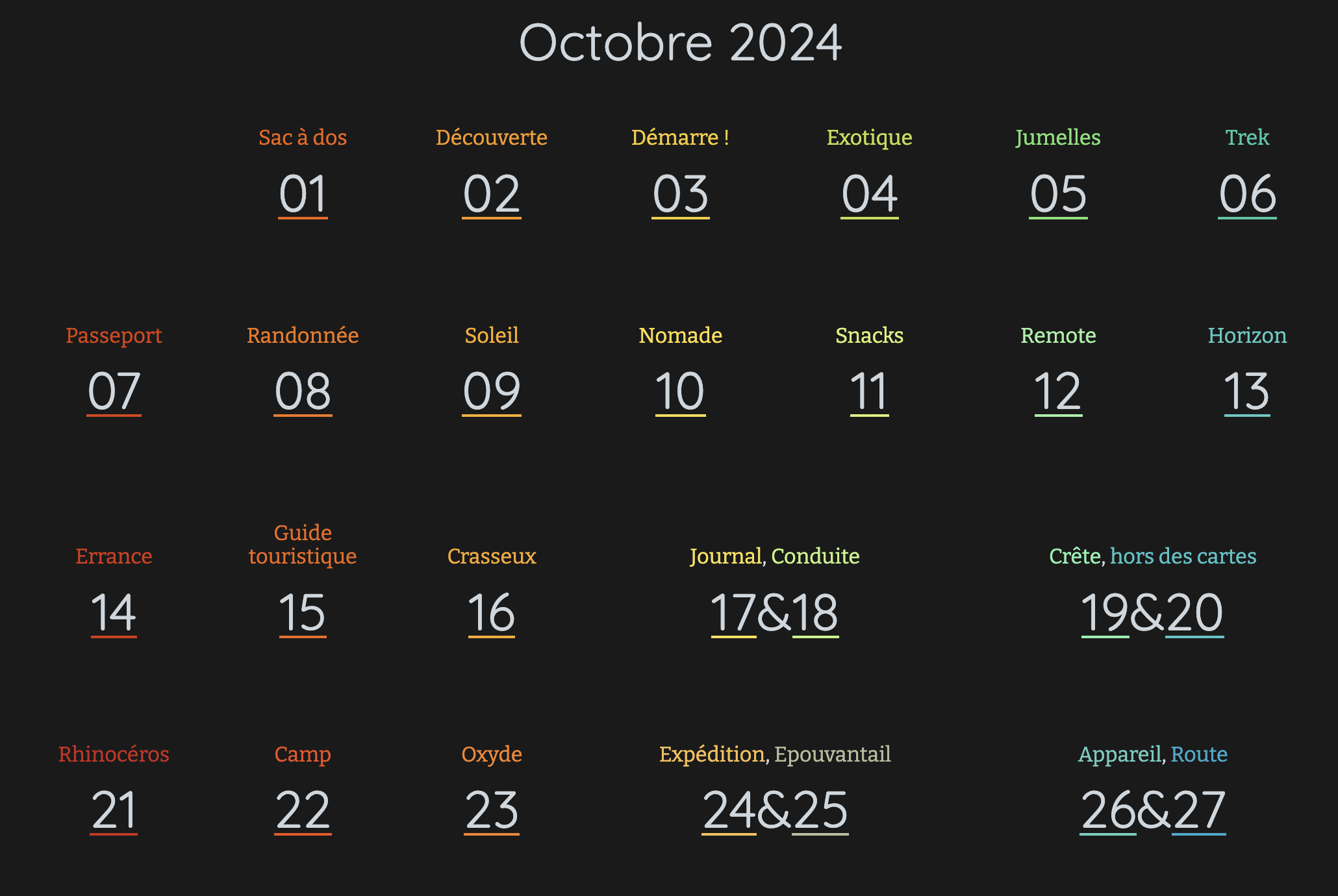
The menu: a calendar of every writing. |
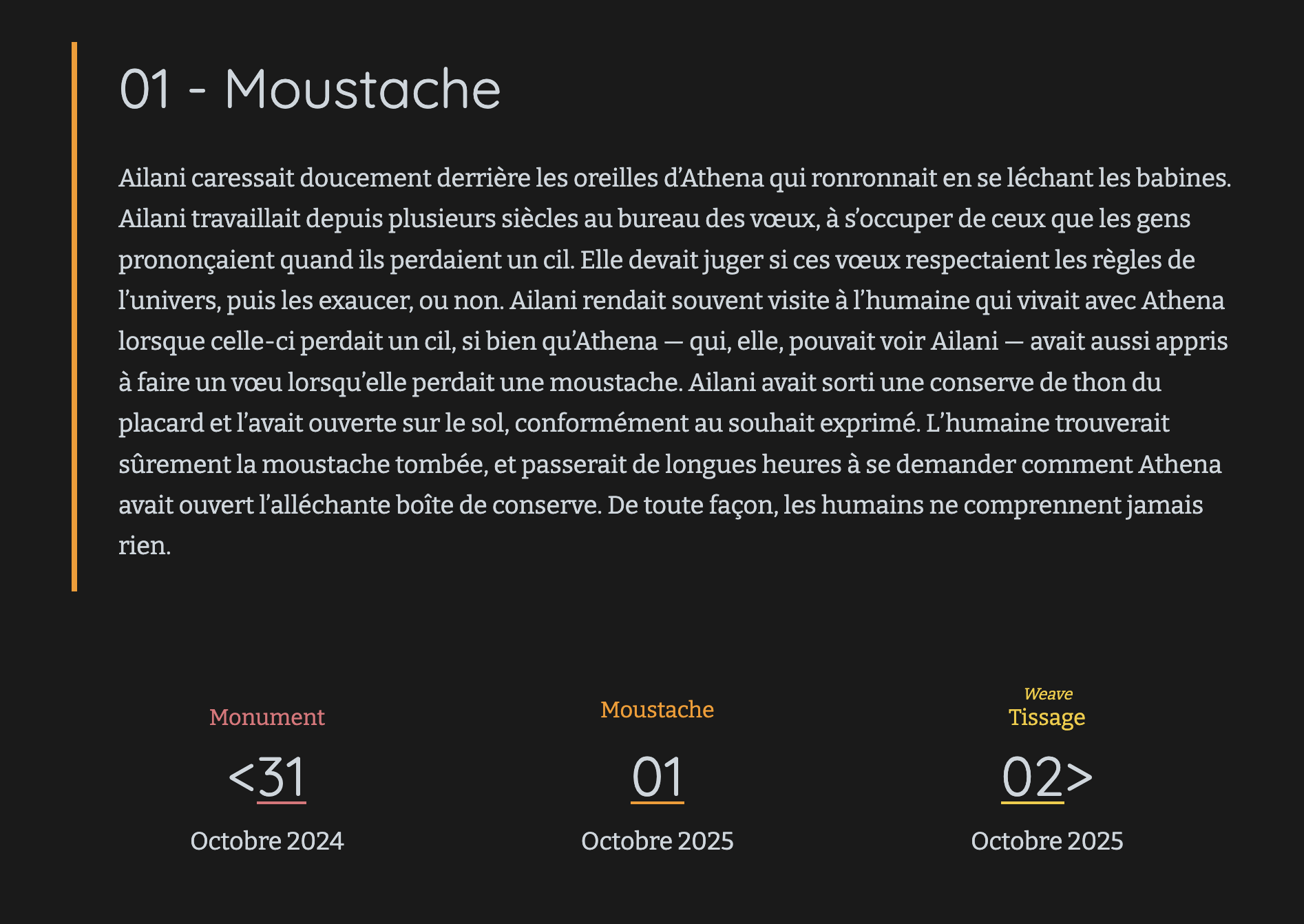
A single writing's page. |
Daily Writing offers various features, such as:
- A page for each writing and a homepage. A menu displaying a calendar with all the writing for all months.
- Each day is linked to a "prompt" (as in writever/writober prompt), and can have a title distinct from the prompt. This is useful if the title of your writing isn't excatly the prompt you were given for the day. Also, if your prompts are in a given language and the title is the prompt you translated to your language, it's nice. The prompt will be displayed in the menu over the title.
- A given writing can span over multiple days and their associated prompts (e.g. if you're late), and the calendar will reflect that. Those days may even be non-consecutive. It's assumed that the title will be composed of multiple parts each related to the associated prompts.
- Each day in a month is linked to a unique color, and the calendar is colored accordingly. The homepage displays all the month's colors.
- Posts can be written in advance and will only be published of their date.
- Links to the previous and next writings, for binge-reading.
- Most metadata can be extracted from the name of the file and the writing markdown title, but can then be normalized to frontmatter. Having a frontmatter is necessaryÒ when using a CMS editor.
- Writings spanning multiple days will have a gradient between the colors of the days.
- A CMS, at
/adminto update your writings and the site settings directly from your browser. - A RSS feed.
- Nice preview images when you post links to social networks.
- Discreet links to the GitHub source of each writing, to ease online edition or typo reporting.
- Privacy-minded Google fonts, downloaded and optimized at build time so that you can get various fonts without offering your reader's data to Google (damn, that was a mess to code)
- Dark mode. No light mode. Contributions welcome on that.
- Support for extra custom CSS. If you want to add a light mode but just for yourself.
- Support of various locales, for date formats. Apart from dates and numbers, all the words that appear on the interface are configurable, so technically, we support all languages that Unicode supports.
- If you rename a file but want to keep its original URL too, you can add aliases.
- Site is 100% usable without javascript for users.
Author's personal undying love of handcrafted open source and meticulous yak shaving went into this project. He likes to think that it shows.
An example:
https://writober.ewjoach.im/ is deployed from https://github.com/ewjoachim/writober, using this project.
Extraction rules
From a single file without a frontmatter, these are the informations being extracted.
Say the file is at 2026/10/03-hello.md and its content starts with a title that says:
# 03 - Bonjour. The system will find that this writing covers a single day
(2026-10-03), its prompt is "hello" and its official title is "Bonjour".
Say the file is at 2026/10/03-hello-darkness.md and its content starts with a title
that says: # 03&04 - Bonjour, Obscurité. The system will find that this writing covers
2 days:
2026-10-03for which the prompt ishelloand the titleBonjour,2026-10-04for which the prompt isdarknessand the titleObscurité.
You can always override those values by editing the frontmatter.
Installation
Github
- Go to
daily-writing-templateand follow the instructions to get started (we'll take care of most of the heavy lifting for you).
Elsewhere
(Feel free to contribute installation instructions for other platforms).
Configuration
Your website can be configured through either:
daily-writing.toml,pyproject.tomlwithin the[tool.daily-writing]section- environments variables,
- CLI flags.
The same options are available in all ways, but they're not spelled out exactly the
same way. In the toml configuration and environment variables, words are
separated by _ (underscores). In the flags, they're separated by - (dashes).
Environment variables are all upper case and prefixed with DAILY_WRITING_
Examples:
daily-writing.toml:server_url = "https://writober.ewjoach.im"- environments variables:
SERVER_URL="https://writober.ewjoach.im" - CLI flags:
--server-url="https://writober.ewjoach.im"
The easiest and most up-to-date way to learn about every configuration option is
through: daily-writing -h. Feel free to consult daily-writing.toml for a working example.
CLI
There are 2 main subcommands:
daily-writing buildbuilds the websitedaily-writing servelaunches a local development server that autobuilds the website and auto-reload pages in your browser when changes are detected.
CI/CD Deployment
Solutions like GitHub Pages, Cloudflare Pages, GitLab Pages, etc will make your life easier, as you can edit the markdown files online or push them through git, and have them get redeployed automatically daily and upon changes.
Here's a GitHub Actions workflow example:
name: Deploy

on:
  push:
    branches: ["main"]
  workflow_dispatch:
  schedule:
    - cron: "1 22,23 * 10 *" # Adjust to whenever relvant to you

permissions:
  contents: read
  pages: write
  id-token: write

concurrency:
  group: "pages"
  cancel-in-progress: false

jobs:
  build:
    runs-on: ubuntu-latest
    steps:
      - uses: actions/checkout@v5

      - name: Setup Pages
        uses: actions/configure-pages@v5

      - uses: astral-sh/setup-uv@v6

      - name: Sphinx build
        run: uv run daily-writing build

      - name: Upload artifact
        uses: actions/upload-pages-artifact@v4
        with:
          path: _build

  # Deployment job
  deploy:
    environment:
      name: github-pages
      url: ${{ steps.deployment.outputs.page_url }}
    runs-on: ubuntu-latest
    needs: build
    steps:
      - name: Deploy to GitHub Pages
        id: deployment
        uses: actions/deploy-pages@v4
Adding new content
Manual
Add and edit your markdown files in the repository via Git or via your platform's Web interface.
Online, with Sveltia
Daily-Writing can come with a CMS, allowing you to get a nice admin interface that doesn't require to interact with Git.
How to avoid using a GitHub Token to log in
While not strictly necessary, it's possible to log into the web interface without a token, though it requires a bit more steps. You will need a Cloudflare account.
Follow the instructions from this repository.
1 maintainer

Release files for daily-writing 2026.9.5
For a detailed explanation of source distributions (sdists) and built distributions (wheels), please see the package formats documentation.
Source distribution (sdist)
| File | Size | Uploaded | |
|---|---|---|---|
| daily_writing-2026.9.5.tar.gz | 1.0 MB | Details |
Built distribution (wheel)
| File | Interpreter | ABI | Platform | Reset |
|---|---|---|---|---|
| daily_writing-2026.9.5-py3-none-any.whl | Python 3 | none | any | Details |
Total release size: 1.0 MB
Release files / daily_writing-2026.9.5.tar.gz
| Download URL | daily_writing-2026.9.5.tar.gz |
|---|---|
| Size | 1.0 MB |
| Tags | Source |
|
SHA-256 checksum How to use checksums |
00abd9988aa98c6f294416db95007b7338c6b88c69f21ecf8e15ef4184ada888
|
|
BLAKE2b-256 checksum How to use checksums |
59bf861731e1a862a86c691eb9a0ad4b0513cab98a24829f4068d328d54eab18
|
| Upload date | |
|
Uploaded using Trusted Publishing? What is trusted publishing? |
Yes |
| Uploaded via |
twine/7.0.0 CPython/3.13.14
|
Provenance
Provenance describes where a file came from. On PyPI, provenance is shared via attestations, which provide a verifiable record of the build or publishing details. View details, limitations and caveats.


PyPI Publish Attestation
PyPI verified that this artifact, at this checksum, originated from the publisher listed below.
Signed by GitHub Actions, verified by PyPI on Sep 23, 2026.
Transparency logRelease files / daily_writing-2026.9.5-py3-none-any.whl
| Download URL | daily_writing-2026.9.5-py3-none-any.whl |
|---|---|
| Size | 44.9 kB |
| Tags | Python 3 |
|
SHA-256 checksum How to use checksums |
9cd476098a5bde8e1e92a44f7e888fce9816c0780a7b73e08612219408087589
|
|
BLAKE2b-256 checksum How to use checksums |
cf7984123719eb1a60bbb1ebaec0ce1a6f6354d96c07fac0d80e968fb3252c20
|
| Upload date | |
|
Uploaded using Trusted Publishing? What is trusted publishing? |
Yes |
| Uploaded via |
twine/7.0.0 CPython/3.13.14
|
Provenance
Provenance describes where a file came from. On PyPI, provenance is shared via attestations, which provide a verifiable record of the build or publishing details. View details, limitations and caveats.
PyPI Publish Attestation
PyPI verified that this artifact, at this checksum, originated from the publisher listed below.
Signed by GitHub Actions, verified by PyPI on Sep 23, 2026.
Transparency log













