

Dairy Data Tools
A dairy's own DairyComp and EZfeed records, read by your AI assistant.
Attach a farm's exports. Ask in plain words. Get each pen's numbers, worked out by tested scripts, not guessed.



Quick start · Other apps · What's in it · Your files
Free, for dairy vets, nutritionists and consultants. By Pádraig Lucey, MVB, MPVM, Ph.D. (Dairy Data Science).
Quick start
1. Add it to Claude
In the Claude app (desktop or claude.ai, on a paid plan):
- Settings > Capabilities: turn on Code execution and file creation. The scripts run in Claude's own sandbox.
- Customize > Plugins > Add marketplace: enter
padge01/dairy-data-tools, then add Dairy Data Tools.
Coming soon to Claude's plugin directory, for one-click install.
2. Ask
Attach the farm's DairyComp and EZfeed exports (or this kit's sample herd) and ask, for example:
How is pen 21 doing? Did the ration change on 28 Sep work, or is it just the season?
You get the figures, where each came from and what it's out of, and a card like this one:
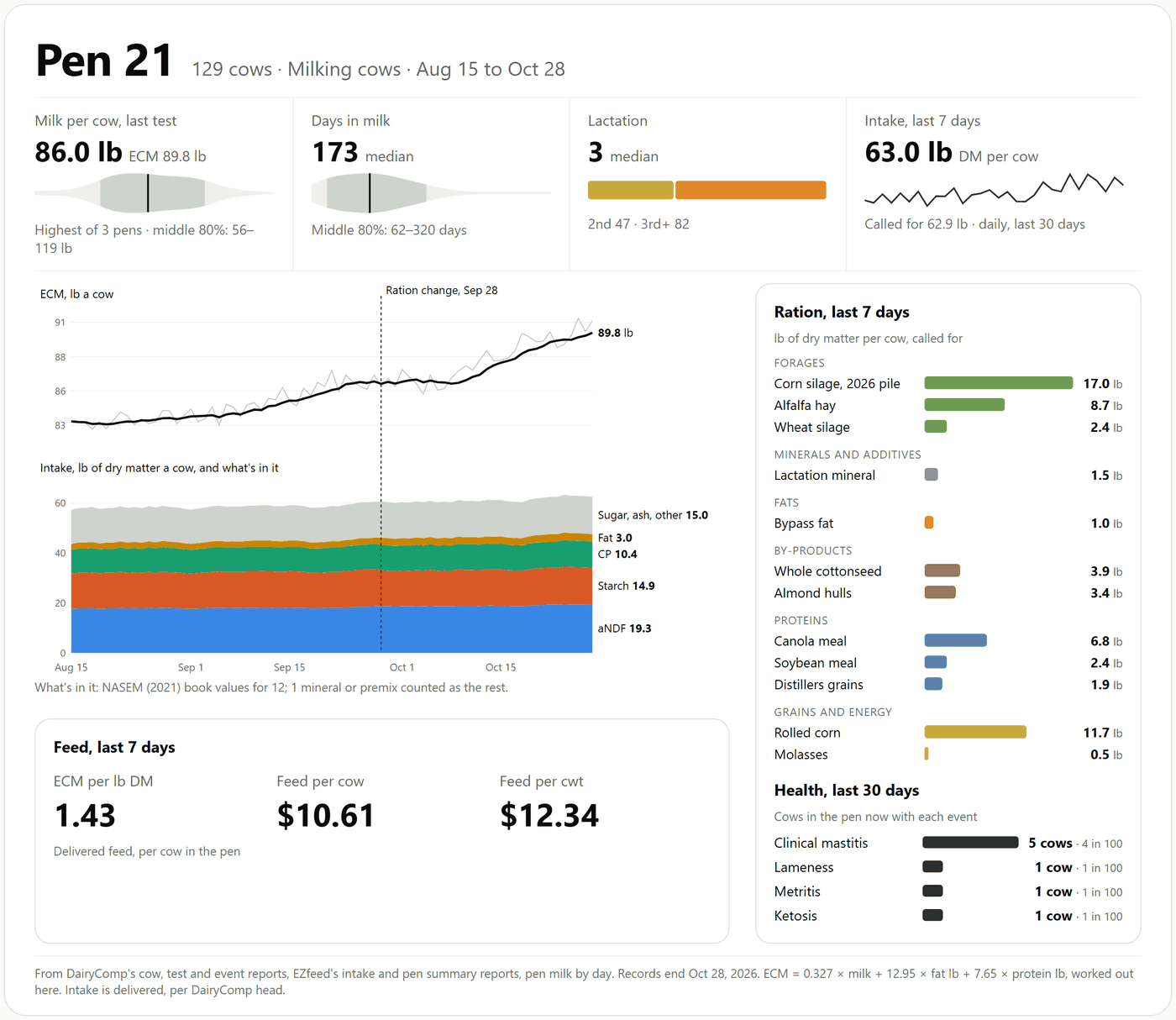
No DairyComp export yet? Ask "What do I type in DairyComp to export what you need?". It writes the SHOW commands from the farm's own item list.
Other apps
| Where | How |
|---|---|
| Claude Code | claude plugin marketplace add padge01/dairy-data-tools, then claude plugin install dairy-data-tools@dairy-data-tools |
| Codex, Cursor, Gemini CLI and other apps that read Agent Skills | npx skills add padge01/dairy-data-tools |
| Python, no AI (Python 3.10 or later, nothing else to install) | pip install dairy-data-tools, then dairy-data-tools pen --folder "Farm Exports" --pen 21; dairy-data-tools --help lists every question |
What's in it
Ask in plain words; the right skill picks itself. No commands to learn.
| Skill | Ask it | What it does |
|---|---|---|
| dairycomp-exports | "How do I get my cow list out of DairyComp?" "Write me a list of fresh cows in pen 1." "Which of these items shouldn't I use?" | The reports to save for this farm; DairyComp commands from plain English, checked against the farm's own items (SHOW, never LIST, which prints); what each item is |
| ezfeed-exports | "Which EZfeed reports do you need?" | The reports to save and how they're read |
| herd-explorer | "How is pen 21 doing?" "What happened to cow 3004?" | The herd, every pen, one pen, one cow: milk and ECM as a spread, events, lactations |
| pen-feed | "What's pen 21's feed efficiency and IOFC?" "Is the feed loaded as called for?" | Each pen's cows joined to its feed: intake per cow, ECM per lb DM, cost per cwt, IOFC, NASEM's predicted intake; loading accuracy, refusals, consistency |
| weekly-review | "Get me ready for Thursday's visit." "How are the fresh cows doing?" | Fresh cows, components and MUN, udder health, reproduction, who left, the pens' feed, and actions for the next visit |
| ration-change | "Did pen 21's ration change work, or is it the season?" | The week before against the latest week, with the same weeks last year or another pen taken out |
| balance-ration | "Balance pen 21's ration" | The free Dairy Ration Lab when it's connected; this kit never makes up a ration |
Plain Python, checked number for number against the author's earlier R version: every count says what it's out of, milk is shown as a spread, and the farm is compared with itself, never with published targets.
A sample herd (sample-herd/): a made-up California dairy's exports, to try every skill before using a real farm's.
Its neighbours, separate tools from the same place: BESTPRED (USDA's best prediction of 305-day and
mature-equivalent milk; in this marketplace, and at https://bestpred.dairydatascience.com/mcp) and the Dairy Ration
Lab (a free ration balancer).
What it does with your files
- The scripts read the export files where they are. They change nothing, keep nothing, and send nothing over the internet. They use Python's standard library only.
- In Claude's chat the files you attach and the scripts run in Claude's own code sandbox. What the agent reads goes to the AI company as part of the conversation, as anything you attach does, unless you run a model on your own computer.
- Event remarks, protocols and technician names are left out of what the scripts report, because they are free text typed on the farm and could contain anything, including instructions aimed at an agent.
- Nothing reads DairyComp's own files or backups, and no figure DairyComp calculates for itself (such as 305-day or mature-equivalent milk) is used: the kit works from raw records.
Good to know
- Weights are in pounds. Pens are compared with themselves and with the farm's other pens, never with published targets.
- It's a teaching and planning tool, not veterinary or nutrition advice: check anything before it changes what cows are fed.
- DairyComp 305 and EZfeed are Valley Ag Software's products; this project isn't affiliated with them.
Cite it
If it helps your work, please cite it: Lucey, P. (2026). Dairy Data Tools [software]. Zenodo. https://doi.org/10.5281/zenodo.23493936 (every version; 0.2.0 is https://doi.org/10.5281/zenodo.23493937). GitHub's "Cite this repository" button gives the same reference.
Licence
Code under Apache-2.0 (LICENSE); the skills' text under CC BY 4.0 (LICENSE-skills.md). Questions and fixes:
issues.
Working on it
plugins/dairy-data-tools/: the plugin people install (skills, sample herd, README, licences).tools/dairy.py,tools/dairytools/and the ration-change scripts intools/: the one copy of the code;python tools/sync_scripts.pycopies it into each skill and writes this README.pyproject.tomlbuilds the same code as thedairy-data-toolspackage on PyPI.tools/make_sample_herd.py: writes the sample herd (fixed seeds, same files every run).tests/:python -m pytest -q tests(made-up files with known answers, the sample herd, the directory's file limits).
1 maintainer

Metadata
1 maintainer
Release files for dairy-data-tools 0.2.1
For a detailed explanation of source distributions (sdists) and built distributions (wheels), please see the package formats documentation.
Source distribution (sdist)
| File | Size | Uploaded | Provenance | |
|---|---|---|---|---|
| dairy_data_tools-0.2.1.tar.gz | 84.8 kB | With provenance | Details |
Built distribution (wheel)
| File | Interpreter | ABI | Platform | Reset |
|---|---|---|---|---|
| dairy_data_tools-0.2.1-py3-none-any.whl | Python 3 | none | any | Details |
Total release size: 171.5 kB
Release files / dairy_data_tools-0.2.1.tar.gz
| Download URL | dairy_data_tools-0.2.1.tar.gz |
|---|---|
| Size | 84.8 kB |
| Tags | Source |
|
SHA-256 checksum How to use checksums |
f15fb5f5c8cf8c145dc92fe859f2ece771f2ef2d8dcd6a138bbeee3253968eeb
|
|
BLAKE2b-256 checksum How to use checksums |
4d73d29df128eb1f9e250d6fec96267343cfead26716509e22df719cf64f527f
|
| Upload date | |
|
Uploaded using Trusted Publishing? What is trusted publishing? |
Yes |
| Uploaded via |
twine/7.0.0 CPython/3.13.16
|
Provenance
Provenance describes where a file came from. On PyPI, provenance is shared via attestations, which provide a verifiable record of the build or publishing details. View details, limitations and caveats.


PyPI Publish Attestation
PyPI verified that this artifact, at this checksum, originated from the publisher listed below.
Signed by GitHub Actions, verified by PyPI on Oct 20, 2026.
Transparency logRelease files / dairy_data_tools-0.2.1-py3-none-any.whl
| Download URL | dairy_data_tools-0.2.1-py3-none-any.whl |
|---|---|
| Size | 86.8 kB |
| Tags | Python 3 |
|
SHA-256 checksum How to use checksums |
93b4534e7d886f46f4c2280b1f0a497539e55eb9ac44b1096b0f8bbb1d262ac6
|
|
BLAKE2b-256 checksum How to use checksums |
93da5425eaa7115601ca5421d13a9cb0a05783e373e6e3106171c124784ce96e
|
| Upload date | |
|
Uploaded using Trusted Publishing? What is trusted publishing? |
Yes |
| Uploaded via |
twine/7.0.0 CPython/3.13.16
|
Provenance
Provenance describes where a file came from. On PyPI, provenance is shared via attestations, which provide a verifiable record of the build or publishing details. View details, limitations and caveats.
PyPI Publish Attestation
PyPI verified that this artifact, at this checksum, originated from the publisher listed below.
Signed by GitHub Actions, verified by PyPI on Oct 20, 2026.
Transparency logSecurity for dairy-data-tools 0.2.1
Provenance
Provenance describes where a file came from. On PyPI, provenance is shared via attestations, which provide a verifiable record of the build or publishing details. View details, limitations and caveats.
Full provenance
All 2 files in this release have been uploaded with provenance metadata.
Attestation for dairy_data_tools-0.2.1.tar.gz
PyPI Publish Attestation
PyPI verified that this artifact, at this checksum, originated from the publisher listed below.
Signed by GitHub Actions, verified by PyPI on Oct 20, 2026.
Transparency logA note on package security
PyPI is a repository for distributing packages, not a service for auditing them. While third-party security researchers and our staff do their best to detect and remove malicious packages, PyPI cannot guarantee the quality, security or suitability of any given package.














