
Web to ebook downloader

Project description
dala: Web pages and threads as books
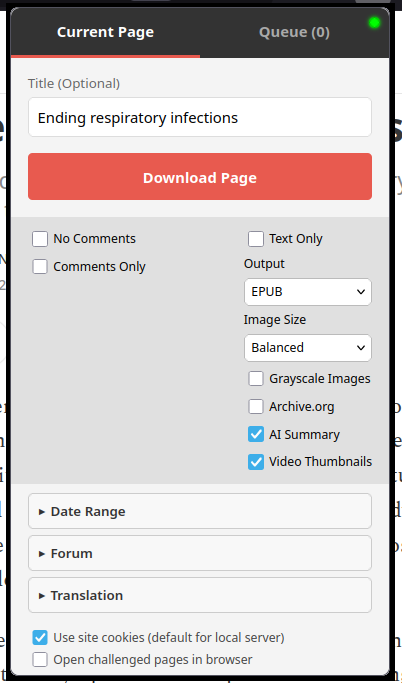
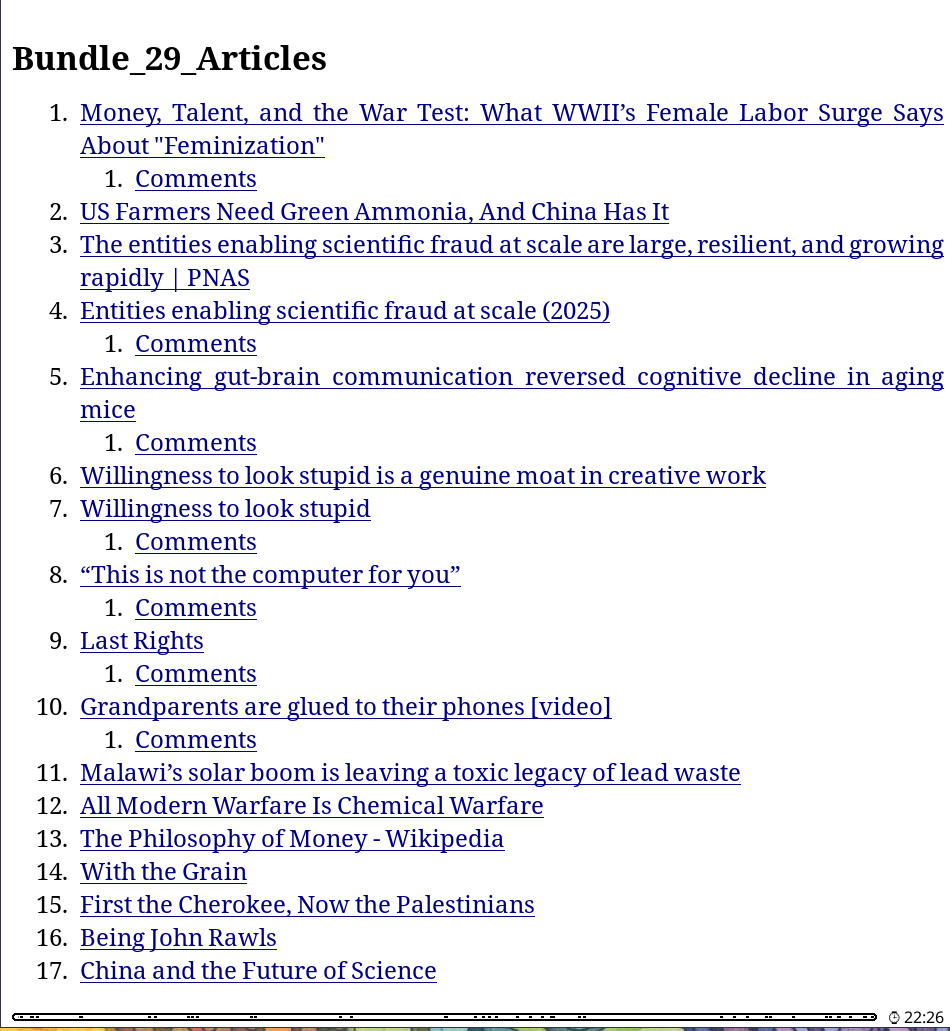
dala turns articles, comment threads, forum posts, Substack pages, and YouTube transcripts into clean EPUBs optimized for e-ink readers such as Kobo/KOReader. It works from a browser extension or CLI, can bundle many links into one anthology, and can preserve logged-in images or attachments when you explicitly share your browser session with the local backend. Translation support built in.
It is built for the "57 tabs I'll read later" problem: make an book out of it.
Everything mostly usable, i'm sure something doesn't work.

Screenshots
| Extension popup | Table of contents |
|---|---|
 |
 |
| Table of contents navigation | Article output |
|---|---|
 |
 |
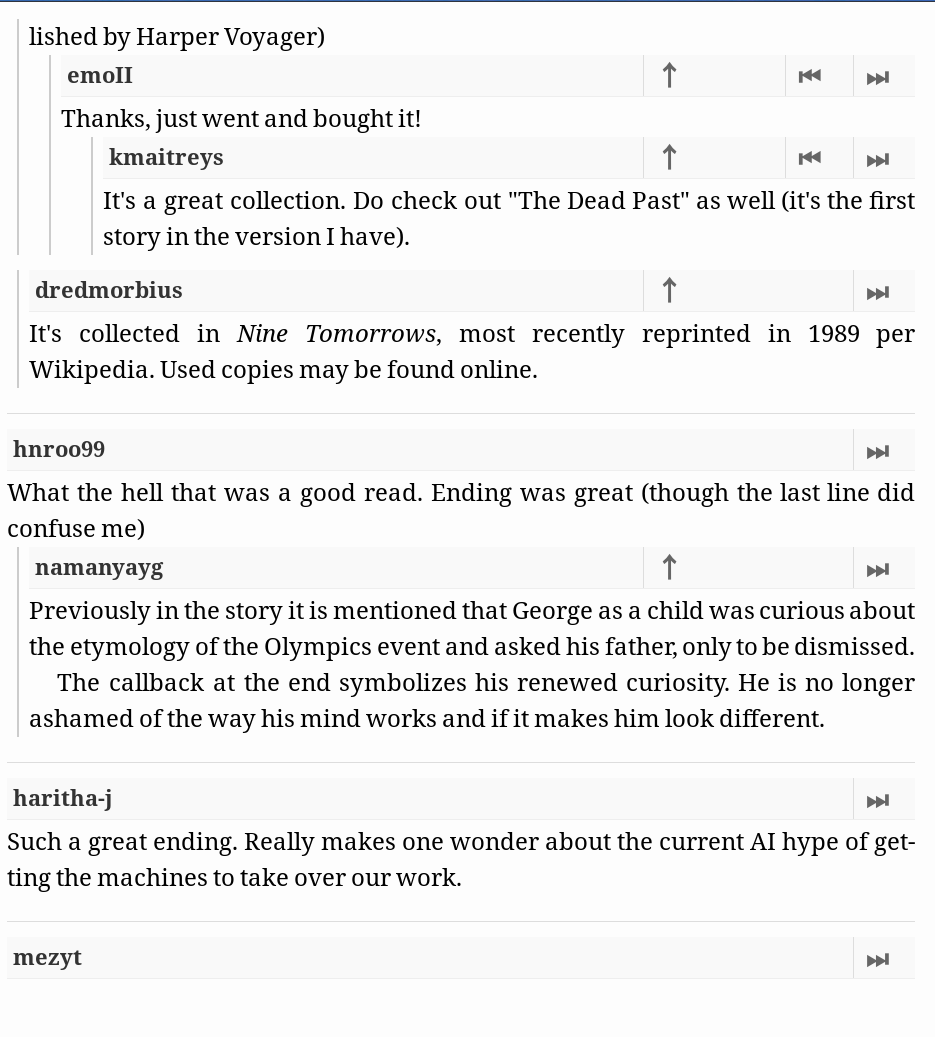
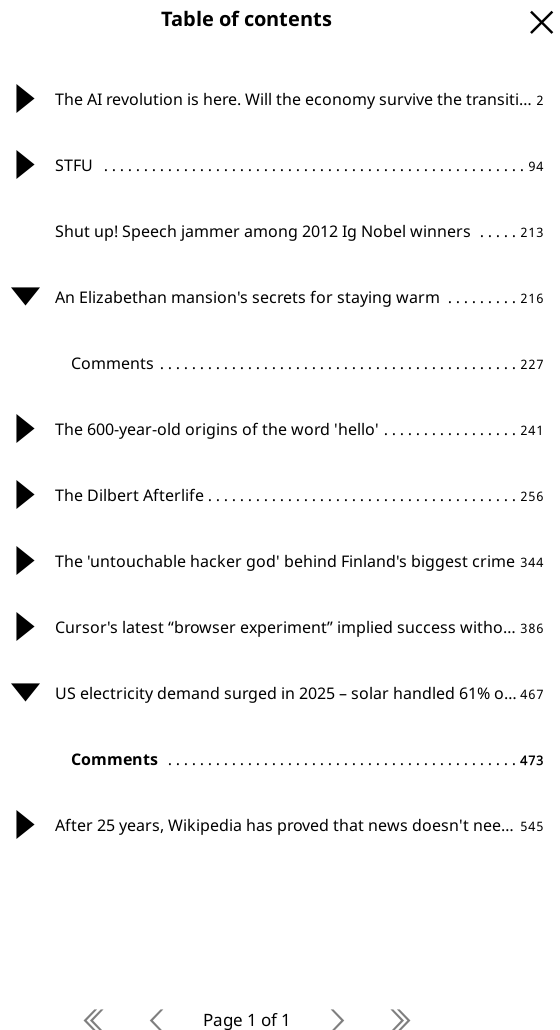
Threaded comments with e-reader navigation controls.

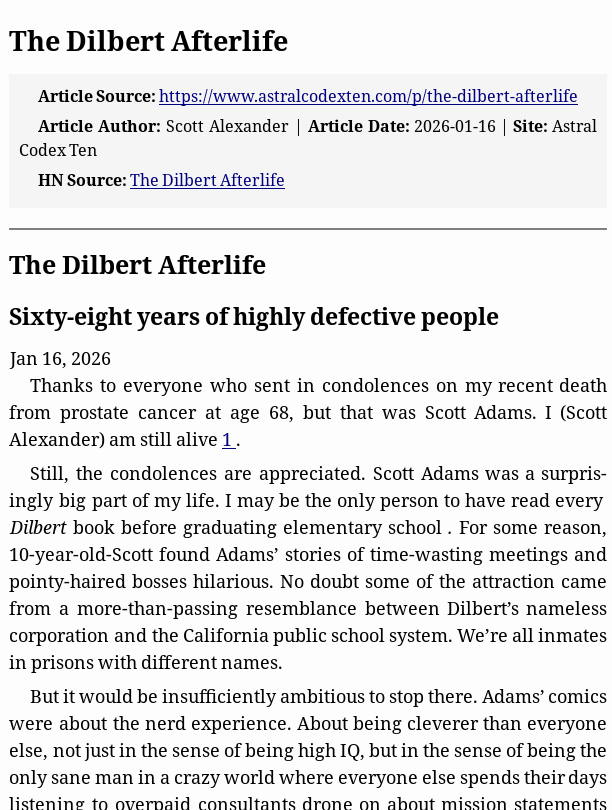
"Underneath" translation layout for bilingual reading.
Quick Start
Install the command-line tools:
uv tool install dala
dala-server
For development from a source checkout:
git clone https://github.com/anaxonda/dala.git
cd dala
uv run dala-server
Install the browser extension:
- Firefox: install the release XPI when available, or load
firefox_extension/temporarily fromabout:debugging. - Chrome/Brave/Edge: open
chrome://extensions, enable Developer Mode, click Load unpacked, and selectextension_chrome/.
Then open a page, click the dala icon, and click Download Page.
Dala opens its local status page when dala-server starts. Use dala-server --no-open for background services, SSH sessions, or scripts that should not open a browser.
For PDF output, JavaScript-heavy pages without extension capture, or headless browser fallback, see Headless Browser Support.
What Do I Install?
| Goal | Best path | Extra setup |
|---|---|---|
| Save a normal article | Extension or CLI | None |
| Save the current logged-in page | Extension | None |
| Save forum images or attachments behind login | Extension with Use Site Cookies | Usually none |
| Bundle browser links | Extension queue | None |
| Bundle URLs from a file | CLI | None |
| Render JavaScript-heavy pages without extension capture | CLI/headless browser rendering | Headless browser support |
| Generate PDF | Extension or CLI | Headless browser support |
| Download a YouTube transcript | CLI or extension | None |
| AI summaries or LLM translation | CLI or extension | API key |
| Google Translate translation | CLI or extension | No API key |
Headless browser support lets the Dala server control Chrome/Chromium in the background. It is needed for PDF output and some JavaScript-heavy pages, and is separate from the normal Dala browser extension.
Source Support
| Source | Supported |
|---|---|
| Articles and blogs | EPUB/PDF, images, captions, cleanup, date-range discovery, Internet Archive fallback |
| Hacker News | Nested comments with parent/sibling/thread navigation |
| Posts, linked article extraction, nested comments, comment images | |
| Substack | Posts, images, comments, custom domains |
| WordPress | WordPress-specific post and comment extraction |
| Forums | Multi-page threads, logged-in images/attachments, quote-link rewriting |
| YouTube | Transcripts, optional comments, thumbnails, AI cleanup |
Output and Reading Features
| Feature | Supported |
|---|---|
| EPUB | E-reader-oriented typography, metadata, table of contents, image optimization |
| Document and e-reader presets through headless browser rendering | |
| Bundles | Multiple pages combined into one anthology-style file |
| Images | Compact, Balanced, or Full presets; optional grayscale conversion |
| Translation | LLM or Google Translate; underneath, side-by-side inspired by Bitextual, EPUB footnote, or replace modes |
| Summaries | Optional LLM-generated summaries for long articles, discussions, forums, and transcripts |
Headless Browser Support
Basic EPUB downloads do not need headless browser support. This section is about Dala's optional Python support for controlling Chrome/Chromium in the background, not the browser extension.
Install Dala with headless browser support only if you want PDF output, JavaScript-heavy page rendering without extension capture, or headless browser fallback:
uv tool install --force "dala[browser]"
dala-setup-browser
dala-server
For development from a source checkout:
uv sync --extra browser
uv run dala-setup-browser
uv run dala-server
dala-setup-browser first tries to use an existing Chromium-compatible browser such as Chrome, Edge, Brave, or Chromium. If none is detected, it installs Playwright's managed Chromium.
Installer scripts and launchers
The installers/ directory has desktop-oriented installers and wrappers. Windows and macOS installers prompt for optional headless browser support and create a desktop launcher when possible; the Linux wrapper installs or updates from a terminal:
installers/Install or Update Dala.bat       # Windows double-click wrapper
installers/Install or Update Dala.ps1       # Windows PowerShell installer
installers/Install or Update Dala.command   # macOS double-click installer
installers/Install or Update Dala.sh        # Linux terminal installer
The scripts/ directory has conservative lower-level installers that reuse an existing uv install, install uv only if missing, and make headless browser support opt-in:
# macOS/Linux
./scripts/install-dala.sh
./scripts/install-dala.sh --headless-browser

# Windows PowerShell
.\scripts\install-dala.ps1
.\scripts\install-dala.ps1 -HeadlessBrowser
The launchers/ directory has double-click templates that start dala-server after Dala is installed.
CLI examples for headless browser rendering
# Render with an auto-detected browser
uv run dala --browser "https://example.com/article"

# Show the browser window for login/debugging
uv run dala --browser --headed "https://example.com/article"

# Point Dala at a specific browser
uv run dala --browser --browser-executable /usr/bin/google-chrome "https://example.com/article"

# Reuse a dedicated browser profile
uv run dala --browser --browser-profile .browser-profile "https://example.com/article"

# Load an unpacked Chromium-compatible extension
uv run dala --browser --browser-extension /path/to/unpacked-extension "https://example.com/article"
Common browser executable paths
# macOS
uv run dala --browser --browser-executable "/Applications/Google Chrome.app/Contents/MacOS/Google Chrome" "https://example.com/article"

# Windows PowerShell
uv run dala --browser --browser-executable "C:\Program Files\Google\Chrome\Application\chrome.exe" "https://example.com/article"

# Linux
uv run dala --browser --browser-executable google-chrome "https://example.com/article"
PDF rendering uses the same browser detection and executable settings. EPUB output may use optimized WebP assets; PDF output feeds Chromium temporary JPEG render assets to avoid oversized embedded RGB image streams.
Authenticated Pages, Forums, and Difficult Sites
Dala can process pages that are already readable in your browser, including pages that need your login session for images or attachments.
Forums and gated images
- Log in to the forum in your browser.
- Use the extension with Use Site Cookies enabled.
- Enable Force Forum Driver if forum auto-detection misses the thread.
- Use Forum Pages or Max Pages for long threads.
Difficult article pages
The simplest workflow is normal browser capture: open the article until it is readable in your everyday browser, then click the Dala extension. If you use a browser extension to make pages readable, install it in the same browser where you run Dala.
Headless browser fallback is an advanced local fallback for automation and testing. The server uses a dedicated Dala browser profile at ~/.local/share/dala/browser-profile by default; it does not automatically use your normal browser profile.
Advanced: headless browser extensions for local testing
Headless browser fallback can load an unpacked Chromium-compatible extension when you explicitly provide its path. This is useful for local automation tests where the rendered browser needs the same helper extension behavior you use interactively. Configure it with:
export DALA_BROWSER_EXTENSION_PATH=/path/to/unpacked-extension
export DALA_BROWSER_EXECUTABLE=/usr/bin/google-chrome
export DALA_BROWSER_PROFILE_DIR=/path/to/custom/dala-chromium-profile
Only load extensions you trust, and only when running a local server you control.
When a site serves an interactive bot challenge, Dala defaults to archive fallback. If Open challenged pages in my browser is enabled, the extension opens the original article URL and asks you to run Dala again from the readable tab.
Extension Options
The extension has a compact popup for common choices and an Options page for server, diagnostics, and advanced behavior.
Extension options reference
| Option | What it does | When to use it |
|---|---|---|
| Server URL | Chooses the Dala backend used by popup checks, helper parsing, jobs, downloads, and cancellation. | LAN/remote server workflows; leave as localhost for normal desktop use. |
| No Comments | Skips downloading comments. | Article-only output from HN, Reddit, Substack, WordPress, or YouTube. |
| Comments Only | Skips the main article body. | Ask HN, Reddit, or discussion-first reading. |
| Text Only | Removes images. | Smaller/faster output. |
| Image Size | Compact, Balanced, or Full image mode. | Compact for small e-reader EPUBs; Full when size is less important. |
| Grayscale Images | Converts images to grayscale. | Monochrome e-ink readers. |
| Archive.org | Forces Wayback Machine lookup. | Dead links or broken live pages. |
| AI Summary | Adds a 3-5 paragraph summary. | Long articles or transcripts; requires an API key. |
| Translation | Translates article text with LLM or Google Translate. | Bilingual reading or translated-only output. |
| Video Thumbnails | Embeds periodic YouTube thumbnails. | Visual context for transcripts. |
| Use Site Cookies | Sends browser cookies to the backend. Defaults on only for local server URLs. | Forums, protected images, authenticated pages. |
| Headless Browser Fallback | Lets the server retry failed extraction in a background Chromium-compatible browser. | JavaScript-heavy, blocked, or difficult pages. |
| Force Forum Driver | Uses forum multi-page scraping. | XenForo/vBulletin-style threads. |
| Forum Pages | Downloads specific pages such as 1,3-5. |
Partial forum thread downloads. |
| Max Pages | Limits sequential forum crawling. | Avoid unexpectedly large downloads. |
The Options page also includes diagnostics for server version, Playwright/headless browser/profile status, PDF availability, retained jobs, cleanup retention, and the last conversion status/error. If PDF is unavailable, the extension disables PDF output and falls back to EPUB.
CLI Recipes
# Save one article
uv run dala "https://example.com/article"

# Save multiple URLs into one EPUB
uv run dala -i links.txt --bundle --bundle-title "Weekend Reading"

# Save all discovered posts from August 2025
uv run dala --start-date 2025-08 --end-date 2025-08 "https://example.wordpress.com/"

# Save a forum thread with cookies exported from your browser
uv run dala --forum --cookie-file cookies.txt --max-pages 5 "https://forum.example.com/thread"

# Basic YouTube transcript cleanup, no API key required
uv run dala "https://www.youtube.com/watch?v=VIDEO_ID"

# Prefer auto-generated captions and include YouTube comments
uv run dala --yt-auto --yt-max-comments 50 "https://www.youtube.com/watch?v=VIDEO_ID"

# Use an LLM for transcript cleanup
uv run dala --llm "https://www.youtube.com/watch?v=VIDEO_ID"

# Add an AI summary
uv run dala --summary "https://example.com/article"

# Add bilingual Spanish translation under each paragraph
uv run dala --translate es --translation-display underneath "https://example.com/article"

# Keep only translated text
uv run dala --translate es --translation-display replace "https://example.com/article"

# Include comments/forum text in translation
uv run dala --translate es --translation-scope all-readable "https://example.com/article"

# Compact grayscale images for a small e-reader EPUB
uv run dala --image-preset compact --image-color grayscale "https://example.com/article"

# Full-size images, but fail before writing if the bundle gets too large
uv run dala --image-preset full --max-bundle-images 250 --max-image-bytes-mb 200 -i links.txt --bundle

# Smoke-test translation configuration
uv run dala --translate es --test-translation-provider "Hello world"
CLI Reference
Full CLI flag reference
| Flag | Description |
|---|---|
-o, --output PATH |
Output filename. |
--format epub|pdf |
Output file format. |
--pdf-preset document|ereader |
PDF layout preset. |
--pdf-page-size letter|a4|kobo_clara |
PDF page size. |
--bundle |
Combine input URLs into one anthology EPUB/PDF. |
--bundle-title "..." |
Set the anthology title. |
--bundle-author "..." |
Set the anthology author. |
-i, --input-file PATH |
Read URLs from a file, one per line. |
--no-article |
Skip the article body. |
--no-comments |
Skip comments. |
--no-images |
Text-only output. |
--image-preset compact|balanced|full |
Image optimization and budget preset. Balanced is default; compact uses smaller 720px WebP assets. |
--image-color color|grayscale |
Keep color or convert images to grayscale. |
--max-bundle-images N |
Override the image count budget before EPUB/PDF write. |
--max-image-bytes-mb N |
Override the optimized image byte budget before EPUB/PDF write. |
-a, --archive |
Force Internet Archive lookup. |
--css PATH |
Inject custom CSS. |
--max-depth N |
Limit recursive comment depth. |
--forum |
Force the forum driver. |
--max-pages N |
Limit forum pages. |
--max-posts N |
Limit forum posts. |
--pages 1,3-5 |
Download specific forum pages. |
--cookie-file cookies.txt |
Load Netscape-format cookies for CLI authentication. |
--start-date DATE |
Discover posts on/after YYYY, YYYY-MM, or YYYY-MM-DD. |
--end-date DATE |
Discover posts on/before YYYY, YYYY-MM, or YYYY-MM-DD. |
--date-fallback auto|shallow|metadata|full |
How hard to work to find post dates during discovery. |
--include-undated |
Include discovered posts with no date. |
--max-discovery-pages N |
Maximum listing/archive pages to scan. |
--max-discovered-posts N |
Maximum post candidates to discover. |
--browser |
Fetch with a headless Chromium-compatible browser. |
--browser-extension PATH |
Load an unpacked Chromium-compatible extension with --browser. |
--browser-profile PATH |
Reuse a browser user data directory with --browser. |
--browser-executable PATH |
Use a specific Chrome/Edge/Brave/Chromium executable. |
--headed |
Show the browser window for login/debugging. |
--browser-timeout-ms N |
Browser navigation timeout. |
--browser-wait-until load|domcontentloaded|networkidle|commit |
Playwright navigation wait condition. |
--browser-settle-ms N |
Extra delay after navigation before capture. |
--browser-challenge-action archive|user_browser|warm |
Bot-challenge behavior. |
--llm |
Use AI to format/clean text, mainly transcripts. |
--llm-provider auto|gemini|openrouter|openai |
Choose the LLM API family. |
--llm-model MODEL |
Choose the LLM model. |
--api-key KEY |
API key override. Prefer .env or shell secrets for normal use. |
--summary |
Generate an AI summary. |
--translate LANG |
Translate text to a target language. |
--translation-provider llm|google |
Choose translation provider. |
--translation-source LANG |
Source language; default auto. |
--translation-display underneath|side-by-side|popup-footnote|replace |
Translation layout. Popup footnotes are EPUB-only. |
--translation-scope article|article-captions|all-readable |
Translate article only, article plus captions, or all readable text including comments/forums. |
--translation-glossary PATH |
Preserve/map terms using source=target lines. |
--no-translation-cache |
Disable persistent translation cache. |
--clear-translation-cache |
Remove the persistent translation cache. |
--test-translation-provider TEXT |
Translate a short text and print the result without downloading. |
--yt-lang en,es |
Preferred YouTube transcript languages. |
--yt-auto |
Prefer auto-generated YouTube captions. |
--thumbnails |
Embed periodic YouTube thumbnails. |
--yt-max-comments N |
Maximum YouTube comments. |
--yt-sort top|new |
YouTube comment sort order. |
Configuration
LLM configuration precedence
LLM and translation settings are resolved in this order:
- Extension settings.
- CLI flags.
- Environment variables or
.env.
Environment variables
Create .env in the project root for persistent local settings. Do not commit it.
# AI / LLM keys
GEMINI_API_KEY=your-gemini-api-key
OPENROUTER_API_KEY=your-openrouter-api-key
OPENAI_API_KEY=your-openai-api-key

# Default LLM provider/model
LLM_PROVIDER=auto
LLM_MODEL=gemini-3.1-flash-lite

# Headless browser fallback
DALA_BROWSER_EXECUTABLE=/path/to/chrome-or-chromium
DALA_BROWSER_PROFILE_DIR=/path/to/dala-browser-profile
DALA_BROWSER_EXTENSION_PATH=/path/to/unpacked-extension

# Translation speed tuning
DALA_GOOGLE_TRANSLATE_CHUNK_SIZE=5
DALA_GOOGLE_TRANSLATE_CONCURRENCY=5
DALA_TRANSLATION_CONCURRENCY=3

# Server job cleanup
DALA_JOB_RETENTION_SECONDS=7200
DALA_JOB_CLEANUP_INTERVAL_SECONDS=300
Where Files Are Saved
| Workflow | Default output location |
|---|---|
| CLI | Current working directory, unless --output is set. |
| Browser extension download | Browser Downloads folder, optionally under the configured Download Subfolder. |
| Server save directory set | The absolute path configured on the server machine. |
| Always Archive enabled | exports/ inside the Dala project. |
| Failed browser download with server archive | Server copy remains available from the job/download endpoint until cleanup. |
CLI and extension outputs use the same title-based naming helpers where possible, but browser downloads may additionally apply browser-specific conflict renaming.
Platform-Specific Installation
Dala is primarily tested on Linux and Android/Termux. Windows and macOS should work with the packaged installers or the manual uv commands below.
Git is not required when installing the published package with uv tool install dala. It is only needed for source-checkout development.
The GitHub release asset dala-installers-vVERSION.zip contains:
installers/: double-click or terminal installers for desktop usersscripts/: lower-level install/update scriptslaunchers/: templates that start the installeddala-serverandroid/: Termux notes and Termux:Widget start/stop/status shortcuts
The installers install or update the Python server from PyPI, install uv only if it is missing, optionally add headless browser support, and do not install the browser extension.
macOS
Recommended: unzip dala-installers-vVERSION.zip, then right-click installers/Install or Update Dala.command and choose Open. The installer prompts for optional headless browser support and creates Start Dala Server.command on the Desktop when possible.
Manual install:
curl -LsSf https://astral.sh/uv/install.sh | sh
uv tool install dala
dala-server
Headless browser/PDF support:
./scripts/install-dala.sh --headless-browser
Start Dala automatically with launchd
Find the installed server path:
command -v dala-server
Create ~/Library/LaunchAgents/com.dala.server.plist, replacing /Users/YOU/.local/bin/dala-server with that path:
<?xml version="1.0" encoding="UTF-8"?>
<!DOCTYPE plist PUBLIC "-//Apple//DTD PLIST 1.0//EN" "http://www.apple.com/DTDs/PropertyList-1.0.dtd">
<plist version="1.0">
<dict>
    <key>Label</key>
    <string>com.dala.server</string>
    <key>ProgramArguments</key>
    <array>
        <string>/Users/YOU/.local/bin/dala-server</string>
        <string>--no-open</string>
    </array>
    <key>RunAtLoad</key>
    <true/>
    <key>KeepAlive</key>
    <true/>
    <key>StandardOutPath</key>
    <string>/tmp/dala.log</string>
    <key>StandardErrorPath</key>
    <string>/tmp/dala.err</string>
</dict>
</plist>
Load it:
launchctl load ~/Library/LaunchAgents/com.dala.server.plist
Windows
Recommended: unzip dala-installers-vVERSION.zip, then double-click installers\Install or Update Dala.bat. It runs the PowerShell installer, prompts for optional headless browser support, and creates Start Dala Server.bat on the Desktop when possible.
Manual install from PowerShell:
powershell -c "irm https://astral.sh/uv/install.ps1 | iex"
uv tool install dala
dala-server
If you see an execution policy error, run:
Set-ExecutionPolicy RemoteSigned -Scope CurrentUser
Headless browser/PDF support:
.\scripts\install-dala.ps1 -HeadlessBrowser
Start Dala automatically from the Startup Folder
Use launchers/Start Dala Server.bat, or create start_dala.bat:
@echo off
dala-server
Press Win + R, enter shell:startup, and add a shortcut to start_dala.bat.
Linux
Recommended: unzip dala-installers-vVERSION.zip, then run:
sh "installers/Install or Update Dala.sh"
Manual install:
curl -LsSf https://astral.sh/uv/install.sh | sh
uv tool install dala
dala-server
Headless browser/PDF support:
./scripts/install-dala.sh --headless-browser
Dala can auto-detect chromium, google-chrome, microsoft-edge, or brave-browser from PATH. A .desktop launcher template is available at launchers/dala-server.desktop; if your desktop environment cannot find dala-server, edit Exec= to the absolute path from command -v dala-server.
Start Dala automatically with systemd
Find the installed server path:
command -v dala-server
Create ~/.config/systemd/user/epub_server.service:
[Unit]
Description=Web to ebook Python Server
After=network.target

[Service]
ExecStart=/home/YOU/.local/bin/dala-server --no-open
Restart=always
RestartSec=5

[Install]
WantedBy=default.target
Enable it:
systemctl --user enable --now epub_server
Android / Termux
Termux does not use the desktop installer bundle. Use the shell installer; it detects Android/Termux and uses Termux Python plus pip --user instead of uv tool install:
pkg update
pkg install python python-pip curl
curl -fsSLo install-dala.sh https://raw.githubusercontent.com/anaxonda/dala/main/scripts/install-dala.sh
sh install-dala.sh
dala-server --no-open
Open http://127.0.0.1:8000/ manually, or point Firefox for Android plus the Dala extension at the local Termux server.
Optional Termux:Widget shortcuts are in android/; copy them into ~/.shortcuts/dala/ after installing Dala if you want home-screen start/stop/status buttons.
Why not uv tool install on Termux? Termux can package uv, but current uv releases can fail while inspecting Android Python with Unknown operating system: android. uv pip has the same limitation on affected devices. The installer avoids that path.
The installer also installs Termux python-lxml and python-pillow packages and uses a small constraints file for the server stack. Without that, PyPI may try to build heavy native dependencies such as lxml, Pillow, or pydantic-core from source on Android.
Re-running the installer is fast when Dala is already installed. To update Dala, run:
sh install-dala.sh --upgrade
If the installer reports broken pip, repair Termux Python packages and rerun it:
pkg update
pkg install python python-pip
pkg reinstall python-pip
sh install-dala.sh
If you want a source checkout on Android, install with pip --user from the checkout:
pkg install git python
git clone https://github.com/anaxonda/dala.git
cd dala
pip install --user -e .
python -m dala.server --no-open
sites.yaml Customization
You can define custom extraction rules for specific websites in sites.yaml at the project root. YAML config support needs PyYAML; install dala[config] if you use custom YAML profiles. Packaged defaults do not need PyYAML, and JSON config files can be loaded without extra dependencies.
uv tool install --force "dala[config]"
- name: "The New York Times"
  domains:
    - "nytimes.com"
  content_selector: "article#story"
  remove:
    - "#top-wrapper"
    - ".ad-container"
    - "div[data-testid='recirculation']"
content_selector: CSS selector for the main article text.remove: CSS selectors to strip before EPUB/PDF generation.
Troubleshooting
The extension says the server is offline
Start the backend:
uv run dala-server
Then open http://127.0.0.1:8000/ping.
The EPUB downloads but images are missing
- For logged-in pages, enable Use Site Cookies and make sure the page is readable in your browser.
- Try Full image mode if a site uses unusual thumbnails or lazy-loaded images.
- For forums, enable Force Forum Driver and keep Use Site Cookies enabled.
PDF option is disabled
Install headless browser support:
uv tool install --force "dala[browser]"
dala-setup-browser
For a source checkout, use uv sync --extra browser and uv run dala-setup-browser. Restart the server and check http://127.0.0.1:8000/.
Headless browser fallback fails
Use headed mode to debug login, bot challenges, or extension loading:
uv run dala --browser --headed "https://example.com/article"
If an interactive bot challenge appears, solve it in your normal browser and run the extension from the readable tab.
Android / Termux install fails
pkg update
pkg install python python-pip curl
pkg reinstall python-pip
sh install-dala.sh
Avoid uv tool install and uv pip on Termux if they fail with Unknown operating system: android; use the installer path from Android / Termux.
Translation fails
- Confirm the API key is present in
.env, the extension settings, or the shell. - Run
uv run dala --translate es --test-translation-provider "Hello world". - For Google Translate, confirm
deep-translatoris installed through the normal project dependencies.
Architecture
Browser extension or CLI input
    |
Driver selection
    |
HTML, transcript, comment, or forum extraction
    |
Image fetching, cleanup, optimization, and budgeting
    |
EPUB/PDF generation
    |
Browser download, CLI output, or server archive
dala/drivers/: source-specific extraction for HN, Reddit, Substack, YouTube, WordPress, forums, and generic articles.dala/core/: shared extraction, browser fallback, image processing, translation, discovery, job, and writer logic.server.py: FastAPI backend used by the extensions and async job flow.firefox_extension/andextension_chrome/: browser clients for page capture, queueing, options, and downloads.
Release Checklist
Dala releases now have two distribution channels:
- PyPI: publish the Python package so users can run
uv tool install dala. - GitHub Releases: attach browser extensions and the easy installer bundle.
Expected GitHub release assets:
dala-chrome-vEXTENSION_VERSION.zip
dala-firefox-vEXTENSION_VERSION-signed.xpi
dala-installers-vPYTHON_PACKAGE_VERSION.zip
If only the Python package/installers changed, extension assets may keep the previous extension version. State that explicitly in the release notes.
Build the unsigned extension packages and installer bundle with:
./package_extensions.sh
Then replace the unsigned Firefox XPI with the AMO-signed XPI before publishing the GitHub release. The installer bundle should be attached to the release page so nontechnical users can download the double-click installers without cloning the repository.
Roadmap
Planned
- Markdown output for note-taking apps.
- Translation polish, provider quality controls, and review tooling.
- More fixture-based tests for brittle extraction heuristics.
- Better progress reporting for long bundles.
Ideas
- Crawler mode with same-domain/main-content guardrails.
- RSS feed ingestion.
- More date-range archive patterns.
- HN/Reddit index filtering by points, dates, or comment counts.
Security and Privacy Notes
- The extension can send the current page HTML and captured page assets to the Dala backend.
- When Use Site Cookies is enabled, the extension can send site cookies to the backend so it can fetch protected images or attachments.
- Keep the backend bound to
127.0.0.1unless you intentionally configure LAN or remote access. - Only enable cookie sharing for a backend you control and trust.
- Do not expose the Dala server directly to the public internet.
- API keys in the extension or
.envare secrets. Do not commit.env. - Dala is intended to process pages you are allowed to access. Use authenticated capture and headless browser fallback responsibly.
License
Release history Release notifications | RSS feed


Download files
Download the file for your platform. If you're not sure which to choose, learn more about installing packages.
Source Distribution
Built Distribution
Filter files by name, interpreter, ABI, and platform.
If you're not sure about the file name format, learn more about wheel file names.
Copy a direct link to the current filters
File details
Details for the file dala-2.4.2.tar.gz.
File metadata
- Download URL: dala-2.4.2.tar.gz
- Upload date:
- Size: 177.0 kB
- Tags: Source
- Uploaded using Trusted Publishing? No
- Uploaded via: twine/6.2.0 CPython/3.12.8
File hashes
| Algorithm | Hash digest | |
|---|---|---|
| SHA256 |
5a16596177b45934f123ed2b063877f376928fe59315762e96a97e995e7f022d
|
|
| MD5 |
33776b912ca54d4071eb84fcc3369b12
|
|
| BLAKE2b-256 |
33b9f2d9735a4dadee829da46fdf15e96eaa10be0ae07e44a0c79b7d22c23f58
|
File details
Details for the file dala-2.4.2-py3-none-any.whl.
File metadata
- Download URL: dala-2.4.2-py3-none-any.whl
- Upload date:
- Size: 139.7 kB
- Tags: Python 3
- Uploaded using Trusted Publishing? No
- Uploaded via: twine/6.2.0 CPython/3.12.8
File hashes
| Algorithm | Hash digest | |
|---|---|---|
| SHA256 |
45519a7c60b6551a6e6e53ea9d049a08b104c16311193fcc028f00a8f35f94cc
|
|
| MD5 |
60518d8e38005542103938aee3442d54
|
|
| BLAKE2b-256 |
42d219ab208b0c69a9235f8e92ffe5d290fea9d796244e730f4b61f0e2ca59d8
|






