
Patched CLI Meme Generator/Caption Maker to automatically add whitespace and text to top and bottom

Project description
dankcli-lib


dankcli-lib is a CLI Image Captioning Tool, Meme Generator and Library which automatically adds white space and text to the top of your image.
Installation
$ pip install dankcli-lib
Usage
$ python -m dankcli_lib "path/to/image" "Meme text you want to add" [-f "final_image_name_without_extension"]
Python:
from dankcli_lib.caption import Caption

caption = Caption("/path/to/image", "Text here", bottom_text="Bottom text here", bottom_font_color="#000000", bottom_text_box=False, font_path="arial.ttf", separator_line=True, separator_line_color="#000000", top_font_color="#ffffff", top_background_color="#000000", bottom_background_color="#000000")
caption.save('file.jpg')
from dankcli_lib.caption import Caption

with Caption("image.jpg", "Your text") as caption:
    buffer = caption.to_buffer()
    await ctx.send(file=discord.File(buffer, "image.jpg"))
from dankcli_lib.caption import Caption
import discord

caption = Caption("https://example.com/image.jpg", "Your text")
buffer = caption.to_buffer()
await ctx.send(file=discord.File(buffer, "image.jpg"))
caption.close()
The text gets automatically wrapped according to width of image but you can also have intentional \n in your text.
The image is saved in the current folder with the name as the current date and time, the name can be changed with the optional -f or --filename argument, specifying a file name without the file extension.
Example
Example 1 (showing \n functionality)
$ python -m dankcli_lib "templates/yesbutno.jpg" "Mom at 2am: Are you awake?\n\nMe:"
turns this

to this
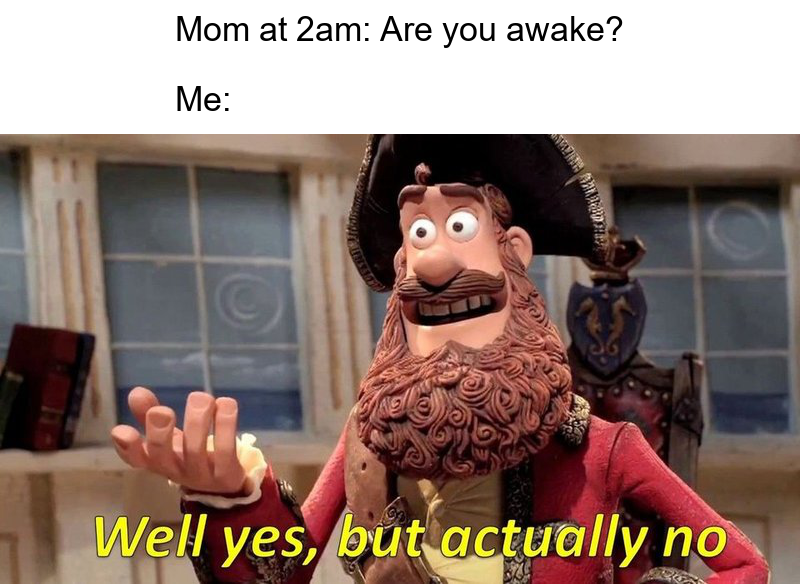
Example 2 (showing auto textwrap)
$ python -m dankcli_lib "mymemes/helpmeme.jpg" "When you make a meme generator but now you can't stop making memes"
turns this

to this

Updates
0.6.4
Added URL/Link support
0.6.5
Added the discord and discord.py tags
0.6.6
Patched URL/Link support caused parsed was undefinied
Release history Release notifications | RSS feed


Download files
Download the file for your platform. If you're not sure which to choose, learn more about installing packages.
Source Distribution
Built Distribution
Filter files by name, interpreter, ABI, and platform.
If you're not sure about the file name format, learn more about wheel file names.
Copy a direct link to the current filters
File details
Details for the file dankcli_lib-0.6.6.tar.gz.
File metadata
- Download URL: dankcli_lib-0.6.6.tar.gz
- Upload date:
- Size: 227.9 kB
- Tags: Source
- Uploaded using Trusted Publishing? No
- Uploaded via: twine/6.2.0 CPython/3.11.14
File hashes
| Algorithm | Hash digest | |
|---|---|---|
| SHA256 |
0bbac5ddadc0bbf8589ac1aef2a211bcff05bba8a1cfd3c635ce11b2da7fff58
|
|
| MD5 |
f92401a589f0e53bd916737ae8b71d4f
|
|
| BLAKE2b-256 |
21d1e2a9aa089da0be1618db07305503472a865a5423d25137caf279a5f1b6a9
|
File details
Details for the file dankcli_lib-0.6.6-py3-none-any.whl.
File metadata
- Download URL: dankcli_lib-0.6.6-py3-none-any.whl
- Upload date:
- Size: 230.3 kB
- Tags: Python 3
- Uploaded using Trusted Publishing? No
- Uploaded via: twine/6.2.0 CPython/3.11.14
File hashes
| Algorithm | Hash digest | |
|---|---|---|
| SHA256 |
59de2775b3581261c8a1de6d687379f76a41120676bdb4a6d2b28eded0f3d5c3
|
|
| MD5 |
759936c87b531a469666ae0aca9d3aeb
|
|
| BLAKE2b-256 |
be854ab4aa278defb2af422c10264354553b214c17d3c0409f7c82b5f15f34ce
|






