
~ Visits ~

~ Stats ~




🚨 dankware 🚨
Python module with various features! Install with the below command!
pip install dankware
pip install dankware[extras]
Update to the latest version with the below command!
pip install --upgrade dankware
📚 Table of Contents
- Multithreading
- Decorators
- File Utilities
- Download with Progress
- Export Registry Keys
- Splash Screen
- Error Traceback
- GitHub Utilities
- Generate Random IPs
- GUI File / Path Selector
- Path Extractor
- Colour Special Characters
- Banners
- Gradient Reworked
🚨 Multithreading 🚨
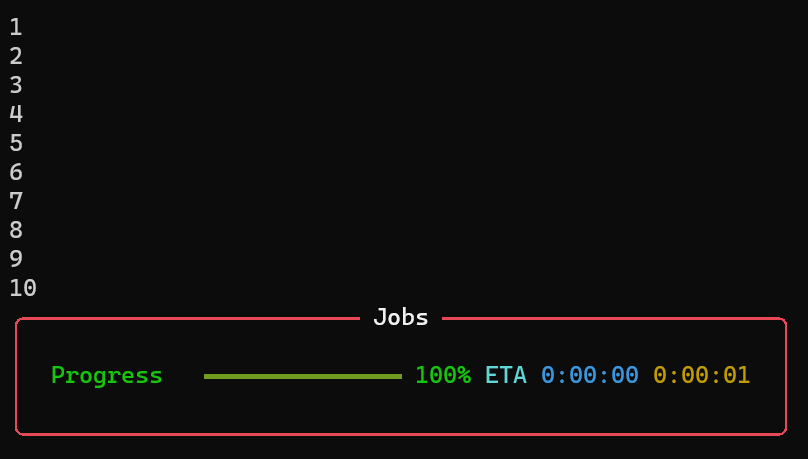
from dankware import multithread
import time

a = 0
def example():
    global a
    a += 1
    print(a)
    time.sleep(5)

multithread(example, 10) # func: example | threads: 10 | single: 50 seconds | multi: 5 seconds
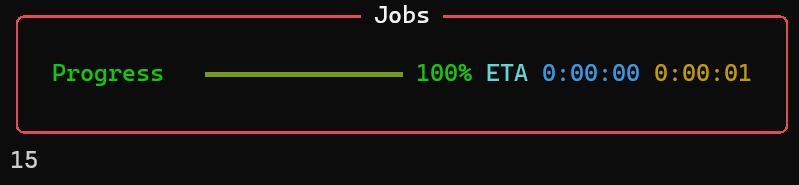
from dankware import multithread
import time

new_list = [1, 2, 3, 4, 5]
sum = 0

def example(num):
    global sum
    sum += num
    time.sleep(5)

multithread(example, 10, new_list) # input_one: list
print(sum)
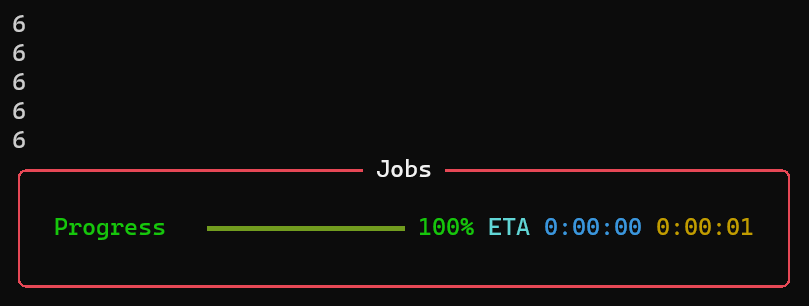
from dankware import multithread
import time

list1 = [1, 2, 3, 4, 5]
list2 = [5, 4, 3, 2, 1]

def example(num1, num2):
    print(num1 + num2)
    time.sleep(5)

multithread(example, 10, list1, list2) # input_one: list1 | input_two: list2
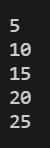
from dankware import multithread
import time

new_list = [1, 2, 3, 4, 5]

def example(num1, num2):
    print(num1 * num2)
    time.sleep(5)

multithread(example, 10, new_list, 5, progress_bar=False) # input_two: 5 | disabled progress bar
🚨 Decorators (NEW) 🚨
♦️ Retry Decorator ♦️
import requests
from dankware import retry

@retry(max_attempts=3, delay=1.0, backoff=2.0)
def unstable_api_call():
    # Will retry up to 3 times on failure with exponential backoff
    response = requests.get("https://api.example.com")
    return response.json()
🚨 File Utilities (NEW) 🚨
from dankware import (
    get_file_hash,
    safe_filename,
    human_readable_size,
    ensure_dir,
    list_files,
)

# Calculate file hash
sha256 = get_file_hash("myfile.txt", "sha256")
print(sha256)

# Sanitize filename
safe = safe_filename('file<>:"/\\|?*.txt')
print(safe)  # "file_________.txt"

# Human readable size
size = human_readable_size(1500000)
print(size)  # "1.43 MB"

# Ensure directory exists
ensure_dir("path/to/new/directory")

# List files matching pattern
for file in list_files(".", "*.py", recursive=True):
    print(file)
🚨 Download with Progress (NEW) 🚨
from dankware import download_file, download_multiple

# Download with progress bar
path = download_file(
    "https://example.com/file.zip",
    "downloads/",
    progress=True
)
print(f"Downloaded to: {path}")

# Download multiple files
urls = [
    "https://example.com/file1.zip",
    "https://example.com/file2.zip",
]
paths = download_multiple(urls, "downloads/")
🚨 Export Registry Keys 🚨
import os
from dankware import export_registry_keys

# [NOTE]: this function requires admin privileges!

export_path = "D:\\export.reg"
registry_root = r'HKEY_CURRENT_USER'
registry_path = r'Software\Google\Chrome\PreferenceMACs'
#export_path = os.path.join(os.environ['USERPROFILE'], 'Desktop', 'export.reg')

export_registry_keys(registry_root, registry_path, recursive=True, export_path=export_path)


🚨 Splash Screen 🚨
from dankware.pillow import splash_screen
#from dankware import hide_window, show_window

# Supports: GIFs / PNGs / JPGs / BMPs / ICOs

# hide_window()
splash_screen("D:\\splash.gif", duration=5) # runs on main thread
# show_window()
from dankware.pillow import splash_screen
from concurrent.futures import ThreadPoolExecutor
ThreadPoolExecutor(1).submit(splash_screen, "splash.png", 5)
# runs on separate thread

🚨 Error Traceback 🚨
import sys
from dankware import err, clr
try: value = 1/0
except Exception as exc:
  print(clr(err((type(exc), exc, exc.__traceback__)),2))
  # OR
  print(clr(err(sys.exc_info()),2))
# OR
try: value = 1/0
except Exception as exc:
  print(clr(err((type(exc), exc, exc.__traceback__),'mini'),2))
  # OR
  print(clr(err(sys.exc_info(),"mini"),2))


🚨 GitHub Utilities 🚨
♦️ Get Download URLs ♦️
from dankware import github_downloads
# full url > https://api.github.com/repos/EssentialsX/Essentials/releases/latest
for url in github_downloads("EssentialsX/Essentials"): print(url)

♦️ Filter Downloads ♦️
from dankware import github_file_selector
# full url > https://api.github.com/repos/EssentialsX/Essentials/releases/latest
for url in github_file_selector("EssentialsX/Essentials", "remove", ('AntiBuild', 'Discord', 'GeoIP', 'Protect', 'XMPP')): print(url)

♦️ Get Release Info (NEW) ♦️
from dankware.requests import github_release_info

info = github_release_info("SirDank/dankware")
print(f"Latest: {info['tag_name']}")
print(f"Published: {info['published_at']}")
print(f"Changelog: {info['body']}")
♦️ Check for Updates (NEW) ♦️
from dankware.requests import github_check_update

has_update, latest, url = github_check_update("SirDank/dankware", "3.6.0")
if has_update:
    print(f"New version available: {latest}")
    print(f"Download: {url}")
♦️ Get Raw File (NEW) ♦️
from dankware.requests import github_get_raw_file

content = github_get_raw_file("SirDank/dankware", "README.md")
print(content)
🚨 Generate Random IPs 🚨
from dankware import random_ip
print(random_ip())

🚨 GUI File / Path Selector 🚨
from dankware.tkinter import file_selector
path = file_selector() # opens file explorer to select a file
print(path)
from dankware.tkinter import folder_selector
path = folder_selector() # opens file explorer to select a folder
print(path)
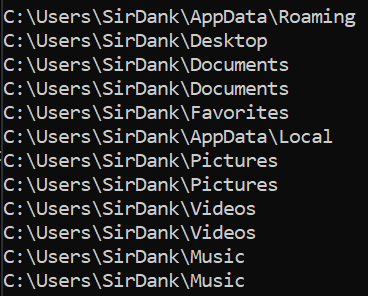
🚨 Path Extractor 🚨
import os
from dankware import get_path

if os.name == 'nt': # extracts path from registry
    locations = ("AppData", "Desktop", "Documents", "Favorites", "Local AppData", "Pictures", "Videos", "Music", "Downloads", "Temp")
elif os.name == 'posix':
    locations = ("Desktop", "Documents", "Downloads", "Music", "Pictures", "Videos", "Temp")
for location in locations:
    path = get_path(location)
    print(path)
🚨 Colour Special Characters 🚨
from dankware import clr
# default preset = 1
# default colour_one = white_bright
# default colour_two = red_bright
print(clr("\n  > Hey! Long time no see :)"))
#print(clr("\n  > Hey! Long time no see :)", colour_one = white_bright, colour_two = red_bright))

from dankware import clr, white, magenta
# default preset = 1
# colour_one = magenta
# colour_two = white
print(clr("\n  > Hey! Long time no see :)", colour_one = magenta, colour_two = white))

from dankware import clr
print(clr("\n  This is a string: True | This is an integer: False"))

from dankware import clr, green, magenta, white
# default colour_one = white_bright
# colour_two = green
print(clr(f"\n  > {magenta}Purple{white} thinks he's better than everyone else :(", colour_two=green))

from dankware import clr
# preset = 2
print(clr("\n  > Error in sector [7] redirecting... | INTEGRITY_CHECK: SUCCESS",2))

from dankware import clr
# preset = 3
print(clr("\n  > Is this a randomly coloured string: TRUE | As you can see it does not colour True/False",3))

from dankware import clr, white, white_normal, white_dim, red, red_normal, red_dim
# preset = 3
print(clr("\n  > This is a randomly coloured string based on the input colours!",3,colours=(white_bright, white_normal, white_dim, red_bright, red_normal, red_dim)))

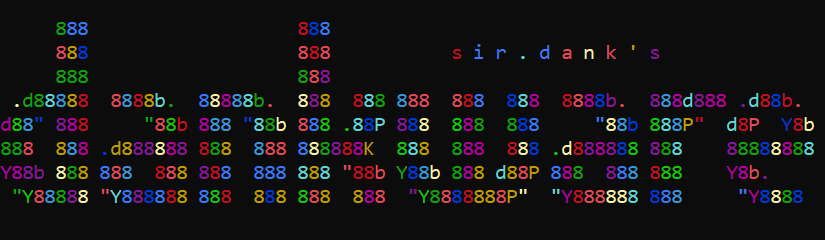
🚨 Banners 🚨
banner = '''

     888                   888
     888                   888           s i r . d a n k ' s
     888                   888
 .d88888  8888b.  88888b.  888  888 888  888  888  8888b.  888d888 .d88b.
d88" 888     "88b 888 "88b 888 .88P 888  888  888     "88b 888P"  d8P  Y8b
888  888 .d888888 888  888 888888K  888  888  888 .d888888 888    88888888
Y88b 888 888  888 888  888 888 "88b Y88b 888 d88P 888  888 888    Y8b.
 "Y88888 "Y888888 888  888 888  888  "Y8888888P"  "Y888888 888     "Y8888

'''
♦️ Colourize Banner (random) ♦️
from dankware import clr
# preset = 4
print(clr(banner,4))
♦️ Align Banner (console center) ♦️
from dankware import align
print(align(banner)) # also works with single text line (even coloured)

♦️ Align Coloured Banner ♦️
from dankware import align, clr
print(clr(align(banner),4)) # OR (preferably not) print(align(clr(banner,4)))

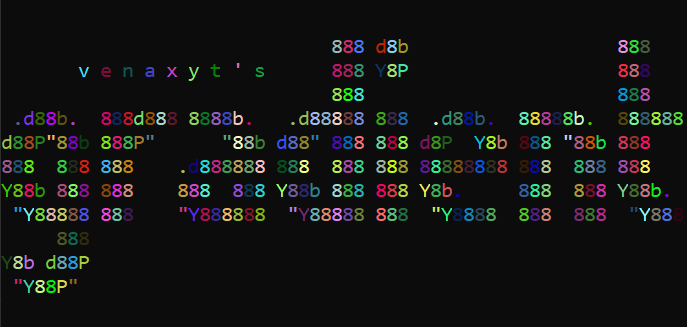
🚨 Gradient Reworked [ Originally By @venaxyt ] 🚨
from dankware import fade
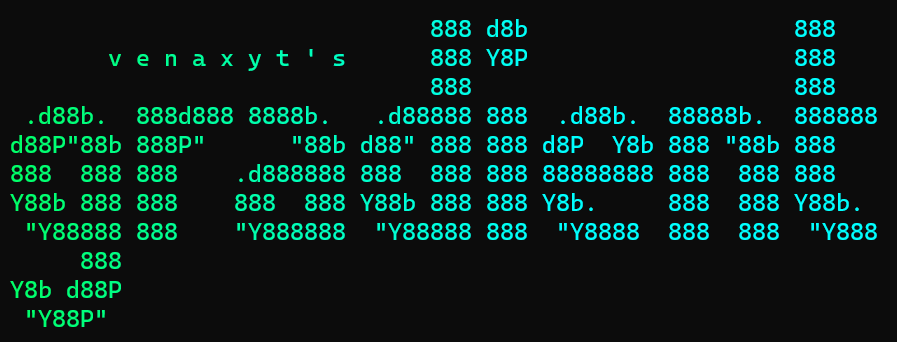
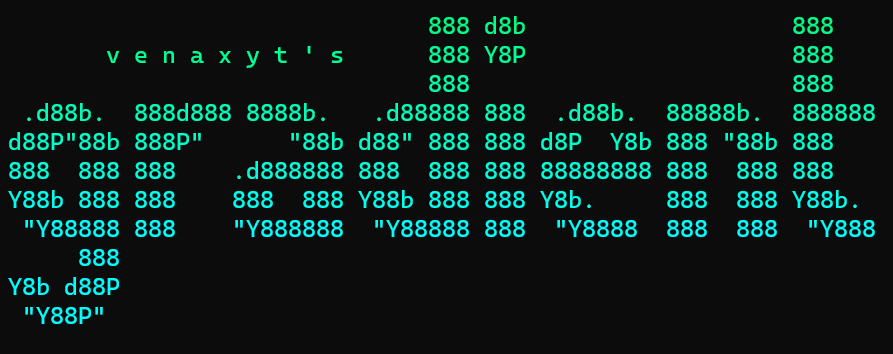
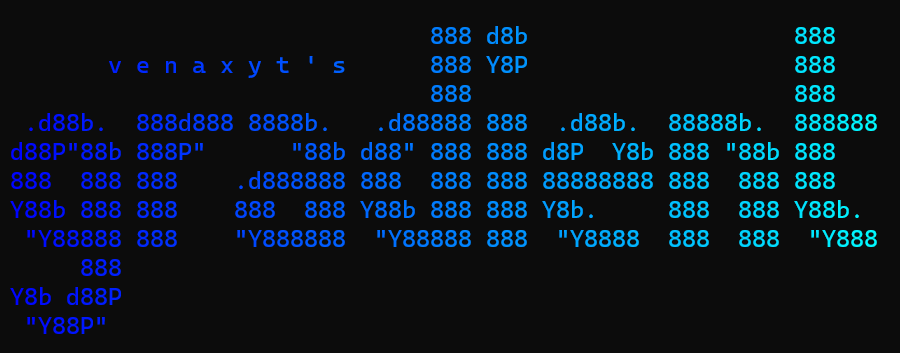
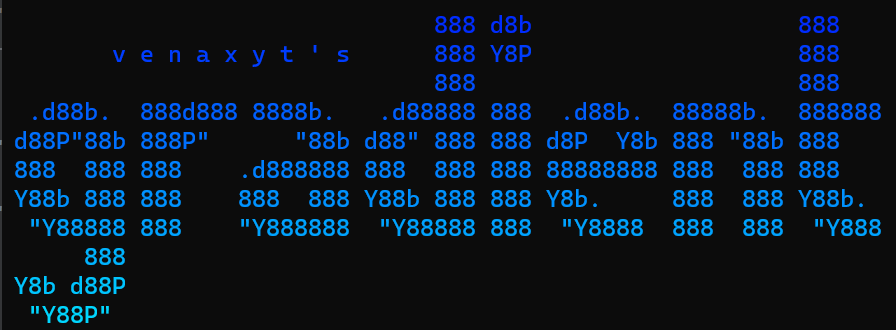
banner = '''

                              888 d8b                   888
       v e n a x y t ' s      888 Y8P                   888
                              888                       888
 .d88b.  888d888 8888b.   .d88888 888  .d88b.  88888b.  888888
d88P"88b 888P"      "88b d88" 888 888 d8P  Y8b 888 "88b 888
888  888 888    .d888888 888  888 888 88888888 888  888 888
Y88b 888 888    888  888 Y88b 888 888 Y8b.     888  888 Y88b.
 "Y88888 888    "Y888888  "Y88888 888  "Y8888  888  888  "Y888
     888
Y8b d88P
 "Y88P"


'''
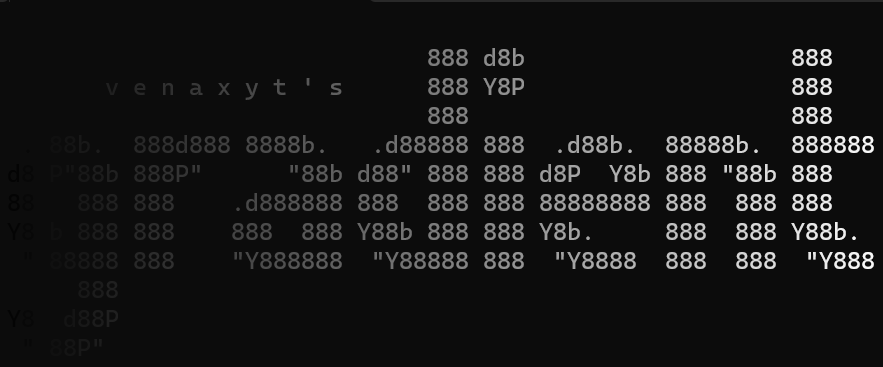
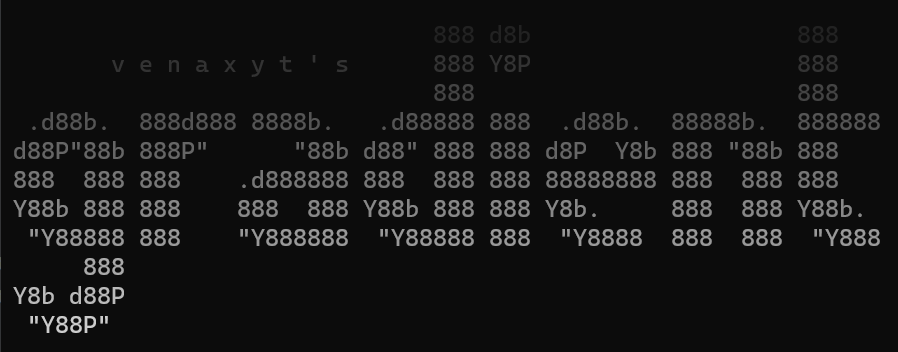
♦️ Black To White ♦️
print(fade(banner, "black2white"))
print(fade(banner, "black2white-v"))
♦️ Yellow To Red ♦️
print(fade(banner, "yellow2red"))
print(fade(banner, "yellow2red-v"))
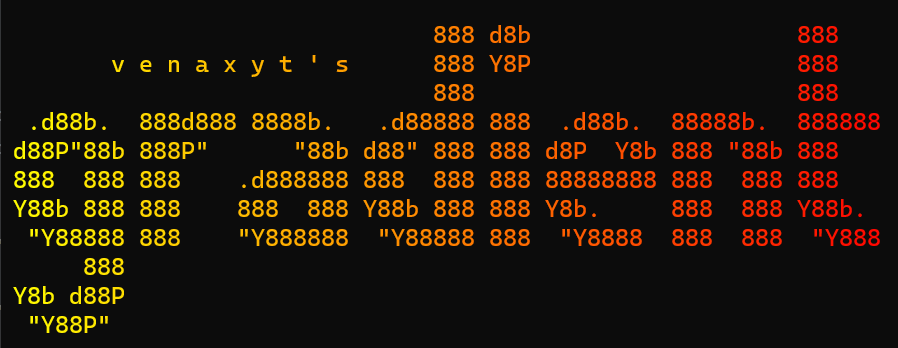
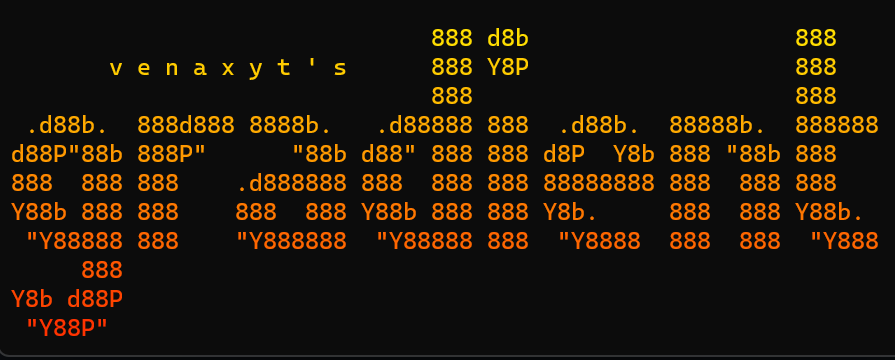
♦️ Green To Yellow ♦️
print(fade(banner, "green2yellow"))
print(fade(banner, "green2yellow-v"))
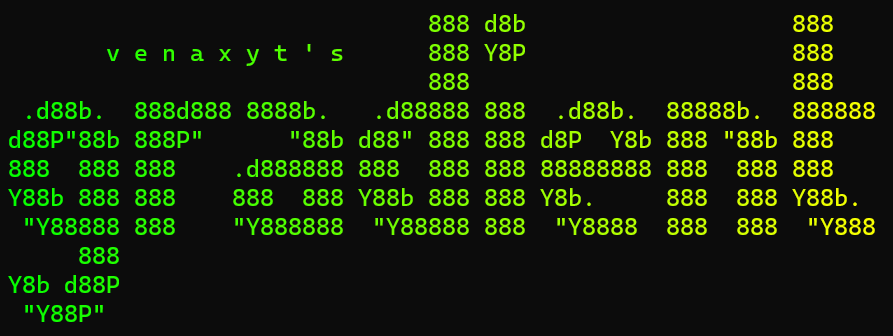
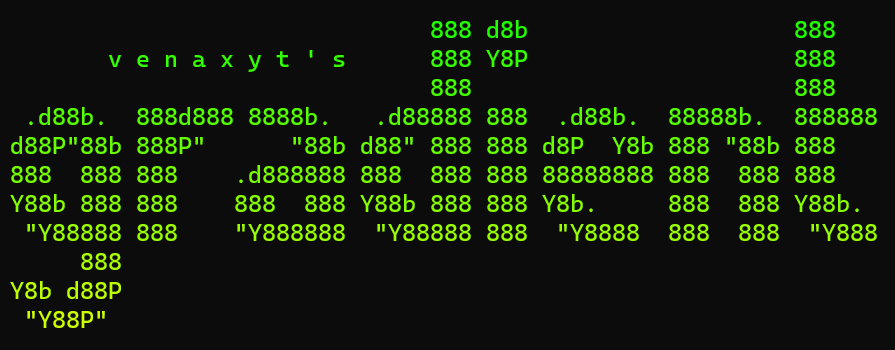
♦️ Green To Cyan ♦️
print(fade(banner, "green2cyan"))
print(fade(banner, "green2cyan-v"))
♦️ Blue To Cyan ♦️
print(fade(banner, "blue2cyan"))
print(fade(banner, "blue2cyan-v"))
♦️ Blue To Pink ♦️
print(fade(banner, "blue2pink"))
print(fade(banner, "blue2pink-v"))
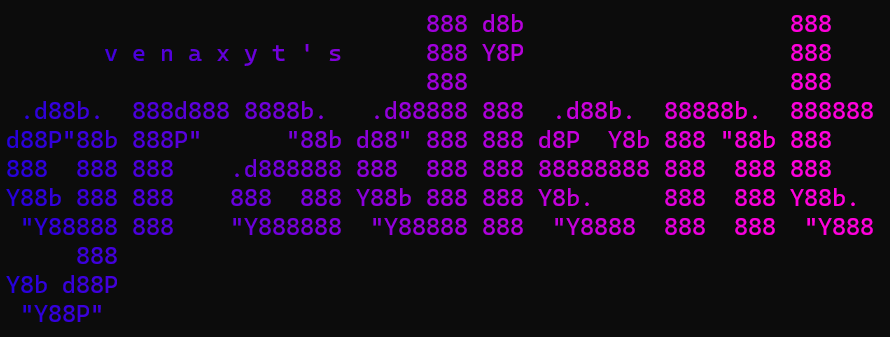
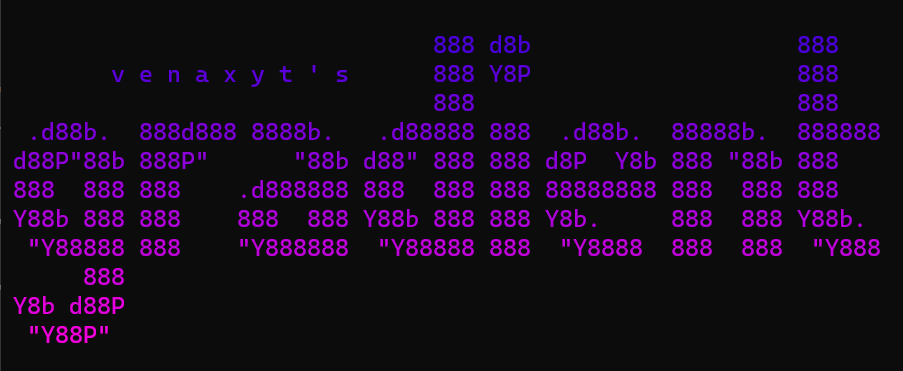
♦️ Pink To Red ♦️
print(fade(banner, "pink2red"))
print(fade(banner, "pink2red-v"))
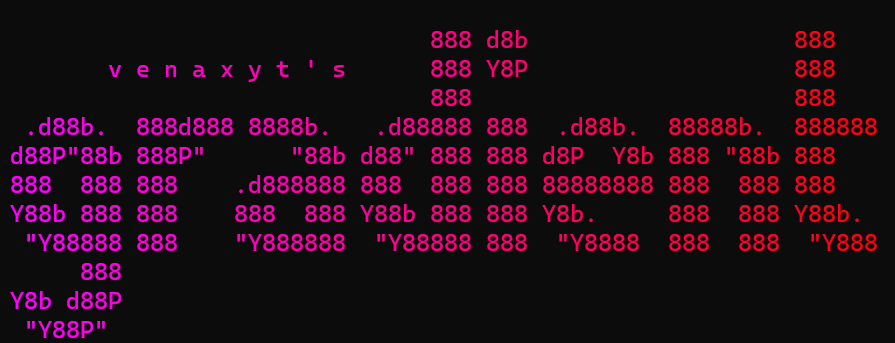
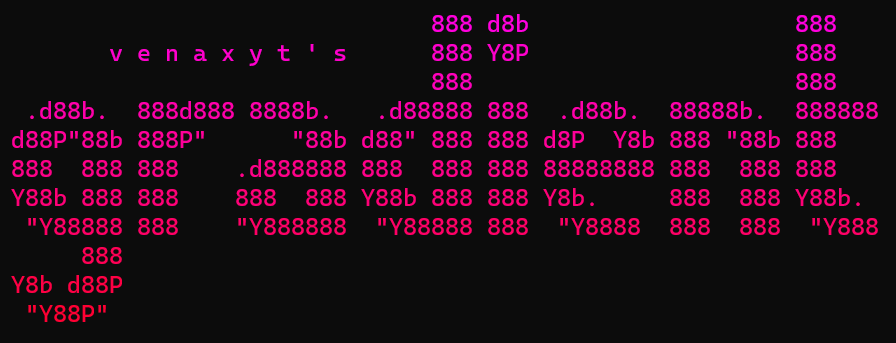
♦️ Random ♦️
print(fade(banner, "random"))
🚨 System Utilities (NEW) 🚨
from dankware.system import (
    get_system_info,
    is_windows,
    is_linux,
    get_username,
    get_home_dir,
    get_temp_dir
)

# Get comprehensive system info
info = get_system_info()
print(info)

# Platform checks
if is_windows():
    print("Running on Windows")
elif is_linux():
    print("Running on Linux")

# Get user info
print(f"Username: {get_username()}")
print(f"Home: {get_home_dir()}")
print(f"Temp: {get_temp_dir()}")
🚨 Also check out 🚨

🚨 Wallpapers 🚨
♦️ Style 1 ♦️

♦️ Style 2 ♦️

♦️ Style 3 ♦️

♦️ Style 4 ♦️

🚨 Stats 🚨
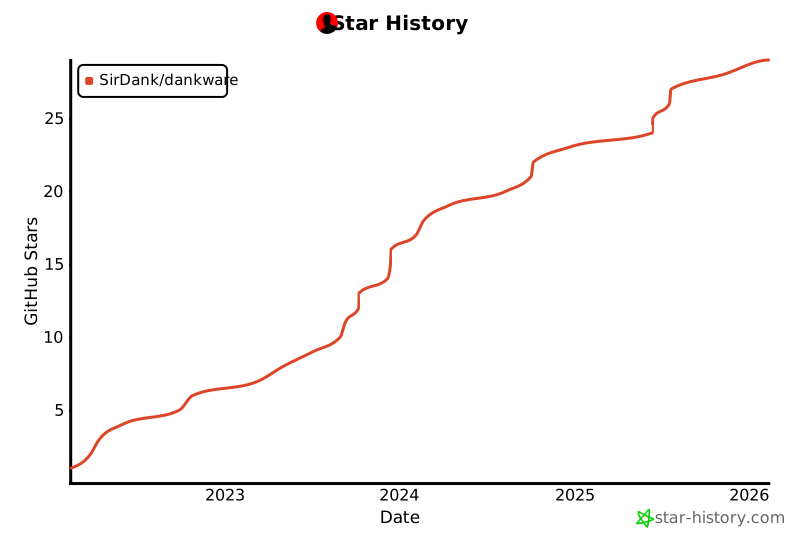
🚨 Star History 🚨
1 maintainer

Metadata
1 maintainer
Release files for dankware 4.0.0
For a detailed explanation of source distributions (sdists) and built distributions (wheels), please see the package formats documentation.
Source distribution (sdist)
| File | Size | Uploaded | Provenance | |
|---|---|---|---|---|
| dankware-4.0.0.tar.gz | 47.6 kB | With provenance | Details |
Built distribution (wheel)
| File | Interpreter | ABI | Platform | Reset |
|---|---|---|---|---|
| dankware-4.0.0-py3-none-any.whl | Python 3 | none | any | Details |
Total release size: 89.5 kB
Release files / dankware-4.0.0.tar.gz
| Download URL | dankware-4.0.0.tar.gz |
|---|---|
| Size | 47.6 kB |
| Tags | Source |
|
SHA-256 checksum How to use checksums |
14b5a683c333333a40e6bff0db3139ef10b12df9c94b46097384da5acd4d9467
|
|
BLAKE2b-256 checksum How to use checksums |
d92f248d9d64976a67a6de5af1e0ab3b1658e7ca02652a8b5272ee8f5cca001a
|
| Upload date | |
|
Uploaded using Trusted Publishing? What is trusted publishing? |
Yes |
| Uploaded via |
twine/7.0.0 CPython/3.13.16
|
Provenance
Provenance describes where a file came from. On PyPI, provenance is shared via attestations, which provide a verifiable record of the build or publishing details. View details, limitations and caveats.


PyPI Publish Attestation
PyPI verified that this artifact, at this checksum, originated from the publisher listed below.
Signed by GitHub Actions, verified by PyPI on Oct 25, 2026.
Transparency logRelease files / dankware-4.0.0-py3-none-any.whl
| Download URL | dankware-4.0.0-py3-none-any.whl |
|---|---|
| Size | 41.9 kB |
| Tags | Python 3 |
|
SHA-256 checksum How to use checksums |
4d5278605f084d20535af199ef450600095e7d2e3a2906bc3503f537bd48d4c6
|
|
BLAKE2b-256 checksum How to use checksums |
5a804fe436ce8e83b4d144a67b95da0d63d48ab11a7f74841f50425b67442492
|
| Upload date | |
|
Uploaded using Trusted Publishing? What is trusted publishing? |
Yes |
| Uploaded via |
twine/7.0.0 CPython/3.13.16
|
Provenance
Provenance describes where a file came from. On PyPI, provenance is shared via attestations, which provide a verifiable record of the build or publishing details. View details, limitations and caveats.
PyPI Publish Attestation
PyPI verified that this artifact, at this checksum, originated from the publisher listed below.
Signed by GitHub Actions, verified by PyPI on Oct 25, 2026.
Transparency logSecurity for dankware 4.0.0
Provenance
Provenance describes where a file came from. On PyPI, provenance is shared via attestations, which provide a verifiable record of the build or publishing details. View details, limitations and caveats.
Full provenance
All 2 files in this release have been uploaded with provenance metadata.
Attestation for dankware-4.0.0.tar.gz
PyPI Publish Attestation
PyPI verified that this artifact, at this checksum, originated from the publisher listed below.
Signed by GitHub Actions, verified by PyPI on Oct 25, 2026.
Transparency logA note on package security
PyPI is a repository for distributing packages, not a service for auditing them. While third-party security researchers and our staff do their best to detect and remove malicious packages, PyPI cannot guarantee the quality, security or suitability of any given package.
To learn more about protecting yourself from malicious actors, visit our package security documentation.














