
danvas
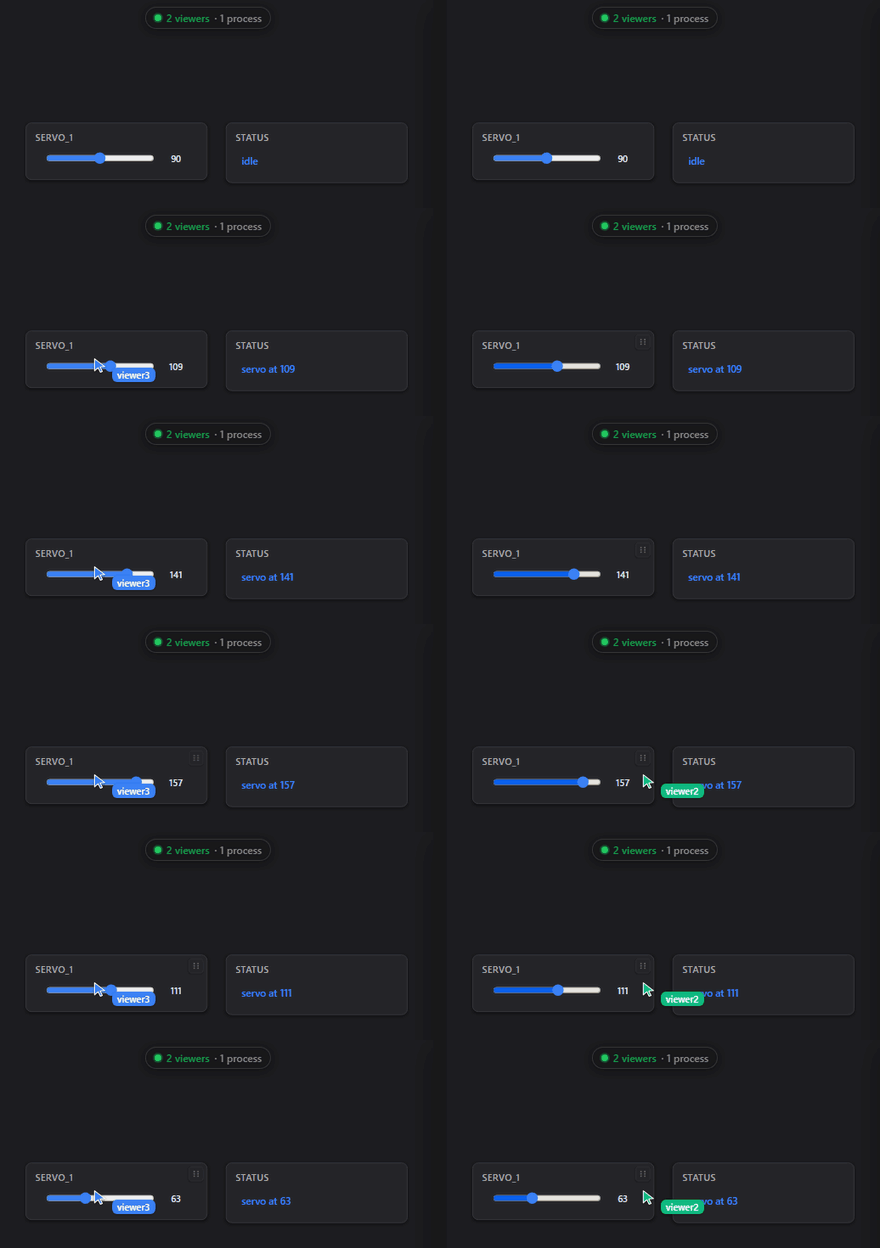
danvas builds interactive browser UIs — dashboards, control panels, live visualizations — entirely in Python, with no HTML, JavaScript, or build step. You make panels (sliders, plots, tables, buttons, video feeds, or your own React/HTML) in Python; they appear on a zoomable browser canvas. A panel is just a face on your program: a click or edit calls a normal Python function running in your process, with full access to your code, libraries, hardware, and files — so anything you can script, you can give a UI and drive live. State flows over one WebSocket; Python owns it, the browser renders it and reports what the user did.
It's multi-user out of the box: any number of browsers — phones, tablets, or desktops — share one live canvas, with a viewer roster, live cursors, chat, and freehand drawing the host can read back. Share it across your LAN, behind a password, or over a public HTTPS tunnel — all built in, no extra services.
Install
pip install danvas
The base install is deliberately light: the serving engine is the danvasd
binary (bundled in the platform wheel, so pip install is all it takes), and the
Python side needs only websockets + orjson. Heavier features are optional
extras:
| Extra | Enables |
|---|---|
pip install "danvas[video]" |
VideoFeed JPEG encoding (OpenCV, ~90 MB) |
pip install "danvas[audio]" |
microphone capture for AudioFeed |
pip install "danvas[tunnel]" |
public sharing (serve(tunnel=True)) |
pip install "danvas[desktop]" |
native window + bake() to a standalone app |
pip install "danvas[serial]" |
python -m danvas.serial COM3 — wire a no-network device (Arduino/UART) onto a canvas |
pip install "danvas[hub]" |
run the Python reference hub python -m danvas.merge (FastAPI/uvicorn) |
canvas.video(...) needs [video] for default encoding — or stream
already-JPEG bytes with VideoFeed(encode=False), which needs nothing. For local
development, clone and pip install -e . (a checkout builds danvasd with
cargo build --release --manifest-path broker/Cargo.toml).
Hello world
import danvas

canvas = danvas.Canvas()
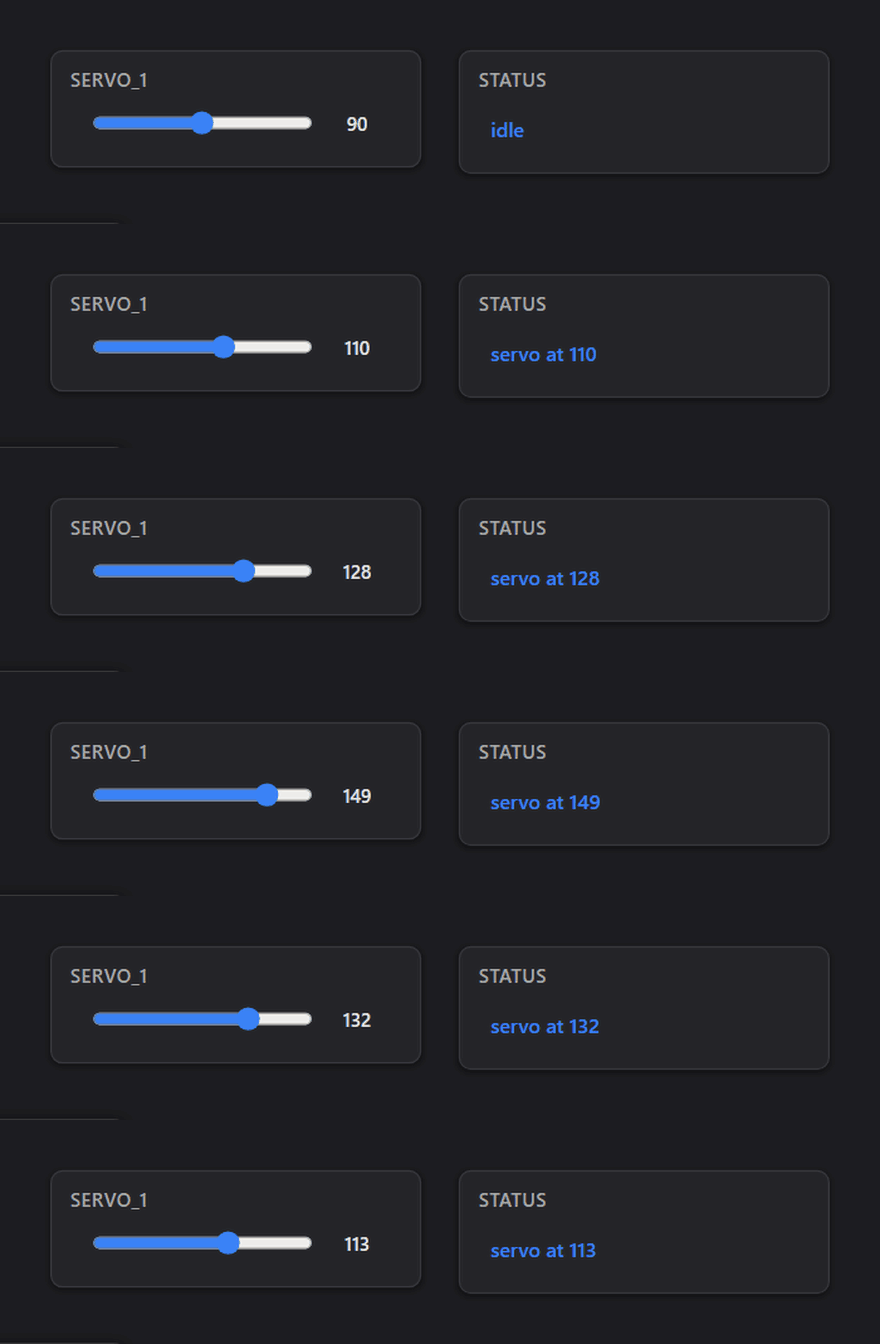
servo  = canvas.slider("servo_1", min=0, max=180, default=90)
status = canvas.label("status", "idle")

@servo.on_change
def handle(value):
    status.update(f"servo at {value}")

canvas.serve(port=8000)   # opens the browser, blocks
Writing danvas code, or asking an AI to? The danvas manual is the complete reference: conventions and a one-page quick reference first, then every feature in depth. Point an assistant at it before it starts.
What's in the box
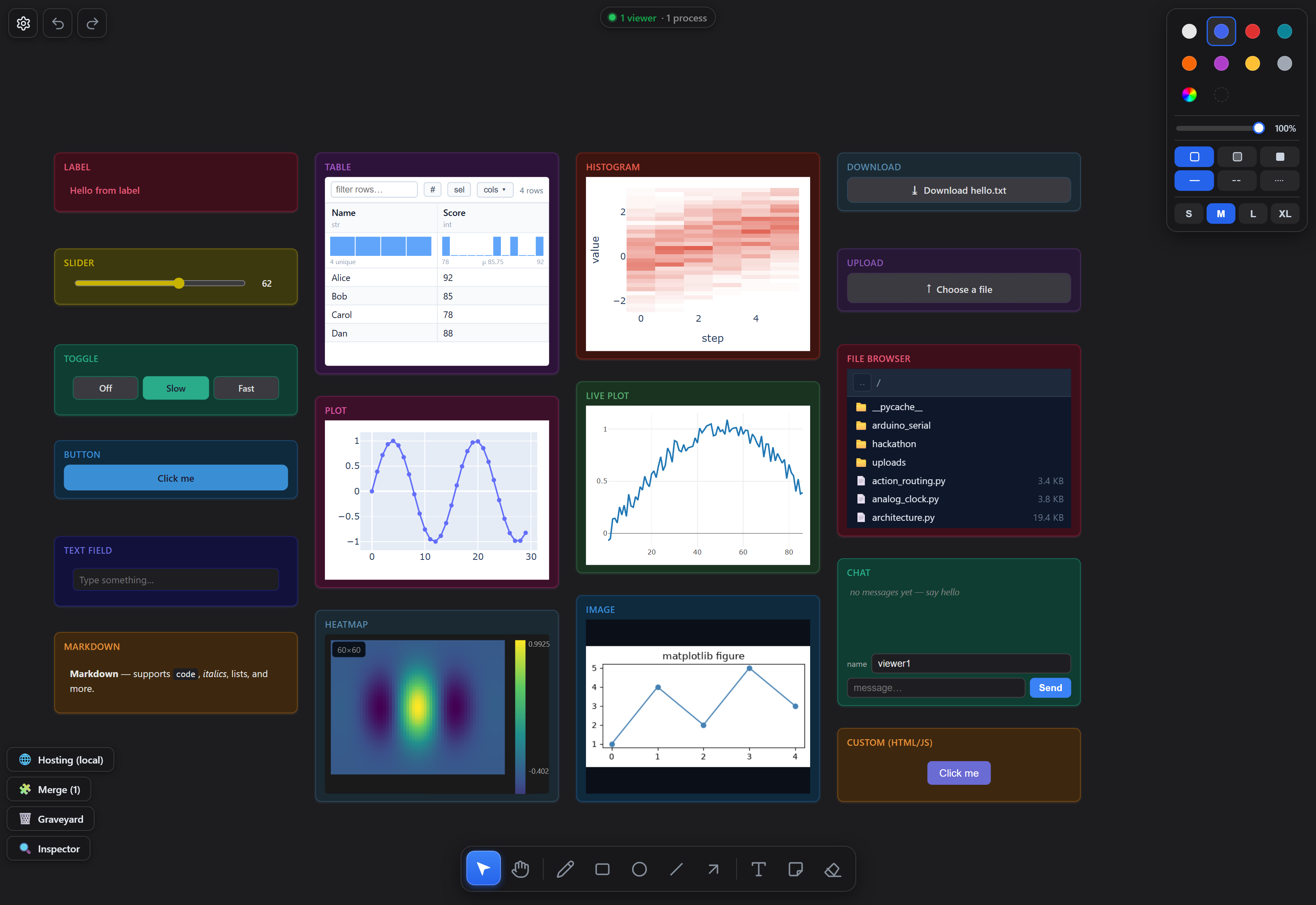
- Panels for everything: controls, tables, Plotly charts, live telemetry, heatmaps, video and audio, chat, file upload and download, a CAD/3D viewer with volume rendering, and your own React or HTML. Catalogue below.
- Your own UI, two ways:
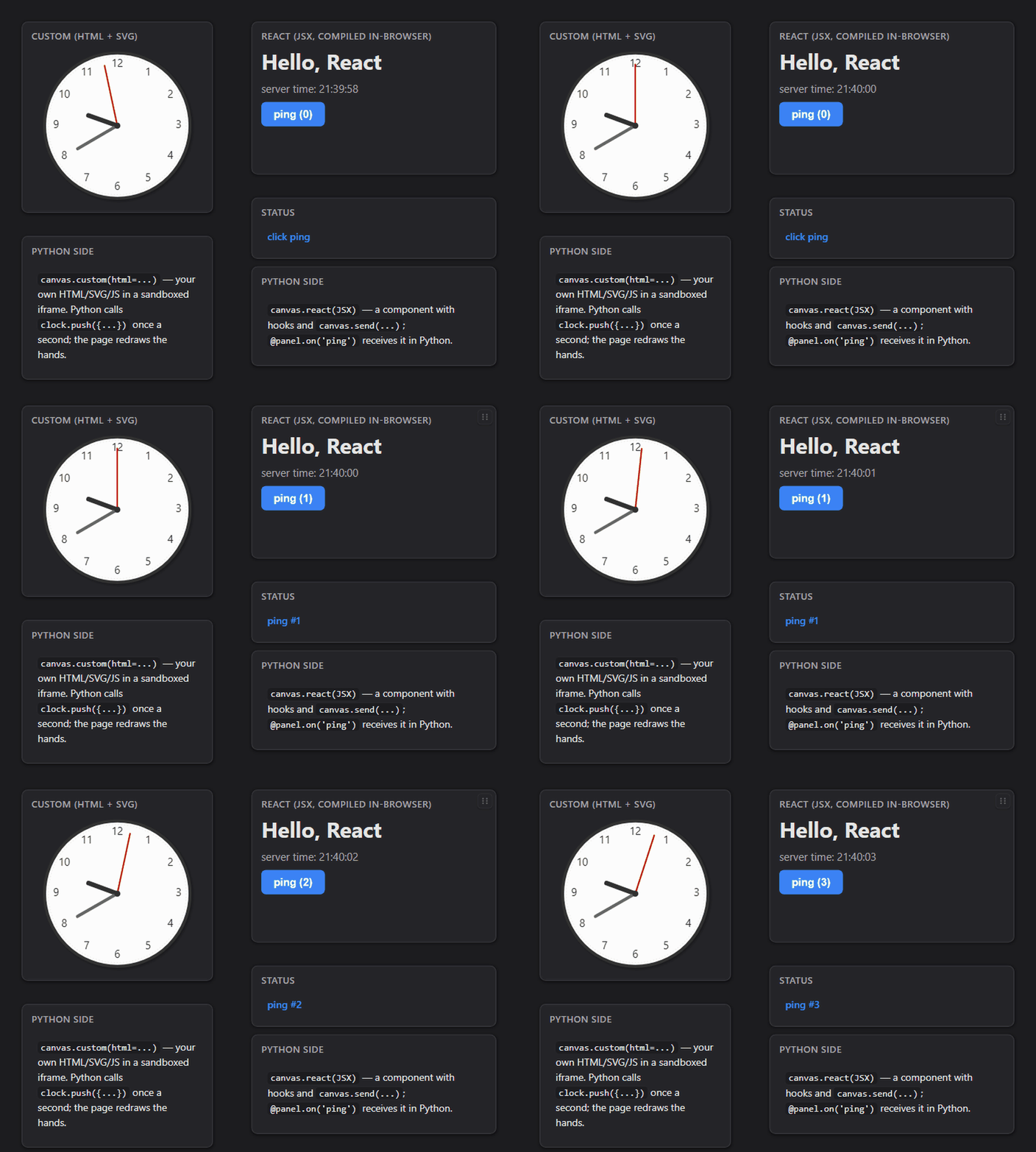
react(...)mounts JSX natively;custom(...)drops in any HTML page —custom(path="page.html", sync=True)even shares an unedited page's controls between everyone viewing it. - Multi-user by default: a viewer roster, live cursors, chat, shared ink, and logins with roles that scope what each person sees and can do.
- Sharing built in: LAN, password, or a public HTTPS tunnel with a link that survives script restarts; widen or narrow reach live.
- Resilient: the UI survives your script crashing and heals on restart;
persist=restores values and layout across runs;danvas ps/killfinds canvases left running in the background. - Fast iteration: hot reload swaps edited function
bodies without restarting,
@canvas.on_editre-runs a function when you save it, anddescribe()/screenshot()let a script, or an AI editing it, check what it built. - Any language: one documented wire protocol; Python, Rust and Node SDKs, and an Arduino serial bridge.
The component catalogue
| Component | Direction | API |
|---|---|---|
Slider |
bidirectional | .value (read/assign), @on_change, .update(v); step= (fractional → float slider + number entry), on_release=True; live: .min, .max, .step, .color |
Toggle |
bidirectional | .value (read/assign), @on_change, .update(opt); positionals flexible: toggle(["a","b"]) or toggle("mode", ["a","b"]); live: .options, .color |
Button |
input | @on_click, .value (click count), text=, .update(text); live: .text, .color |
TextField |
bidirectional | single-line or multiline=True; @on_change on Enter/blur; .value (read/assign), .update(text), placeholder=; live: .placeholder, .color |
Label |
output | escaped text/number; .text (read/assign), .update(text); h="auto"; live: .color |
Markdown |
output | rendered Markdown; .text (read/assign), .update(text), .html (rendered) |
Image |
output | path/URL/bytes/Matplotlib/PIL/array; .src (read/assign — reads the wire-canonical data:/http URL), .update(src), .fit (read/assign); live: .color |
Table |
bidirectional | DataFrame/Series/records/dict/array → sortable, filterable, paginated; toolbar toggles index/column-visibility/row-selection (+ ✎ edit when editable=True); @on_select(indices), @on_edit(row, col, value); .selected (read/assign, silent), .update(data); each viewer's sort/filter/page survives scrolling out |
Plot |
output | .update(fig) — a Plotly figure rendered natively, with the interactive toolbar (zoom/pan/box-zoom/save-PNG on hover) |
LivePlot |
output | streaming telemetry; .push({trace: y | [y…]}, x=), .clear(), smoothing=; live: .max_points, .mode, .color |
Histogram |
output | distribution over time; .add(values, step); color= tints frame + chart |
Heatmap |
output | 2D array as a colormapped image: .update(array2d, vmin=, vmax=, cmap=, extent=, smooth=) — colorbar, cursor value readout in extent units, @on_pick clicks |
VideoFeed |
output | .update(bgr_frame) → binary JPEG; encode=False for pre-encoded |
AudioFeed |
output | .update(pcm_chunk) → Web Audio playback |
Chat |
bidirectional | shared room across viewers; .post(text), @on_message |
WebView |
output | external site in an iframe; .url (read/assign), .navigate(url) |
Model3D |
output | the 3D panel (xeokit + a WebGL2 ray marcher): .update(glb, points=, lines=, curve=, mesh_color=); named layers via .layer(name) (.points(color_by=)/.lines()/.curve()/.vectors()/.voxels()/.isosurface()/.volume()/.visible/.clear()) — orbit, mm snap measurements, section plane (cuts volumes too), X-ray/edges, NavCube + XYZ axes, MIP/Fog/Slice volume modes with window-level, per-layer Items panel, hover/@on_pick; view= starting camera + .view(preset|eye=,look=) points every viewer; shared_camera=True shares one viewer's orbit with all; .export_html(path) writes a standalone file |
FileBrowser |
bidirectional | navigate a folder (sandboxed to root=); @on_select, .value, pattern= |
Upload |
input | click/drop zone receiving a viewer's file; @on_upload, .text (read/assign), dest= (stream to disk), accept=, multiple=, max_size= |
Download |
input | button sending a host file/bytes to the viewer; source= or @provide, .text (read/assign), filename= |
Custom |
bidirectional | arbitrary HTML/CSS/JS in a sandboxed iframe; @on(event)/@on_message/@on_request/@on_binary, .push(data)/.push_binary(bytes), .update(html); themed=True, keep_mounted=True (survive scroll-out with state intact); sync=True shares any page's controls (and Plotly views) between viewers, sync="local" keeps them per viewer across culling; shared .state / @on_state; .export_html(path) |
React |
bidirectional | your JSX, compiled in-browser, theme-aware; @on(event)/@on_request/@on_binary, .update(**props), .push(data)/.push_binary(bytes), css=; shared state prop + canvas.setState / @on_state; canvas.useViewState for per-viewer state that survives culling |
Inspector |
output | live panel/globals state browser |
Most color= panels expose .color (and most accept lock/chrome flags) —
see Controlling panels live.
Your own panels
counter = canvas.react(jsx='<button onClick={() => canvas.send({n: 1})}>tap</button>')
page    = canvas.custom(path="dashboard.html", sync=True)   # any HTML file, shared live

@counter.on_message
def _(msg, viewer):
    print(viewer["name"], "tapped")
Two bigger builds
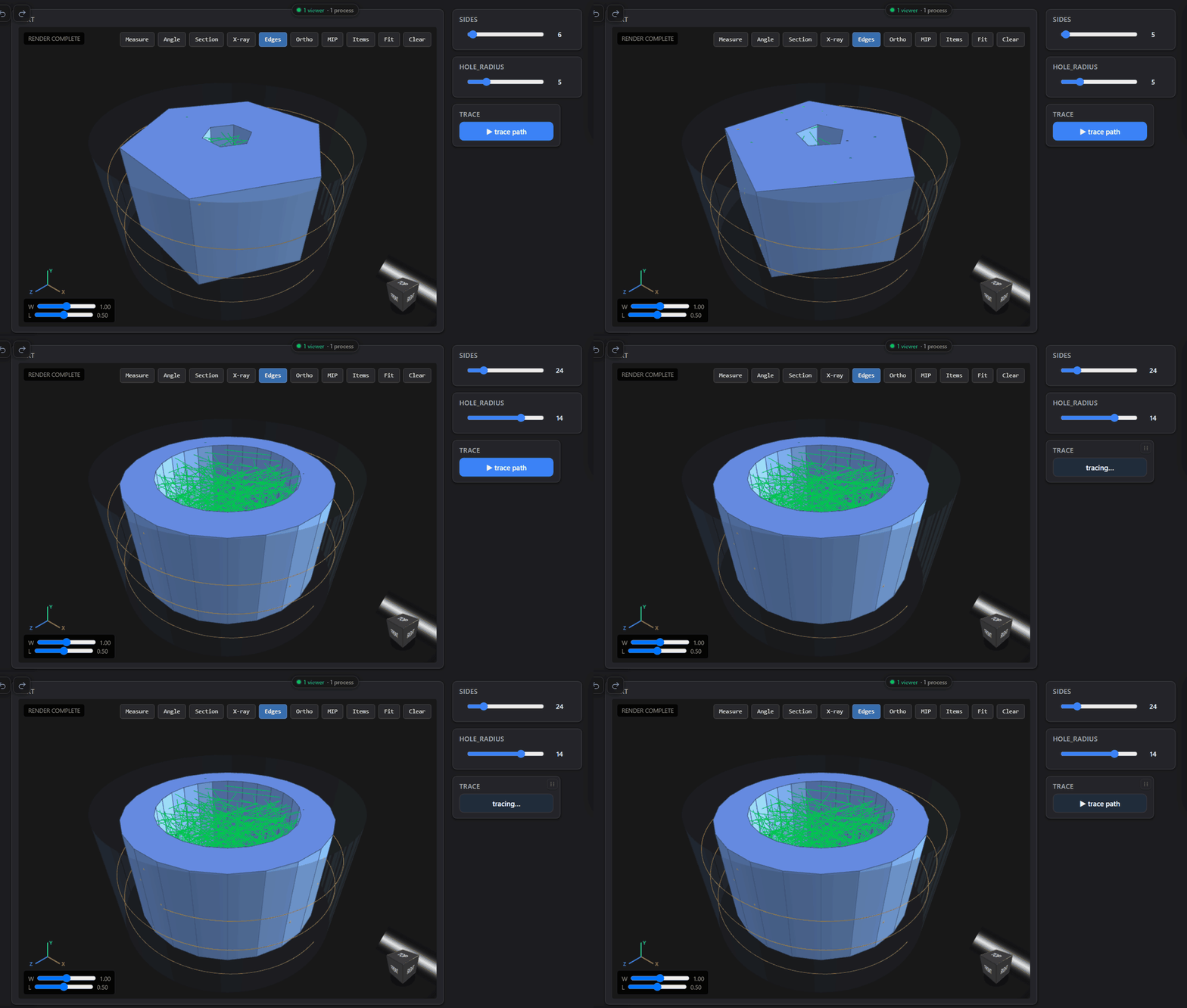
Parametric CAD in the 3D panel (cad_model3d.py): sliders rebuild a build123d part and push mesh, point cloud, line net, isosurface and volume layers into Model3D.
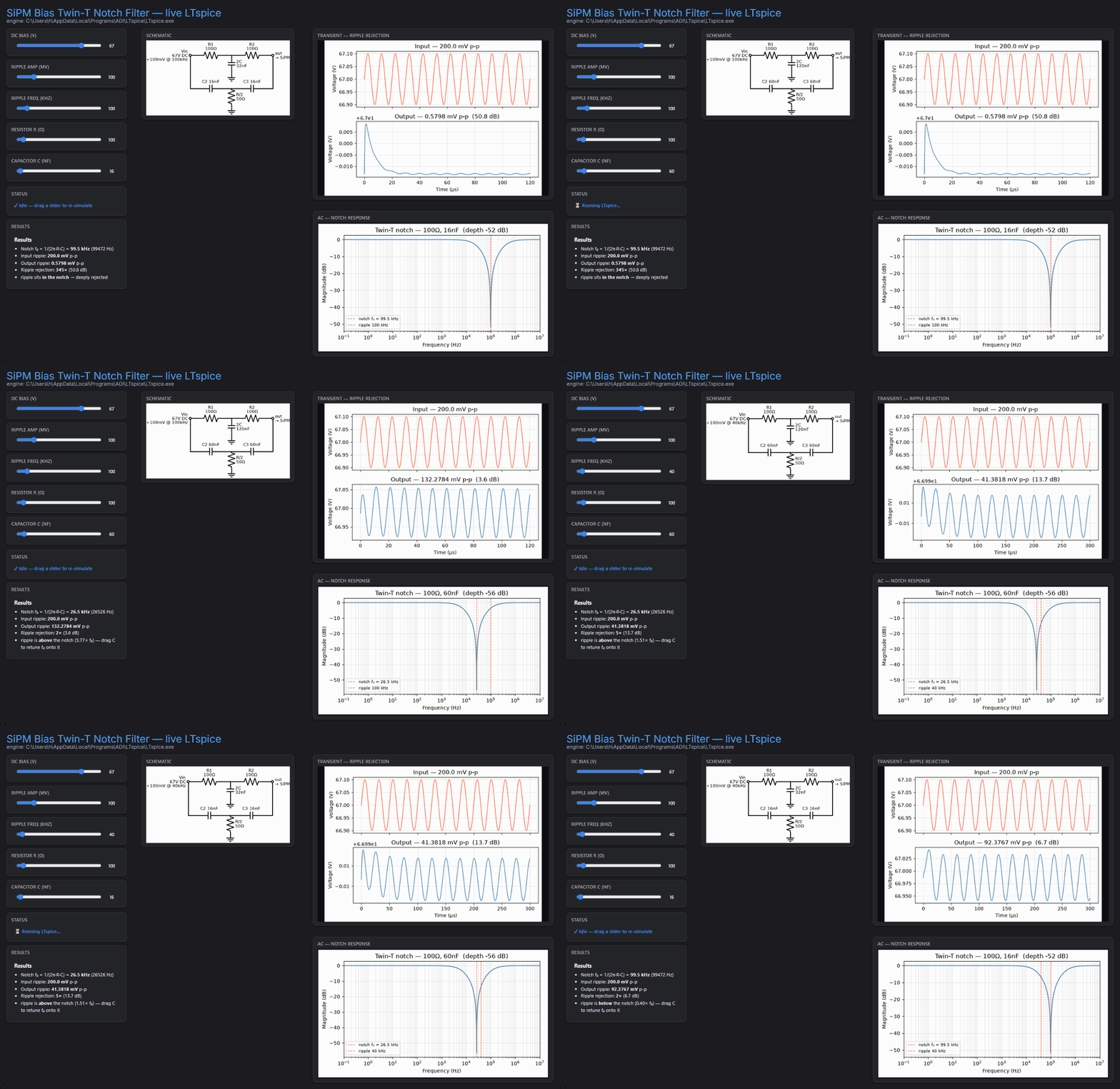
A live LTspice front-end (circuit_dashboard.py): release a slider, LTspice re-simulates, and the schematic, transient, Bode plot and results redraw.
Learn more
- The danvas manual — conventions, quick reference, and every feature in depth.
- examples/ — 50 runnable scripts grouped by topic.
- PROTOCOL.md — the wire contract, for other languages and tools.
- SECURITY.md — the trust model.
Examples
python examples/hello_world.py            # slider + label
python examples/frontend_backend_tour.py  # interactive tour of the wire, live frame tap
python examples/sensor_dashboard.py       # live VideoFeed + worker thread
python examples/show_anything.py          # canvas.show() over every type
python examples/custom_html.py            # hand-written bidirectional HTML panel
python examples/custom_binary_stream.py   # high-rate binary telemetry (push_binary)
python examples/managed_shapes.py          # managed shapes + on_draw observer
python examples/binary_stream.py          # webcam → Python via canvas.requestCamera
python examples/mic_input.py              # microphone → Python via canvas.requestMicrophone
python examples/react_canvas_api.py       # React: canvas.viewport / setView / chat
python examples/matplotlib_panel.py       # slider re-renders a matplotlib figure
python examples/plotly_panel.py           # interactive Plotly chart
python examples/robot_control.py          # sliders, toggle, plot, video together
python examples/download_button.py        # download a host file / generated data
python examples/upload_button.py          # upload a file from the browser to Python
python examples/chat_room.py              # shared chat with editable names
python examples/moving_widget.py          # per-viewer cursor-following emoji
python examples/public_tunnel.py          # share worldwide via HTTPS tunnel
python examples/train_dashboard.py        # TensorBoard-style training tracker
python examples/hackathon/hackathon.py    # roles, per-team budgets, runtime teams
Notebooks: examples/notebook_dynamic.ipynb (live add/move/remove),
examples/notebook_autopanel.ipynb (cell capture),
examples/merge_canvases.ipynb (two canvases on one merge host). The
matplotlib/plotly examples need pip install matplotlib plotly.
Developing
The frontend bundle in danvas/frontend/dist/ is committed; rebuild with
cd danvas/frontend && npm install && npm run build, then
cargo build --release --manifest-path broker/Cargo.toml (the broker embeds it).
See CONTRIBUTING.md.
Licence
danvas's own source code is under the GNU Affero General Public License v3.0 (AGPL-3.0-or-later). Commercial licences — which waive the AGPL copyleft for internal or proprietary use — are available on request via daniel.chahine004@gmail.com.
Scope. The AGPL covers danvas's own code. The pre-built frontend bundle in
danvas/frontend/dist/ is compiled from third-party packages under their
licences — all permissive (MIT), built on Preact
(the Inter typeface is under the SIL Open Font License).
See THIRD_PARTY_LICENSES.md.
No frontend licence key is required. The frontend is fully open and permissive — there is no proprietary component, no production licence key, and no watermark. Run danvas in development or production freely; only danvas's own AGPL terms apply to danvas's code.
Older releases bundled tldraw (proprietary licence, with a production key and "made with tldraw" watermark). The frontend has been rewritten to be tldraw-free, so that requirement no longer applies.
serve(tldraw_license_key=…)is accepted but ignored (kept for backwards compatibility).
1 maintainer

Metadata
1 maintainer
Release files for danvas 0.9.1
For a detailed explanation of source distributions (sdists) and built distributions (wheels), please see the package formats documentation.
Source distribution (sdist)
| File | Size | Uploaded | Provenance | Actions |
|---|---|---|---|---|
| danvas-0.9.1.tar.gz | 2.6 MB | With provenance | Details for danvas-0.9.1.tar.gz |
Built distributions (wheels)
| File | Actions Reset | |||
|---|---|---|---|---|
| danvas-0.9.1-py3-none-win_amd64.whl | Python 3 | none | Windows x86-64 | Details for danvas-0.9.1-py3-none-win_amd64.whl |
| danvas-0.9.1-py3-none-manylinux2014_x86_64.whl | Python 3 | none | Linux glibc 2.17+ x86-64 | Details for danvas-0.9.1-py3-none-manylinux2014_x86_64.whl |
| danvas-0.9.1-py3-none-manylinux2014_aarch64.whl | Python 3 | none | Linux glibc 2.17+ ARM64 | Details for danvas-0.9.1-py3-none-manylinux2014_aarch64.whl |
| danvas-0.9.1-py3-none-macosx_11_0_arm64.whl | Python 3 | none | macOS 11.0+ ARM64 | Details for danvas-0.9.1-py3-none-macosx_11_0_arm64.whl |
| danvas-0.9.1-py3-none-any.whl | Python 3 | none | any | Details for danvas-0.9.1-py3-none-any.whl |
Total release size: 30.7 MB
Release files / danvas-0.9.1.tar.gz
| Download URL | danvas-0.9.1.tar.gz |
|---|---|
| Size | 2.6 MB |
| Tags | Source |
|
SHA-256 checksum How to use checksums |
e2d6244c46336cf824185ce69c6e959a7172438acdaad06531825e9b46f9d2c9
|
|
BLAKE2b-256 checksum How to use checksums |
1f3cc96ad4765ec9cd159bae38012c254f2c317f287529643c17951054960f01
|
| Upload date | |
|
Uploaded using Trusted Publishing? What is trusted publishing? |
Yes |
| Uploaded via |
twine/7.0.0 CPython/3.13.14
|
Provenance
Provenance describes where a file came from. On PyPI, provenance is shared via attestations, which provide a verifiable record of the build or publishing details. View details, limitations and caveats.


PyPI Publish Attestation
PyPI verified that this artifact, at this checksum, originated from the publisher listed below.
Signed by GitHub Actions, verified by PyPI on Oct 20, 2026.
Transparency logRelease files / danvas-0.9.1-py3-none-win_amd64.whl
| Download URL | danvas-0.9.1-py3-none-win_amd64.whl |
|---|---|
| Size | 6.4 MB |
| Tags | Python 3 Windows x86-64 |
|
SHA-256 checksum How to use checksums |
ac3fdbd57c5474cf99352f2012e5205ae936a880cc038dfeea2a63007c28c197
|
|
BLAKE2b-256 checksum How to use checksums |
b15a0b16d69466afbbe454afa71b87a38afbce37c4fc868cc41e884f16282f37
|
| Upload date | |
|
Uploaded using Trusted Publishing? What is trusted publishing? |
Yes |
| Uploaded via |
twine/7.0.0 CPython/3.13.14
|
Provenance
Provenance describes where a file came from. On PyPI, provenance is shared via attestations, which provide a verifiable record of the build or publishing details. View details, limitations and caveats.
PyPI Publish Attestation
PyPI verified that this artifact, at this checksum, originated from the publisher listed below.
Signed by GitHub Actions, verified by PyPI on Oct 20, 2026.
Transparency logRelease files / danvas-0.9.1-py3-none-manylinux2014_x86_64.whl
| Download URL | danvas-0.9.1-py3-none-manylinux2014_x86_64.whl |
|---|---|
| Size | 6.6 MB |
| Tags | Linux glibc 2.17+ x86-64 Python 3 |
|
SHA-256 checksum How to use checksums |
14e09e21eae8c5b1b8b54161c98ca9d081401165928f8284f67b506bde3b653d
|
|
BLAKE2b-256 checksum How to use checksums |
bf06d15e96d3f57fc48041a484eb51ed55a901b4134f63a3a6e099da54c83be6
|
| Upload date | |
|
Uploaded using Trusted Publishing? What is trusted publishing? |
Yes |
| Uploaded via |
twine/7.0.0 CPython/3.13.14
|
Provenance
Provenance describes where a file came from. On PyPI, provenance is shared via attestations, which provide a verifiable record of the build or publishing details. View details, limitations and caveats.
PyPI Publish Attestation
PyPI verified that this artifact, at this checksum, originated from the publisher listed below.
Signed by GitHub Actions, verified by PyPI on Oct 20, 2026.
Transparency logRelease files / danvas-0.9.1-py3-none-manylinux2014_aarch64.whl
| Download URL | danvas-0.9.1-py3-none-manylinux2014_aarch64.whl |
|---|---|
| Size | 6.3 MB |
| Tags | Linux glibc 2.17+ ARM64 Python 3 |
|
SHA-256 checksum How to use checksums |
7980dfd8d866f5e198d8f3b0946502b81d3cc58e8341cdca091b506aa4eb2c83
|
|
BLAKE2b-256 checksum How to use checksums |
4ac87918ea651302f0af5ce0c44c1462d628f63858fafb88d87540bc417831a0
|
| Upload date | |
|
Uploaded using Trusted Publishing? What is trusted publishing? |
Yes |
| Uploaded via |
twine/7.0.0 CPython/3.13.14
|
Provenance
Provenance describes where a file came from. On PyPI, provenance is shared via attestations, which provide a verifiable record of the build or publishing details. View details, limitations and caveats.
PyPI Publish Attestation
PyPI verified that this artifact, at this checksum, originated from the publisher listed below.
Signed by GitHub Actions, verified by PyPI on Oct 20, 2026.
Transparency logRelease files / danvas-0.9.1-py3-none-macosx_11_0_arm64.whl
| Download URL | danvas-0.9.1-py3-none-macosx_11_0_arm64.whl |
|---|---|
| Size | 6.3 MB |
| Tags | Python 3 macOS 11.0+ ARM64 |
|
SHA-256 checksum How to use checksums |
caf6ec04e8749d57a08869de4343ba2701d2888e72a08e34e431f381307e63f0
|
|
BLAKE2b-256 checksum How to use checksums |
2f6ffac862494154b7442fae7cddefe2ad82725d0eb9481c38174867710e338d
|
| Upload date | |
|
Uploaded using Trusted Publishing? What is trusted publishing? |
Yes |
| Uploaded via |
twine/7.0.0 CPython/3.13.14
|
Provenance
Provenance describes where a file came from. On PyPI, provenance is shared via attestations, which provide a verifiable record of the build or publishing details. View details, limitations and caveats.
PyPI Publish Attestation
PyPI verified that this artifact, at this checksum, originated from the publisher listed below.
Signed by GitHub Actions, verified by PyPI on Oct 20, 2026.
Transparency logRelease files / danvas-0.9.1-py3-none-any.whl
| Download URL | danvas-0.9.1-py3-none-any.whl |
|---|---|
| Size | 2.4 MB |
| Tags | Python 3 |
|
SHA-256 checksum How to use checksums |
7f4172c485c6aca38379d24284ee310b8419eb9ee60eadbee7667803f7aa39a5
|
|
BLAKE2b-256 checksum How to use checksums |
949e0747672dc3cbbd43183441842ea069cdb79e0501bd29fe274cbb1929403d
|
| Upload date | |
|
Uploaded using Trusted Publishing? What is trusted publishing? |
Yes |
| Uploaded via |
twine/7.0.0 CPython/3.13.14
|
Provenance
Provenance describes where a file came from. On PyPI, provenance is shared via attestations, which provide a verifiable record of the build or publishing details. View details, limitations and caveats.
PyPI Publish Attestation
PyPI verified that this artifact, at this checksum, originated from the publisher listed below.
Signed by GitHub Actions, verified by PyPI on Oct 20, 2026.
Transparency logSecurity for danvas 0.9.1
Provenance
Provenance describes where a file came from. On PyPI, provenance is shared via attestations, which provide a verifiable record of the build or publishing details. View details, limitations and caveats.
Full provenance
All 6 files in this release have been uploaded with provenance metadata.
Attestation for danvas-0.9.1.tar.gz
PyPI Publish Attestation
PyPI verified that this artifact, at this checksum, originated from the publisher listed below.
Signed by GitHub Actions, verified by PyPI on Oct 20, 2026.
Transparency logA note on package security
PyPI is a repository for distributing packages, not a service for auditing them. While third-party security researchers and our staff do their best to detect and remove malicious packages, PyPI cannot guarantee the quality, security or suitability of any given package.
To learn more about protecting yourself from malicious actors, visit our package security documentation.














