
DARLING
the python [D]ark field x-ray microscopy [A]nalysis & [R]econstruction [L]ibrary for rapid data [IN]spection & [G]raphing





Usecase
Loading & plotting Data
Darling collects many useful tools in the properties module.
For example, it is possible to model the angular intensity distribution of a scan using a Gaussian Mixture Model (GMM) and then color code the scan based on the first maxima of the GMM using a RGB color map known as a mosaicity map.
import numpy as np

# read some toy data in
path_to_data, _, _ = darling.assets.domains()  # replace with your own data
scan_id = "1.1"  # tope level key in the hdf5 file
dset = darling.DataSet(path_to_data, scan_id)

# model the intensity distribution using a GMM
features = darling.properties.gaussian_mixture(dset.data, k=4, coordinates=dset.motors)

# color code the scan based on the first maxima of the GMM
first_maxima_mean = np.concatenate(
   (features["mean_motor1"][..., 0, None], features["mean_motor2"][..., 0, None]),
   axis=-1,
)
rgbmap, colorkey, colorgrid = darling.properties.rgb(
   first_maxima_mean, norm="dynamic", coordinates=dset.motors
)
To visualize the resulting mosaicity map, you can use the following code:
import matplotlib.pyplot as plt

# plot the resulting mosaicity map
plt.style.use('dark_background')
fig, ax = plt.subplots(1, 1, figsize=(7,7))
im = ax.imshow(rgbmap)
plt.tight_layout()
plt.show()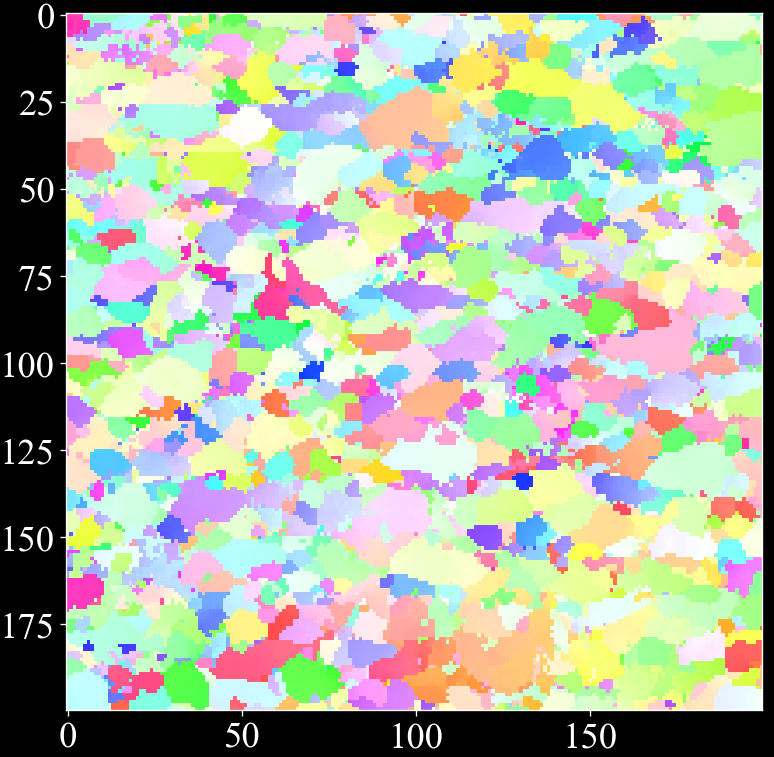
for more examples see the externally hosted documentation at https://axelhenningsson.github.io/darling/
Installation
From source the key is simply to clone and pip install
git clone https://github.com/AxelHenningsson/darling.git
cd darling
pip install -e .
In general, you probably want to install in a fresh virtual environment as
python3 -m venv .venv_darling
source .venv_darling/bin/activate
git clone https://github.com/AxelHenningsson/darling.git
cd darling
pip install -e .
use
source .venv_darling/bin/activatewhenever you want to activate the environment. To add your env into a jupyter kernel such that you can use it in an interactive notebook you may add the following two commands:
pip install ipykernel
python -m ipykernel install --user --name=darling
Note on jupyter & the ESRF slurm cluster
In the main ESRF slurm Python jupyter kernel it is possible to do the following hack to get the latest darling running.
git clone https://github.com/AxelHenningsson/darling.git
sys.path.insert(0, os.path.abspath('./darling'))
import darling
This trick is possible since that all dependencies of darling are already installed in the big Python jupyter kernel at ESRF.
The following snippet has also been verified to work on the ESRF slurm cluster 19 Dec 2024 in a browser terminal:
python3 -m venv .venv_darling
source .venv_darling/bin/activate
git clone https://github.com/AxelHenningsson/darling.git
cd darling
pip install -e .
pip install ipykernel
python -m ipykernel install --user --name=darling
This appraoch should work on other clusters as well, as long as some user permission to install exists.
Documentation
Darling hosts documentation at https://axelhenningsson.github.io/darling/
1 maintainer

Metadata
1 maintainer
Release files for darling-pypi 1.0.0
For a detailed explanation of source distributions (sdists) and built distributions (wheels), please see the package formats documentation.
Source distribution (sdist)
| File | Size | Uploaded | |
|---|---|---|---|
| darling_pypi-1.0.0.tar.gz | 52.8 MB | Details |
Built distribution (wheel)
| File | Interpreter | ABI | Platform | Reset |
|---|---|---|---|---|
| darling_pypi-1.0.0-py3-none-any.whl | Python 3 | none | any | Details |
Total release size: 105.9 MB
Release files / darling_pypi-1.0.0.tar.gz
| Download URL | darling_pypi-1.0.0.tar.gz |
|---|---|
| Size | 52.8 MB |
| Tags | Source |
|
SHA-256 checksum How to use checksums |
d61a967d4beb062c4a6e46899f18bbec3407e12baef11de25746ab436a38defd
|
|
BLAKE2b-256 checksum How to use checksums |
4cf61f8772826c1bf48718aeefe60a1cae119ffd2404b289abea89a7056667a1
|
| Upload date | |
|
Uploaded using Trusted Publishing? What is trusted publishing? |
No |
| Uploaded via |
twine/6.2.0 CPython/3.10.13
|
Release files / darling_pypi-1.0.0-py3-none-any.whl
| Download URL | darling_pypi-1.0.0-py3-none-any.whl |
|---|---|
| Size | 53.1 MB |
| Tags | Python 3 |
|
SHA-256 checksum How to use checksums |
a018f72bce1404c25a05db91d1a07e6a09e8627104684d1cef8ab8cd6528474a
|
|
BLAKE2b-256 checksum How to use checksums |
211e521efcfc3bb863d8aad2677e6cfe55a1a3ab7d952e2b0ceb1f4fd69819ea
|
| Upload date | |
|
Uploaded using Trusted Publishing? What is trusted publishing? |
No |
| Uploaded via |
twine/6.2.0 CPython/3.10.13
|













