




DART-MLCI: Aligning Blueprint and Physical Microfluidic Chip for Design-Aware and Real-Time Capable Live-Cell Image Analysis
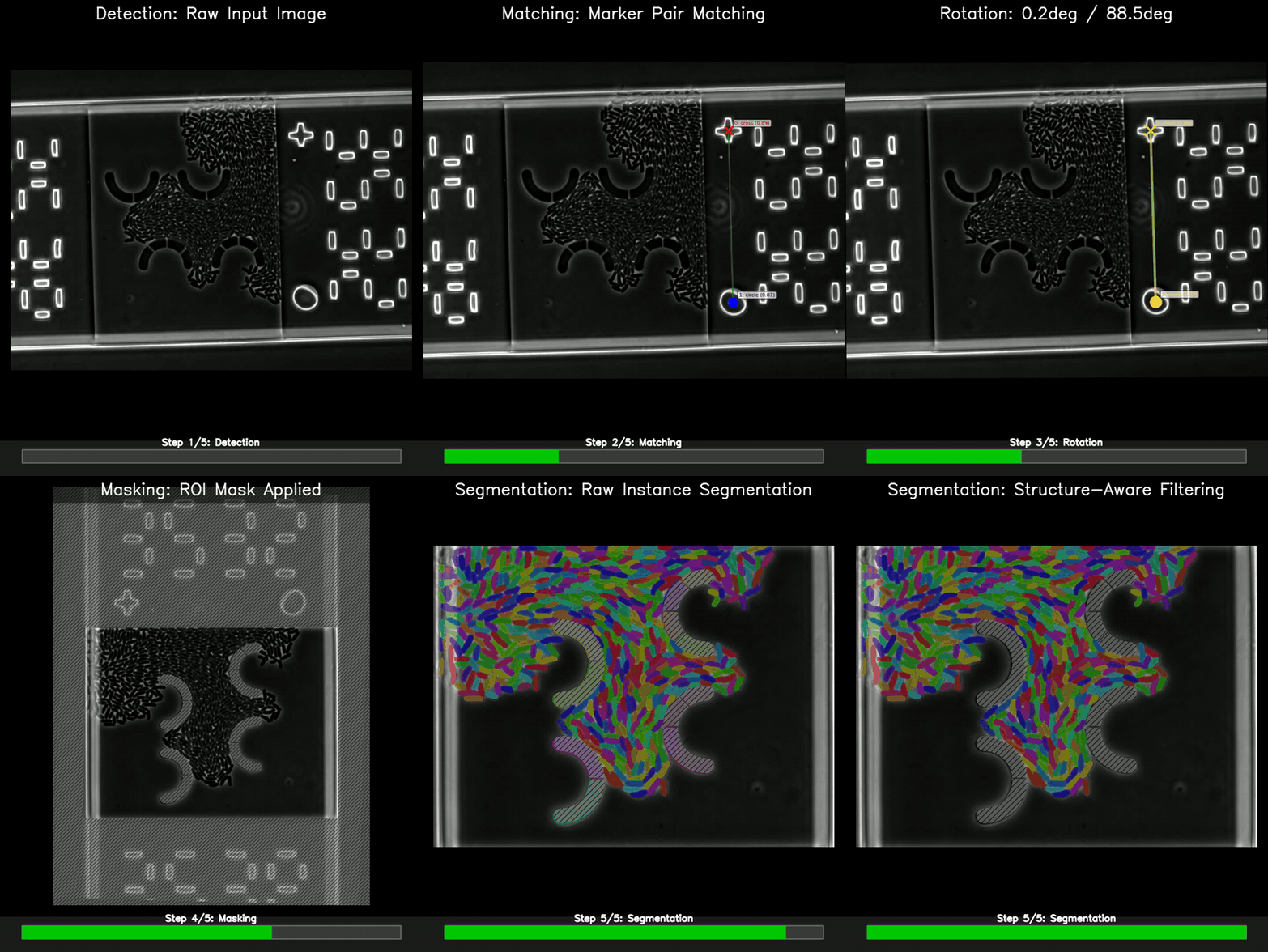
Real-time microfluidic RoI image processing. DART-MLCI takes a raw microscopy frame, detects alignment markers, rotates and crops the RoI, masks the region of interest, and segments cells — automatically, for any chip design described by a single JSON config (fine alignment).
Time-constant microfluidic chip mapping. DART-MLCI allows to record several RoI positions on the microfluidic chip when its on the microscopy stage and aligns the microfluidic blueprint providing all RoI positions for any chip design described by a single JSON config (coarse alignment).
The repository covers two complementary capabilities:
- Fine algiment (Masking pipeline) — marker detection, pair matching, rotation correction, polygon masking, and ROI cropping.
- Coarse alignment (Map calibration) — affine alignment of the chip blueprint with microscope stage coordinates, so every chamber can be revisited automatically.
Installation
# From PyPI
pip install dart-mlci

# Or from source
git clone https://github.com/SMLCI/DART-MLCI.git
cd DART-MLCI
pip install ".[dev]"        # core + dev extras
YOLO marker-detection weights and the bundled sample images (~40 MB) are
not shipped in the wheel. They download automatically on first use to
~/.cache/dart-mlci/ (Linux/macOS) or %LOCALAPPDATA%\dart-mlci\ (Windows).
You can override the location with DART_ARTIFACTS_DIR=.... No manual
download step is required.
Optional extras: pip install "dart-mlci[api]" for the FastAPI service,
pip install "dart-mlci[segmentation]" to pull in Cellpose-SAM / Omnipose.
Quickstart: Python API
Run the marker detector on a bundled sample image:
# snippet: marker-detection
import cv2
from dart_mlci import ChipStructureLibrary, MarkerDetectionModel, sample_path

lib = ChipStructureLibrary.from_file(sample_path("chips/sak.json"), pixel_size=0.065789)
model = MarkerDetectionModel()

image = cv2.imread(str(sample_path("images/sak/0007.png")))
markers = model.predict_markers(image)
print(f"Detected {len(markers)} markers")  # e.g. "Detected 4 markers"
Compose the full pipeline as steps. lib(roi_id) returns the chamber's
polygon and the expected pixel-space positions of its cross/circle markers
(mgp):
# snippet: full-pipeline
import cv2
from dart_mlci import (
    ChipStructureLibrary,
    ImageRotationStep,
    MarkerDetectionStep,
    MarkerMatchingStep,
    RoIMaskingStep,
    sample_path,
)

lib = ChipStructureLibrary.from_file(sample_path("chips/sak.json"), pixel_size=0.065789)
_, polygon, mgp = lib("0000")  # any NormaleBox-inner ROI matches 0007.png

image  = cv2.imread(str(sample_path("images/sak/0007.png")))
detect = MarkerDetectionStep()
match  = MarkerMatchingStep(marker_group_pixel=mgp)
rotate = ImageRotationStep()
mask   = RoIMaskingStep(marker_group_pixels=mgp, roi_polygon=polygon)

data = mask(rotate(match(detect(image))))
cropped, chamber_mask = data["image"], data["mask"]
Process Your Own TIFF Stack
scripts/process_folder.py is the CLI for batch-processing time-lapse TIFF
stacks. It works for a single stack just as well as a full experiment — point
its folders dict at one subfolder.
1. Lay out your data
my_data/
├── my_chamber/
│   ├── stack_001.tif         # T x H x W, uint16
│   └── stack_002.tif
2. Write a minimal folder_config.json
{
  "input_dir": "my_data",
  "output_dir": "my_output",
  "pixel_size": 0.0928,
  "segmenter": "cellpose-sam",
  "folders": {
    "my_chamber": "NormaleBox-inner"
  }
}
Omit chip_config / model_path to use the auto-downloaded defaults (the
SAK chip JSON and the bundled YOLO weights). Override either field with an
absolute path if you have a custom chip.
Set pixel_size to your microscope's µm/px. To list the chamber types
available in your chip JSON:
# snippet: list-chamber-types
from dart_mlci import ChipStructureLibrary, sample_path

lib = ChipStructureLibrary.from_file(sample_path("chips/sak.json"), pixel_size=0.065789)
print(list(lib.polygon_library))
3. Run
python scripts/process_folder.py \
    --config folder_config.json \
    --save-cropped \
    --render-stacks \
    --verbose
Useful flags:
| Flag | Purpose |
|---|---|
--render-stacks |
Emit timelapse.mp4 (segmentation overlay) and timelapse_raw.mp4 (rotated raw) per stack. |
--save-cropped |
Save the rotated+cropped raw frames as stack_cropped.tif. |
--min-area-um2, --max-area-um2 |
Drop segmentation artifacts outside the size range. |
--max-files N |
Process only the first N stacks (smoke testing). |
--skip-existing |
Resume a partially complete run. |
4. What you get
Each stack produces stack.tif (instance labels), cells.csv (per-cell
measurements), meta.csv (per-frame metadata), and — with --render-stacks —
two MP4s. The full output schema is in
docs/configuration.md.
Using a chip other than SAK? Author a new chip JSON — see Adapting to a new chip design.
Reproduce the Paper Experiment
A single command runs the full pipeline against the public DART dataset:
bash reproduce.sh            # smoke test (1 stack per folder, ~250 MB)
bash reproduce.sh --full     # full experiment (all stacks, ~9 GB)
The script creates a conda env, downloads the dataset and calibration data
from Sciebo, calibrates the map, processes all seven chamber types, and
validates the outputs. Per-step details are in
docs/configuration.md.
Map Calibration
The second core contribution: aligning the chip blueprint with microscope stage coordinates so every chamber can be revisited automatically.
# Compute affine transform from 3 calibration images
python scripts/calibrate_map.py \
    --config calibration_config.json \
    --output calibrated_map.csv \
    --output-dir calibration_output/ \
    --verbose

# Validate against independent images
python scripts/validate_map.py \
    --config validation_config.json \
    --output-dir validation_output/ \
    --verbose
The calibration step in reproduce.sh invokes both. Validation reports
per-point error in microns and pixels and produces a histogram + spatial
error map.
REST API
pip install "dart-mlci[api]"
uvicorn dart_mlci.api.main:app --host 0.0.0.0 --port 8000
# Interactive docs at http://localhost:8000/docs
import base64, requests
b64 = base64.b64encode(open("image.tif", "rb").read()).decode()
resp = requests.post("http://localhost:8000/process-image",
                     json={"image": b64, "roi_id": "0050"})
print(resp.json()["chamber_type"])
Or via Docker: docker-compose up --build.
Visit http://localhost:8000/docs for interactive Swagger documentation of
every endpoint. See docs/DOCKER_GUIDE.md for
container deployment.
Adapting to a New Chip Design
The pipeline is chip-agnostic: it only needs one JSON describing chamber
polygons, marker positions, and a blueprint map. Start from the bundled SAK
config as a template (sample_path("chips/sak.json") resolves it on demand),
then follow docs/CHIP_CONFIG.md for the full schema,
polygon conventions, marker-detection trade-offs (reuse the bundled YOLO
weights vs. retrain on new fiducials), and a validation checklist.
License
MIT — Copyright (c) 2026 Johannes Seiffarth, Forschungszentrum Jülich GmbH.
Citation
If you use DART-MLCI in your research, please cite:
@software{dart-mlci,
  author  = {Seiffarth, Johannes and Pesch, Matthias and Scholtes, Lukas and Kohlheyer, Dietrich and Scharr, Hanno and N{\"o}h, Katharina},
  title   = {DART: Aligning Blueprint and Physical Microfluidic Chip for Design-Aware and Real-Time Capable Live-Cell Image Analysis},
  year    = {2026},
  url     = {https://github.com/SMLCI/DART-MLCI}
}
1 maintainer

Download files
Download the file for your platform. If you're not sure which to choose, learn more about installing packages.
Source Distribution
Built Distribution
Filter files by name, interpreter, ABI, and platform.
If you're not sure about the file name format, learn more about wheel file names.
Copy a direct link to the current filters
File details
Details for the file dart_mlci-0.3.0.tar.gz.
File metadata
- Download URL: dart_mlci-0.3.0.tar.gz
- Upload date:
- Size: 223.8 kB
- Tags: Source
- Uploaded using Trusted Publishing? Yes
- Uploaded via:
twine/7.0.0 CPython/3.13.14
File hashes
| Algorithm | Hash digest | |
|---|---|---|
| SHA256 |
e8524ac03626af2e713d4b6f095ab097dbe8015de618c6c22c6809089052f6ab
|
|
| MD5 |
30ce2251e17ef9c43daa82b295e676bb
|
|
| BLAKE2b-256 |
a82566558e5f1701f11ca07d32a8cd91f5c14142fa6e39bb0791e468d4344f1c
|
Provenance
The following attestation bundles were made for dart_mlci-0.3.0.tar.gz:
Publisher:
release.yml on SMLCI/DART-MLCI
-
Statement:
-
Statement type:
https://in-toto.io/Statement/v1 -
Predicate type:
https://docs.pypi.org/attestations/publish/v1 -
Subject name:
dart_mlci-0.3.0.tar.gz -
Subject digest:
e8524ac03626af2e713d4b6f095ab097dbe8015de618c6c22c6809089052f6ab - Sigstore transparency entry: 2287267055
- Sigstore integration time:
-
Permalink:
SMLCI/DART-MLCI@8ca5ffd692fd2ff31522d2fa4de022d6a8dbd7d5 -
Branch / Tag:
refs/tags/v0.3.0 - Owner: https://github.com/SMLCI
-
Access:
public
-
Token Issuer:
https://token.actions.githubusercontent.com -
Runner Environment:
github-hosted -
Publication workflow:
release.yml@8ca5ffd692fd2ff31522d2fa4de022d6a8dbd7d5 -
Trigger Event:
push
-
Statement type:
File details
Details for the file dart_mlci-0.3.0-py3-none-any.whl.
File metadata
- Download URL: dart_mlci-0.3.0-py3-none-any.whl
- Upload date:
- Size: 107.0 kB
- Tags: Python 3
- Uploaded using Trusted Publishing? Yes
- Uploaded via:
twine/7.0.0 CPython/3.13.14
File hashes
| Algorithm | Hash digest | |
|---|---|---|
| SHA256 |
6e3ace4d39ac0f89cc785fcf7ba0f30aab3c0c5114b986c777869dcb9c167f6e
|
|
| MD5 |
8d13950c496d94c5d1311387e2af25b4
|
|
| BLAKE2b-256 |
797a9f10e00162a4733a212fb89b28a4baa6fb25dd4e7273fef813361fc31bb4
|
Provenance
The following attestation bundles were made for dart_mlci-0.3.0-py3-none-any.whl:
Publisher:
release.yml on SMLCI/DART-MLCI
-
Statement:
-
Statement type:
https://in-toto.io/Statement/v1 -
Predicate type:
https://docs.pypi.org/attestations/publish/v1 -
Subject name:
dart_mlci-0.3.0-py3-none-any.whl -
Subject digest:
6e3ace4d39ac0f89cc785fcf7ba0f30aab3c0c5114b986c777869dcb9c167f6e - Sigstore transparency entry: 2287267064
- Sigstore integration time:
-
Permalink:
SMLCI/DART-MLCI@8ca5ffd692fd2ff31522d2fa4de022d6a8dbd7d5 -
Branch / Tag:
refs/tags/v0.3.0 - Owner: https://github.com/SMLCI
-
Access:
public
-
Token Issuer:
https://token.actions.githubusercontent.com -
Runner Environment:
github-hosted -
Publication workflow:
release.yml@8ca5ffd692fd2ff31522d2fa4de022d6a8dbd7d5 -
Trigger Event:
push
-
Statement type:














