
dash-chat



dash-chat is a Dash component library chat interface. It provides a customizable and responsive chat UI with support for markdown, chat persistence, typing indicators, themes, and state management.
Installation
$ pip install dash-chat
Basic Usage
The simplest way to use the dash_chat.ChatComponent is to initialize the messages prop as an empty list. This is a list of messages that initialize the chat UI. Each message is an OpenAI-style dictionary that must have the following key-value pairs:
role: The message sender, either"user"or"assistant".content: The content of the message.
A dash callback chat function is also required to handle how the messages are updated
Example 1
Using OpenAI with dash-chat (requires the openai package - install it by running pip install openai)
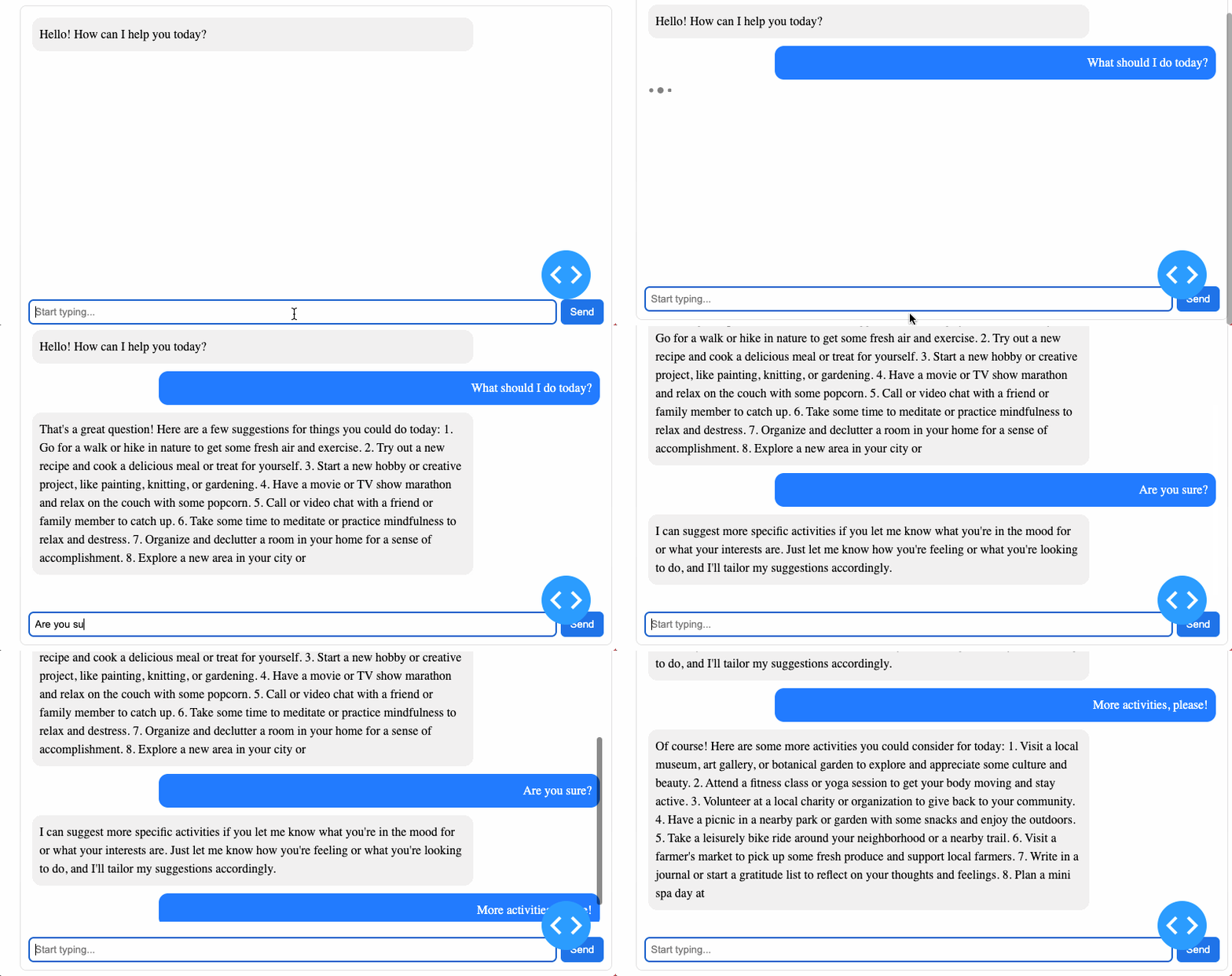
import os
import dash
from dash import callback, html, Input, Output, State
from dash_chat import ChatComponent
from openai import OpenAI


api_key = os.environ.get("OPENAI_API_KEY")
client = OpenAI(api_key=api_key)

app = dash.Dash(__name__)

app.layout = html.Div([
    ChatComponent(
        id="chat-component",
        messages=[],
    )
])

@callback(
    Output("chat-component", "messages"),
    Input("chat-component", "new_message"),
    State("chat-component", "messages"),
    prevent_initial_call=True,
)
def handle_chat(new_message, messages):
    if not new_message:
        return messages

    updated_messages = messages + [new_message]

    if new_message["role"] == "user":
        response = client.chat.completions.create(
            model="gpt-3.5-turbo",
            messages=updated_messages,
            temperature=1.0,
            max_tokens=150,
        )

        bot_response = {"role": "assistant", "content": response.choices[0].message.content.strip()}
        return updated_messages + [bot_response]

    return updated_messages

if __name__ == "__main__":
    app.run(debug=True)
Example 2
To send local images and files along with a message to the AI assistant, the structure of content in the messages prop becomes a list of dictionary. The content takes the structure;
    [
        {"type": "text", "text": "Analyze image"},
        {
            "type": "attachment",
            "file": <base64File>,
            "fileName": <file.name>,
            "fileType": <file.type>
        },
    ]
In your dash callback, follow the OpenAI-style for uploading images with text.
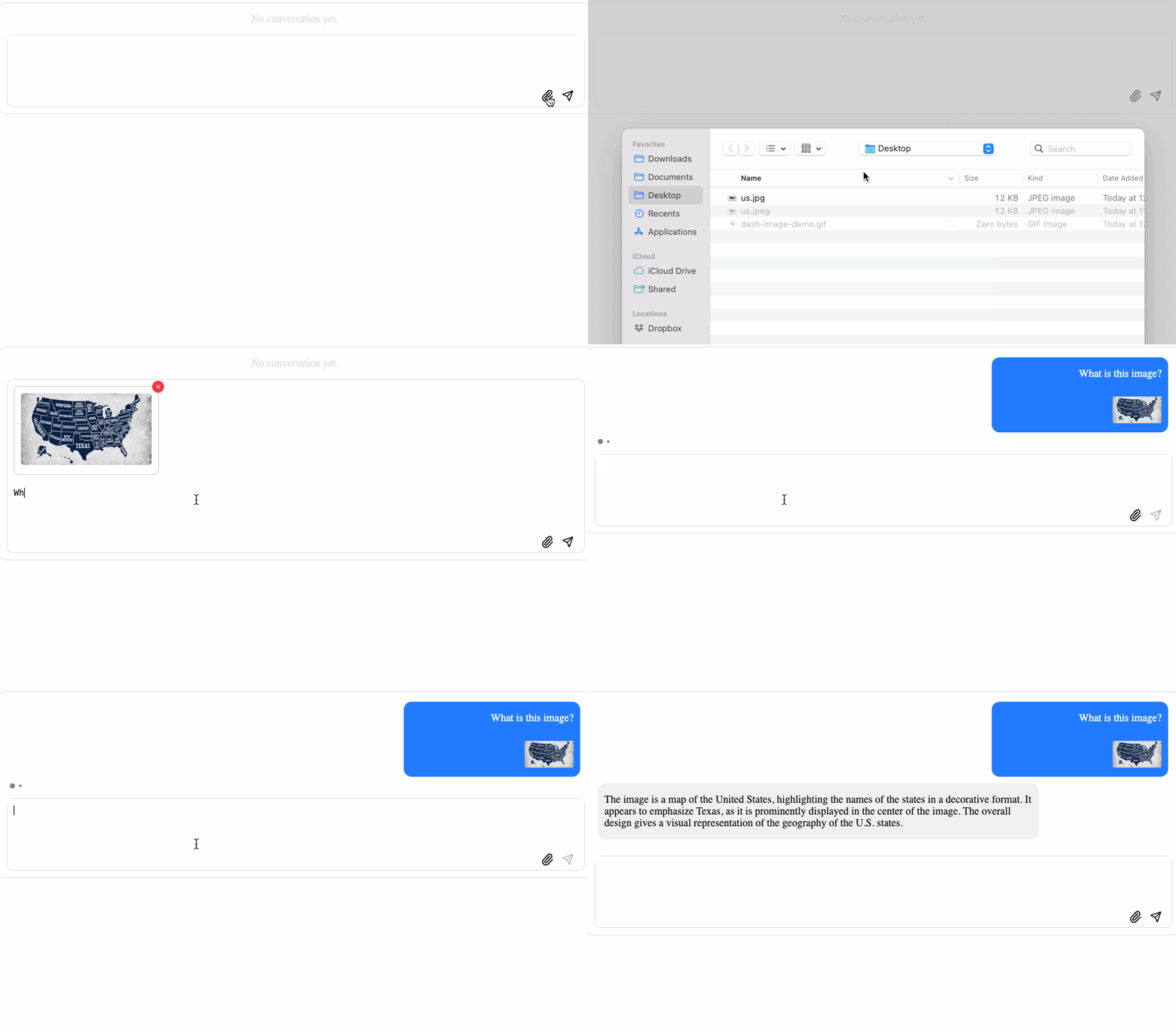
import base64
import dash
import os
import re
from io import BytesIO
from dash import callback, html, Input, Output, State
from dash_chat import ChatComponent
from openai import OpenAI


api_key = os.environ.get("OPENAI_API_KEY")
client = OpenAI(api_key=api_key)

app = dash.Dash(__name__)

app.layout = html.Div([
    ChatComponent(
        id="chat-component",
        messages=[],
        supported_input_file_types=[".png", ".jpg", ".pdf", ".doc"]
    )
])


def decode_base64(data):
    match = re.match(r"data:(.*?);base64,(.*)", data)
    if match:
        _, base64_data = match.groups()
    else:
        base64_data = data

    missing_padding = len(base64_data) % 4
    if missing_padding:
        base64_data += "=" * (4 - missing_padding)

    return base64.b64decode(base64_data)


@callback(
    Output("chat-component", "messages"),
    Input("chat-component", "new_message"),
    State("chat-component", "messages"),
    prevent_initial_call=True,
)
def handle_chat(new_message, messages):
    if not new_message:
        return messages

    if isinstance(new_message["content"], list):
        user_content = []
        for item in new_message["content"]:
            if item["type"] == "text":
                user_content.append({"type": "text", "text": item["text"]})
            elif item["type"] == "attachment":
                file_type = item["fileType"]
                file_path = item["file"]
                file_name = item["fileName"]

                if file_type.startswith("image/"):
                    # https://github.com/openai/openai-python#vision
                    user_content.append(
                        {"type": "image_url", "image_url": {"url": file_path}}
                    )
                else:
                    # other file types (PDF, DOCX, etc.)
                    # https://github.com/openai/openai-python?tab=readme-ov-file#file-uploads
                    decoded_bytes = decode_base64(file_path)
                    uploaded_file = client.files.create(
                        file=(file_name, BytesIO(decoded_bytes), file_type),
                        purpose="user_data"
                    )
                    user_content.append({
                        "type": "text",
                        "text": f"File '{file_name}' uploaded. ID: {uploaded_file.id}",
                    })
        updated_messages = messages + [{"role": "user", "content": user_content}]
    else:
        updated_messages = messages + [new_message]

    if new_message["role"] == "user":
        response = client.chat.completions.create(
            model="gpt-4o-mini",
            messages=updated_messages,
            temperature=1.0,
            max_tokens=150,
        )

        bot_response = {
            "role": "assistant",
            "content": response.choices[0].message.content.strip(),
        }

        return updated_messages + [bot_response]

    return updated_messages


if __name__ == "__main__":
    app.run(debug=True)
Example 3
ChatComponent is agnostic about which chatbot or AI assistant technology you're interacting with, so here's an example not using OpenAI
import time
import dash
from dash import callback, html, Input, Output, State
from dash_chat import ChatComponent


app = dash.Dash(__name__)

app.layout = html.Div([
    ChatComponent(
        id="chat-component",
        messages=[],
    )
])

@callback(
    Output("chat-component", "messages"),
    Input("chat-component", "new_message"),
    State("chat-component", "messages"),
    prevent_initial_call=True,
)
def handle_chat(new_message, messages):
    if not new_message:
        return messages

    updated_messages = messages + [new_message]

    if new_message["role"] == "user":
        time.sleep(2)
        bot_response = {"role": "assistant", "content": "Hello John Doe."}
        return updated_messages + [bot_response]

    return updated_messages

if __name__ == "__main__":
    app.run(debug=True)
Persistence Functionality
The ChatComponent supports persistence, allowing messages to be stored and retrieved across page reloads. When persistence=True, messages are saved in the specified storage (localStorage or sessionStorage).
On initialization, the component checks for stored messages. If stored messages exist, they are loaded; otherwise, an empty message list is used. New messages are automatically saved to storage. When the page is refreshed, stored messages are restored to maintain chat history. To enable persistence, set:
ChatComponent(
    id="chat-component",
    persistence=True,
    persistence_type="local"  # or "session"
)
Renderers (Graphs, Tables, Attachments & Text)
dash-chat supports rich content rendering by allowing messages to contain structured content types like graphs, tables, and images. You can render custom content by passing a structured list to the content field of a message.
Text
{
    "role": "assistant",
    "content": {
        "type": "text",
        "text": "This will be rendered as a markdown message"
    },
}
Attachments (Images & Files)
{
    "role": "assistant",
    "content": {
        "type": "attachment",
        "file": "data:image/png;base64,...",
        "fileName": "example.png",
        "fileType": "image/png"
    }
}
Renders an image or a downloadable file preview.
Graph
{
    "role": "assistant",
    "content": {
        "type": "graph",
        "props": {
            "figure": {
                "data": [
                    {
                        "x": [1, 2, 3],
                        "y": [4, 1, 2],
                        "type": "bar", "name": "Demo"
                    }
                ],
                "layout": {"title": "Bar Chart"},
            },
            "config": {"displaylogo": True},
            "responsive": True
        }
    }
}
Renders an interactive Plotly graph equivalent to dcc.Graph. The props object supports most of the arguments you would pass to a dcc.Graph.
Table
{
    "role": "assistant",
    "content": {
        "type": "table",
        "header": ["Order ID", "Item", "Quantity", "Total"],
        "data": [
            ["#1021", "Apple iPhone", 1, "$799"],
            ["#1022", "Samsung Galaxy", 2, "$1398"]
        ],
        "props": {
            "striped": True,
            "bordered": True,
            "hover": True,
            "responsive": True,
            "size": "lg"
        }
    }
}
Renders an HTML table. You provide the table by setting:
-
header: a list of strings representing the column names.
Example: ["Order ID", "Item", "Quantity", "Total"]
-
data: a list of rows, where each row is a list of strings (or values) for the cells.
Example: [["#1021", "Apple iPhone", 1, "$799"], ["#1022", "Samsung Galaxy", 2, "$1398"]]
The props object supports all the arguments you would pass to dbc.Table in dash-bootstrap-components.
Multiple renderers as a list at "content"
Multiple supported renderers can also be provided as the assistants' content:
{
    "role": "assistant",
    "content": [
        {"type": "text", "text": "Here's a bar chart of your data."},
        {
            "type": "graph",
            "props": {
                "figure": {
                    "data": [{"x": [1, 2, 3], "y": [4, 1, 2], "type": "bar", "name": "Demo"}],
                    "layout": {"title": "Bar Chart"},
                }
                "config": {},
                "responsive": True
            },
        },
        {
            "type": "table",
            "header": ["Order ID", "Item", "Quantity", "Total"],
            "data": [
                ["#1021", "iPhone 14", 1, "$799"],
                ["#1022", "Galaxy S22", 2, "$1398"],
                ["#1023", "Pixel 7", 1, "$599"],
            ],
            "props": {
                "striped": True
            },
        },
    ]
}
For a complete example of how to setup dash apps and how to uses renderers see the usage folder.
Props
ChatComponent can be configured with the following properties:
| Prop Name | Type | Default Value | Description |
|---|---|---|---|
| id | string |
None |
Unique identifier for the component, required for Dash callbacks. |
| container_style | dict |
None |
Inline css styles to customize the chat container. |
| fill_height | boolean |
True |
Whether to vertically fill the screen with the chat container. If False, constrains height. |
| fill_width | boolean |
True |
Whether to horizontally fill the screen with the chat container. If False, constrains width. |
| input_container_style | dict |
None |
Inline css styles for the container holding the message input field. |
| input_text_style | dict |
None |
Inline css styles for the message input field itself. |
| messages | list of dicts |
None |
List of chat messages. Each message object must include: role and content. Initialize as an empty list if no on first load. |
| theme | string |
"light" |
Theme for the chat interface. Options: "light" or "dark". |
| typing_indicator | string |
"dots" |
Type of typing indicator. Options: "dots" (animated dots) or "spinner" (spinner). |
| user_bubble_style | dict |
{"backgroundColor": "#007bff", "color": "white", "marginLeft": "auto", "textAlign": "right"} |
Inline css styles to customize the message bubble for user. |
| assistant_bubble_style | dict |
{"backgroundColor": "#f1f0f0", "color": "black", "marginRight": "auto", "textAlign": "left"} |
Inline css styles to customize the message bubble for assistant. |
| input_placeholder | string |
None |
Placeholder text to be used in the input box. |
| class_name | string |
None |
Name to use as class attribute on the main chat container. |
| persistence | boolean |
False |
Whether to store chat messages so that it can be persisted. |
| persistence_type | string |
"local" |
Where chat messages will be stored for persistence. Options: "local" or "session" |
| supported_input_file_types | string |
"*/*" |
String or list of file types to support in the file input |
License
This project is licensed under the MIT License. See the LICENSE file for details.
1 maintainer

Metadata
1 maintainer
Release files for dash-chat 0.3.0
For a detailed explanation of source distributions (sdists) and built distributions (wheels), please see the package formats documentation.
Source distribution (sdist)
| File | Size | Uploaded | |
|---|---|---|---|
| dash_chat-0.3.0.tar.gz | 5.7 MB | Details |
Built distribution (wheel)
| File | Interpreter | ABI | Platform | Reset |
|---|---|---|---|---|
| dash_chat-0.3.0-py3-none-any.whl | Python 3 | none | any | Details |
Total release size: 11.5 MB
Release files / dash_chat-0.3.0.tar.gz
| Download URL | dash_chat-0.3.0.tar.gz |
|---|---|
| Size | 5.7 MB |
| Tags | Source |
|
SHA-256 checksum How to use checksums |
5128c098e81fa09325bf4bb02f218c972af5dbd256fc0dc73e556ab704d52ce5
|
|
BLAKE2b-256 checksum How to use checksums |
a44137dee8f36679d660c74cf3226f8da6a1dee94faa0dbbd250f0e8b51e9c4d
|
| Upload date | |
|
Uploaded using Trusted Publishing? What is trusted publishing? |
No |
| Uploaded via |
twine/6.0.1 CPython/3.11.1
|
Release files / dash_chat-0.3.0-py3-none-any.whl
| Download URL | dash_chat-0.3.0-py3-none-any.whl |
|---|---|
| Size | 5.8 MB |
| Tags | Python 3 |
|
SHA-256 checksum How to use checksums |
335c2acf21aa4c74fcc6a260c1c5510503040f001b86beae92592f8e7f1fa792
|
|
BLAKE2b-256 checksum How to use checksums |
555817e7db64bba03de19838a5d436ff764838d43b59312cb8446c4e6120925f
|
| Upload date | |
|
Uploaded using Trusted Publishing? What is trusted publishing? |
No |
| Uploaded via |
twine/6.0.1 CPython/3.11.1
|














