





Powerful data grid component for Plotly Dash, powered by RevoGrid.
Render 1M+ rows, millions of cells, and thousands of columns efficiently with no hard row limit in the grid.
Used by some of the largest companies in Europe and the United States.
Docs • Getting Started • Configuration • Events • RevoGrid API • License
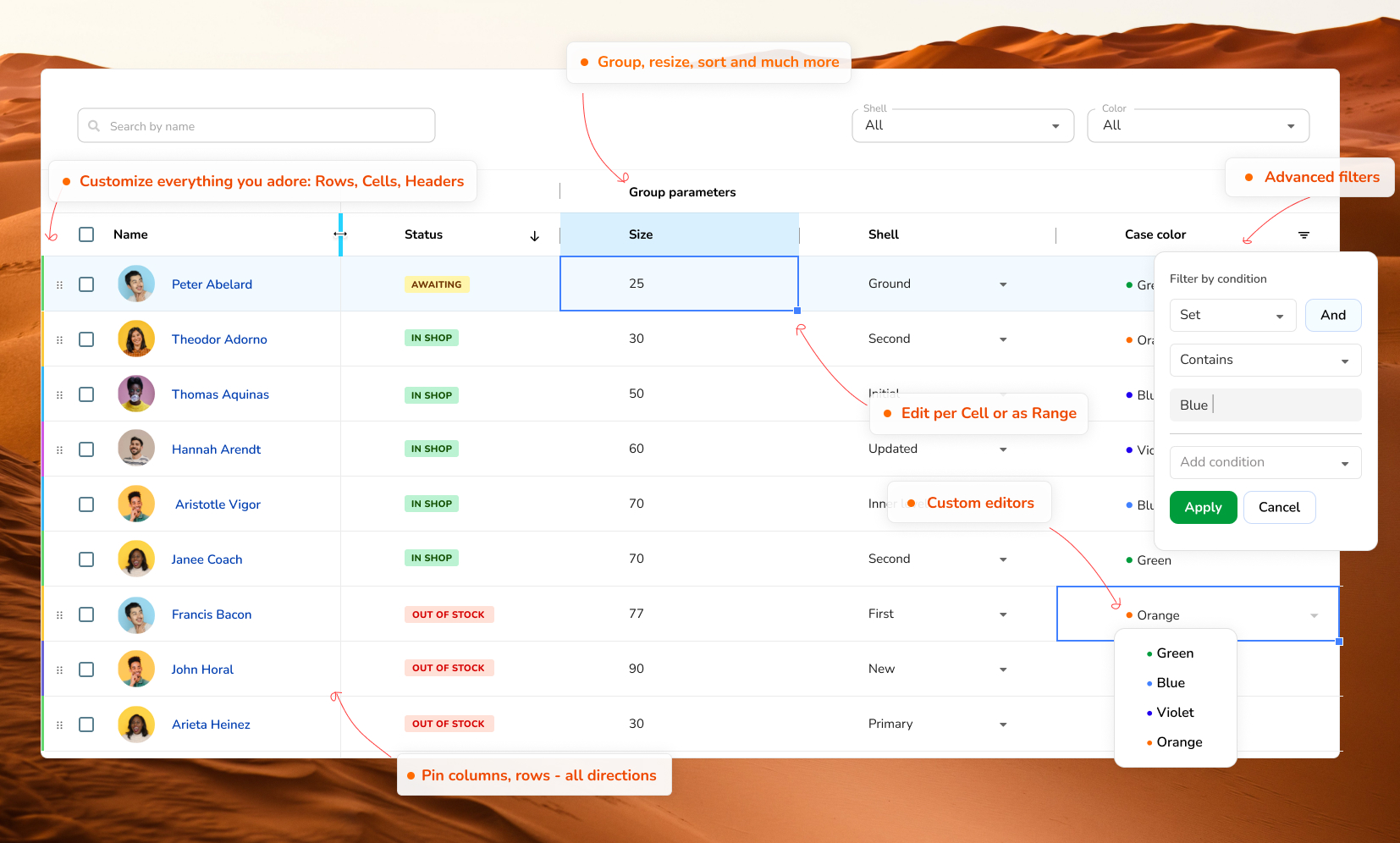 RevoGrid material theme.
Dash DataGrid
dash-datagrid is the official RevoGrid Core component for
Plotly Dash. It combines RevoGrid's virtualized
custom element with a generated, typed Python class.
- PyPI package:
dash-datagrid - Python import:
dash_datagrid - Python component:
dash_datagrid.RevoGrid - npm package:
@revolist/dash-datagrid - Full documentation: Dash Data Grid
- Core API: RevoGrid API
- Events: RevoGrid Events API
The Python package includes the JavaScript bundle and source map. Normal Dash applications do not need to install the npm package separately.
Compatibility and scope
- Python 3.10 or newer
- Dash 3.x or 4.x
- RevoGrid Core at the same version as
dash-datagrid
Dash Data Grid exposes the RevoGrid property surface and supports server-side
Dash callbacks for Core, Pro, Enterprise, and custom plugin events through
eventListeners and eventData. Plugin activation, custom JavaScript
renderers/editors, imperative grid methods, and synchronous browser-event
cancellation are separate concerns.
Getting started
Install
python -m venv .venv
source .venv/bin/activate
python -m pip install dash-datagrid
On Windows PowerShell:
python -m venv .venv
.venv\Scripts\Activate.ps1
python -m pip install dash-datagrid
Create a grid
Save this as app.py:
from dash import Dash, Input, Output, callback, html
from dash_datagrid import RevoGrid


app = Dash(__name__)

app.layout = html.Main(
    [
        html.H1("Orders"),
        RevoGrid(
            id="orders-grid",
            columns=[
                {
                    "prop": "order",
                    "name": "Order",
                    "readonly": True,
                    "size": 130,
                },
                {
                    "prop": "customer",
                    "name": "Customer",
                    "sortable": True,
                    "size": 180,
                },
                {
                    "prop": "amount",
                    "name": "Amount",
                    "sortable": True,
                    "filter": "number",
                },
            ],
            source=[
                {"order": "A-100", "customer": "Ada", "amount": 120},
                {"order": "A-101", "customer": "Grace", "amount": 85},
                {"order": "A-102", "customer": "Linus", "amount": 210},
            ],
            rowHeaders=True,
            resize=True,
            range=True,
            filter=True,
            style={"height": 420},
        ),
        html.Pre("Edit a cell to see its event.", id="edit-output"),
    ]
)


@callback(
    Output("edit-output", "children"),
    Input("orders-grid", "afteredit"),
    prevent_initial_call=True,
)
def show_edit(event):
    detail = event["detail"]
    if "prop" not in detail:
        return f"Range edit: {detail}"
    return (
        f'Row {detail["rowIndex"]}, {detail["prop"]} '
        f'changed to {detail["val"]!r}'
    )


if __name__ == "__main__":
    app.run(debug=True)
Run it:
python app.py
Then open the local URL printed by Dash, normally
http://127.0.0.1:8050.
Each column prop selects a key from every source row. Give the component an
explicit height through style; RevoGrid fills that host height.
Loading data
source, pinnedTopSource, and pinnedBottomSource accept lists of
JSON-serializable row dictionaries:
rows = [
    {"id": 1, "product": "Keyboard", "price": 95.0},
    {"id": 2, "product": "Mouse", "price": 35.5},
]
Use strings, finite numbers, booleans, None, lists, and dictionaries made
from those values. Normalize datetime, Decimal, NumPy scalar, UUID, and
other Python-specific values before assigning them to a component prop.
See Data & Rows and Data Source Loading and Syncing.
pandas DataFrames
For a DataFrame that already contains JSON-native values:
rows = frame.to_dict("records")

grid = RevoGrid(
    columns=columns,
    source=rows,
    style={"height": 420},
)
For timestamps, missing values, NumPy values, or mixed DataFrames, normalize through JSON:
import json

rows = json.loads(
    frame.to_json(
        orient="records",
        date_format="iso",
    )
)
The JSON round trip converts timestamps to ISO strings and missing values to
None-compatible JSON null.
Python-driven source changes
Return a new source when the application intentionally loads a different
dataset:
from dash import Input, Output, callback


@callback(
    Output("orders-grid", "source"),
    Input("reload-orders", "n_clicks"),
    prevent_initial_call=True,
)
def reload_orders(_clicks):
    return load_orders_from_database()
Full replacement is appropriate for a reload, search, page change, or server
refresh. Normal cell edits should usually use the compact afteredit delta
instead.
Configuring columns
Columns are plain dictionaries. The most common JSON-safe fields are:
| Field | Purpose |
|---|---|
prop |
Required row key |
name |
Header label |
size, minSize, maxSize |
Width constraints in pixels |
readonly |
Disable editing for this column |
sortable, order |
Enable sorting and set asc or desc order |
filter |
Enable a built-in filter family |
pin |
Use colPinStart or colPinEnd |
rowDrag |
Add a row-drag handle |
columnType |
Use a preset from columnTypes |
columns = [
    {
        "prop": "id",
        "name": "ID",
        "readonly": True,
        "pin": "colPinStart",
        "size": 90,
    },
    {
        "prop": "customer",
        "name": "Customer",
        "sortable": True,
        "minSize": 140,
    },
    {
        "prop": "amount",
        "name": "Amount",
        "sortable": True,
        "filter": "number",
        "order": "desc",
    },
]
Column groups also use plain objects:
columns = [
    {
        "name": "Customer",
        "children": [
            {"prop": "first_name", "name": "First name"},
            {"prop": "last_name", "name": "Last name"},
        ],
    },
    {
        "name": "Order",
        "children": [
            {"prop": "status", "name": "Status"},
            {"prop": "amount", "name": "Amount", "filter": "number"},
        ],
    },
]
Function-valued column members are not supported. This includes
cellTemplate, columnTemplate, cellProperties, columnProperties,
cellCompare, cellParser, constructor-based editor values, function-based
readonly, and function-based rowDrag.
References:
Reusable column types
columnTypes accepts JSON-safe column presets:
grid = RevoGrid(
    columnTypes={
        "identifier": {"readonly": True, "size": 120},
        "money": {"size": 140, "sortable": True, "filter": "number"},
    },
    columns=[
        {"prop": "id", "name": "ID", "columnType": "identifier"},
        {"prop": "amount", "name": "Amount", "columnType": "money"},
    ],
    source=rows,
    style={"height": 420},
)
Common configuration
Editing, range selection, and clipboard
grid = RevoGrid(
    source=rows,
    columns=columns,
    readonly=False,
    range=True,
    useClipboard={"rangeFill": True},
    applyOnClose=True,
    style={"height": 420},
)
readonly=Truemakes the complete grid read-only.- A column-level
readonly=Truelocks only that column. range=Trueenables multi-cell selection.useClipboard=Trueenables the built-in copy/paste behavior.rangeFillrequires range selection.
References:
Filtering and sorting
grid = RevoGrid(
    filter={
        "collection": {
            "status": {"type": "eq", "value": "Open"},
        }
    },
    sorting={
        "columns": [
            {"prop": "amount", "order": "desc"},
        ],
        "additive": False,
    },
    columns=[
        {"prop": "status", "name": "Status", "filter": "string"},
        {
            "prop": "amount",
            "name": "Amount",
            "filter": "number",
            "sortable": True,
        },
    ],
    source=rows,
    style={"height": 420},
)
Custom filter functions and custom sorting comparators require JavaScript and are not supported through Python in v1.
References:
Row grouping
grid = RevoGrid(
    grouping={
        "props": ["region", "team"],
        "expandedAll": True,
        "preserveGroupingOnUpdate": True,
    },
    columns=columns,
    source=rows,
    style={"height": 420},
)
groupLabelTemplate and getGroupValue are functions and cannot cross the
Python boundary.
References:
Sizing and pinned data
grid = RevoGrid(
    colSize=120,
    rowSize=34,
    rowHeaders={"size": 56},
    resize=True,
    autoSizeColumn=True,
    stretch="last",
    canMoveColumns=True,
    pinnedTopSource=[{"name": "Current selection"}],
    pinnedBottomSource=[{"name": "Total"}],
    columns=columns,
    source=rows,
    style={"height": 500},
)
References:
Dash callbacks and RevoGrid events
Generated event properties
Every public RevoGrid event discovered in Stencil compiler metadata is generated as a same-name Dash input property. Seven common event paths are active by default for backwards compatibility:
Use the RevoGrid Events API as the canonical catalog of event names, payload types, and descriptions. The RevoGrid component API documents the complete Core property, event, and method surface.
| Dash property | When it updates | Typical detail |
|---|---|---|
afteredit |
A cell or selected range changes | Compact delta or range data |
afterfocus |
Focus rendering completes | Focused cell/range |
headerclick |
A header is clicked | JSON-safe column definition |
roworderchanged |
A row reorder is requested | from, to |
aftersortingapply |
Sorting finishes | Final sorting state |
beforefilterapply |
Filtering is about to apply | Filter collection |
aftercolumnresize |
Column resizing finishes | Resized columns by index |
Every named and generic callback value has this envelope:
{
  "name": "afteredit",
  "detail": {
    "rowIndex": 0,
    "colIndex": 2,
    "prop": "amount",
    "val": 140,
    "type": "rgRow",
    "colType": "rgCol"
  },
  "timestamp": 1784980000000,
  "sequence": 1
}
nameis the lowercase RevoGrid DOM event name.detailis the JSON-safe event payload.timestampis the browser time in Unix milliseconds.sequenceincrements for every event, so identical consecutive payloads still update Dash.
For a single-cell edit, afteredit.detail keeps rowIndex, colIndex, prop,
val or value, type, and colType. For a range edit, it keeps data,
newRange, oldRange, and type. Large grid-owned models and collections are
removed.
from dash import Input, Output, callback


@callback(
    Output("edit-summary", "children"),
    Input("orders-grid", "afteredit"),
    prevent_initial_call=True,
)
def show_edit(event):
    detail = event["detail"]
    if "prop" in detail:
        return f'{detail["prop"]} changed to {detail["val"]!r}'
    return f"Range edit: {detail}"
When a callback has several event inputs, use dash.ctx.triggered_id or
dash.ctx.triggered_prop_ids to identify the triggering property.
Subscribe to other events
Set eventListeners to activate any other generated Core event. The envelope
updates both its same-name property and the backwards-compatible eventData
property:
grid = RevoGrid(
    id="orders-grid",
    eventListeners=[
        "aftergridinit",
        "filterconfigchanged",
        "sortingconfigchanged",
    ],
    columns=columns,
    source=rows,
    style={"height": 420},
)


@callback(
    Output("event-log", "children"),
    Input("orders-grid", "eventData"),
    prevent_initial_call=True,
)
def show_event(event):
    return f'{event["sequence"]}: {event["name"]}'
Names are deduplicated and listeners are reconciled when eventListeners
changes. The seven default events already update their named properties and do
not need to be listed. Runtime plugin event names absent from Stencil metadata
continue to update eventData only.
Avoid high-frequency events such as viewportscroll unless a server request
for every event is intentional.
Use the complete Events API to choose event names and Event Patterns to understand their lifecycle.
Event serialization
Before calling Dash setProps, the bridge makes event details JSON safe:
- strings, finite numbers, booleans,
null, arrays, and plain objects remain; - JavaScript dates become ISO strings;
- non-finite numbers, cycles, DOM nodes, and class instances become
null; - function, symbol, and
undefinedobject fields are omitted; - unsupported array entries become
null.
Edit synchronization
Default: compact deltas
syncSourceOnEdit=False is the default. The browser applies the edit and sends
only the compact afteredit envelope to Python:
edit in browser -> compact afteredit envelope -> Dash callback
This avoids cloning or transmitting the complete source and is recommended for large datasets, autosave APIs, patch queues, and audit logs.
@callback(
    Output("save-status", "children"),
    Input("orders-grid", "afteredit"),
    prevent_initial_call=True,
)
def persist_edit(event):
    detail = event["detail"]
    if "prop" not in detail:
        return "A range edit was received"

    save_cell_change(
        row_index=detail["rowIndex"],
        field=detail["prop"],
        value=detail["val"],
    )
    return f'Saved row {detail["rowIndex"]}'
save_cell_change represents your persistence layer. For multi-user data,
include a stable identifier in every source row and map the reported row index
to that identifier.
Opt in to full source synchronization
Set syncSourceOnEdit=True only when a callback needs the complete updated
source:
grid = RevoGrid(
    id="orders-grid",
    syncSourceOnEdit=True,
    columns=columns,
    source=rows,
    style={"height": 420},
)


@callback(
    Output("row-count", "children"),
    Input("orders-grid", "source"),
    prevent_initial_call=True,
)
def receive_complete_source(source):
    return f"{len(source)} rows received"
The bridge snapshots source after every edit and updates it together with
afteredit. It suppresses the immediate echoed assignment when Dash returns
that same snapshot, avoiding a redundant grid reset.
Full synchronization costs memory, serialization time, and network bandwidth proportional to the complete dataset.
Complete component property reference
This is the complete public property surface generated for
dash_datagrid.RevoGrid.
Dash host and event bridge
| Property | Python shape | Purpose |
|---|---|---|
id |
str or Dash pattern ID |
Component identifier |
className |
str |
CSS class on the Dash host |
style |
dict |
Inline host style; normally include a height |
| Every public Core event name | dict |
Latest JSON-safe event envelope; generated automatically from Stencil metadata |
eventListeners |
list[str] |
Additional generated or runtime event names to activate |
eventData |
dict |
Latest generic event envelope |
syncSourceOnEdit |
bool, default False |
Also update full Dash source after edits |
Core data and schema
| Property | Python shape | Purpose | Documentation |
|---|---|---|---|
columns |
list[dict] |
Regular/grouped column definitions | Columns |
source |
list[dict] |
Main row source | Rows |
pinnedTopSource |
list[dict] |
Top pinned rows | Pinned Rows |
pinnedBottomSource |
list[dict] |
Bottom pinned rows | Pinned Rows |
columnTypes |
dict |
Named JSON-safe column presets | Column Types |
rowDefinitions |
list[dict] |
Per-row sizes | RowDefinition |
additionalData |
dict |
Extra plain JSON context | Advanced Configuration |
Core layout and interaction
| Property | Python shape | Purpose | Documentation |
|---|---|---|---|
rowHeaders |
bool or dict |
Row numbers or JSON-safe header options | Row Headers |
colSize |
number | Default column width | Grid Size |
rowSize |
number | Default row height | Row Height |
rowClass |
str |
Row field containing its CSS class | Rows |
resize |
bool |
Allow column resizing | Column Resize |
autoSizeColumn |
bool or dict |
Automatic column sizing | Column Autosize |
stretch |
bool or str |
Fill remaining horizontal space | Column Stretch |
readonly |
bool |
Make the complete grid read-only | Editing |
applyOnClose |
bool |
Apply an editor value on close | Editing |
range |
bool |
Enable range selection | Selection API |
useClipboard |
bool or dict |
Clipboard behavior | Clipboard |
canFocus |
bool |
Allow grid cell focus | Advanced Configuration |
canMoveColumns |
bool |
Enable column movement | Column Ordering |
canDrag |
bool |
Allow native drag-and-drop | Row Ordering |
Core data features
| Property | Python shape | Purpose | Documentation |
|---|---|---|---|
filter |
bool or dict |
Built-in filtering | Filtering |
sorting |
dict |
External sorting configuration | Sorting |
grouping |
dict |
Core row grouping | Row Grouping |
trimmedRows |
dict |
Hidden physical main-row indexes | Rows and Trimming |
exporting |
bool |
Enable Core export behavior | Export Plugin |
Core rendering and platform
| Property | Python shape | Purpose | Documentation |
|---|---|---|---|
theme |
str |
Theme name | Themes |
accessible |
bool |
Accessibility behavior | Accessibility |
rtl |
bool |
Right-to-left layout | RTL |
frameSize |
number | Virtualization buffer | Performance |
disableVirtualX |
bool |
Disable column virtualization | Performance |
disableVirtualY |
bool |
Disable row virtualization | Performance |
virtualX |
list[str] |
Column dimensions using X virtualization | Viewports |
noHorizontalScrollTransfer |
bool |
Do not mirror horizontal viewport scroll | RevoGrid API |
hideAttribution |
bool |
Hide attribution only with the required subscription | Attribution |
Use the generated Python documentation locally:
from dash_datagrid import RevoGrid

help(RevoGrid)
For exact Core defaults and TypeScript types, open the RevoGrid component API.
Python boundary limitations
Explicitly excluded Core properties
| Property | Reason |
|---|---|
editors |
Contains editor constructors/classes |
plugins |
Contains plugin classes |
focusTemplate |
Contains a render function |
jobsBeforeRender |
Contains browser promises |
registerVNode |
Contains virtual nodes or render functions |
Functions nested inside otherwise supported objects are unsupported too. That includes custom cell/header renderers, custom editor constructors, custom comparators or parsers, custom filters, and custom grouping renderers.
before* events are notifications in Python
Cancelable RevoGrid before* events rely on a synchronous JavaScript listener
calling preventDefault(). A Python callback runs after a network round trip,
so beforefilterapply and generic before* callbacks cannot cancel or rewrite
the browser action.
Imperative methods are not exposed
The Core API documents selection, scrolling, data, export, and targeted-update methods for JavaScript. They are not callable through the Python component in v1. Use Dash output props for Python-driven changes.
Troubleshooting
Blank or zero-height grid
Set a height on the component host:
RevoGrid(..., style={"height": "60vh", "minHeight": 320})
Value is not JSON serializable
Normalize DataFrame, NumPy, Decimal, datetime, UUID, and custom object values
before passing them to Dash.
Custom renderer/editor/comparator/filter is ignored
Those APIs require JavaScript functions and are outside the Python v1 boundary.
before* callback does not cancel the operation
Python callbacks cannot synchronously call the browser event's
preventDefault().
Large request after each edit
Leave syncSourceOnEdit=False and use the compact afteredit delta.
Generic event is not received
Use the lowercase name from the
Events API. Auto-discovered events
update both their named property and eventData; runtime-only plugin events
update eventData.
Complete RevoGrid documentation map
The Dash component is generated from the Core metadata. These are the authoritative API and feature references:
| Area | Documentation |
|---|---|
| Complete component properties, events, methods | RevoGrid API |
| Complete event names and payloads | Events API |
| Event order and lifecycle | Event Patterns |
| Generated TypeScript type index | Type Reference |
| Columns | Column Guide, ColumnRegular, ColumnGrouping |
| Rows | Row Guide, Headers, Height, Pinning, Ordering |
| Editing, selection, clipboard | Editing, Selection API, Clipboard, Clipboard API |
| Filtering, sorting, grouping | Filtering, Sorting, Grouping |
| Sizing and column layout | Grid Size, Autosize, Resize, Stretch, Pin Columns, Column Order |
| Data ownership and remote data | Data Sync, Server-side Data, Real-time Updates |
| Virtualization | Performance, Viewports |
| Platform and appearance | Themes, Accessibility, RTL |
| Export | Export Plugin, Excel Export, PDF Export |
Some Core pages include browser-only functions and methods. Use the property tables and boundary section above to determine what the Dash package exposes.
npm package
The npm distribution is @revolist/dash-datagrid. It exports the generated
React bridge and bundles the standalone RevoGrid custom element. React and
ReactDOM remain peer dependencies. Python Dash applications should install the
PyPI package instead.
The Stencil Dash output target is private build tooling in the RevoGrid repository root. It is bundled into this package's generated JavaScript and is not a public npm package or runtime dependency.
Example application
examples/
is a complete project with its own dependency manifest, setup instructions,
responsive styling, a DataFrame-backed grid, Python-driven data changes, and
dedicated plus generic callbacks.
Run it from the repository:
cd examples
python -m venv .venv
source .venv/bin/activate
python -m pip install -r requirements.txt
python app.py
Development
Development requires Node 22, npm, and Python 3.10 or newer:
npm install
python -m venv .venv
.venv/bin/python -m pip install -r requirements-dev.txt
npm run build
npm test
npm run test:browser
npm run build bundles the standalone custom elements with React externalized,
then runs the official dash-generate-components pipeline.
Release
The release workflow preflights the exact version on npm and PyPI, tests the npm tarball and Python distributions, and publishes each missing registry artifact. Existing versions are skipped, so an interrupted partial release can recover without attempting a duplicate publish. A successful release creates the matching Git tag and GitHub release.
1 maintainer

Metadata
1 maintainer
Release files for dash-datagrid 4.28.4
For a detailed explanation of source distributions (sdists) and built distributions (wheels), please see the package formats documentation.
Source distribution (sdist)
| File | Size | Uploaded | |
|---|---|---|---|
| dash_datagrid-4.28.4.tar.gz | 667.9 kB | Details |
Built distribution (wheel)
| File | Interpreter | ABI | Platform | Reset |
|---|---|---|---|---|
| dash_datagrid-4.28.4-py3-none-any.whl | Python 3 | none | any | Details |
Total release size: 1.3 MB
Release files / dash_datagrid-4.28.4.tar.gz
| Download URL | dash_datagrid-4.28.4.tar.gz |
|---|---|
| Size | 667.9 kB |
| Tags | Source |
|
SHA-256 checksum How to use checksums |
98cdbe2106fff3c7d389ee9da6fe286de611f9543e2955f57e61fb48feabc581
|
|
BLAKE2b-256 checksum How to use checksums |
074424cd0fcb89083dd8362eb3a8e963bf261a030bbba92a21ebaecd071e64a8
|
| Upload date | |
|
Uploaded using Trusted Publishing? What is trusted publishing? |
Yes |
| Uploaded via |
twine/7.0.0 CPython/3.13.14
|
Provenance
Provenance describes where a file came from. On PyPI, provenance is shared via attestations, which provide a verifiable record of the build or publishing details. View details, limitations and caveats.


PyPI Publish Attestation
PyPI verified that this artifact, at this checksum, originated from the publisher listed below.
Signed by GitHub Actions, verified by PyPI on Oct 12, 2026.
Transparency logRelease files / dash_datagrid-4.28.4-py3-none-any.whl
| Download URL | dash_datagrid-4.28.4-py3-none-any.whl |
|---|---|
| Size | 656.5 kB |
| Tags | Python 3 |
|
SHA-256 checksum How to use checksums |
2b1af3b71b8fecf666eeb77dbc80acf444b2c6740813e139524ef685bb03b7af
|
|
BLAKE2b-256 checksum How to use checksums |
9e4ebd68d25cb94c0c18b151e683e6fc4b81458cf194e0f219ad3064771bfc3a
|
| Upload date | |
|
Uploaded using Trusted Publishing? What is trusted publishing? |
Yes |
| Uploaded via |
twine/7.0.0 CPython/3.13.14
|
Provenance
Provenance describes where a file came from. On PyPI, provenance is shared via attestations, which provide a verifiable record of the build or publishing details. View details, limitations and caveats.
PyPI Publish Attestation
PyPI verified that this artifact, at this checksum, originated from the publisher listed below.
Signed by GitHub Actions, verified by PyPI on Oct 12, 2026.
Transparency log













