
dash-emoji-mart — emoji picker for Dash
An emoji picker for Plotly Dash 4.
emoji-mart — the picker behind Missive, and the one most React apps reach for — wrapped as a single Dash component.



Documentation · PyPI · Changelog · Discord
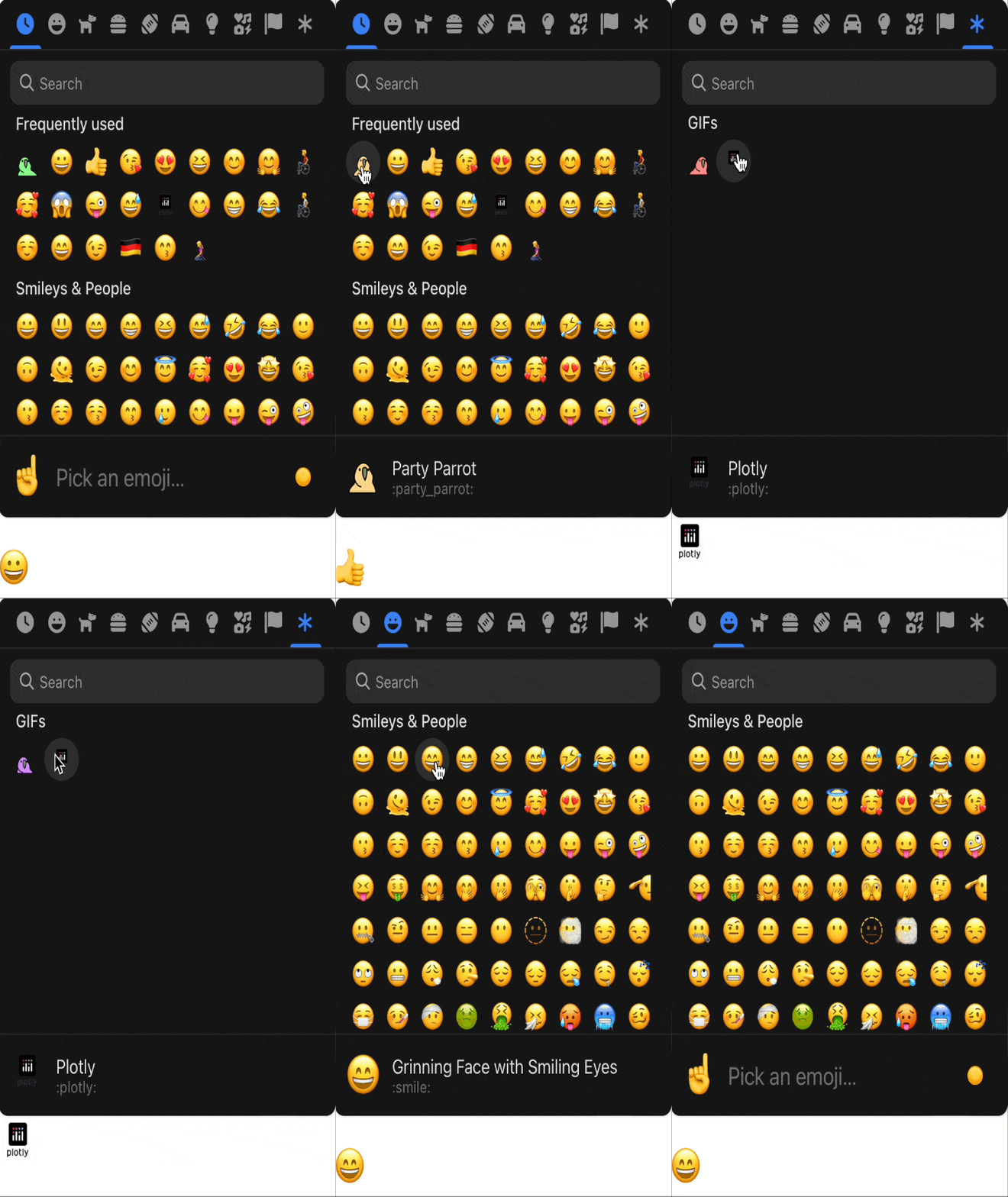
The goal is a component that is universal but specifically elegant on mobile: an emoji, icon and picture selector that is intuitive on any device.
Install
pip install dash-emoji-mart
Python 3.9+ and Dash 4.1+. The compiled JavaScript bundle ships inside the package — no
Node, no build step, no external_scripts. The full emoji data set is bundled too, so the
picker works offline and makes no requests of its own.
Iconify icon-set support is an optional extra:
pip install "dash-emoji-mart[iconify]"
Quick start
from dash import Dash, callback, html, Input, Output
from dash_emoji_mart import DashEmojiMart

app = Dash(__name__)
app.layout = html.Div([
    DashEmojiMart(id="picker"),
    html.Div(id="out", style={"fontSize": 48}),
])

@callback(Output("out", "children"), Input("picker", "value"))
def show(value):
    return value or "Pick one"

if __name__ == "__main__":
    app.run(debug=True)
Reading a selection
Every pick writes two props in one update, so a callback taking both fires once:
| Prop | Type | Contents |
|---|---|---|
value |
str |
The native glyph ("😀"), or the image URL for a custom emoji. |
selectedEmoji |
dict |
The whole emoji-mart object — id, name, native, unified, shortcodes, keywords, skin, and src for custom emojis. |
selectedEmoji is the cleanest way to tell a built-in emoji from a custom one, since only
custom emojis carry src:
@callback(Output("out", "children"), Input("picker", "selectedEmoji"))
def show(emoji):
    if not emoji:
        return "Nothing picked"
    if emoji.get("src"):
        return html.Img(src=emoji["src"], style={"height": 32})
    return emoji["native"]
clickedOutside is an n_clicks-style counter that increments on each click outside the
picker — the signal for closing a popover.
Custom emojis
Categories of your own images, GIFs or SVGs sit alongside the built-in ones:
DashEmojiMart(
    id="picker",
    custom=[{
        "id": "team",
        "name": "Team",
        "emojis": [{
            "id": "party_parrot",
            "name": "Party Parrot",
            "keywords": ["dance", "party"],
            "skins": [{"src": "https://example.com/parrot.gif"}],
            "native": "",
            "unified": "custom",
        }],
    }],
    categoryIcons={"team": {"svg": '<svg width="1em" height="1em" ...></svg>'}},
    categories=["frequent", "team", "people"],   # place it in the order you want
)
Custom emojis have no native glyph, so value comes back as the image URL. Full details:
Custom emojis.
Iconify icon sets
Iconify hosts 150+ icon sets, several of them emoji
sets far larger than the one emoji-mart bundles — twemoji has ~4,000 glyphs, OpenMoji
~4,200. dash_emoji_mart.iconify reshapes any of them into pickable categories:
from dash_emoji_mart import DashEmojiMart
from dash_emoji_mart.iconify import iconify_to_emoji_mart

DashEmojiMart(
    id="picker",
    custom=iconify_to_emoji_mart("twemoji", max_icons_per_category=60),
)
Responses are cached on disk for 24 hours (DASH_EMOJI_MART_CACHE_DIR relocates it), and
a network failure degrades to an empty category list rather than an error. Full details:
Iconify icon sets.
Picker in a popover
Very few apps want a 400px picker sitting in the page. dmc.Popover gives you a trigger
that opens the picker and dismisses it on an outside click, both client-side, so the only
callback you write is the one that closes it after a pick:
@callback(
    Output("popover", "opened"),
    Input("picker", "value"),
    prevent_initial_call=True,
)
def close_on_pick(_value):
    return False
Do not also add a callback that toggles opened from the trigger's n_clicks:
dmc.Popover has already flipped opened itself by the time it runs, so reading it as
State and returning not opened closes the popover on the same click that opened it.
For a hand-rolled panel — no dmc.Popover — use the picker's clickedOutside counter
instead.
Full worked example: Picker in a popover.
Props
The complete, always-current table is at
emojimart.2plot.dev/api-reference, and in
the component docstring (help(DashEmojiMart)). The commonly used ones:
| Prop | Default | Choices |
|---|---|---|
perLine |
9 |
Emojis per row |
emojiSize |
24 |
px |
emojiButtonSize |
36 |
px |
emojiButtonRadius |
"100%" |
any CSS radius, e.g. "6px" |
theme |
"auto" |
auto, light, dark |
set |
"native" |
native, apple, facebook, google, twitter |
locale |
"en" |
en, ar, be, cs, de, es, fa, fi, fr, hi, it, ja, ko, nl, pl, pt, ru, sa, tr, uk, vi, zh |
categories |
[] (all) |
frequent, people, nature, foods, activity, places, objects, symbols, flags. Built-ins only — do not combine with custom, see below |
navPosition |
"top" |
top, bottom, none |
previewPosition |
"bottom" |
top, bottom, none |
previewEmoji |
"point_up" |
emoji id shown when nothing is hovered |
searchPosition |
"sticky" |
sticky, static, none |
skinTonePosition |
"preview" |
preview, search, none |
skin |
1 |
1–6 |
emojiVersion |
14 |
max Emoji version to show |
maxFrequentRows |
4 |
0 disables the frequent category |
exceptEmojis |
[] |
emoji ids to hide from the grid — search still finds them, see below |
noResultsEmoji |
"cry" |
shown when a search finds nothing |
noCountryFlags |
False |
hide country flags from the grid — search still finds them, see below |
icons |
"auto" |
auto, outline, solid |
autoFocus |
False |
focus the search input on mount |
dynamicWidth |
False |
fill the container instead of sizing from perLine |
emojiButtonColors |
[] |
hover backgrounds, cycled |
className / style |
— | applied to the wrapper element |
persistence / persisted_props / persistence_type |
— | standard Dash persistence |
set,localeandcustomare read once, when emoji-mart builds its internal store. Changing them on a mounted picker has no visible effect — wrap it in ahtml.Div(..., id=...)whose id varies with the value to force a remount (Dash keys each child on its id; akey=prop is not read for reconciliation). Every other prop updates in place.
exceptEmojisandnoCountryFlagsfilter the grid, not the search. Measured against emoji-mart 5.6.0: both remove the emoji from its category, whileSearchIndex.searchmatches over the unfiltered emoji map. WithnoCountryFlags=Truethe flags category shrinks to a small safe list and typing "united" still returns 🇬🇧 🇺🇸 🇦🇪 🇺🇳. Treat them as tidying, not as access control.Do not pass
categoriestogether withcustom. emoji-mart filterscategoriesagainst a snapshot it takes on the first picker initialised in the page's lifetime, so custom ids resolve on that first picker and are silently dropped on every one after it — making the result depend on which page a user opened first. Omitcategorieswhen usingcustom; your categories are then appended after the built-ins.
Development
git clone https://github.com/pip-install-python/dash-emoji-mart
cd dash_emoji_mart

python -m venv .venv && source .venv/bin/activate
pip install -r requirements.txt      # docs site + the component, editable

# markdown2dash pins gunicorn<22, against the CVE-driven gunicorn>=23 floor in
# requirements.txt. pip cannot resolve both, so it installs without its
# dependency set — everything it actually needs is already in the line above.
pip install --no-deps markdown2dash==0.1.2

npm install
npm run build                        # webpack bundle + generated Python classes

python run.py                        # the docs site at http://127.0.0.1:8050
npm run build writes into dash_emoji_mart/ — both the bundle and the generated
DashEmojiMart.py. Both are committed: that is what lets pip install work without
Node, and what lets the Docker image build without it.
Before opening a PR:
python scripts/smoke_test.py         # renders every docs page, checks every route
python scripts/check_release.py      # version drift, stale bundle, packaging leaks
CI runs both against Dash 4.1.0 → 4.4.1 and installs the built wheel on Python 3.9 → 3.13. See CONTRIBUTING.md and RELEASING.md.
Documentation site
The docs at emojimart.2plot.dev are this repository's
docs/ directory: one folder per page, holding a markdown file and the example.py that
renders its live demo. pages/markdown.py walks them and registers each as a Dash page —
adding a page means adding a folder, with no Python wiring anywhere else.
Every page also serves /<page>/llms.txt with its prose and complete example source, for
pasting into a chat window.
Deployment is a Render Blueprint (render.yaml) building Dockerfile.
Upgrading from 0.0.x
0.2.0 raises the floor to Dash 4.1 / Python 3.9 and removes four props that no Dash app
could ever have used (onEmojiSelect, onClickOutside, onAddCustomEmoji,
getSpritesheetURL — all function-typed, and Dash cannot serialise a Python function).
value is unchanged, so callbacks reading it keep working. See the
changelog for the full list.
Credits
Built on emoji-mart by Missive. Icon sets from Iconify. Documentation shell from the dash-documentation-boilerplate.
License
MIT — see LICENSE.
1 maintainer

Metadata
1 maintainer
Release files for dash-emoji-mart 0.2.1
For a detailed explanation of source distributions (sdists) and built distributions (wheels), please see the package formats documentation.
Source distribution (sdist)
| File | Size | Uploaded | |
|---|---|---|---|
| dash_emoji_mart-0.2.1.tar.gz | 222.2 kB | Details |
Built distribution (wheel)
| File | Interpreter | ABI | Platform | Reset |
|---|---|---|---|---|
| dash_emoji_mart-0.2.1-py3-none-any.whl | Python 3 | none | any | Details |
Total release size: 431.3 kB
Release files / dash_emoji_mart-0.2.1.tar.gz
| Download URL | dash_emoji_mart-0.2.1.tar.gz |
|---|---|
| Size | 222.2 kB |
| Tags | Source |
|
SHA-256 checksum How to use checksums |
62fd4a96d843e67e6d857eff4caf1d55c527114f7a4be2760d1b99adfb14e3c7
|
|
BLAKE2b-256 checksum How to use checksums |
62f6edb4582d45d61d6ac5e4593a3426ebea8d3a95fcf2ab1acf9d12bffd528d
|
| Upload date | |
|
Uploaded using Trusted Publishing? What is trusted publishing? |
Yes |
| Uploaded via |
twine/7.0.0 CPython/3.13.14
|
Provenance
Provenance describes where a file came from. On PyPI, provenance is shared via attestations, which provide a verifiable record of the build or publishing details. View details, limitations and caveats.


PyPI Publish Attestation
PyPI verified that this artifact, at this checksum, originated from the publisher listed below.
Signed by GitHub Actions, verified by PyPI on Aug 2, 2026.
Transparency logRelease files / dash_emoji_mart-0.2.1-py3-none-any.whl
| Download URL | dash_emoji_mart-0.2.1-py3-none-any.whl |
|---|---|
| Size | 209.1 kB |
| Tags | Python 3 |
|
SHA-256 checksum How to use checksums |
f6581825600cf732aaac047d992135568ce1c39c75b9107e645db3fcf34f9a45
|
|
BLAKE2b-256 checksum How to use checksums |
2128fba7b9b3a4e9cc17496e54b1122593747c63059540848316bb7e5d3341da
|
| Upload date | |
|
Uploaded using Trusted Publishing? What is trusted publishing? |
Yes |
| Uploaded via |
twine/7.0.0 CPython/3.13.14
|
Provenance
Provenance describes where a file came from. On PyPI, provenance is shared via attestations, which provide a verifiable record of the build or publishing details. View details, limitations and caveats.
PyPI Publish Attestation
PyPI verified that this artifact, at this checksum, originated from the publisher listed below.
Signed by GitHub Actions, verified by PyPI on Aug 2, 2026.
Transparency log













