
Prism: Powerful multi-panel workspace manager for Plotly Dash
Verified details
These details have been verified by PyPIProject links
GitHub Statistics
Maintainers

Project description
Dash Prism





A multi-panel workspace manager for Plotly Dash applications.
Docs (main): https://ludwigaj.github.io/dash-prism/
Docs (dev): https://ludwigaj.com/dash-prism/
PyPI: https://pypi.org/project/dash-prism/
What is Dash Prism?
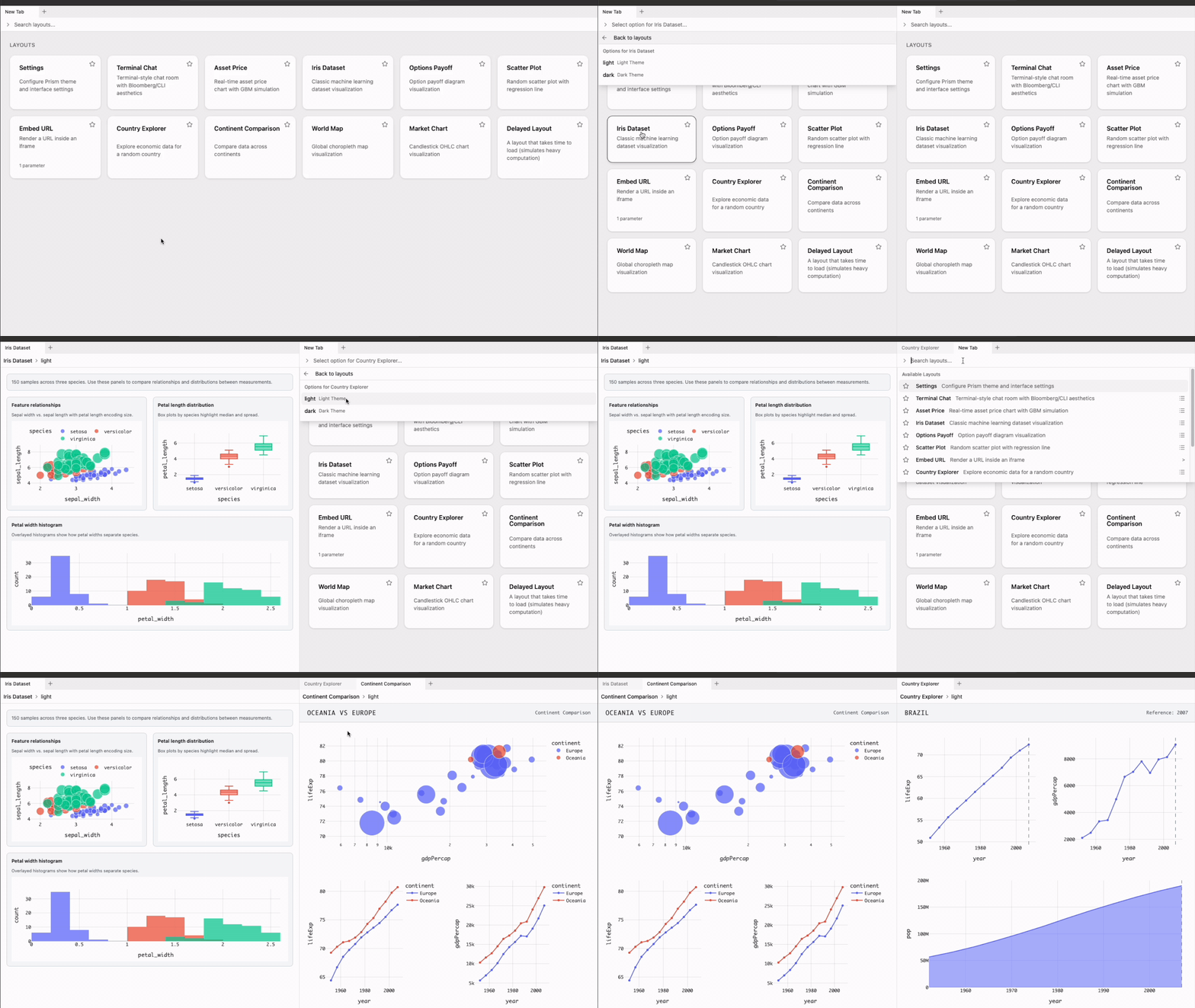
Dash Prism provides a unified workspace where multiple Dash layouts coexist as tabs within resizable, splittable panels. Users arrange their workspace via drag-and-drop while developers focus on building content.
The Problem
Building dashboards with Plotly Dash typically means:
- Fragmented applications - Each dashboard lives in isolation, requiring users to switch between browser tabs or navigate complex menus.
- Repetitive UI work - Developers spend time on layout scaffolding, content management, and styling instead of business logic.
- One-size-fits-all layouts - Users get a fixed arrangement that may not match their workflow.
- No personalization - Workspaces reset on every visit; users cannot save their preferred view.
The Solution
Dash Prism addresses these issues by providing:
- Unified workspace - Register any number of layouts; users open them as tabs in a single interface.
- User-driven design - Drag tabs to split panels, resize areas, and rearrange freely. Developers define content; users define structure.
- Persistence - Workspace state saves to localStorage, sessionStorage, or memory so users return to exactly where they left off.
- Minimal boilerplate - A decorator-based API keeps layout registration concise and readable.
Features
- User-Driven Layout - Users style tabs with colors and icons, reorder them freely, and drag to panel edges to split the view. You create the content; they make the dashboard.
- Favorites & Search - Find layouts instantly with the integrated search bar. Mark frequently-used ones as favorites to pin them at the top.
- On-Demand Loading - Tab content loads dynamically when selected, keeping initial page load fast even with many registered layouts.
- Parameterized Layouts - Capture user options before loading a layout, minimizing server round-trips and delivering exactly what the user wants.
- Custom Actions - Add status bar buttons that trigger Dash callbacks for saving workspaces, exporting data, or any custom functionality.
- Persistence & Workspace State - State saves to localStorage, sessionStorage,
or memory. Use
readWorkspaceandupdateWorkspacefor programmatic backup, restore, or team sharing. - Context Menus - Right-click tabs to rename, duplicate, lock, style, or generate a shareable link to send a specific tab to someone else.
- Keyboard Shortcuts - Full keyboard navigation: new tab, close, rename, undo close, switch tabs, and more.
- Error Resilience - Errors are captured at the tab level, guarding against crashes that would otherwise take down the workspace.
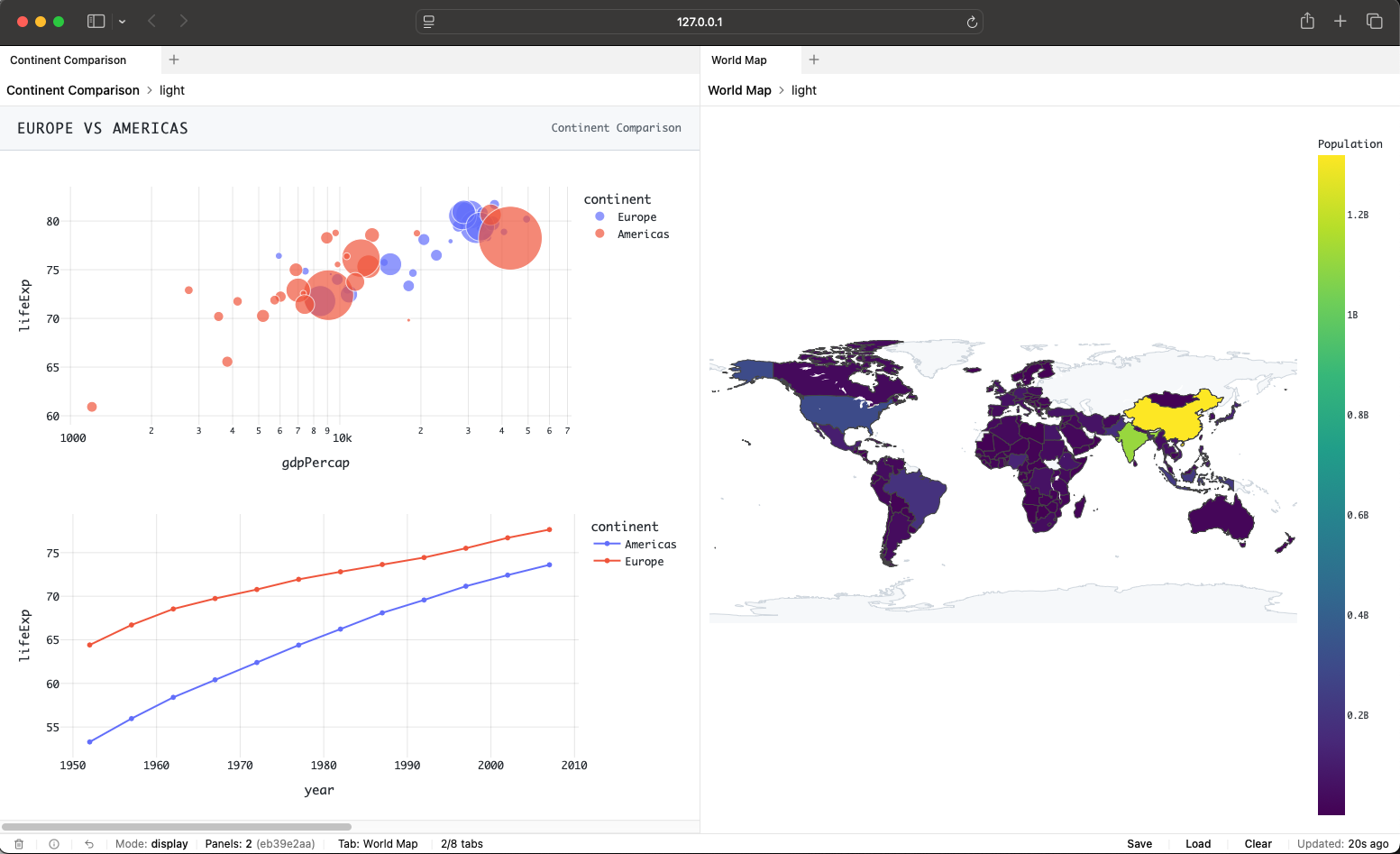
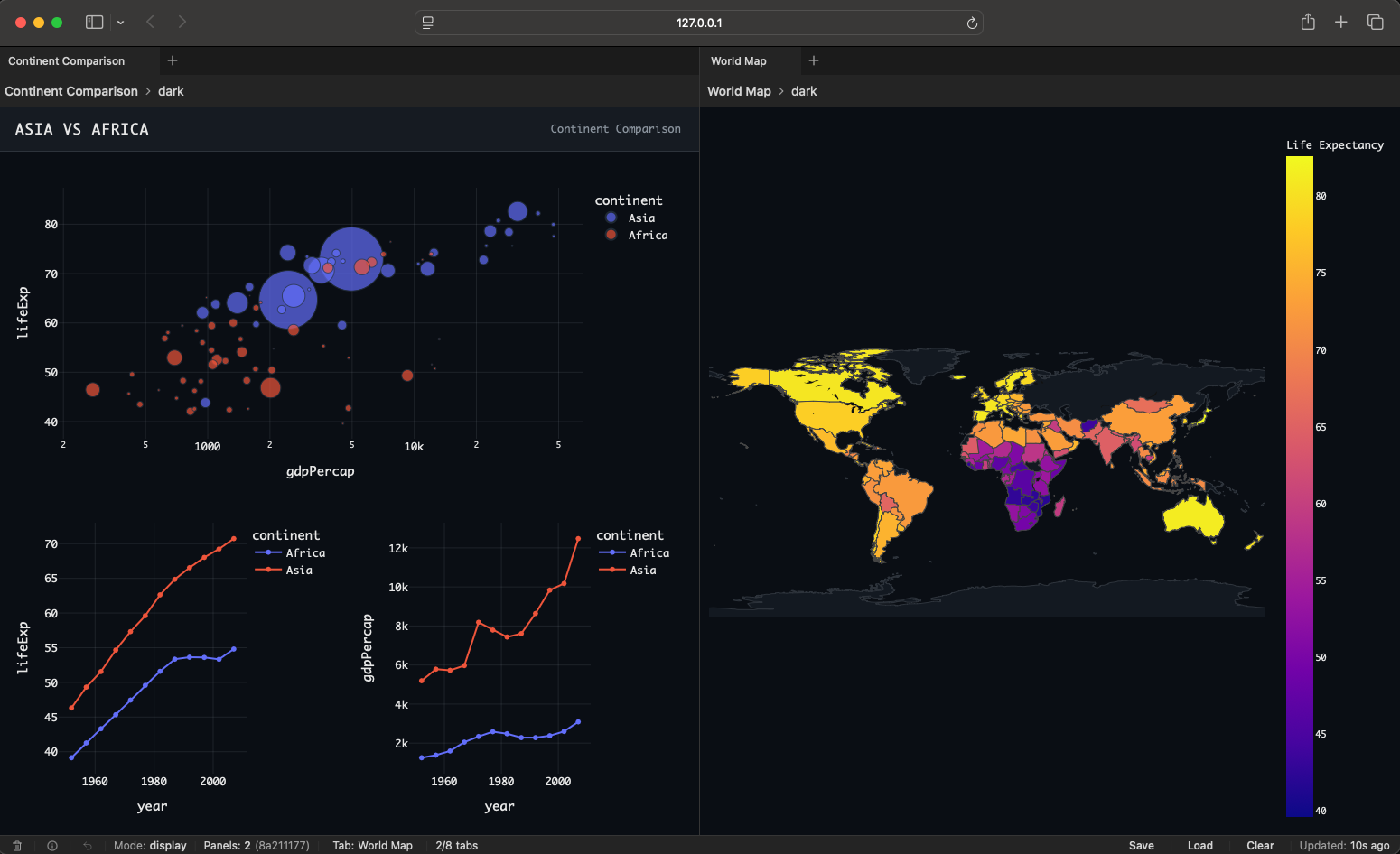
Light and Dark Mode
Dash Prism supports both light and dark themes, so the workspace adapts to your style.
Installation
Requirements: Python 3.10+, Dash 3.1.1+
pip install dash-prism
Quick Start
import dash
from dash import html
import dash_prism

app = dash.Dash(__name__)

@dash_prism.register_layout(id='home', name='Home')
def home():
    return html.Div('Welcome to Dash Prism')

@dash_prism.register_layout(id='analytics', name='Analytics')
def analytics():
    return html.Div('Analytics content here')

app.layout = html.Div([
    dash_prism.Prism(id='workspace', persistence=True)
])

dash_prism.init('workspace', app)

if __name__ == '__main__':
    app.run(debug=True)
Development
This project uses Poetry for dependency management and packaging.
Setup
# Clone and enter the project
git clone https://github.com/LudwigAJ/dash-prism.git
cd dash-prism

# Create a virtual environment
python -m venv .venv
source .venv/bin/activate  # Windows: .venv\Scripts\activate

# Install dependencies
poetry install --with dev,test,docs,demo
npm install

# Build
npm run build
Using Just
If you have just installed:
just install   # Install Python and npm dependencies
just build     # Build the package
just test      # Run tests
Contributing
Contributions are welcome. Please:
- Fork the repository.
- Create a feature branch.
- Write tests for new functionality.
- Ensure all tests pass (
pytest). - Submit a pull request.
See the Contributing Guide in the documentation for more details.
License
Apache License 2.0. See LICENSE for details.
Project details
Verified details
These details have been verified by PyPIProject links
GitHub Statistics
Maintainers
Release history Release notifications | RSS feed


Download files
Download the file for your platform. If you're not sure which to choose, learn more about installing packages.
Source Distribution
Built Distribution
Filter files by name, interpreter, ABI, and platform.
If you're not sure about the file name format, learn more about wheel file names.
Copy a direct link to the current filters
File details
Details for the file dash_prism-0.8.2.tar.gz.
File metadata
- Download URL: dash_prism-0.8.2.tar.gz
- Upload date:
- Size: 169.9 kB
- Tags: Source
- Uploaded using Trusted Publishing? Yes
- Uploaded via: twine/6.1.0 CPython/3.13.7
File hashes
| Algorithm | Hash digest | |
|---|---|---|
| SHA256 |
35eea5481232f9404fd0fe30848326a5cccec9ee55f372b484426c3c2ee10faa
|
|
| MD5 |
4e74010de6c8e3ad837f30513008f64d
|
|
| BLAKE2b-256 |
7215323f94fa31aec8c9228c6d5e9c950bd62e6136fd99f78f6fdb6d61c76e3f
|
Provenance
The following attestation bundles were made for dash_prism-0.8.2.tar.gz:
Publisher:
python-publish.yml on LudwigAJ/dash-prism
-
Statement:
-
Statement type:
https://in-toto.io/Statement/v1 -
Predicate type:
https://docs.pypi.org/attestations/publish/v1 -
Subject name:
dash_prism-0.8.2.tar.gz -
Subject digest:
35eea5481232f9404fd0fe30848326a5cccec9ee55f372b484426c3c2ee10faa - Sigstore transparency entry: 912993548
- Sigstore integration time:
-
Permalink:
LudwigAJ/dash-prism@c92596e917b8355671685057627384097c95955e -
Branch / Tag:
refs/tags/v0.8.2 - Owner: https://github.com/LudwigAJ
-
Access:
public
-
Token Issuer:
https://token.actions.githubusercontent.com -
Runner Environment:
github-hosted -
Publication workflow:
python-publish.yml@c92596e917b8355671685057627384097c95955e -
Trigger Event:
release
-
Statement type:
File details
Details for the file dash_prism-0.8.2-py3-none-any.whl.
File metadata
- Download URL: dash_prism-0.8.2-py3-none-any.whl
- Upload date:
- Size: 33.3 kB
- Tags: Python 3
- Uploaded using Trusted Publishing? Yes
- Uploaded via: twine/6.1.0 CPython/3.13.7
File hashes
| Algorithm | Hash digest | |
|---|---|---|
| SHA256 |
e471eb86ac16d358662045517ef8029ed3c430d6f0f6c0ed05cf685a6f28f4a1
|
|
| MD5 |
ade46adecdb2e314a650d84e56febf47
|
|
| BLAKE2b-256 |
81fcfaade28d46ec1677f97e8a2fae4ec2bd42ca052c1237805945b86ccceede
|
Provenance
The following attestation bundles were made for dash_prism-0.8.2-py3-none-any.whl:
Publisher:
python-publish.yml on LudwigAJ/dash-prism
-
Statement:
-
Statement type:
https://in-toto.io/Statement/v1 -
Predicate type:
https://docs.pypi.org/attestations/publish/v1 -
Subject name:
dash_prism-0.8.2-py3-none-any.whl -
Subject digest:
e471eb86ac16d358662045517ef8029ed3c430d6f0f6c0ed05cf685a6f28f4a1 - Sigstore transparency entry: 912993596
- Sigstore integration time:
-
Permalink:
LudwigAJ/dash-prism@c92596e917b8355671685057627384097c95955e -
Branch / Tag:
refs/tags/v0.8.2 - Owner: https://github.com/LudwigAJ
-
Access:
public
-
Token Issuer:
https://token.actions.githubusercontent.com -
Runner Environment:
github-hosted -
Publication workflow:
python-publish.yml@c92596e917b8355671685057627384097c95955e -
Trigger Event:
release
-
Statement type:






