

dash_slicer
A volume slicer for Dash
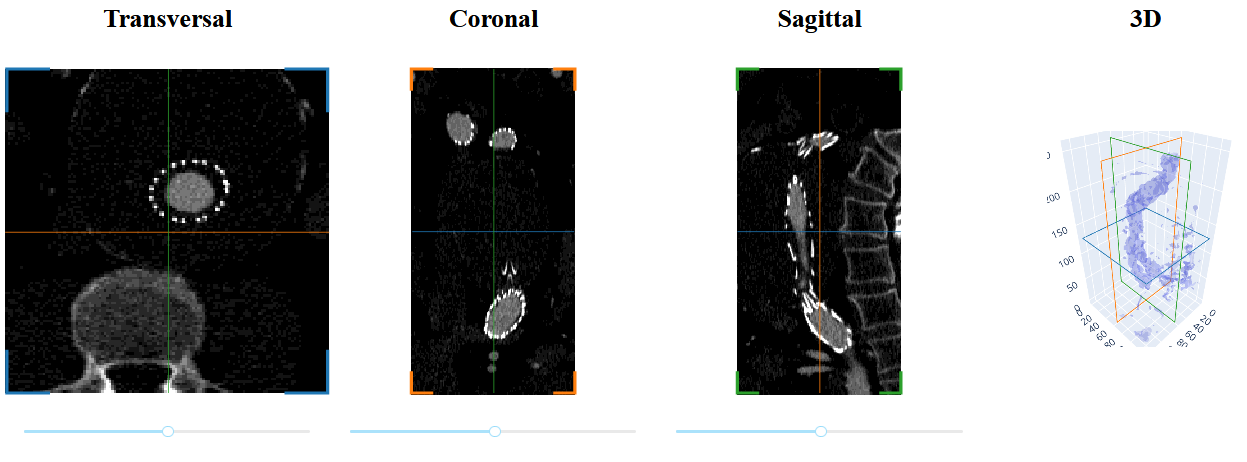
Create slice views along a given dimension, and allows multiple such views to be linked, to help with navigation. Supports anisotropic data, mask overlays, and more.
Status
This work is marked as alpha - some essential features are still in development, and some parts of the API may change in future releases.
Installation
$ pip install dash-slicer
Dash-slicer depends on Python 3.6+ plus some dependencies.
Usage example
import dash
from dash import html
from dash_slicer import VolumeSlicer
import imageio

app = dash.Dash(__name__, update_title=None)

vol = imageio.volread("imageio:stent.npz")
slicer = VolumeSlicer(app, vol)

app.layout = html.Div([slicer.graph, slicer.slider, *slicer.stores])

if __name__ == "__main__":
    app.run_server(debug=True, dev_tools_props_check=False)
See the guide for more examples and explanations. A complete app that uses dash-slicer is dash-vocid-xray (source).
License
This code is distributed under the MIT license.
Developers
-
Make sure that you have Python with the appropriate dependencies installed, e.g. via
venv. -
Run
pip install -e .to do an in-place install of the package. -
Run the examples using e.g.
python examples/all_features.py -
Use
black .to autoformat. -
Use
flake8 .to lint. -
Use
pytest .to run the tests. -
Use
python update_docs_in_readme.pyto update the readme when needed.
On every PR, an app with the same name as your branch is deployed to the Dash playground instance so that you can change whether your changes did not break the package.
Release procedure:
- Bump version in
__init__.py(and commit this change). - Run
git tag v?.? && git push origin v?.? - On GH, turn that tag into a release and write release notes.
- Clear the dist dir.
- Run
python setup.py sdist bdist_wheel - Run
twine upload dist/* - Bump version of dash-slicer in dash-docs.
Reference
The VolumeSlicer class
class VolumeSlicer(app, volume, *, spacing=None, origin=None, axis=0, reverse_y=True, clim=None, scene_id=None, color=None, thumbnail=True)
A slicer object to show 3D image data in Dash. Upon instantiation one can provide the following parameters:
app(dash.Dash): the Dash application instance.volume(ndarray): the 3D numpy array to slice through. The dimensions are assumed to be in zyx order. If this is not the case, you can usenp.swapaxesto make it so.spacing(tuple offloat): the distance between voxels for each dimension (zyx). The spacing and origin are applied to make the slice drawn in "scene space" rather than "voxel space".origin(tuple offloat): the offset for each dimension (zyx).axis(int): the dimension to slice in. Default 0.reverse_y(bool): whether to reverse the y-axis, so that the origin of the slice is in the top-left, rather than bottom-left. Default True. Note: setting this to False affects performance, see #12. This has been fixed, but the fix has not yet been released with Dash.clim(tuple offloat): the (initial) contrast limits. Default the min and max of the volume.scene_id(str): the scene that this slicer is part of. Slicers that have the same scene-id show each-other's positions with line indicators. By default this is derived fromid(volume).color(str): the color for this slicer. By default the color is a shade of blue, orange, or green, depending on the axis. Set to empty string to prevent drawing indicators for this slicer.thumbnail(intorbool): the preferred size of low-resolution data to be uploaded to the client. IfFalse, the full-resolution data are uploaded client-side. IfTrue(default), a default value of 32 is used.
Note that this is not a Dash Component. The components that make
up the slicer (and which must be present in the layout) are:
slicer.graph, slicer.slider, and slicer.stores.
method VolumeSlicer.create_overlay_data(mask, color=None)
Given a 3D mask array, create an object that can be used as
output for slicer.overlay_data. Set mask to None to clear the mask.
The color can be a hex color or an rgb/rgba tuple. Alternatively,
color can be a list of such colors, defining a colormap.
property VolumeSlicer.axis (int): The axis to slice.
property VolumeSlicer.clim: A dcc.Store to be used as Output, representing the contrast
limits as a 2-element tuple. This value should probably not be
changed too often (e.g. on slider drag) because the thumbnail
data is recreated on each change.
property VolumeSlicer.extra_traces: A dcc.Store to be used as an Output to define additional
traces to be shown in this slicer. The data must be a list of
dictionaries, with each dict representing a raw trace object.
property VolumeSlicer.graph: The dcc.Graph for this slicer. Use graph.figure to access the
Plotly Figure object.
property VolumeSlicer.nslices (int): The number of slices for this slicer.
property VolumeSlicer.overlay_data: A dcc.Store to be used an Output for the overlay data. The
form of this data is considered an implementation detail; users
are expected to use create_overlay_data to create it.
property VolumeSlicer.scene_id (str): The id of the "virtual scene" for this slicer. Slicers that have
the same scene_id show each-other's positions.
property VolumeSlicer.slider: The dcc.Slider to change the index for this slicer. If you
don't want to use the slider, wrap it in a div with style
display: none.
property VolumeSlicer.state: A dcc.Store representing the current state of the slicer (present
in slicer.stores). This store is intended for use as State or Input.
Its data is a dict with the fields:
- "index": the integer slice index.
- "index_changed": a bool indicating whether the index changed since last time.
- "xrange": the view range (2 floats) in the x-dimension (2D).
- "yrange": the view range (2 floats) in the y-dimension (2D).
- "zpos": the float position aling the axis, in scene coordinates.
- "axis": the axis (int) for this slicer.
- "color": the color (str) for this slicer.
The id of the store is a dictionary so it can be used in a pattern matching Input. Its field are: context, scene, name. Where scene is the scene_id and name is "state".
property VolumeSlicer.stores: A list of dcc.Store objects that the slicer needs to work.
These must be added to the app layout. Note that public stores
like state and extra_traces are also present in this list.
Reacting to slicer state
It is possible to get notified of updates to slicer position and view ranges. To get this for all slicers with a specific scene_id, create a pattern matching input like this:
Input({"scene": scene_id, "context": ALL, "name": "state"})
See the state property for details.
Setting slicer positions
To programatically set the position of the slicer, create a dcc.Store with
a dictionary-id that has the following fields:
- 'context': a unique name for this store.
- 'scene': the scene_id of the slicer objects to set the position for.
- 'name': 'setpos'
The value in the store must be an 3-element tuple (x, y, z) in scene coordinates.
To apply the position for one dimension only, use e.g (None, None, x).
Performance tips
There tends to be a lot of interaction in an application that contains slicer objects. To realize a smooth user experience, performance matters. Here are some tips to help with that:
- Most importantly, when running the server in debug mode, consider setting
dev_tools_props_check=False. - Also consider creating the
Dashapplication withupdate_title=None. - Setting
reverse_yto False negatively affects performance. This will be fixed in a future version of Plotly/Dash. - For a smooth experience, avoid triggering unnecessary figure updates.
- When adding a callback that uses the slicer position, use the (rate limited)
statestore rather than the slider value.
3 maintainers


Metadata
3 maintainers
Release files for dash-slicer 0.3.1
For a detailed explanation of source distributions (sdists) and built distributions (wheels), please see the package formats documentation.
Source distribution (sdist)
| File | Size | Uploaded | Provenance | Actions |
|---|---|---|---|---|
| dash-slicer-0.3.1.tar.gz | 20.0 kB | Without provenance | Details for dash-slicer-0.3.1.tar.gz |
Built distribution (wheel)
| File | Interpreter | ABI | Platform | Actions Reset |
|---|---|---|---|---|
| dash_slicer-0.3.1-py3-none-any.whl | Python 3 | none | any | Details for dash_slicer-0.3.1-py3-none-any.whl |
Total release size: 39.7 kB
Release files / dash-slicer-0.3.1.tar.gz
| Download URL | dash-slicer-0.3.1.tar.gz |
|---|---|
| Size | 20.0 kB |
| Tags | Source |
|
SHA-256 checksum How to use checksums |
95ec6237c3a19d008ff6878d09d5bb7dedb303c9d4aabc3f80bc073d2aa40f9c
|
|
BLAKE2b-256 checksum How to use checksums |
e5d3f39746fe4d952fe33e1b0393e917fa399785f1789101c7d6809114eb9046
|
| Upload date | |
|
Uploaded using Trusted Publishing? What is trusted publishing? |
No |
| Uploaded via |
twine/4.0.2 CPython/3.11.2
|
Release files / dash_slicer-0.3.1-py3-none-any.whl
| Download URL | dash_slicer-0.3.1-py3-none-any.whl |
|---|---|
| Size | 19.8 kB |
| Tags | Python 3 |
|
SHA-256 checksum How to use checksums |
68c821c017533f1014c984c93ad5c01ce306cdc633c3c7630fa1a2a8301d3d53
|
|
BLAKE2b-256 checksum How to use checksums |
200156d2874efd9897eb48c2bd7a684fe42432ae2ae14bc99d9247cf3d9a8f68
|
| Upload date | |
|
Uploaded using Trusted Publishing? What is trusted publishing? |
No |
| Uploaded via |
twine/4.0.2 CPython/3.11.2
|
Security for dash-slicer 0.3.1
Provenance
Provenance describes where a file came from. On PyPI, provenance is shared via attestations, which provide a verifiable record of the build or publishing details. View details, limitations and caveats.
No provenance found
None of the files in this release were uploaded with provenance metadata.
A note on package security
PyPI is a repository for distributing packages, not a service for auditing them. While third-party security researchers and our staff do their best to detect and remove malicious packages, PyPI cannot guarantee the quality, security or suitability of any given package.
To learn more about protecting yourself from malicious actors, visit our package security documentation.














