
DashUI — Databricks Library



Part of the Dashlibs suite — Databricks libraries built for business users.
Shared ipywidgets components so every dash-* library looks and behaves the
same way inside a Databricks (or plain Jupyter) notebook: headers, the
UC Table / DataFrame / SQL source picker, output panels, status lines, and
schema introspection helpers — styled to match the team's
datapal-access Databricks App design system
(IBM Plex Sans, a teal primary, rounded-lg cards with a soft shadow)
instead of default ipywidgets styling.
What it looks like
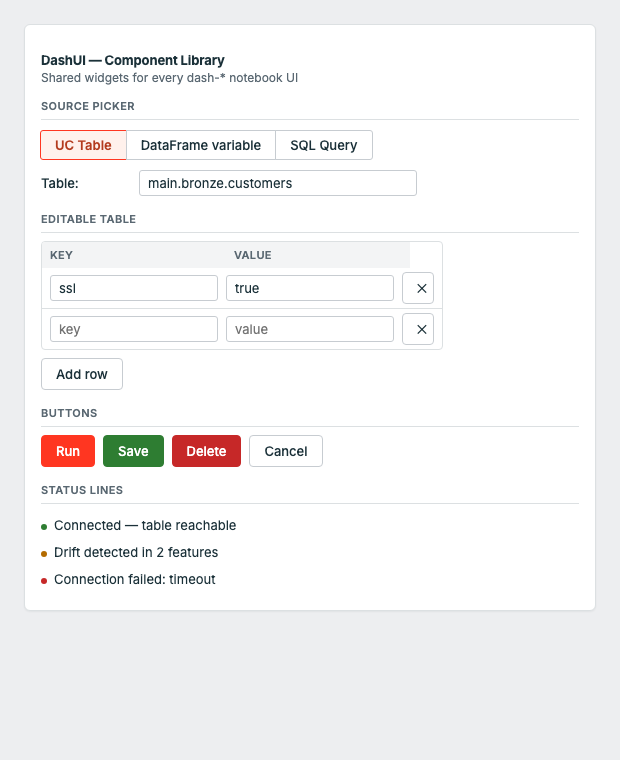
The top card is dashsynthetic's "Single Table" tab, built entirely out of dashui components.
Installation
%pip install dash-uis
Note: the PyPI distribution is named
dash-uis(the namedash-uiwas already taken by an unrelated package). The importable module is stilldashui.
Quick Start
import dashui
from IPython.display import display

src = dashui.source_selector()
run_btn = dashui.action_button("Run", style="success", emoji="▶")
out = dashui.output_panel()

def on_run(b):
    with out:
        out.clear_output()
        kind, value = src.value()
        print(f"✅ Source: {kind} = {value!r}")

run_btn.on_click(on_run)

ui = dashui.card([
    dashui.header("My Library", library="dashsynthetic", emoji="🧬"),
    dashui.section("Step 1: Source data"),
    src.toggle, src.box,
    run_btn, out,
])
display(ui)
Components
header(title, library="default", emoji="", subtitle="")
The banner at the top of every launch() UI. Color comes from a per-library accent
(dashsynthetic is purple, dashobserve is red, etc. — see dashui.theme.ACCENTS).
dashui.header("DashObserve — Data Observability", library="dashobserve", emoji="👁️")
section(title)
A small uppercase step divider with a bottom border, used to break a form into steps ("Step 1: Source data", "Step 2: Generation settings", ...).
dashui.section("Step 2: Generation settings")
source_selector(label="Source:")
The UC Table / DataFrame variable / SQL Query picker used by every Dashlibs UI that
reads from Databricks. Returns a SourceSelector with .toggle, .box (swap-on-select
widgets) and helpers to resolve the chosen source.
src = dashui.source_selector()
ui = dashui.card([src.toggle, src.box])

kind, value = src.value()   # ("table", "catalog.schema.customers")
df = src.resolve_df()       # resolves straight to a Spark DataFrame
action_button(text, style="primary", emoji="")
A styled button matching the datapal-access button variants. style is one of
primary | success | warning | danger | info.
run_btn = dashui.action_button("Generate Synthetic Data", style="success", emoji="▶")
status_line(text, kind="info")
A one-line colored status message. kind is one of success | error | warning | info.
dashui.status_line("Row count 9,842 within expected bounds", kind="success")
dashui.status_line("Schema changed — added: discount_code", kind="warning")
output_panel()
The standard scrollable result/error area used under every action button — an
ipywidgets.Output pre-styled with a muted background and rounded border.
out = dashui.output_panel()
with out:
    print("✅ Done")
running_list(formatter)
A live-updating numbered list for "added items" accumulators (tables, relationships,
monitors, ...). Returns (output_widget, render_fn).
items = []
out, render = dashui.running_list(lambda i, item: f"{i}. {item['name']}")
items.append({"name": "Customer"})
render(items)
card(children, padding="20px")
The bordered, shadowed container every launch() UI is wrapped in. Injects the shared
<style> block (fonts, button variants, card shell) once per notebook kernel.
ui = dashui.card([header, section_title, src.toggle, src.box, run_btn, out])
display(ui)
list_columns(table) / list_columns_safe(table)
UC table column introspection — list_columns_safe returns [] instead of raising,
which is what you want when populating a dropdown in a UI callback.
cols = dashui.list_columns_safe("catalog.schema.customers")
Design tokens
The raw palette is also exported for building fully custom widgets that still match
the system: dashui.PRIMARY, dashui.SUCCESS, dashui.DANGER, dashui.WARNING,
dashui.BORDER, dashui.CARD, dashui.MUTED, dashui.FONT_SANS, dashui.FONT_MONO.
Part of Dashlibs
| Library | Purpose |
|---|---|
| dash-dq | Data Quality |
| dash-synthetic | Synthetic Data Generation |
| dash-observe | Data Observability (freshness, volume, schema) |
| dash-ml | ML Model Monitoring |
| dash-ingest | Data Ingestion |
| dash-gov | Data Governance |
| dash-ontology | Ontology & Lineage for AI |
| dash-ui | Shared UI components (PyPI: dash-uis) |
Quality & Contributing
- 10 unit tests, zero Spark dependency to run them —
pytest tests/ -v - Lint-clean (
ruff check dashui/), PEP 561 typed (py.typed) - Every change ships through a reviewed pull request; CI (lint → test on Python 3.9–3.12 → build) gates every PR and every release
- See CONTRIBUTING.md for dev setup, CHANGELOG.md for release history, SECURITY.md to report a vulnerability, and CODE_OF_CONDUCT.md
License
Apache 2.0
1 maintainer

Metadata
1 maintainer
Release files for dash-uis 0.3.2
For a detailed explanation of source distributions (sdists) and built distributions (wheels), please see the package formats documentation.
Source distribution (sdist)
| File | Size | Uploaded | |
|---|---|---|---|
| dash_uis-0.3.2.tar.gz | 102.7 kB | Details |
Built distribution (wheel)
| File | Interpreter | ABI | Platform | Reset |
|---|---|---|---|---|
| dash_uis-0.3.2-py3-none-any.whl | Python 3 | none | any | Details |
Total release size: 121.1 kB
Release files / dash_uis-0.3.2.tar.gz
| Download URL | dash_uis-0.3.2.tar.gz |
|---|---|
| Size | 102.7 kB |
| Tags | Source |
|
SHA-256 checksum How to use checksums |
b6a4ea38ed8a16ad48ec1efae388bc21b0873c69b7c14cc317716bb0c2c33931
|
|
BLAKE2b-256 checksum How to use checksums |
b69300a792b9c5699ca9a83511e01b0eab7ad7e3db8e4cc0a1452876c9575c1c
|
| Upload date | |
|
Uploaded using Trusted Publishing? What is trusted publishing? |
Yes |
| Uploaded via |
twine/6.1.0 CPython/3.13.12
|
Provenance
Provenance describes where a file came from. On PyPI, provenance is shared via attestations, which provide a verifiable record of the build or publishing details. View details, limitations and caveats.


PyPI Publish Attestation
PyPI verified that this artifact, at this checksum, originated from the publisher listed below.
Signed by GitHub Actions, verified by PyPI on Jul 6, 2026.
Transparency logRelease files / dash_uis-0.3.2-py3-none-any.whl
| Download URL | dash_uis-0.3.2-py3-none-any.whl |
|---|---|
| Size | 18.4 kB |
| Tags | Python 3 |
|
SHA-256 checksum How to use checksums |
8e645f2d0a2a116dd444c13af121425b6fa1f0c956639319f0cf997fba2d9759
|
|
BLAKE2b-256 checksum How to use checksums |
805878917dcb0ffe75d561e3ce3807d071fb98a97aadba2045b64f23b83a5d96
|
| Upload date | |
|
Uploaded using Trusted Publishing? What is trusted publishing? |
Yes |
| Uploaded via |
twine/6.1.0 CPython/3.13.12
|
Provenance
Provenance describes where a file came from. On PyPI, provenance is shared via attestations, which provide a verifiable record of the build or publishing details. View details, limitations and caveats.
PyPI Publish Attestation
PyPI verified that this artifact, at this checksum, originated from the publisher listed below.
Signed by GitHub Actions, verified by PyPI on Jul 6, 2026.
Transparency log













