
dask-ee
Google Earth Engine Feature Collections via Dask DataFrames.






How to use
Install with pip:
pip install dask-ee
Install with conda:
conda install -c conda-forge dask-ee
Then, authenticate Earth Engine:
earthengine authenticate
In your Python environment, you may now import the library:
import ee
import dask_ee
You'll need to initialize Earth Engine before working with data:
ee.Initialize()
From here, you can read Earth Engine FeatureCollections like they are DataFrames:
df = dask_ee.read_ee("WRI/GPPD/power_plants")
df.head()
These work like Pandas DataFrames, but they are lazily evaluated via Dask.
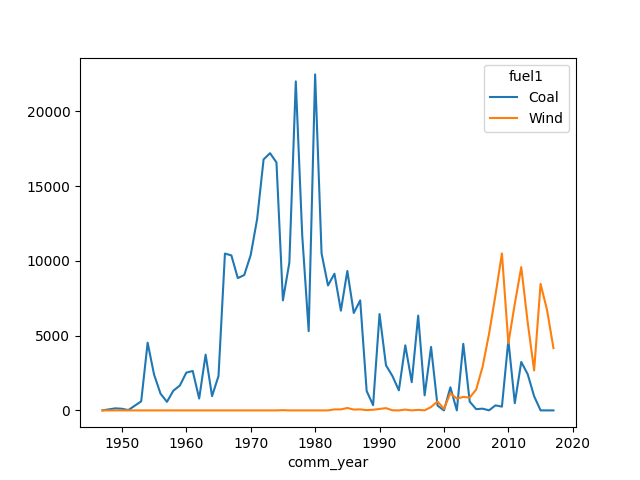
Feel free to do any analysis you wish. For example:
# Thanks @aazuspan, https://www.aazuspan.dev/blog/dask_featurecollection
(
    df[df.comm_year.gt(1940) & df.country.eq("USA") & df.fuel1.isin(["Coal", "Wind"])]
    .astype({"comm_year": int})
    .drop(columns=["geo"])
    .groupby(["comm_year", "fuel1"])
    .agg({"capacitymw": "sum"})
    .reset_index()
    .sort_values(by=["comm_year"])
    .compute(scheduler="threads")
    .pivot_table(index="comm_year", columns="fuel1", values="capacitymw", fill_value=0)
    .plot()
)
There are a few other useful things you can do.
For one, you may pass in a pre-processed ee.FeatureCollection. This allows full utilization
of the Earth Engine API.
fc = (
  ee.FeatureCollection("WRI/GPPD/power_plants")
  .filter(ee.Filter.gt("comm_year", 1940))
  .filter(ee.Filter.eq("country", "USA"))
)
df = dask_ee.read_ee(fc)
In addition, you may change the chunksize, which controls how many rows are included in each
Dask partition.
df = dask_ee.read_ee("WRI/GPPD/power_plants", chunksize=7_000)
df.head()
Contributing
Contributions are welcome. A good way to start is to check out open issues or file a new one. We're happy to review pull requests, too.
Before writing code, please install the development dependencies (after cloning the repo):
pip install -e ".[dev]"
License
Copyright 2024 Alexander S Merose

Licensed under the Apache License, Version 2.0 (the "License");
you may not use this file except in compliance with the License.
You may obtain a copy of the License at

    https://www.apache.org/licenses/LICENSE-2.0

Unless required by applicable law or agreed to in writing, software
distributed under the License is distributed on an "AS IS" BASIS,
WITHOUT WARRANTIES OR CONDITIONS OF ANY KIND, either express or implied.
See the License for the specific language governing permissions and
limitations under the License.
Some sources are re-distributed from Google LLC via https://github.com/google/Xee (also Apache-2.0 License) with and without modification. These files are subject to the original copyright; they include the original license header comment as well as a note to indicate modifications (when appropriate).
1 maintainer

Metadata
1 maintainer
Release files for dask-ee 0.0.4
For a detailed explanation of source distributions (sdists) and built distributions (wheels), please see the package formats documentation.
Source distribution (sdist)
| File | Size | Uploaded | |
|---|---|---|---|
| dask_ee-0.0.4.tar.gz | 51.8 kB | Details |
Built distribution (wheel)
| File | Interpreter | ABI | Platform | Reset |
|---|---|---|---|---|
| dask_ee-0.0.4-py3-none-any.whl | Python 3 | none | any | Details |
Total release size: 62.4 kB
Release files / dask_ee-0.0.4.tar.gz
| Download URL | dask_ee-0.0.4.tar.gz |
|---|---|
| Size | 51.8 kB |
| Tags | Source |
|
SHA-256 checksum How to use checksums |
a6c6a8324b05a0a6a6698e7bf7767d643abc73c03a2b1be988e954343dec4cdc
|
|
BLAKE2b-256 checksum How to use checksums |
47bf730d0c1b635f6f7e12dacfd8987f2fd6aea103f8386ddde7b68f564591e0
|
| Upload date | |
|
Uploaded using Trusted Publishing? What is trusted publishing? |
No |
| Uploaded via |
twine/6.1.0 CPython/3.9.21
|
Release files / dask_ee-0.0.4-py3-none-any.whl
| Download URL | dask_ee-0.0.4-py3-none-any.whl |
|---|---|
| Size | 10.5 kB |
| Tags | Python 3 |
|
SHA-256 checksum How to use checksums |
a4c26be060322ab447df16823a8b6ccebc96cd3524a712d1c5742a67d92b60aa
|
|
BLAKE2b-256 checksum How to use checksums |
170793daba109171f9b7643cba9ed27c6a5f76a743d70183a200acab3a12cc1a
|
| Upload date | |
|
Uploaded using Trusted Publishing? What is trusted publishing? |
No |
| Uploaded via |
twine/6.1.0 CPython/3.9.21
|














