
Inspired by fourtysevencode/My-Data-Center, an idle tycoon you play over SSH. This is an independent rewrite for the local terminal; see Credits.
My Data Center
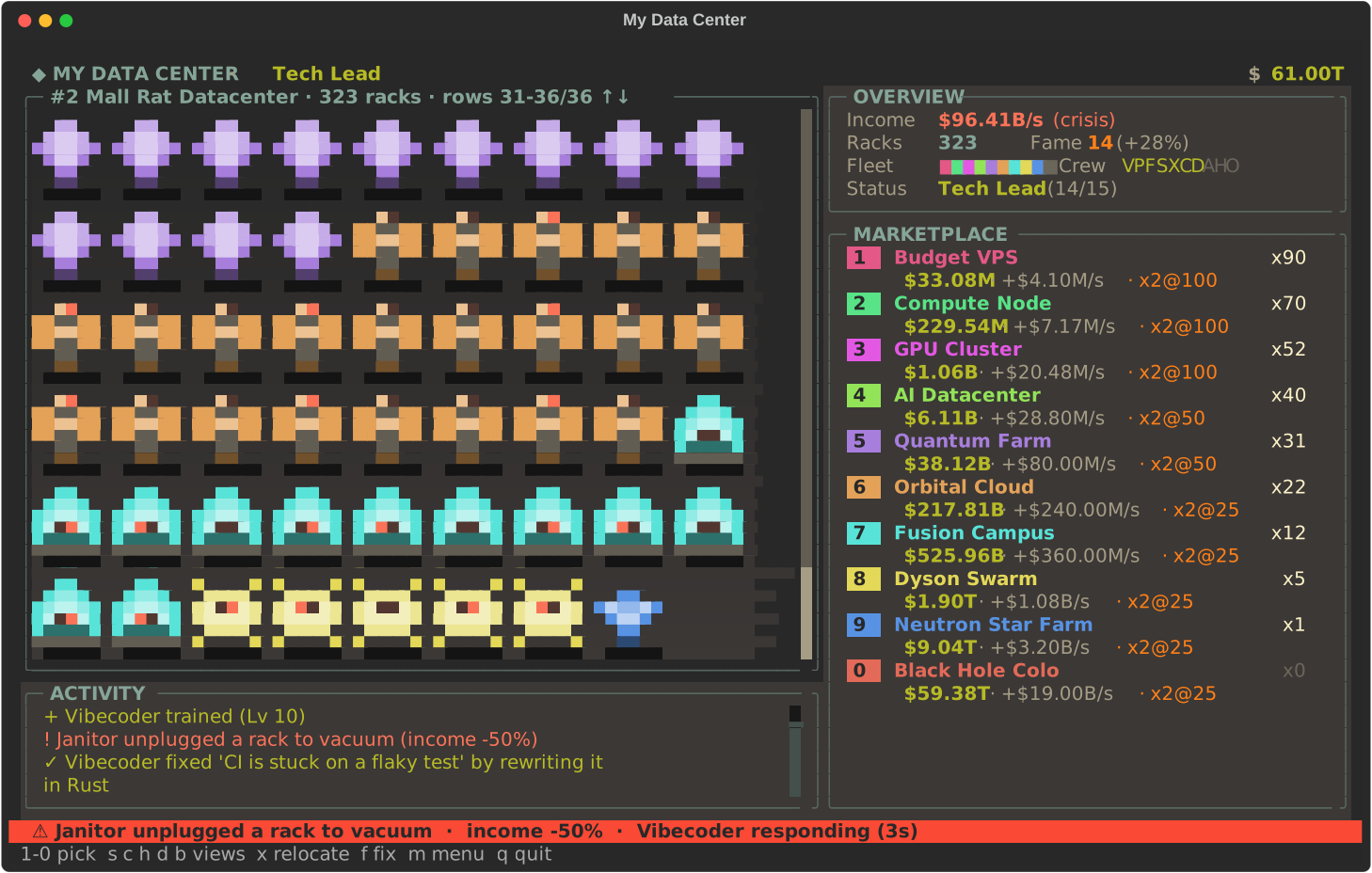
A pixel-art idle tycoon for your terminal. Buy servers, hire Vibecoders, survive crises, and relocate to ever-bigger data centers, from a budget VPS to a black hole colocation. Built to sit in a tmux pane while you wait on something else.
Install
pipx install data-center-tui        # once it is on PyPI (or: pip install data-center-tui)
data-center-tui
From source:
git clone https://github.com/yusuf0279/data-center-tui
cd data-center-tui
pip install .
data-center-tui                      # or: python -m data_center_tui
Needs Python 3.10 or newer and a terminal with colour; 100×30 or larger looks best (80×24 works, with a smaller hall). It plays fine inside tmux and uses the keyboard only.
data-center-tui --no-online          # never contact the leaderboard server
data-center-tui --save my.json       # use a different save file
Controls
| Key | Action |
|---|---|
1-9, 0 |
Pick an item in the open card (0 is the 10th): buy a server, install a chip, or hire/train crew |
s c h d b |
Open the servers, chips, crew (hire), data centers or leaderboard (board) card |
, / . |
Scroll the open card when it has more rows than fit |
↑ ↓ PgUp PgDn Home End |
Scroll the data hall |
x |
Relocate to the next data center (when your newest one reaches its target) |
[ / ] |
Visit the older / newer data center (or press d, then 1-6) |
f |
Fix the current crisis yourself |
a |
Crew autopilot on/off |
n |
Give the data center you are looking at your own name |
m or Esc |
The menu: join or leave the leaderboard, change your name, rename a data center, autopilot, change theme, save and quit |
j |
Join or leave the online leaderboard (also in the menu) |
ctrl+p |
Command palette, including Change theme |
q |
Save and quit |
How it plays
- Ten server tiers, each with its own pixel sprite and colour: Budget VPS, Compute Node, GPU Cluster, AI Datacenter, Quantum Farm, Orbital Cloud, Fusion Campus, Dyson Swarm, Neutron Star Farm, Black Hole Colo. Cheap tiers pay back in about 30 seconds, the biggest in about 40 minutes, so each tier has its moment. Every extra copy costs a little more than the last (+7% on the cheapest up to +13% on the biggest).
- Milestones. Owning 25, 50, 100, 200, 300, 400 ... of a tier doubles that tier's income, and the shop shows the next one (
x2@25). - Chip upgrades. Twenty levels per tier (five chip families, four editions each), every level doubling that tier's income and costing 4x the last. Named with puns on some very familiar GPUs and CPUs ("Radeoff", "Rizzen", "Thread-Shred", "H-100 (a kidney)", "Bee-200 (melts)", "Ultra Max"...).
- On-call crew. Ten roles, from Vibecoder up to Founder Mode CEO, one specialist per tier. Train them to level 10 and they unlock perks: at Lv2 they auto-buy their tier's cheap servers, at Lv4 they double that tier's income, at Lv6 they auto-buy its cheap chips, at Lv8 they double it again. They also fix crises (bigger crises need more senior people), and every level adds +5% income. "Cheap" means a purchase costing at most 1/50 of a second of your income, so autopilot handles the small repetitive buying and can never use up the money you are saving for big purchases.
apauses it if you want to buy everything yourself. - Random crises. Power cuts, flaky CI, an intern pushing to main on a Friday: they cut your income until fixed, by you (
f) or by your crew. - Relocate, forever. Reach $10 quadrillion in your newest data center and you can relocate to the next one (Garage in Palo Alto, Abandoned Mall in Ohio, Decommissioned Missile Silo, ... and on into Parallel Universes). You start from scratch there: money, servers, chips and crew all reset. The old data center is decommissioned: you can visit it (
d, or[and]) and look around, with the lights off and everything washed out, but you can't buy anything there and it earns nothing. Your newest data center keeps earning while you look. Each new data center has bigger numbers and a target 1000x higher, and takes a little longer than the last. There is no last level. - Fame and status. Every relocation earns Fame (more if you waited past the target): each point is +2% income in every data center, forever. Fame also climbs your status ladder: Nobody, Intern, Junior Dev, Senior Dev, Tech Lead, Engineering Manager, Director, VP of Engineering, CTO, Tech CEO, Tech Billionaire, Tech Overlord, and then Tech Overlord II, III, ... without end.
- Names. Every data center can be given your own name (
n, or the menu), up to 24 plain characters; leave it blank for the default. - Scrollable data hall. All your racks are drawn, cheapest tier first, with a scrollbar; it follows the newest racks until you scroll.
- Offline earnings. While the game is closed the data center you were in earns 75% of its normal income, with no time limit.
Themes
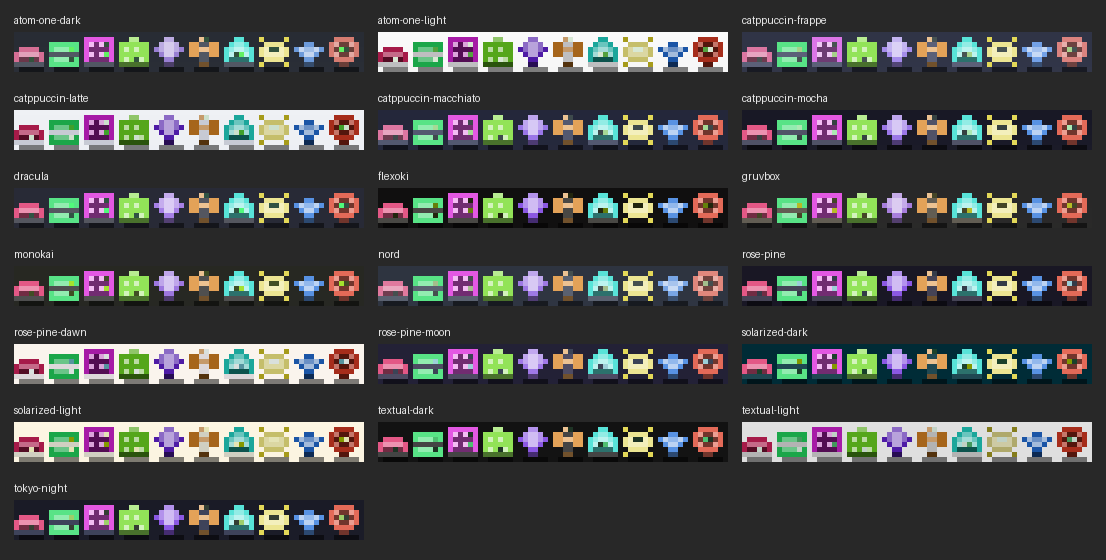
Panels, text and the hall follow your Textual theme (ctrl+p, then Change theme; it starts on gruvbox and remembers your choice). Each server type keeps the same colour in every theme, so you can always tell them apart:
Tmux friendly
The screen only repaints when something changed. If the game runs in a tmux pane that isn't the active one, it keeps playing in the background but redraws only every 20 seconds, because every repaint of a background pane makes tmux flick your real cursor over to it.
Online leaderboard (optional)
On first launch the game asks whether you want to join. If you do, it asks for a name and sends only that name, your Fame and your number of data centers to data-center.openexplorer.xyz (the code is in server/). You can join, leave or change your name at any time from the menu (m); it is not a one-time question. It is an honour-system board. Everything the game sends and stores is listed in PRIVACY.md, and --no-online (or DC_ONLINE=0) switches every online feature off.
Saves
Every data center's money, servers, chips and crew, plus your Fame, names and theme, are saved to ~/.local/share/dc-tui/save.json (or $XDG_DATA_HOME/dc-tui/save.json) every second and on quit. Set DC_SAVE=/path/to/file.json or use --save for a different file. Older saves are converted automatically.
Development
pip install -e .
python -m unittest discover -s tests                         # the game (about 45 s)
python -m unittest discover -s server -p test_server.py      # the leaderboard server
data_center_tui/game.py is the whole game, server/ is the leaderboard server (see server/README.md), tests/ holds the tests. The web port lives in web/; npm run build copies it into the VS Code extension (vscode/media) and the browser extensions (browser/dist/chrome, browser/dist/firefox), and npm test runs its Node tests.
What was verified headlessly: the build output, that both browser manifests parse and reference only files that exist in browser/dist, the extension CSP and host permission strings, vsce package producing a .vsix, and the web tests under web/test/. Not verified: loading the extensions in a real Chrome, Firefox or VS Code, rendering, and live requests to the leaderboard server from inside a webview or extension page. The extensions' leaderboard is opt-in and sends only name, Fame and number of data centers to data-center.openexplorer.xyz; clearing extension storage loses the leaderboard identity token.
Credits
The idea, the "buy servers and watch the money roll in" loop and the first six tiers' income figures come from My Data Center by fourtysevencode. That project runs as an SSH server with its own accounts. The prices, price scaling, milestones, chips, crew, crises and everything after the first version are this repository's own.
The reset-and-Fame loop and the milestone doublings are inspired by mobile idle tycoons such as Cash, Inc. and AdVenture Capitalist. The numbers here are tuned with a simulated player and are not copied from any of them.
This repository is a from-scratch rewrite in Textual. It shares no source code with the original, whose repository has no license file.
License
1 maintainer

Metadata
1 maintainer
Release files for data-center-tui 0.1.0
For a detailed explanation of source distributions (sdists) and built distributions (wheels), please see the package formats documentation.
Source distribution (sdist)
| File | Size | Uploaded | Provenance | Actions |
|---|---|---|---|---|
| data_center_tui-0.1.0.tar.gz | 41.2 kB | With provenance | Details for data_center_tui-0.1.0.tar.gz |
Built distribution (wheel)
| File | Interpreter | ABI | Platform | Actions Reset |
|---|---|---|---|---|
| data_center_tui-0.1.0-py3-none-any.whl | Python 3 | none | any | Details for data_center_tui-0.1.0-py3-none-any.whl |
Total release size: 73.1 kB
Release files / data_center_tui-0.1.0.tar.gz
| Download URL | data_center_tui-0.1.0.tar.gz |
|---|---|
| Size | 41.2 kB |
| Tags | Source |
|
SHA-256 checksum How to use checksums |
4a95dd79c21220518eb6f6a0a2d73771e94de362bc418f9e107a5f051637f9a9
|
|
BLAKE2b-256 checksum How to use checksums |
7d742745e9549a5afdce15840c8533a4c77a7879b45dbcba48f81bffe6e66587
|
| Upload date | |
|
Uploaded using Trusted Publishing? What is trusted publishing? |
Yes |
| Uploaded via |
twine/7.0.0 CPython/3.13.16
|
Provenance
Provenance describes where a file came from. On PyPI, provenance is shared via attestations, which provide a verifiable record of the build or publishing details. View details, limitations and caveats.


PyPI Publish Attestation
PyPI verified that this artifact, at this checksum, originated from the publisher listed below.
Signed by GitHub Actions, verified by PyPI on Nov 12, 2026.
Transparency logRelease files / data_center_tui-0.1.0-py3-none-any.whl
| Download URL | data_center_tui-0.1.0-py3-none-any.whl |
|---|---|
| Size | 32.0 kB |
| Tags | Python 3 |
|
SHA-256 checksum How to use checksums |
6d04a894c77e795a96454c75af5461cc93ecac4d4d815d9315f700c86c8b33b8
|
|
BLAKE2b-256 checksum How to use checksums |
43b7a95a5ab36fef2e372c16fa8f4014063d8eb0c8baf3458d6f960b095b2824
|
| Upload date | |
|
Uploaded using Trusted Publishing? What is trusted publishing? |
Yes |
| Uploaded via |
twine/7.0.0 CPython/3.13.16
|
Provenance
Provenance describes where a file came from. On PyPI, provenance is shared via attestations, which provide a verifiable record of the build or publishing details. View details, limitations and caveats.
PyPI Publish Attestation
PyPI verified that this artifact, at this checksum, originated from the publisher listed below.
Signed by GitHub Actions, verified by PyPI on Nov 12, 2026.
Transparency logSecurity for data-center-tui 0.1.0
Provenance
Provenance describes where a file came from. On PyPI, provenance is shared via attestations, which provide a verifiable record of the build or publishing details. View details, limitations and caveats.
Full provenance
Both files in this release have been uploaded with provenance metadata.
Attestation for data_center_tui-0.1.0.tar.gz
PyPI Publish Attestation
PyPI verified that this artifact, at this checksum, originated from the publisher listed below.
Signed by GitHub Actions, verified by PyPI on Nov 12, 2026.
Transparency logA note on package security
PyPI is a repository for distributing packages, not a service for auditing them. While third-party security researchers and our staff do their best to detect and remove malicious packages, PyPI cannot guarantee the quality, security or suitability of any given package.
To learn more about protecting yourself from malicious actors, visit our package security documentation.













