
Commandline tool to generate data flow diagrams from text

Project description
DFD
DFD (Data Flow Diagram) Generator - Commandline tool to generate diagrams as images in various formats (SVG, PNG, JPG, PDF, etc.) from source text files.
The source for this project is available here. The package page is available here.
Scope
The present tool allows to create diagrams following the "Structured Analysis / Stuctured Design" (SA/SD) modelling technique as described by Edward Yourdon.
SA/RT (which is SA/SD with a real-time extension), can be found in the design of real-time and embedded systems. Example: Firmware modelling of the Active Descent System of the Rosetta Lander spacecraft.
Surprisingly, SA/RT is also well-suited to the analyse and design of web micro-services and IoT architectures.
Summary
Data Flow Diagram are used to model the flow and processing of information through a system.
process	P	Process
process	P2	Process
entity	E	Entity
store	S	Store
channel	C	Channel

E  --> P	flow
P  ::> P2	signal
P  <-> S	bidirectional flow
P  --- C	undirected flow
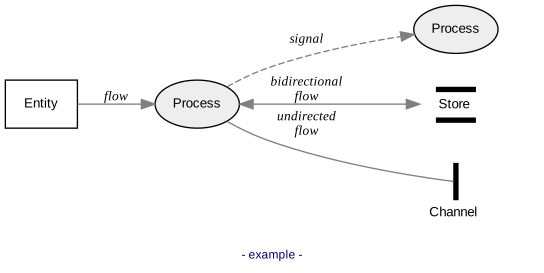
Syntax and examples
See the documentation page.
Dependencies
- Python3
- Graphviz
Installing via pip3
[sudo] pip3 install data-flow-diagram
Installation troubleshooting
If you get an error at runtime like:
ModuleNotFoundError: No module named 'reportlab.graphics._renderPM'
you may have to reinstall reportlab:
[sudo] python3 -m pip install --upgrade --force-reinstall reportlab
Usage
data-flow-diagram -h says:
usage: data-flow-diagram [-h] [--output-file OUTPUT_FILE] [--markdown]
                         [--format FORMAT]
                         [--background-color BACKGROUND_COLOR]
                         [--no-graph-title] [--no-check-dependencies]
                         [--debug] [--version]
                         [INPUT_FILE]

Command-line DFD diagram generator. Converts a textual description into a
graphic file.

positional arguments:
  INPUT_FILE            UML sequence input file; if omitted, stdin is used

options:
  -h, --help            show this help message and exit
  --output-file OUTPUT_FILE, -o OUTPUT_FILE
                        output file name; pass '-' to use stdout; if omitted,
                        use INPUT_FILE base name with '.svg' extension, or
                        stdout
  --markdown, -m        consider snippets between opening marker: ```data-
                        flow-diagram OUTFILE, and closing marker: ```
                        allowing to generate all diagrams contained in an
                        INPUT_FILE that is a markdown file
  --format FORMAT, -f FORMAT
                        output format: gif, jpg, tiff, bmp, pnm, eps, pdf,
                        svg (any supported by Graphviz), or dot (raw Graphviz
                        DOT text); default is svg
  --background-color BACKGROUND_COLOR, -b BACKGROUND_COLOR
                        (not yet available) background color name (including
                        'none' for transparent) in web color notation; see
                        https://developer.mozilla.org/en-
                        US/docs/Web/CSS/color_value for a list of valid
                        names; default is white; deprecated: use 'style
                        background-color VALUE' in the DFD itself
  --no-graph-title      suppress graph title; deprecated: use 'style no-
                        graph-title' in the DFD itself
  --no-check-dependencies
                        suppress dependencies checking
  --debug               emit debug messages
  --version, -V         print the version and exit

See https://github.com/pbauermeister/dfd for information, syntax and
examples.
Release history Release notifications | RSS feed


Download files
Download the file for your platform. If you're not sure which to choose, learn more about installing packages.
Source Distribution
File details
Details for the file data_flow_diagram-1.16.7.tar.gz.
File metadata
- Download URL: data_flow_diagram-1.16.7.tar.gz
- Upload date:
- Size: 29.5 kB
- Tags: Source
- Uploaded using Trusted Publishing? No
- Uploaded via: twine/6.1.0 CPython/3.12.3
File hashes
| Algorithm | Hash digest | |
|---|---|---|
| SHA256 |
9fdb5e205048258c89a5bd3524e185aa0715a374194222bdf8db656b8a91aff8
|
|
| MD5 |
156361443a3807df868837cfff06e7a8
|
|
| BLAKE2b-256 |
5e5640040a7bdd98dd79a5803708dcd92d7c931d27bb17899b0cf4fbd7f91518
|






