






Turn data-heavy projects into LLM context that actually fits.
One command packs a directory of CSVs, notebooks, Excel workbooks and SQLite
databases into a single structured document: sampled, profiled, redacted, and
sized to your context window.
Point a generic repo-to-prompt tool at a project with real datasets in it and you get tens of megabytes of output. That is not a number you can trim your way out of. To a generic packer a CSV is just a large text file, so it offers two choices: dump the whole thing, or skip it.
data2prompt reads data files as data. Every table is profiled on the complete dataset (schema, dtypes, per-column statistics, missing-value counts), then represented by a seeded random sample of real rows. The model gets a statistical picture of the data plus enough real rows to see formats, ranges and quirks. Anything the tool changed or left out is stated inline, so the model always knows what it is looking at.
Why
The same data-heavy project, packed by three tools on default settings:

Read that as feasibility rather than savings. A 22 MB dump is millions of tokens, no llm model can read that at once. On a real data project a generic packer doesn't produce an expensive prompt, it produces an impossible one. Of the three outputs, only the 241 KB one can be handed to a model at all, thats the main point of the data2prompt.
The reduction comes from representation, not truncation. Each table still contributes its full schema, statistics computed over every row, and a seeded sample of real rows. The model often ends up knowing more about your data than it would from pages of raw rows, because distributions, missingness and dtypes are stated outright instead of inferred from whichever rows happened to fit.
Quick start
# No install: fetch and run in one step, via uv
uvx data2prompt

# Or install as a global CLI tool
uv tool install data2prompt   # via uv
pipx install data2prompt      # via pipx

# Or into an active virtual environment
pip install data2prompt
uvx caches the tool after the first run, so
repeat runs start instantly and nothing is left on your system to clean up.
Run it from your project root:
data2prompt                        # → PROMPT.md (markdown, default settings)
data2prompt -b 100k -c             # fit into 100k tokens, copy to clipboard
data2prompt -f xml --schema-only   # XML format, schemas only, zero data rows
Parquet / Feather / Arrow support (optional extra)
Columnar formats need pyarrow, which is not bundled by default:
uvx --from "data2prompt[parquet]" data2prompt   # no install
uv tool install "data2prompt[parquet]"          # uv global install
pipx install "data2prompt[parquet]"             # fresh pipx install
pipx inject data2prompt pyarrow                 # already installed via pipx
pip install "data2prompt[parquet]"              # pip equivalent
Without pyarrow these files still appear in the output, with an inline note explaining why they were skipped.
Install from source
git clone https://github.com/arianmokhtariha/data2prompt.git
cd data2prompt
pip install -e .
What happens to your files
Every file type gets a strategy, not a dump:
| File type | Strategy | What the LLM sees |
|---|---|---|
.csv |
Seeded random sampling | Column schema, full-dataset stats, N sampled rows |
.parquet .feather .arrow |
Same, via pyarrow | Schema, stats and sample, identical treatment to CSV |
.xlsx .xls .xlsm |
Per-sheet extraction | Each sheet as its own schema, stats and sample section |
.db .sqlite .sqlite3 |
Read-only stdlib sqlite3 |
Per-table CREATE TABLE DDL (keys, FKs, indexes), stats, sampled rows |
.sql |
Statement-aware parsing | Schema statements kept intact, INSERT floods capped |
.ipynb |
Cell-level cleaning | Code, markdown and text outputs, with base64 images and HTML dumps stripped |
.env |
Name-only redaction | KEY=<redacted>, so variable names but never values |
| Binary files | Null-byte detection | Skipped, listed in the file index |
| Everything else | Size-aware reading | Full text, or just the first 10 KB once it passes --max-file-size (default 70 KB) |
Two things make the samples trustworthy. Statistics are computed on the full
dataset before any sampling happens, so dtypes, missing counts and the
describe() summary reflect every row even when the model only sees 15 of them.
And every intervention the tool makes (sampling, truncation, redaction, skips)
appears as a uniform -- [...] -- notice inside the document, so the model is
never left guessing why something looks incomplete.
Fitting a context window
State the outcome you want instead of tuning knobs:
data2prompt --budget 100k
--budget runs a de-escalation ladder: halve CSV and SQL sample sizes, trim
notebook outputs, switch to schema-only, drop the stats blocks, cap large text
files to their first 10 KB, and as a last resort omit the heaviest remaining
files. It re-renders and re-counts the actual
document after every step until it fits. The number that gets checked is the
number you ship.
- Accepts
50000,100k,1.5m. Commas and underscores are fine. - A budget report is embedded in the document and shown in the terminal report, listing every parameter change and every omitted file.
- If the budget is infeasible even at the ladder's floor, nothing is written. The process exits non-zero with the minimum achievable count, so you never silently receive an over-budget file.
Under the hood
Two rules shape the whole pipeline: never misrepresent what the model is seeing,
and never estimate a number that can be measured. That's why --budget
re-renders and re-counts instead of guessing, why every reduction leaves a
notice behind, and why the same command on the same project produces
byte-identical output a year later.
Profiling and sampling
- Every CSV, Parquet file, Excel sheet and SQLite table is profiled before a
single row is sampled: per-column dtype, missing count and percentage, and the
full
describe()battery (count, unique, top, freq, mean, std, min, quartiles, max), rendered as one unified schema table. - Sampling is seeded, and the drawn rows are re-sorted back into original file
order, so time series stay chronological and IDs stay ascending. Every notice
cites the true size captured before sampling, as in
-- [Sample: random 15 of 1,234,567 rows] --, so the sample can never be mistaken for the dataset. - Parquet, Feather and Arrow columns carry pyarrow's native type strings
(
int64,utf8,timestamp[us, tz=UTC]), and SQLite columns their declared types fromPRAGMA table_info. Both override pandas' lossier inference. - SQLite files are verified by magic bytes and opened strictly read-only
(
mode=roplusPRAGMA query_only). Each table is rendered with its fullCREATEDDL, including keys, foreign keys and indexes. Tables past 100k rows areLIMIT-read so a pathological database can't stall a run, and their stats block is honestly omitted rather than computed on a partial scan.
The generated document
- It opens with a reading contract covering layout, structural conventions, the notice grammar, and explicit accuracy rules against hallucination. The preamble is context-aware: conventions for notebooks, Excel, SQLite or env files only appear when those types were actually scanned.
- A File Index lists every scanned file with its type and an inclusion status
drawn from a controlled vocabulary (
Full,Sampled,Schema Only,Redacted,Omittedand a few more). Nothing the scan touched goes unaccounted for. - Every tool intervention uses the same
-- [Category: detail] --form, taught once in the preamble, so the model can always separate what the tool says from what your files say. - Fences are sized dynamically. Before content is embedded, the longest backtick run inside it is measured and the enclosing fence is made one backtick longer, so a README or notebook that contains its own fences can't break the structure.
- Each file has one canonical path (project-relative, forward-slashed) that is byte-identical across the File Index, the file headers and every notice, so the model can cross-reference sections by literal string match.
- Two formats,
markdown(default) andxmlfor stronger structural anchoring in long contexts, are logically identical and governed by a written output contract. XML mode quotes attributes carrying user data while leaving file content verbatim, so no<entity noise inflates the token count. - The document closes with an end-of-codebase recap that restates the accuracy rules, so the model knows the snapshot is complete and nothing follows.
Reliability
- Token counts are exact and offline. A bundled
o200k_baseBPE (tiktoken) counts the fully rendered document, scaffolding included, with a pure-regex fallback if the encoding can't load. No network call, ever. --seed 42keeps runs reproducible. Regenerate a prompt for a diff, an eval or a bug report and you get the identical document back.- Every parser contains its own failures. A corrupt file, a locked file, a truncated database, one bad Excel sheet or one bad SQLite table degrades to an inline error note for that file alone, never a crashed run.
.envvalues never reach the output (names only, values redacted), long lines are truncated to neutralize prompt-injection padding, and binary content is detected and excluded.- Scanning respects
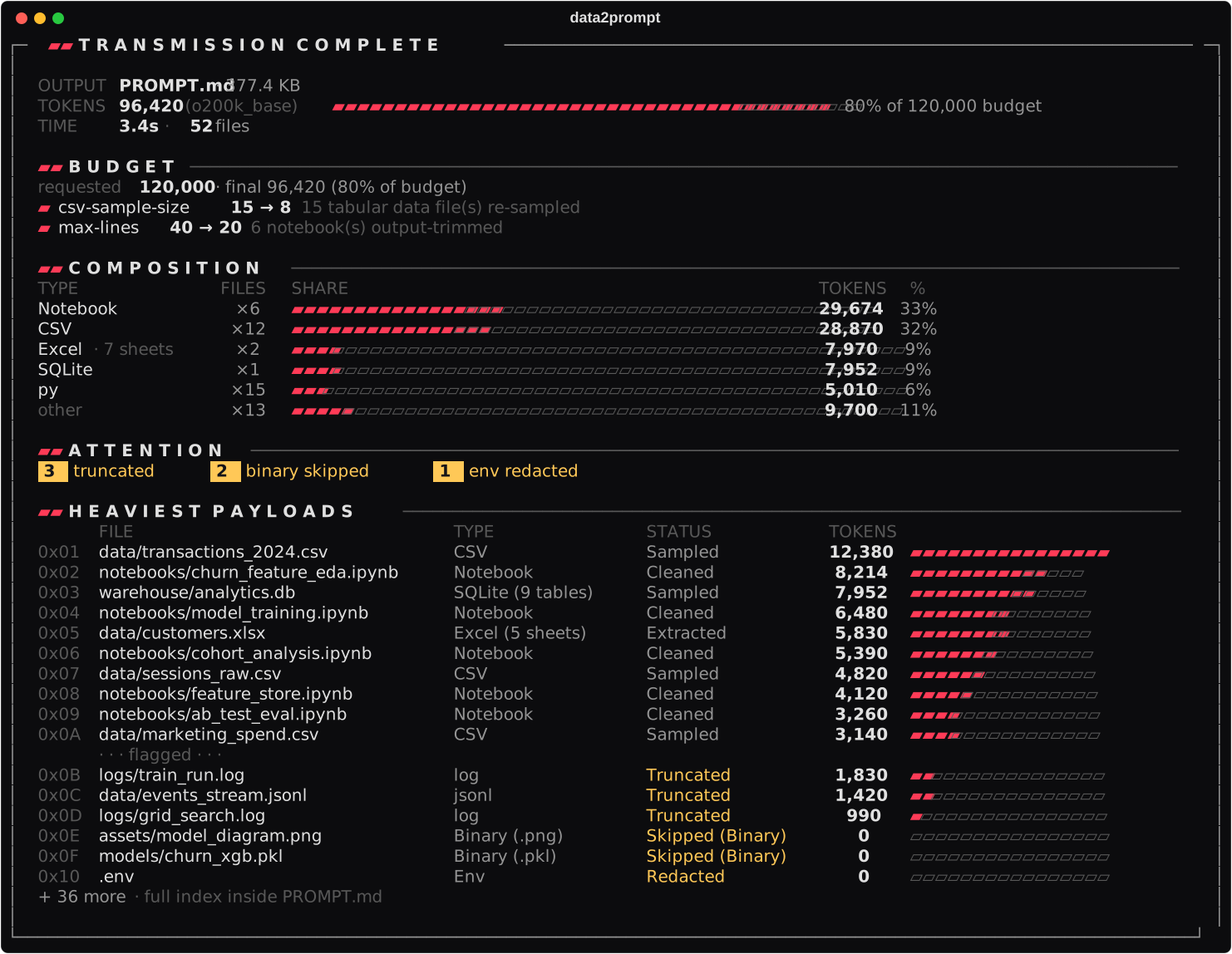
.gitignorewith real per-directory scoping (asrc/.gitignoreapplies undersrc/, exactly like git), honors a project-level.data2promptignore, ships hardened core ignore lists (.git,node_modules, caches), and recognizes its own previous outputs by an embedded marker so it never packs itself. --clipboardpipes the result to your OS clipboard through native tools (clip,pbcopy,xclip,wl-copy) with a file fallback, using UTF-16 on Windows so non-ASCII content round-trips intact.- An animated banner and a transient progress bar run during the scan, and the final report shows a token gauge against a 200K context window, a per-type composition chart, attention badges, and the heaviest files each with a token-share bar. Animations disable themselves on non-interactive output.
CLI reference
The flags you will actually reach for:
| Flag | Default | Purpose |
|---|---|---|
-o, --output |
PROMPT |
Base name of the generated file |
-f, --format |
markdown |
Output format: markdown or xml |
-b, --budget |
off | Target token budget (50000, 100k, 1.5m) |
-c, --clipboard |
off | Copy to clipboard instead of writing a file |
-s, --csv-sample-size |
15 |
Rows sampled per tabular file |
--seed |
42 |
Sampling seed, for identical output across runs |
--schema-only |
off | Schemas and dtypes only, zero data rows |
--max-lines |
40 |
Output lines kept per notebook cell |
--max-sheets |
10 |
Sheets processed per Excel workbook |
--max-tables |
25 |
Tables processed per SQLite database |
--stats-decimals |
4 |
Max decimals for float statistics (values below 1 keep at least 4 significant digits) |
--data-decimals |
6 |
Max decimals for float sample values (raise it to keep more digits) |
--max-file-size |
70 |
KB threshold before plain files are head-truncated |
--no-stats-summary |
stats on | Drop the per-table stats block |
--no-env-keys |
redact | Skip .env files entirely instead of redacting |
--no-gitignore |
respect | Ignore .gitignore rules while scanning |
--ignore-folders / --ignore-files / --skip-exts |
Additional exclusions, merged with the core ignore sets |
Full reference with validation rules and edge cases: docs/cli.md
Architecture
Small, single-responsibility modules under an orchestration layer. Parsing, output generation, scanning, token budgeting and UI never bleed into each other:
graph LR
    CLI[cli.py] --> Main[main.py]
    Main -->|Registry| Parsers[parsers.py]
    Main -->|Strategy| Output[output.py]
    Main -->|Scan + tokens| Utils[utils.py]
    Main -->|Feedback| UI[ui.py]
    Main -->|--budget| Budget[budget.py]
    Budget --> Output
A parser registry maps extensions to specialized parsers, so new file types plug in without touching the pipeline. An output strategy keeps markdown and XML generation interchangeable and contract-bound. The codebase is fully typed (PEP 484) and stdlib-first.
Every module has a matching deep-dive document:
| Architecture | Module layout, data flow, design patterns |
| Parsers | Per-format strategies and the tool-notice grammar |
| Budget | The --budget de-escalation ladder, end to end |
| Output · Output Contract | Document structure and the markdown/XML parity rules |
| CLI · UI · Installation | Flags, the terminal interface, setup |
Development
pip install -e .[dev]
pytest
Contributions are welcome. New file-type parsers are the highest-leverage place to start, since the registry makes them self-contained. Please open an issue first for anything that changes the generated document, and read docs/output-contract.md before touching output code.
If data2prompt saved you time and tokens, a star helps other data people find it.
1 maintainer

Metadata
1 maintainer
Release files for data2prompt 1.1.0
For a detailed explanation of source distributions (sdists) and built distributions (wheels), please see the package formats documentation.
Source distribution (sdist)
| File | Size | Uploaded | |
|---|---|---|---|
| data2prompt-1.1.0.tar.gz | 1.8 MB | Details |
Built distribution (wheel)
| File | Interpreter | ABI | Platform | Reset |
|---|---|---|---|---|
| data2prompt-1.1.0-py3-none-any.whl | Python 3 | none | any | Details |
Total release size: 3.6 MB
Release files / data2prompt-1.1.0.tar.gz
| Download URL | data2prompt-1.1.0.tar.gz |
|---|---|
| Size | 1.8 MB |
| Tags | Source |
|
SHA-256 checksum How to use checksums |
b5514048d243638860899d430ca270beed141439e59851204291a6c7f72eda05
|
|
BLAKE2b-256 checksum How to use checksums |
cb086ebbcaec30d14cb7b7b01e7d8a1b3890002b944241f05c3464028c16d9fb
|
| Upload date | |
|
Uploaded using Trusted Publishing? What is trusted publishing? |
No |
| Uploaded via |
twine/7.0.0 CPython/3.10.21
|
Release files / data2prompt-1.1.0-py3-none-any.whl
| Download URL | data2prompt-1.1.0-py3-none-any.whl |
|---|---|
| Size | 1.8 MB |
| Tags | Python 3 |
|
SHA-256 checksum How to use checksums |
ff0a1605aeb604ced951d4addfd7066e8bbcbb915271af18b9c82565556a42fe
|
|
BLAKE2b-256 checksum How to use checksums |
dde40f5bae52ed66c00410eff0ddb33918c5789485e2f394eb99f32da5da7ecc
|
| Upload date | |
|
Uploaded using Trusted Publishing? What is trusted publishing? |
No |
| Uploaded via |
twine/7.0.0 CPython/3.10.21
|














