
Charter your data — contract-governed local data exploration, powered by DuckDB
Verified details
These details have been verified by PyPIProject links
GitHub Statistics
Maintainers

Project description
DataCharter
Query all your data locally — then hand your AI agents exactly the data you choose, and not one column more.



The big-words version: a local, federated data explorer with governed, regulated agentic data access, powered by DuckDB. Here's what that actually means 👇
🔍 Query all your data, locally — no pipelines, no warehouse, no waiting
- Local CSV, Parquet, JSON, and Excel files — or drag one onto the window
- Postgres, MySQL, SQLite, SQL Server, Snowflake, BigQuery, DuckDB, Iceberg, Delta — and more
- JOIN a local CSV → a Snowflake table → a Parquet file in S3, in one SQL statement, all on your laptop
- Yes, it's as unreasonable as it sounds. You kind of have to try it to believe it.
🤖 Connect an agent — and decide exactly what it's allowed to see
- Claude Code — runs on your existing subscription, no API key
- A model running fully local with Ollama
- Any OpenAI-compatible agent
- Grant or deny access in the UI or right in your data contracts, at every level: whole sources → individual tables → individual columns
- PII is auto-detected and defaulted to no agent access — override per field if you really mean to
- Don't take our word for it: flip on Agent view and see, column by column, exactly what your agent gets back when it runs a query. (Spoiler: the PII comes back
•••.)
Wait, there's more!
Beyond local federation and governed agent access, you also get:
- See answers as you type. Live results preview while you write SQL, one-click auto-charts, and a profiling panel — missing values, distributions, outliers, and per-column top-value bars — no separate BI tool.
- Never lose a query. Every run is saved to a local history you can reopen, and a ⌘K command palette jumps to any table or action.
- Know the cost before you run. One click estimates how many rows a query will scan and warns before a big one.
- Safe by design. The engine is read-only by construction — no query can write, delete, or touch the filesystem — so pointing an AI (or a teammate) at your real databases can't do damage.
- Point other AI tools at your data, too. A governed MCP server exposes the same read-only, PII-masked query tools to Cursor, Cline, or your own agent.
- Every agent answer is reproducible. The chat shows the exact SQL the agent ran, with one click to open it in the editor — and each result shows which source columns it read, so you always know where a number came from.
- Save, reuse, export. Snapshot a result as a reusable local table; export to CSV, Parquet, JSON, or XLSX.
- Governance you can automate. From the command line: assert data quality (
datacharter test), catch schema/PII drift in CI, diff data across sources, trace cross-source lineage, and define certified metrics.
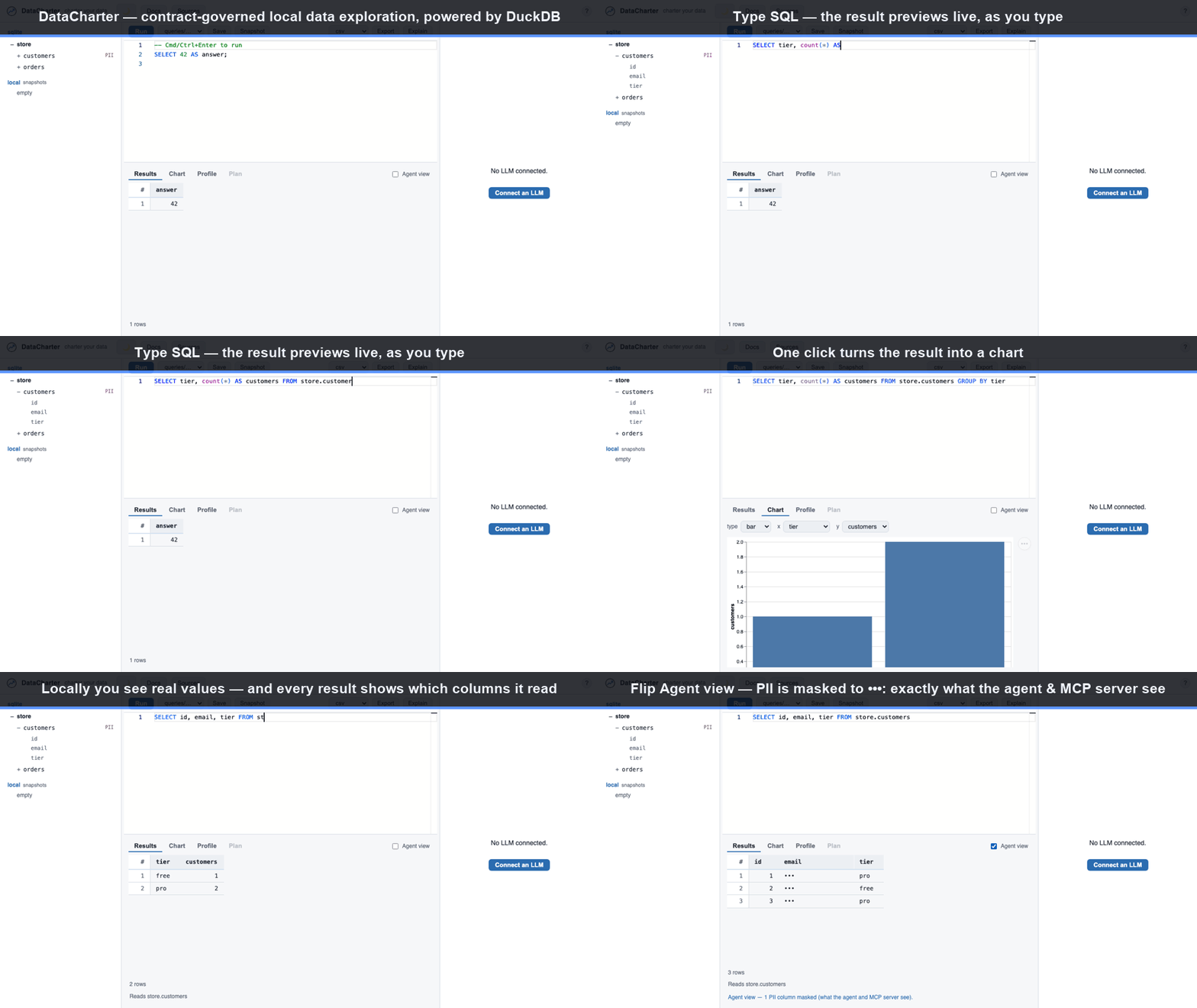
Status: pre-release. V1 in development.
Quick start
# Try it instantly on generated demo data — no install, no config:
uvx datacharter serve          # needs `uv` → https://astral.sh/uv
# → serves at http://127.0.0.1:8321 (open it in your browser)

# Or install it:
pip install datacharter        # Python 3.11+

# Start your own workspace:
datacharter init               # scaffolds charter.yaml, queries/, .env.example
# → add a source: edit charter.yaml, or use the "Sources" panel in the UI
datacharter serve              # → http://127.0.0.1:8321
Then, once it's running, drag a CSV, Parquet, or JSON file onto the window to query it instantly — no config needed.
Optional natural-language agent — point it at any OpenAI-compatible endpoint:
export OPENAI_BASE_URL=...     # any OpenAI-compatible API
export OPENAI_API_KEY=...
datacharter serve
…or run fully local — no API key, no data leaves your machine (requires Ollama):
ollama pull qwen3:8b           # once
datacharter serve --local      # qwen3:8b by default (--model to change)
Why DataCharter
- Your contracts are the catalog.
charter.yamldescribes sources, tables, and PII fields — the same contract spec your data team already writes, so there's no separate metadata store to maintain. - Real federation, not just a shared connection. Filters and projections are
pushed down to each source — even across a cross-source join, every leg is
filtered where its data lives. (Snowflake runs via connector extract,
datacharter[snowflake], with the same pushdown into the extract.) - Local-first. One process, your machine, no cloud dependency. The optional
--localagent runs a small open model via Ollama — no API key, no data leaves your machine. - The workspace is a directory.
charter.yaml+queries/*.sql+.env.example— commit it, clone it,datacharter serve. Your team's whole exploration environment travels as a repo; secrets and local state never do.
DataCharter governs and audits your data, not just displays it. The full command
set (drift, scan, diff, metric, mcp, and more) is in the
CLI reference; the security model is in security.
Built on
DataCharter stands on excellent open-source foundations:
- DuckDB — the analytical engine at our core:
federation (
ATTACH), file formats, Iceberg/Delta, encryption, autocomplete. - Open Data Contract Standard /
datacontract.com — the contract format
charter.yamlspeaks. - Model Context Protocol — the open protocol
the
datacharter mcpserver speaks to agents and MCP clients. - Vega-Lite — declarative charting.
- Monaco Editor — the SQL editor.
- TanStack Table & Virtual — the virtualized results grid.
- And the Python & React ecosystems — FastAPI, pydantic, httpx, keyring, and ruamel.yaml on the backend; React and Vite on the front.
Testing uses VidaiMock, an Apache-2.0 mock LLM server, as the offline agent endpoint in CI.
DuckDB is a trademark of the DuckDB Foundation. DataCharter is an independent project and is not affiliated with or endorsed by the DuckDB Foundation.
License
Project details
Verified details
These details have been verified by PyPIProject links
GitHub Statistics
Maintainers
Release history Release notifications | RSS feed


Download files
Download the file for your platform. If you're not sure which to choose, learn more about installing packages.
Source Distribution
Built Distribution
Filter files by name, interpreter, ABI, and platform.
If you're not sure about the file name format, learn more about wheel file names.
Copy a direct link to the current filters
File details
Details for the file datacharter-0.10.3.tar.gz.
File metadata
- Download URL: datacharter-0.10.3.tar.gz
- Upload date:
- Size: 7.3 MB
- Tags: Source
- Uploaded using Trusted Publishing? Yes
- Uploaded via: twine/6.1.0 CPython/3.13.14
File hashes
| Algorithm | Hash digest | |
|---|---|---|
| SHA256 |
a711c34c061e8d78b4d0f953e38dc2f59801ca13657ead3e35dba06f38334794
|
|
| MD5 |
bdc0d28bc75032d4ce887dc7aac93967
|
|
| BLAKE2b-256 |
568747734d714887d498a5d6e862e1d8b69242956b46b0d4d09bc90157cbadfb
|
Provenance
The following attestation bundles were made for datacharter-0.10.3.tar.gz:
Publisher:
release.yml on datacharter/datacharter
-
Statement:
-
Statement type:
https://in-toto.io/Statement/v1 -
Predicate type:
https://docs.pypi.org/attestations/publish/v1 -
Subject name:
datacharter-0.10.3.tar.gz -
Subject digest:
a711c34c061e8d78b4d0f953e38dc2f59801ca13657ead3e35dba06f38334794 - Sigstore transparency entry: 2266313821
- Sigstore integration time:
-
Permalink:
datacharter/datacharter@d781089a8b1a1498b62db76cb6d1c23612e24426 -
Branch / Tag:
refs/tags/v0.10.3 - Owner: https://github.com/datacharter
-
Access:
public
-
Token Issuer:
https://token.actions.githubusercontent.com -
Runner Environment:
github-hosted -
Publication workflow:
release.yml@d781089a8b1a1498b62db76cb6d1c23612e24426 -
Trigger Event:
release
-
Statement type:
File details
Details for the file datacharter-0.10.3-py3-none-any.whl.
File metadata
- Download URL: datacharter-0.10.3-py3-none-any.whl
- Upload date:
- Size: 4.0 MB
- Tags: Python 3
- Uploaded using Trusted Publishing? Yes
- Uploaded via: twine/6.1.0 CPython/3.13.14
File hashes
| Algorithm | Hash digest | |
|---|---|---|
| SHA256 |
a86db09b0fae3a3f6a828280f348ff6e5bcbbf75623c6edbb11bef99a1415cb3
|
|
| MD5 |
7c1c3c2192a09d316849abddab70184e
|
|
| BLAKE2b-256 |
992f6bc2b89a502a6bffe9e7637e76be194f36259512f17cbae6cc1f040d008d
|
Provenance
The following attestation bundles were made for datacharter-0.10.3-py3-none-any.whl:
Publisher:
release.yml on datacharter/datacharter
-
Statement:
-
Statement type:
https://in-toto.io/Statement/v1 -
Predicate type:
https://docs.pypi.org/attestations/publish/v1 -
Subject name:
datacharter-0.10.3-py3-none-any.whl -
Subject digest:
a86db09b0fae3a3f6a828280f348ff6e5bcbbf75623c6edbb11bef99a1415cb3 - Sigstore transparency entry: 2266314071
- Sigstore integration time:
-
Permalink:
datacharter/datacharter@d781089a8b1a1498b62db76cb6d1c23612e24426 -
Branch / Tag:
refs/tags/v0.10.3 - Owner: https://github.com/datacharter
-
Access:
public
-
Token Issuer:
https://token.actions.githubusercontent.com -
Runner Environment:
github-hosted -
Publication workflow:
release.yml@d781089a8b1a1498b62db76cb6d1c23612e24426 -
Trigger Event:
release
-
Statement type:






