






DataContext
Runtime attribution for data access in Python
Why | How It Works | Quick Start | Event Shape | Production Behavior | Roadmap
DataContext helps developers answer a simple question:
Which code path, request, job, or agent caused this query?
DataContext gives developers and platform teams more context for understanding data access patterns and improving how production services use databases and data platforms.
DataContext is early and intentionally small. The core event model is designed to stay stable, while integrations and APIs will evolve with real-world usage.
Install
pip install datacontext
Optional OpenTelemetry support:
pip install "datacontext[otel]"
Optional SQLAlchemy support:
pip install "datacontext[sqlalchemy]"
Optional PostgreSQL support:
pip install "datacontext[postgres]"
Optional BigQuery support:
pip install "datacontext[bigquery]"
Optional Dagster support:
pip install "datacontext[dagster]"
Optional Snowflake support:
pip install "datacontext[snowflake]"
Optional dbt support:
pip install "datacontext[dbt]"
Quick Start
Configure DataContext at an explicit data-access boundary:
import datacontext

datacontext.configure(
    service_name="checkout-api",
    environment="production",
    instruments=[
        datacontext.instrument_function(
            target="app.db.execute",
            query_arg="query",
            db_system="postgres",
            client="internal-db-wrapper",
        )
    ],
)
After configuration, calls to app.db.execute(...) emit one completed query event when the function returns or raises.
Wrappers preserve return values and re-raise original exceptions unchanged. If DataContext fails, your application should not.
Emitted event:
{
  "event_name": "datacontext.query",
  "timestamp": "2026-05-15T10:31:04.203Z",
  "started_at": "2026-05-15T10:31:04.182Z",
  "ended_at": "2026-05-15T10:31:04.203Z",
  "service_name": "checkout-api",
  "environment": "production",
  "db_system": "postgres",
  "client": "internal-db-wrapper",
  "query_fingerprint": "sha256:4f5b7f...",
  "query_text": "select * from orders where id = ?",
  "duration_ms": 21.4,
  "callsite": {
    "file": "checkout.py",
    "path": "/app/checkout.py",
    "line": 42,
    "function": "load_cart",
    "stack": "checkout:42 load_cart -> routes:88 post_checkout"
  },
  "status": "ok"
}
Why DataContext?
Queries often lose their application context by the time they reach logs, traces, or the data platform itself.
That makes it hard to answer:
- Which request, job, or agent triggered this query?
- Which code path caused this unexpected load?
- Which actor, tenant, or session was involved?
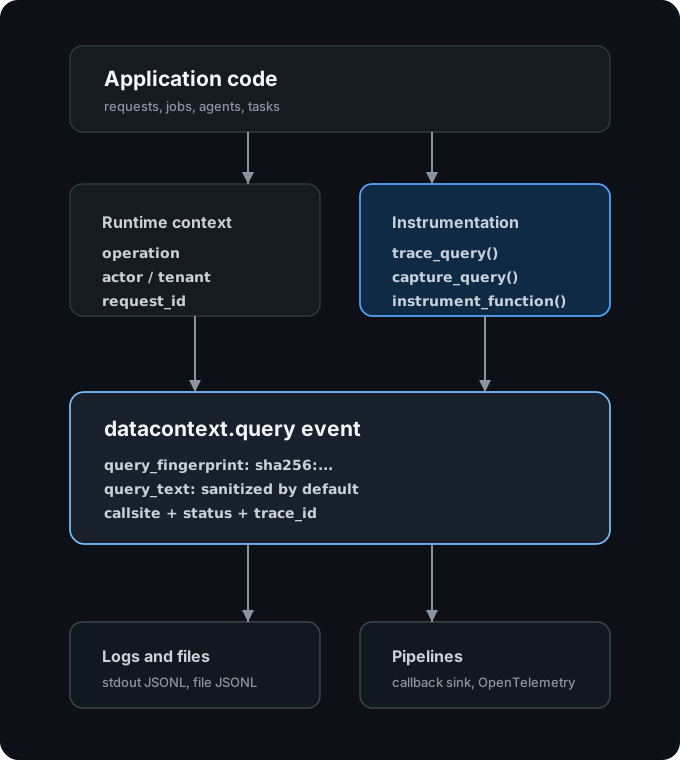
DataContext connects query events to runtime context, source callsites, and OpenTelemetry trace context when available.
How It Works
Supported Today
DataContext currently supports:
- manual query instrumentation with
trace_query(...)andcapture_query(...), - wrapping explicit data-access functions with
instrument_function(...), - SQLAlchemy engine instrumentation through the optional
sqlalchemyextra, - native PostgreSQL connection instrumentation through the optional
postgresextra, - native BigQuery client instrumentation through the optional
bigqueryextra, - Dagster execution context attribution through the optional
dagsterextra, - dbt execution context attribution through the optional
dbtextra, - native Snowflake connector instrumentation through the optional
snowflakeextra, - JSONL, callback, and OpenTelemetry-oriented sinks,
- correlating query events with runtime context and active OpenTelemetry spans.
Other database drivers are not automatically instrumented yet.
Planned Integrations
Other database clients, ORMs, and data-platform libraries will be prioritized from real usage.
Use GitHub Discussions or feature requests to share the library, data-access pattern, sync/async behavior, and event fields you need.
Add Runtime Context
DataContext is most useful when queries are connected to runtime context:
from datacontext import context

with context.use(
    operation="checkout",
    actor="user:123",
    request_id="req_abc",
    attributes={"tenant": "acme", "region": "us-east-1"},
):
    run_business_logic()
Any query captured inside the context includes that attribution.
Event Shape
DataContext emits one final event per query, at finish or error time.
Every normal event includes:
event_name,timestamp,started_at,ended_at,service_name,environment,db_system,client,query_fingerprint,duration_ms,callsite, andstatus.
The timestamp is the event finish time and matches ended_at. By default, events also include sanitized query_text; it can be disabled globally or per captured query. Optional fields are only present when DataContext can derive them or when the caller supplies them.
Example datacontext.query event:
{
  "event_name": "datacontext.query",
  "timestamp": "2026-05-15T10:31:04.203Z",
  "started_at": "2026-05-15T10:31:04.182Z",
  "ended_at": "2026-05-15T10:31:04.203Z",
  "service_name": "checkout-api",
  "environment": "production",
  "db_system": "postgres",
  "client": "internal-db-wrapper",
  "query_fingerprint": "sha256:4f5b7f...",
  "query_text": "select * from orders where id = ?",
  "duration_ms": 21.4,
  "callsite": {
    "file": "checkout.py",
    "path": "/app/checkout.py",
    "line": 42,
    "function": "load_cart",
    "stack": "checkout:42 load_cart -> routes:88 post_checkout"
  },
  "status": "ok",
  "trace_id": "0af7651916cd43dd8448eb211c80319c",
  "span_id": "b7ad6b7169203331",
  "trace_flags": "01",
  "operation": "checkout",
  "actor": "user:123",
  "request_id": "req_abc",
  "job_id": "job_456",
  "session_id": "sess_789",
  "rows": 12,
  "db_name": "checkout",
  "db_host": "postgres.internal",
  "attributes": {
    "tenant": "acme",
    "region": "us-east-1"
  }
}
On errors, DataContext emits status: "error" and includes compact error metadata before re-raising the original exception.
{
  "status": "error",
  "error": {
    "type": "ValueError",
    "message": "boom"
  }
}
Production Behavior
DataContext is designed to sit on production data-access paths without changing application behavior:
- wrappers preserve return values and re-raise original exceptions,
- DataContext capture failures fall back to a minimal event,
- sink failures are logged and dropped,
- sanitized
query_textis emitted by default, while raw SQL is explicit opt-in, - OpenTelemetry trace context is used when present, but DataContext does not configure tracing or exporters.
Schema Philosophy
DataContext uses a small, stable event shape on purpose.
The core schema answers the questions teams usually need first:
- what query shape ran,
- where it came from in code,
- which runtime context caused it,
- which trace or span it belongs to.
The schema is meant to work as JSON logs, warehouse rows, debugging artifacts, or observability events. Team-specific metadata belongs in attributes, so teams can extend events without changing the common attribution layer.
Manual Instrumentation
The Quick Start approach is the recommended default: configure DataContext once and wrap your existing data-access function. When that does not fit, you can instrument directly at the call site with the lower-level APIs:
with datacontext.trace_query(
    db_system="postgres",
    client="internal-db-wrapper",
    query=query,
):
    db.execute(query)
Use capture_query(...) when timing is already measured by your integration:
datacontext.capture_query(
    db_system="postgres",
    client="internal-db-wrapper",
    query=query,
    started_at=started_at,
    ended_at=ended_at,
    duration_ms=duration_ms,
    status="ok",
    rows=12,
)
SQLAlchemy
SQLAlchemy support is optional and only installed with the sqlalchemy extra. Pass an engine to instrument_sqlalchemy(...) during configuration:
import datacontext

datacontext.configure(
    service_name="checkout-api",
    environment="production",
    instruments=[
        datacontext.instrument_sqlalchemy(engine),
    ],
)
The integration listens to SQLAlchemy engine events and emits one DataContext event for each completed or failed statement. It also supports async engines by registering listeners on the underlying sync engine.
PostgreSQL
PostgreSQL support is optional and only installed with the postgres extra. It instruments a psycopg connection by wrapping connection-level execute(...) calls and cursors returned by cursor().
import datacontext
import psycopg

conn = psycopg.connect("postgresql://checkout@postgres.internal/checkout")

datacontext.configure(
    service_name="checkout-api",
    environment="production",
)
datacontext.instrument_postgres(conn).apply()

with conn.cursor() as cursor:
    cursor.execute("select * from orders where id = %s", [order_id])
The integration emits one DataContext event per completed or failed execute(...) or executemany(...) call. Events use db_system: "postgresql", client: "psycopg", and include db_name, db_host, and rows when available from the connection or cursor.
BigQuery
BigQuery support is optional and only installed with the bigquery extra. Pass a google.cloud.bigquery.Client to instrument_bigquery(...) during configuration:
from google.cloud import bigquery
import datacontext

client = bigquery.Client(project="analytics-prod")

datacontext.configure(
    service_name="warehouse-loader",
    environment="production",
    instruments=[
        datacontext.instrument_bigquery(
            client,
            labels={"service": "warehouse-loader"},
            job_id_prefix="warehouse_loader_",
        ),
    ],
)
The integration instruments Client.query_and_wait(...) and Client.query(...). For query(...), DataContext emits the event when the returned job's result() method completes or raises, so the duration follows the waited query rather than only job submission. Captured events use db_system: "bigquery", client: "google-cloud-bigquery", the client project as db_name, and BigQuery job metadata under attributes.
BigQuery job labels and job_id_prefix are opt-in. When configured, labels are injected through QueryJobConfig; if the call already passed a job_config, DataContext merges labels into it and user-defined labels win on matching keys. job_id_prefix is injected for Client.query(...) only if the call did not already pass job_id or job_id_prefix.
Dagster
Dagster support is optional and only installed with the dagster extra. DataContext does not replace Dagster observability, materializations, asset lineage, or run state. Dagster remains the source of truth for orchestration identity; DataContext adds Dagster metadata to query events emitted inside assets and ops.
Use the dependency-free context bridge inside a Dagster asset or op:
import datacontext as dc

@asset
def orders(context):
    with dc.use_dagster_context(context):
        run_queries()
When Dagster is installed, you can also use the native resource:
from datacontext import DataContextResource

@asset
def orders(context, datacontext: DataContextResource):
    with datacontext.use_context(context):
        run_queries()
Captured queries include the Dagster run id as job_id, the asset key or op name as operation, and Dagster details under attributes such as dagster.run_id, dagster.job_name, dagster.op_name, dagster.asset_key, and dagster.partition_key. Dagster run tags are included only when include_run_tags=True.
Snowflake
Snowflake connector support is optional and only installed with the snowflake extra. Configure it once before creating or using cursors:
import snowflake.connector

import datacontext

datacontext.configure(
    service_name="analytics-worker",
    environment="production",
    instruments=[
        datacontext.instrument_snowflake(),
    ],
)

conn = snowflake.connector.connect(
    account="acme-prod",
    user="loader",
    password="...",
    warehouse="analytics_wh",
    database="analytics",
    schema="public",
)

cursor = conn.cursor()
cursor.execute("select count(*) from orders")
The integration wraps snowflake-connector-python cursor execute, executemany, and execute_async. It emits db_system: "snowflake", client: "snowflake-connector-python", rows from cursor.rowcount when available, and Snowflake metadata under attributes, including snowflake.query_id from cursor.sfqid.
Richer Snowflake cost and performance metrics, such as bytes scanned, partitions scanned, execution time, spill bytes, load percent, and cloud-services credits, come from Snowflake Query History. DataContext does not query Query History inside the synchronous cursor wrapper; join those metrics later by attributes.snowflake.query_id.
dbt
dbt support is optional and only installed with the dbt extra. DataContext does not replace dbt artifacts, exposures, lineage, or run results. dbt remains the source of truth for transformation identity; DataContext adds dbt metadata to query events emitted inside Python models or other dbt-adjacent execution code.
Use the dependency-free context bridge inside a dbt Python model:
import datacontext as dc

def model(dbt, session):
    with dc.use_dbt_context(dbt):
        return run_queries(session)
Captured queries include the dbt invocation id as job_id, the model unique id or relation as operation, and dbt details under attributes such as dbt.invocation_id, dbt.node.unique_id, dbt.node.name, dbt.node.resource_type, dbt.node.package_name, dbt.this, and dbt.target.name.
Privacy and Query Text
DataContext emits query_fingerprint and sanitized query_text by default. Raw query text is not emitted unless you explicitly opt in.
To emit only the fingerprint without sanitized query text, disable query text:
datacontext.configure(
    service_name="checkout-api",
    environment="production",
    include_query_text=False,
)
The sanitizer uses the same normalization as fingerprinting: it replaces string and numeric literals with ?, normalizes whitespace, lowercases SQL, and compacts placeholder IN (...) lists.
To include exact raw SQL instead, use the explicit raw-query option:
datacontext.capture_query(
    db_system="postgres",
    client="internal-db-wrapper",
    query=query,
    started_at=started_at,
    ended_at=ended_at,
    duration_ms=duration_ms,
    status="ok",
    include_raw_query_text=True,
)
OpenTelemetry
DataContext uses OpenTelemetry context when it exists. It does not set up tracing, choose exporters, or replace your existing pipeline.
With an active span, DataContext adds trace_id, span_id, and trace_flags to emitted events. It can also attach compact datacontext.* attributes to the active span, including query fingerprint, status, duration, operation, and request ID.
Sinks
The default sink writes JSON Lines to stdout. You can send events to a file, a callback, or an OpenTelemetry-oriented sink.
Configure a file sink:
import datacontext
from datacontext.sinks import FileJsonlSink

datacontext.configure(
    service_name="checkout-api",
    environment="production",
    sink=FileJsonlSink("datacontext.jsonl"),
)
Configure a callback sink:
from datacontext.sinks import CallbackSink

datacontext.configure(
    service_name="checkout-api",
    environment="production",
    sink=CallbackSink(lambda event: send_to_pipeline(event)),
)
Sink failures are dropped and logged. They should not block application work.
Community
Use GitHub Discussions for questions, design feedback, and integration ideas.
Use GitHub Issues for bugs and focused feature requests.
License
Apache-2.0
1 maintainer

Download files
Download the file for your platform. If you're not sure which to choose, learn more about installing packages.
Source Distribution
Built Distribution
Filter files by name, interpreter, ABI, and platform.
If you're not sure about the file name format, learn more about wheel file names.
Copy a direct link to the current filters
File details
Details for the file datacontext-0.1.1.tar.gz.
File metadata
- Download URL: datacontext-0.1.1.tar.gz
- Upload date:
- Size: 21.8 kB
- Tags: Source
- Uploaded using Trusted Publishing? No
- Uploaded via:
twine/6.2.0 CPython/3.9.6
File hashes
| Algorithm | Hash digest | |
|---|---|---|
| SHA256 |
c30fba1984256f121165cf66cddfd2925d0763d8977e0ac679e3edc5d4d82787
|
|
| MD5 |
b71dff1f688c50646b5bb9435656a31b
|
|
| BLAKE2b-256 |
32bedf91ca667e0605521354dae21aa7af8514af60dd581a06a7430a2f8803a8
|
File details
Details for the file datacontext-0.1.1-py3-none-any.whl.
File metadata
- Download URL: datacontext-0.1.1-py3-none-any.whl
- Upload date:
- Size: 30.5 kB
- Tags: Python 3
- Uploaded using Trusted Publishing? No
- Uploaded via:
twine/6.2.0 CPython/3.9.6
File hashes
| Algorithm | Hash digest | |
|---|---|---|
| SHA256 |
7ca5da2e12bcec1e4ebef1761a1cbbae34b4edc4186da7fbf1c56505578470f4
|
|
| MD5 |
b6cb97cc02d80fbff5631d3f2bd412ab
|
|
| BLAKE2b-256 |
26b61643ba320f7c1577e57d50932ed5a618d12151e94319b31f5f4d81f4a6d6
|














