







DataCoolie — Multi-engine, Multi-platform Data Pipeline Framework
DataCoolie is a metadata-driven Python data pipeline framework. It supports SQL and custom Python sources, unifies compatible execution across Polars and Spark, and runs on Local, Microsoft Fabric, Databricks and AWS environments. It is batch-first and scales stages through independently launched Driver jobs.
What problem does it solve?
Data teams often prototype pipelines locally, then rewrite the same pipeline for Spark and again for each cloud runtime. That duplicates ETL code and makes operational behavior such as watermarks, schema hints, partitions, load strategies, and maintenance drift across environments.
DataCoolie solves this by separating pipeline intent from execution details. You define connections, dataflows, transforms, and operational controls as metadata, then run the same intent on Polars or Spark and on local, Fabric, Databricks, or AWS platforms.
A source can combine multiple operations into one engine-compatible DataFrame through SQL or a Python function. Built-in transformers operate on that current DataFrame; the project runner remains responsible for engine setup, custom table registration, credentials and host-specific configuration.
Why it helps
- Metadata-driven — pipeline behavior lives in metadata instead of being re-implemented in each job.
- Right-sized compute — small and medium jobs can stay on lighter runtimes like Polars or local execution instead of paying Spark or cluster overhead too early.
- Portable — reuse one canonical metadata model across environments, with overlays and runners for target-specific paths, catalogs, engines, and runtimes.
- Engine-unified — compatible pipeline intent runs on Spark and Polars through engine-specific runners.
- Cloud-agnostic —
local,aws,fabric,databricksplatforms abstract file I/O and secrets. - Lakehouse-native — first-class Delta Lake and Apache Iceberg via the shared
fmt="delta"/fmt="iceberg"API; concrete addressing and optional dependencies vary by engine. - Operationally complete — watermarks, schema hints, partitions, load strategies, logging, and maintenance are built in.
- Extensible components — engines, platforms, sources, destinations, transformers, and secret resolvers use registries with Python entry-point discovery; built-ins are also registered in-process.
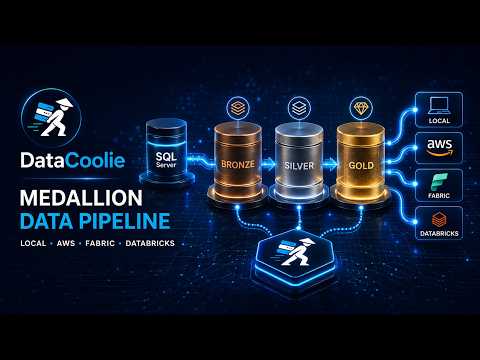
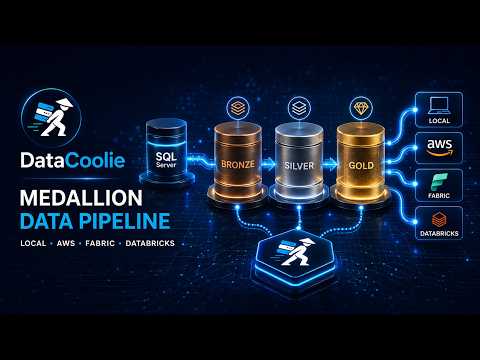
See DataCoolie in action
Watch the short demos to see the metadata-driven workflow from setup through pipeline execution:
| English demo | Vietnamese demo |
|---|---|
 |
 |
Start here
If you are evaluating DataCoolie for the first time, use this order:
- Install the smallest useful runtime:
pip install "datacoolie[polars-delta]" - Run the quick start below
- Then move to the docs for using your own input and building a multi-stage flow
If you already know your runtime will be Spark, swap the install to
pip install "datacoolie[spark-delta]" and keep the same metadata pattern.
Installation
# Most common first install
pip install "datacoolie[polars-delta]"

# Spark-first local validation
pip install "datacoolie[spark-delta]"

# Add stable hash_columns support to a Polars runtime
pip install "datacoolie[polars-delta,polars-hash]"

# Core only (mainly useful for extension work)
pip install datacoolie

# Project tooling (init, validate, inspect, build, metadata conversion)
pip install "datacoolie[cli]"

# All engines
pip install "datacoolie[all]"

# External platform SDKs (native Fabric/Databricks runtimes use base install)
pip install "datacoolie[fabric-external]"
pip install "datacoolie[databricks-external]"
pip install "datacoolie[aws]"  # AWS, MinIO, or LocalStack
The project CLI is intentionally preparation-only; run dataflows from a
project-owned Python script or notebook so custom engine setup remains under
user control. The dc and datacoolie executables are equivalent aliases.
See the DataCoolie user guide and
CLI reference.
Extras are composable by use case rather than by a platform × engine matrix.
For example, polars-delta,source-db-oracle-polars,aws covers a Polars Delta
pipeline that reads Oracle and writes to S3. Use
source-db-native-polars when a MySQL or MSSQL source must retain unsigned
integer and high-precision decimal values before schema-hint casting.
Quick Start
Install, then run two short scripts:
prepare_quickstart.pycreates a sample CSV andmetadata.json.run_quickstart.pyloads that metadata and runs the pipeline.
pip install "datacoolie[polars]"
Part 1 — Prepare sample data and metadata
# prepare_quickstart.py
import json
from pathlib import Path

root = Path("dc_quickstart")
(root / "input" / "orders").mkdir(parents=True, exist_ok=True)
(root / "output").mkdir(parents=True, exist_ok=True)

(root / "input/orders/orders.csv").write_text(
    "order_id,customer_id,amount\n1,100,19.99\n2,100,42.50\n3,101,7.25\n"
)

metadata = {
    "connections": [
        {"name": "csv_in", "connection_type": "file", "format": "csv",
         "configure": {"base_path": str(root / "input"),
                "read_options": {"header": "true", "inferSchema": "true"}}},
        {"name": "parquet_out", "connection_type": "file", "format": "parquet",
         "configure": {"base_path": str(root / "output")}},
    ],
    "dataflows": [
        {"name": "orders_csv_to_parquet", "stage": "bronze2silver",
         "processing_mode": "batch",
         "source": {"connection_name": "csv_in", "table": "orders"},
         "destination": {"connection_name": "parquet_out", "table": "orders",
                         "load_type": "full_load"},
         "transform": {}},
    ],
}
metadata_path = root / "metadata.json"
metadata_path.write_text(json.dumps(metadata, indent=2))
print(f"Created {metadata_path}")
python prepare_quickstart.py
Part 2 — Run the pipeline
# run_quickstart.py
from pathlib import Path

from datacoolie.engines.polars_engine import PolarsEngine
from datacoolie.platforms.local_platform import LocalPlatform
from datacoolie.metadata.file_provider import FileProvider
from datacoolie.orchestration.driver import DataCoolieDriver

root = Path("dc_quickstart")
metadata_path = root / "metadata.json"

platform = LocalPlatform()
engine = PolarsEngine(platform=platform)
provider = FileProvider(config_path=str(metadata_path), platform=platform)

with DataCoolieDriver(engine=engine, metadata_provider=provider) as driver:
    result = driver.run(stage="bronze2silver")
    print(f"Completed: {result.succeeded}/{result.total}")
python run_quickstart.py
Reuse the same dataflow intent with SparkEngine or a cloud platform by adding
the target runtime dependencies, runner, and environment-specific paths or
catalog settings. Compatibility is per selected engine, address mode, and
installed optional dependency.
What to do next
- Understand the framework and ecosystem boundary: https://datacoolie.github.io/datacoolie/introduction/
- Use your own files while keeping the same runner pattern: https://datacoolie.github.io/datacoolie/guide/getting-started/use-your-own-data/
- Configure Driver paths, replay and run attributes: https://datacoolie.github.io/datacoolie/guide/operations/runtime-configuration/
- Build a multi-stage bronze→silver tutorial flow: https://datacoolie.github.io/datacoolie/guide/getting-started/multi-stage-dataflow/
- Learn the metadata model field by field: https://datacoolie.github.io/datacoolie/guide/metadata/
- Install the official DataCoolie Skills workflow: https://datacoolie.github.io/datacoolie/introduction/ai-skills/
- Watch the WWI multi-cloud Medallion walkthrough: https://datacoolie.github.io/datacoolie/examples/wwi-medallion-multicloud/
AI-assisted project workflow
DataCoolie Skills are an official public feature. Install the five lifecycle
Skills with
npx skills add datacoolie/datacoolie. The framework-facing project source of
truth remains datacoolie.yml, its configured metadata/components, and
project-owned runners. Generated builds and .runtime state stay separate
from source; agent approvals and evidence are workflow concerns documented by
the Skills guide and do not change the Driver runtime contract.
The shared project and framework contract lives in the public project workflow
and runtime configuration guide.
ai/AGENTS.md is the agent routing and safety layer: it routes
work by required outcome, while discovery, material design, provisioning, and
explicit release retain their separate exact-scope gates.
See the public DataCoolie Skills guide for prerequisites, installation, routing, project state, and approval boundaries.
Testbed & scenarios
See usecase-sim/README.md for a ready-made integration
testbed that exercises the local {polars,spark} × {file,database,api} matrix,
selected AWS-platform file scenarios, lakehouse maintenance, and a Docker-compose
backend stack. It is a representative scenario set, not a full platform cross-product.
License
AGPL-3.0-or-later — free and open source.
See CONTRIBUTING.md for contribution terms.
1 maintainer

Metadata
1 maintainer
Release files for datacoolie 0.2.0
For a detailed explanation of source distributions (sdists) and built distributions (wheels), please see the package formats documentation.
Source distribution (sdist)
| File | Size | Uploaded | Provenance | Actions |
|---|---|---|---|---|
| datacoolie-0.2.0.tar.gz | 486.9 kB | With provenance | Details for datacoolie-0.2.0.tar.gz |
Built distribution (wheel)
| File | Interpreter | ABI | Platform | Actions Reset |
|---|---|---|---|---|
| datacoolie-0.2.0-py3-none-any.whl | Python 3 | none | any | Details for datacoolie-0.2.0-py3-none-any.whl |
Total release size: 1.1 MB
Release files / datacoolie-0.2.0.tar.gz
| Download URL | datacoolie-0.2.0.tar.gz |
|---|---|
| Size | 486.9 kB |
| Tags | Source |
|
SHA-256 checksum How to use checksums |
278e233eeaa98834fed439806ef0e6efced4ef7ce3e89cf5577dad38a0a51e4b
|
|
BLAKE2b-256 checksum How to use checksums |
1512f531f63794c79c7e0ebb3f77a9af347af458c0b644df09b6ec0083a25100
|
| Upload date | |
|
Uploaded using Trusted Publishing? What is trusted publishing? |
Yes |
| Uploaded via |
twine/7.0.0 CPython/3.13.16
|
Provenance
Provenance describes where a file came from. On PyPI, provenance is shared via attestations, which provide a verifiable record of the build or publishing details. View details, limitations and caveats.


PyPI Publish Attestation
PyPI verified that this artifact, at this checksum, originated from the publisher listed below.
Signed by GitHub Actions, verified by PyPI on Oct 21, 2026.
Transparency logRelease files / datacoolie-0.2.0-py3-none-any.whl
| Download URL | datacoolie-0.2.0-py3-none-any.whl |
|---|---|
| Size | 614.4 kB |
| Tags | Python 3 |
|
SHA-256 checksum How to use checksums |
99a0a770cec47fc4bc612fa443313a1274b70f97a10310ec5de9675d215a12da
|
|
BLAKE2b-256 checksum How to use checksums |
94a416fceb57d5c9f5c026292b6768fd76189c9ecdd3e16d46a7470fa3b2152c
|
| Upload date | |
|
Uploaded using Trusted Publishing? What is trusted publishing? |
Yes |
| Uploaded via |
twine/7.0.0 CPython/3.13.16
|
Provenance
Provenance describes where a file came from. On PyPI, provenance is shared via attestations, which provide a verifiable record of the build or publishing details. View details, limitations and caveats.
PyPI Publish Attestation
PyPI verified that this artifact, at this checksum, originated from the publisher listed below.
Signed by GitHub Actions, verified by PyPI on Oct 21, 2026.
Transparency logSecurity for datacoolie 0.2.0
Provenance
Provenance describes where a file came from. On PyPI, provenance is shared via attestations, which provide a verifiable record of the build or publishing details. View details, limitations and caveats.
Full provenance
Both files in this release have been uploaded with provenance metadata.
Attestation for datacoolie-0.2.0.tar.gz
PyPI Publish Attestation
PyPI verified that this artifact, at this checksum, originated from the publisher listed below.
Signed by GitHub Actions, verified by PyPI on Oct 21, 2026.
Transparency logA note on package security
PyPI is a repository for distributing packages, not a service for auditing them. While third-party security researchers and our staff do their best to detect and remove malicious packages, PyPI cannot guarantee the quality, security or suitability of any given package.
To learn more about protecting yourself from malicious actors, visit our package security documentation.














