

Description
Converse with Your Data Through Open Source AI.
Unleash the power of your data with natural language questions.
Our open-source platform, built on Ollama, delivers powerful insights without the cost of APIs.
Integrate effortlessly with your existing infrastructure, connecting to various data sources including SQL, NoSQL, CSV, and XLS files.
Obtain in-depth analytics by aggregating data from multiple sources into a unified platform, providing a holistic view of your business.
Convert raw data into valuable insights, facilitating data-driven strategies and enhancing decision-making processes.
Design intuitive and interactive charts and visual representations to simplify the understanding and interpretation of your business metrics.
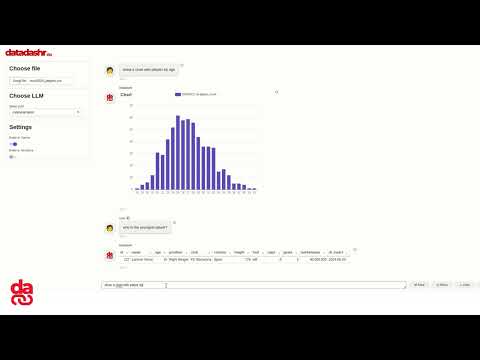
DataDashr Installation and Setup Guide
Installation
To install the DataDashr package, run the following command:
pip install datadashr
Requirements
To ensure a fully local system, we utilize Ollama and Codestral models. Follow these steps to set up the necessary components.
Step 1: Download Ollama
Download Ollama from the following link: https://ollama.com/download
Step 2: Install Models
Install the Codestral model for data processing by running the following command:
ollama pull codestral
Install the Llama3 model for conversation by running the following command:
ollama pull llama3
Install the Nomic-Embed-Text model for embedding by running the following command:
ollama pull nomic-embed-text
Configuration
Create a default settings file named datadashr_settings.json at the same level as your main script. This file should contain the following configuration:
{
  "llm_context": {
    "model_name": "llama3",
    "api_key": "None",
    "llm_type": "ollama"
  },
  "llm_data": {
    "model_name": "codestral",
    "api_key": "None",
    "llm_type": "ollama"
  },
  "vector_store": {
    "store_type": "chromadb"
  },
  "embedding": {
    "embedding_type": "ollama",
    "model_name": "nomic-embed-text:latest"
  },
  "enable_cache": "False",
  "format_type": "data",
  "reset_db": "True",
  "verbose": "True"
}
Initializing DataDashr
To initialize the DataDashr object with your data and LLM instance, use the following code:
from datadashr import DataDashr

# Define your import_data dictionary with your data sources
import_data = {
    'sources': [
        {"source_name": "employees_df", "data": employees_df, "source_type": "pandas",
         "description": "Contains employee details including their department.", "save_to_vector": False},
        {"source_name": "salaries_df", "data": salaries_df, "source_type": "pandas",
         "description": "Contains salary information for employees.", "save_to_vector": False},
        {"source_name": "departments_df", "data": departments_df, "source_type": "pandas",
         "description": "Contains information about departments and their managers.", "save_to_vector": False},
        {"source_name": "projects_df", "data": projects_df, "source_type": "pandas",
         "description": "Contains information about projects and the employees assigned to them.",
         "save_to_vector": False},
    ],
    'mapping': {
        "employeeid": [
            {"source": "employees_df", "field": "id"},
            {"source": "salaries_df", "field": "employeeid"},
            {"source": "projects_df", "field": "employeeid"}
        ],
        "department": [
            {"source": "employees_df", "field": "department"},
            {"source": "departments_df", "field": "department"}
        ]
    }
}

# Initialize DataDashr with the imported data
df = DataDashr(data=import_data)

# Execute a query on the combined DataFrame
result = df.chat('Show the Charlie salary', response_mode='data')

# Print the result
pprint(result)
Response Modes
response_mode = 'data': The system interacts with data in a tabular manner, automatically generating SQL queries and providing responses that include one or more tables, charts, or both.
response_mode = 'context': Enables RAG (Retrieval-Augmented Generation) mode, where data is vectorized. In this mode, you can import various sources such as PDFs, DOCs, websites, etc., and interact with the data naturally.
Here's an example of how to use the chat method with different response modes:
# Using response_mode 'data' for tabular interaction
result_data = df.chat('Show the Charlie salary', response_mode='data')
pprint(result_data)

# Using response_mode 'context' for natural interaction with vectorized data
result_context = df.chat('Explain the employee structure', response_mode='context')
pprint(result_context)
This tutorial provides a comprehensive guide to installing, configuring, and using DataDashr for both Pandas and Polars DataFrames, as well as interacting with data in different response modes.
1 maintainer

Metadata
1 maintainer
Release files for datadashr 0.2.5
For a detailed explanation of source distributions (sdists) and built distributions (wheels), please see the package formats documentation.
Source distribution (sdist)
| File | Size | Uploaded | |
|---|---|---|---|
| datadashr-0.2.5.tar.gz | 11.3 MB | Details |
Built distribution (wheel)
| File | Interpreter | ABI | Platform | Reset |
|---|---|---|---|---|
| datadashr-0.2.5-py3-none-any.whl | Python 3 | none | any | Details |
Total release size: 22.9 MB
Release files / datadashr-0.2.5.tar.gz
| Download URL | datadashr-0.2.5.tar.gz |
|---|---|
| Size | 11.3 MB |
| Tags | Source |
|
SHA-256 checksum How to use checksums |
a3f95384e497d46e764359be0e13206584bf573d49b97ee34b8b51706e2a7189
|
|
BLAKE2b-256 checksum How to use checksums |
6e4a6099224d0894a4d69dcc0d0763e0953f2e962b6f05279be08facfa81aae4
|
| Upload date | |
|
Uploaded using Trusted Publishing? What is trusted publishing? |
No |
| Uploaded via |
poetry/1.8.3 CPython/3.10.12 Linux/6.9.3-76060903-generic
|
Release files / datadashr-0.2.5-py3-none-any.whl
| Download URL | datadashr-0.2.5-py3-none-any.whl |
|---|---|
| Size | 11.6 MB |
| Tags | Python 3 |
|
SHA-256 checksum How to use checksums |
d67801c2eb1277d4256b727630cb49919c3b0894bc272595787b84cd2cc3ba93
|
|
BLAKE2b-256 checksum How to use checksums |
12177ea41330151ba4d4d8f77e3e418bb5dac80723baf5a392121772c569dba7
|
| Upload date | |
|
Uploaded using Trusted Publishing? What is trusted publishing? |
No |
| Uploaded via |
poetry/1.8.3 CPython/3.10.12 Linux/6.9.3-76060903-generic
|














