

The best Python package for comparing two dataframes
Explore the docs »
Table of Contents
About The Project
DataDelta is a very useful Python package for easily comparing two pandas dataframes for use in data analysis, data engineering, and tracking table changes across time.
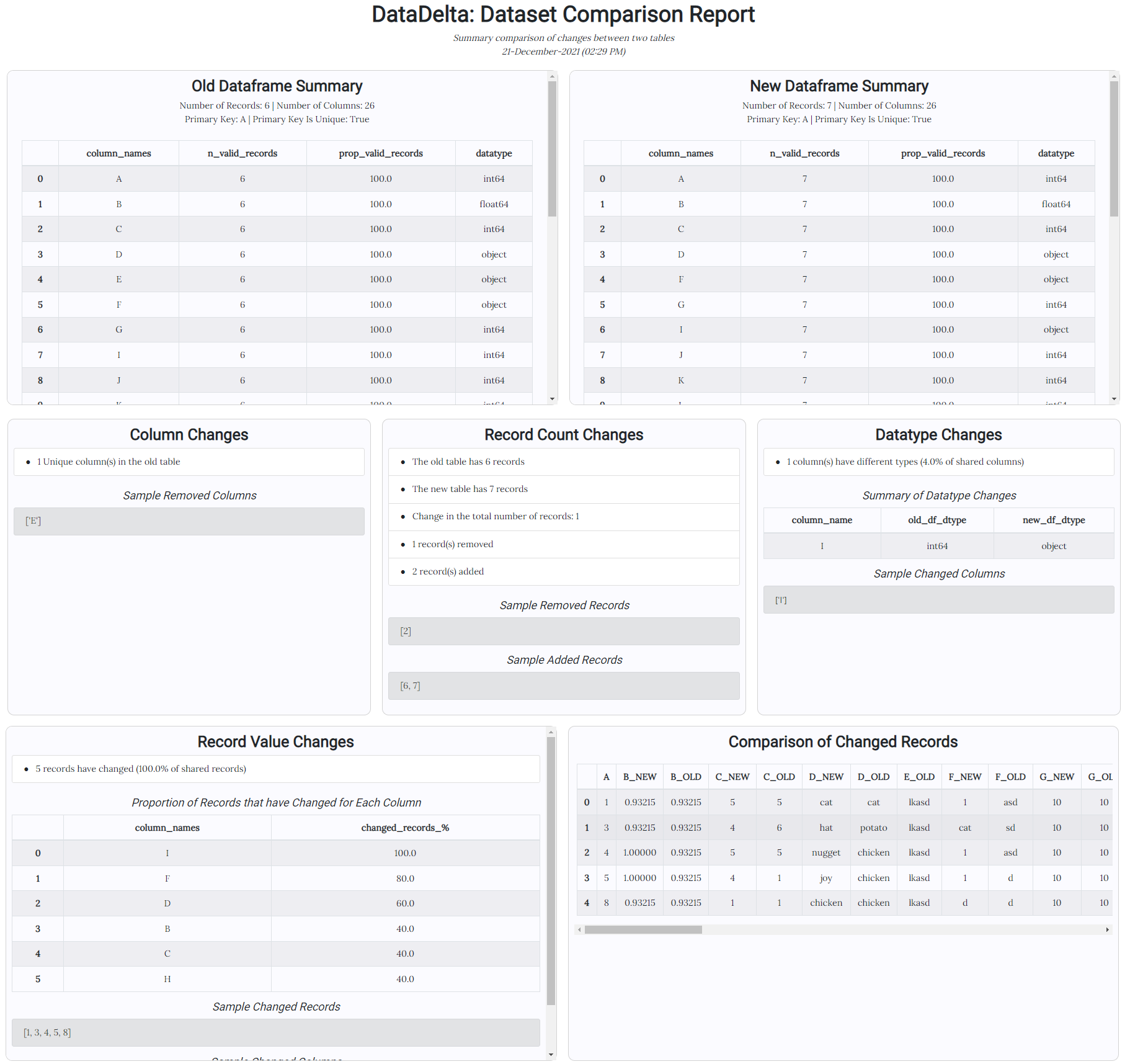
DataDelta generates a report as both a Python dict and HTML file that summarizes the key changes between two dataframes through completing a series of tests (that can also be selected individually). The Python report is intended for use as part of a DevOps / DataOps pipeline for testing to ensure table changes are expected.
Getting Started
DataDelta is easy to install through pip or feel free to clone locally to make changes.
Dependencies
DataDelta has very few dependencies:
- pandas: a fast, powerful, flexible and easy to use open source data analysis and manipulation tool - DataDelta is built on for comparing dataframes
- numpy: The fundamental package for scientific computing with Python - used for transformations and calculations
- jinja2: a fast, expressive, extensible templating engine - used to generate the HTML report
- pytest (optional): a mature full-featured Python testing tool that helps you write better programs - used for testing
Installation
- Install using Pip through PyPI:
pip install datadelta
OR
- Clone the repo locally:
git clone https://github.com/gibbsbravo/DataDelta.git
Usage Examples
-
Quick starter code to get summary dataframe changes report:
import pandas as pd
import datadelta as delta

old_df = pd.read_csv('MainTestData_old_df.csv') # Add your old dataframe here
new_df = pd.read_csv('MainTestData_new_df.csv') # Add your new dataframe here
primary_key = 'A' # Set the primary key
column_subset = None # Specify the subset of columns of interest or leave None to compare all columns

# The consolidated_report dictionary will contain the summary changes
consolidated_report, record_changes_comparison_df = delta.create_consolidated_report(
    old_df, new_df, primary_key, column_subset)

# This will create a report named datadelta_html_report.html in the current working directory containing the summary changes
delta.export_html_report(consolidated_report, record_changes_comparison_df,
                      export_file_name='datadelta_html_report.html',
                      overwrite_existing_file=False)
-
Get dataframe summary:
  import pandas as pd
  import datadelta as delta

  new_df = pd.read_csv('MainTestData_new_df.csv') # Add your new dataframe here

  # Returns a report summarizing the key attributes and values of a dataframe
  summary_report = delta.get_df_summary(
    input_df=new_df, primary_key=primary_key, column_subset=column_subset, max_cols=15)
-
Get record count changes report:
  old_df = pd.read_csv('MainTestData_old_df.csv') # Add your old dataframe here
  new_df = pd.read_csv('MainTestData_new_df.csv') # Add your new dataframe here
  primary_key = 'A' # Set the primary key
  column_subset = None # Specify the subset of columns of interest or leave None to compare all columns

  # Returns a report summarizing any changes to the number of records (and composition) between two dataframes
  record_count_change_report = delta.check_record_count(
    old_df, new_df, primary_key)
Other functions include:
- check_column_names: Returns a report summarizing any changes to column names between two dataframes
- check_datatypes: Returns a report summarizing any columns with different datatypes
- check_chg_in_values: Returns a report summarizing any records with changes in values
- get_records_in_both_tables: Returns the records found in both dataframes
- get_record_changes_comparison_df: Returns a dataframe comparing any records with changes in values by column
- export_html_report: Exports an html report of the differences between two dataframes
Contributing
Contributions are what make the open source community such an amazing place to learn, inspire, and create. Any contributions you make are greatly appreciated.
If you have a suggestion that would make this better, please fork the repo and create a pull request. You can also simply open an issue with the tag "enhancement". Don't forget to give the project a star! Thanks again!
- Fork the Project
- Create your Feature Branch (
git checkout -b feature/AmazingFeature) - Commit your Changes (
git commit -m 'Add some AmazingFeature') - Push to the Branch (
git push origin feature/AmazingFeature) - Open a Pull Request
Example HTML Report Output
License
Distributed under the GNU General Public License v3 (GPLV3) License. See LICENSE.txt for more information.
Contact
Andrew Gibbs-Bravo - andrewgbravo@gmail.com
Project Link: https://github.com/gibbsbravo/DataDelta
1 maintainer

Metadata
1 maintainer
Release files for datadelta 0.0.2
For a detailed explanation of source distributions (sdists) and built distributions (wheels), please see the package formats documentation.
Source distribution (sdist)
| File | Size | Uploaded | |
|---|---|---|---|
| datadelta-0.0.2.tar.gz | 293.8 kB | Details |
Built distribution (wheel)
| File | Interpreter | ABI | Platform | Reset |
|---|---|---|---|---|
| datadelta-0.0.2-py3-none-any.whl | Python 3 | none | any | Details |
Total release size: 328.5 kB
Release files / datadelta-0.0.2.tar.gz
| Download URL | datadelta-0.0.2.tar.gz |
|---|---|
| Size | 293.8 kB |
| Tags | Source |
|
SHA-256 checksum How to use checksums |
afc6e92af9dd18933fa8695fe067d405b7b9fee728dd57851babc923b908d003
|
|
BLAKE2b-256 checksum How to use checksums |
9fa9ba52a38bd173bd7e966469b83ddd4e9fd824cf58713f965f7b7f8c7dc688
|
| Upload date | |
|
Uploaded using Trusted Publishing? What is trusted publishing? |
No |
| Uploaded via |
twine/3.7.1 importlib_metadata/4.10.0 pkginfo/1.8.2 requests/2.26.0 requests-toolbelt/0.9.1 tqdm/4.62.3 CPython/3.7.0
|
Release files / datadelta-0.0.2-py3-none-any.whl
| Download URL | datadelta-0.0.2-py3-none-any.whl |
|---|---|
| Size | 34.7 kB |
| Tags | Python 3 |
|
SHA-256 checksum How to use checksums |
3ce225b842fcd7fa83188d9cc029c121a3f2976ac3f37b32514819d2f4226255
|
|
BLAKE2b-256 checksum How to use checksums |
c048a800c80548a7bfb416d2f99cc9f2725f5e9c4e63c2568f50f7a8b4300436
|
| Upload date | |
|
Uploaded using Trusted Publishing? What is trusted publishing? |
No |
| Uploaded via |
twine/3.7.1 importlib_metadata/4.10.0 pkginfo/1.8.2 requests/2.26.0 requests-toolbelt/0.9.1 tqdm/4.62.3 CPython/3.7.0
|














