
datadiff-engine
What changed between yesterday's data and today's?
A lightweight dataset diff and drift analysis toolkit for data engineers.





Install | Quick start | Python API | CLI | Methodology | Roadmap
Overview
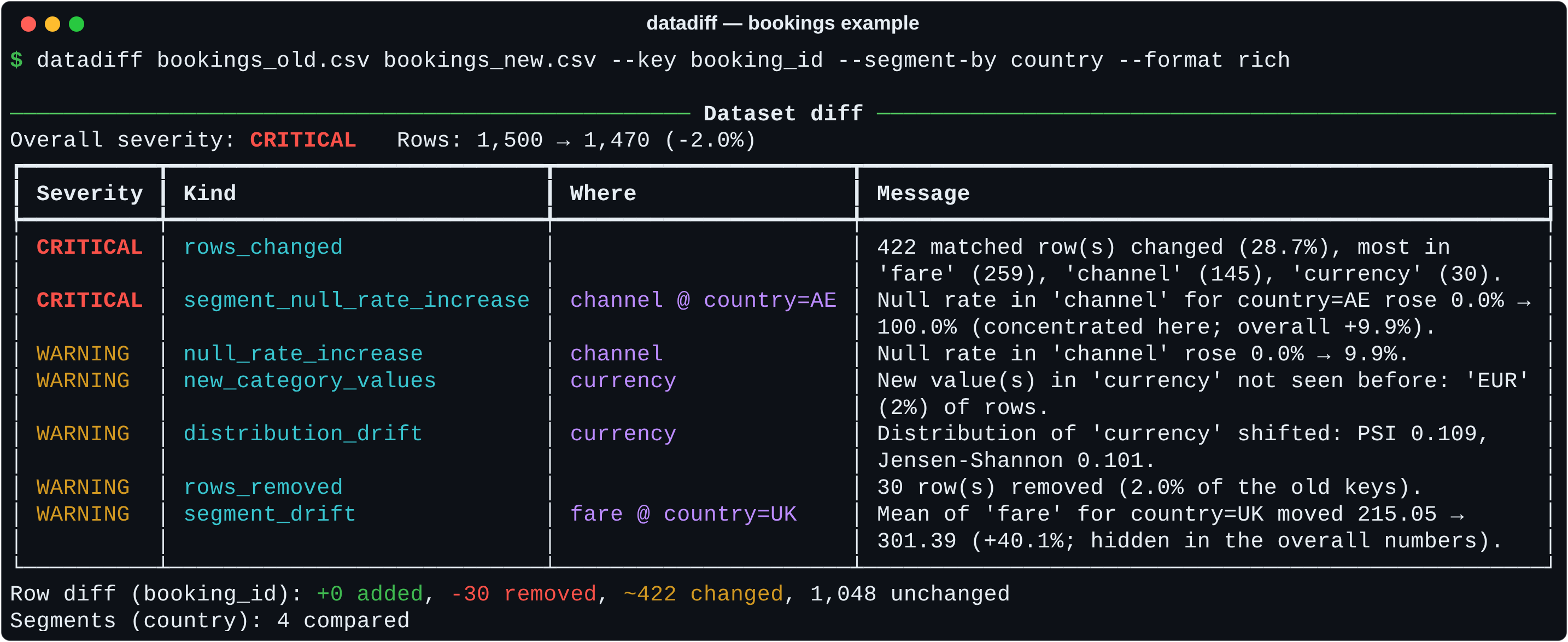
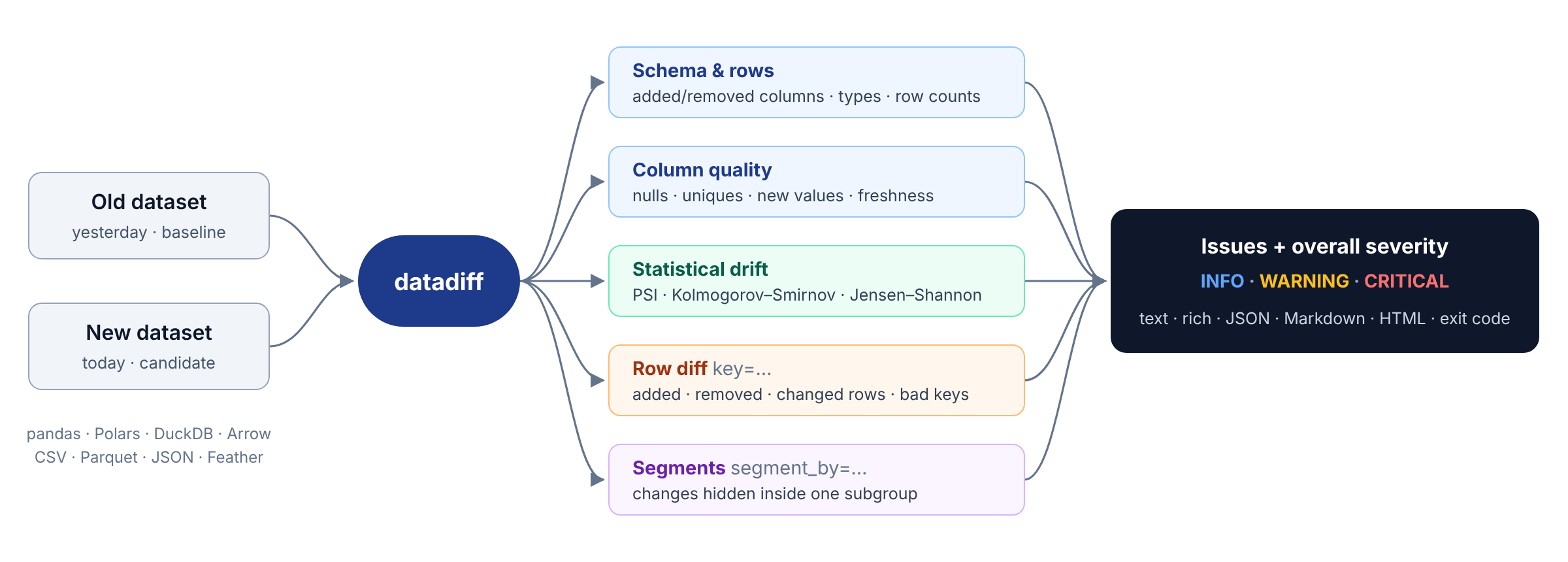
Data pipelines can produce outputs that are technically valid but unexpectedly different. datadiff-engine compares two datasets and makes those differences visible, so you can catch silent regressions before they reach downstream consumers.
| Check | What it catches |
|---|---|
| Row counts | Unexpected growth or drops |
| Schema | Added or removed columns, data-type changes |
| Null rates | Silent data-quality regressions |
| Unique values | Cardinality changes and collapsed columns |
| Numeric statistics | Shifts in summary statistics |
| Numeric drift | Relative change in mean, median and P95 |
| Categoricals | Changes in categorical statistics |
| Severity | Configurable warning and critical thresholds |
Output is available as a Python object, a terminal report, or JSON for automation. The CLI supports CSV and Parquet.
Install
pip install datadiff-engine
Requires Python 3.10 or newer.
Quick start
Compare two files from the command line:
datadiff examples/orders_old.csv examples/orders_new.csv
Or compare two DataFrames in Python:
import pandas as pd

from datadiff_engine import compare

old = pd.DataFrame({
    "customer_id": [1, 2, 3],
    "amount": [100, 200, 300],
})

new = pd.DataFrame({
    "customer_id": [1, 2, 3, 4],
    "amount": [100, 200, None, 500],
    "country": ["IN", "IN", "US", "IN"],
})

diff = compare(old, new)

print(diff)
In this example the comparison reports that the row count grew from 3 to 4, a new country column appeared, and amount gained a null value.
Output:
DATASET DIFF
========================================

ROWS
  3 → 4
  Change: +1 (+33.33%)

SCHEMA
  + Added:   ['country']
  - Removed: none
  ~ Changed: amount (int64 → float64)

COLUMN CHANGES
----------------------------------------
amount
  Data type: int64 → float64
  Null rate: 0.00% → 25.00% (+25.00 pp)
  Severity:  CRITICAL

  Statistics
    Mean:    200.00 → 266.67
    Median:  200.00 → 200.00
    Min:     100.00 → 100.00
    Max:     300.00 → 500.00
    P95:     290.00 → 470.00
Python API
Column-level analysis
amount = diff.column("amount")

print(amount.old_dtype)
print(amount.new_dtype)

print(amount.null_rate_old)
print(amount.null_rate_new)
print(amount.null_rate_change)

print(amount.severity)
Numeric statistics and drift
if amount.old_stats and amount.new_stats:
    print(amount.old_stats.mean)
    print(amount.new_stats.mean)

if amount.drift:
    print(amount.drift.mean_change_pct)
    print(amount.drift.has_drift)
Custom thresholds
from datadiff_engine import DiffConfig, compare

config = DiffConfig(
    warning_null_rate=0.10,
    critical_null_rate=0.50,
)

diff = compare(old, new, config=config)
Excluding identifier columns from numeric drift
config = DiffConfig(
    ignored_columns={"customer_id"},
)

diff = compare(old, new, config=config)
The column remains part of the comparison; only numeric drift analysis is skipped for it.
Issues and overall severity
Every diff can summarise itself as a list of issues, most severe first, plus one overall severity. This is the easiest thing to act on in a pipeline, an alert, or an AI agent.
for issue in diff.issues():
    print(issue.severity, issue.kind, issue.column, issue.message)

if diff.overall_severity == "CRITICAL":
    raise RuntimeError("Bad batch, not loading it")
| Issue kind | When | Severity |
|---|---|---|
empty_dataset |
new dataset has no rows (old one had some) | CRITICAL |
row_count_change |
row count moved past the configured % | WARNING / CRITICAL |
column_removed |
a column disappeared | CRITICAL |
column_added |
a new column appeared | INFO |
type_changed |
a column's data type changed | WARNING |
null_rate_increase |
null rate rose past the configured thresholds | WARNING / CRITICAL |
new_category_values |
a low-cardinality text column (status, currency, channel...) has values never seen before | WARNING |
numeric_drift |
mean, median or p95 moved past drift_threshold_pct |
WARNING |
All thresholds live in DiffConfig:
config = DiffConfig(
    warning_null_rate=0.05,
    critical_null_rate=0.20,
    drift_threshold_pct=20.0,
    warning_row_change_pct=20.0,
    critical_row_change_pct=50.0,
    max_categories_for_new_value_check=50,  # skip free text / IDs
    new_value_min_share=0.01,                # ignore one-off values
)
Machine-readable output
result = diff.to_dict()
The returned structure is JSON-friendly and designed for pipeline and automation use. It starts with a summary block (overall_severity, issue_count, issues). Values that JSON cannot represent, such as infinite drift from a zero baseline or the statistics of an all-null column, are reported as null, so the output always serialises as strict JSON.
CLI
| Task | Command |
|---|---|
| Compare CSV files | datadiff old.csv new.csv |
| Compare Parquet files | datadiff old.parquet new.parquet |
| Return JSON | datadiff old.csv new.csv --json |
| Ignore columns for numeric drift | datadiff old.csv new.csv --ignore customer_id |
| Fail (exit code 1) on critical issues | datadiff old.csv new.csv --fail-on critical |
| Tune thresholds | datadiff old.csv new.csv --drift-threshold 10 --critical-row-change 30 |
| Show help | datadiff --help |
Exit codes: 0 OK, 1 the --fail-on threshold was reached, 2 bad input (missing file, unsupported format).
Using it in automation
Because the CLI can emit JSON, it fits naturally into scheduled jobs and CI. For example, a GitHub Actions step that compares two snapshots and keeps the report as a build artifact:
- name: Compare datasets (fails the job on critical issues)
  run: |
    pip install datadiff-engine
    datadiff data/yesterday.parquet data/today.parquet --json --fail-on critical > diff.json

- name: Upload diff report
  uses: actions/upload-artifact@v4
  with:
    name: datadiff-report
    path: diff.json
The same pattern works in Airflow, cron jobs, or any orchestrator that can run a shell command.
Drift methodology
The current release uses a lightweight heuristic for numeric drift. It compares relative changes in selected summary statistics:
- Mean
- Median
- P95
A configurable threshold decides whether any tracked statistic changed beyond the allowed level.
This is intentionally simple and fast. It is not intended to replace formal statistical distribution-drift tests, such as KS or PSI based approaches. Use it as a quick first line of defense that tells you where to look.
Supported inputs
| Interface | Formats |
|---|---|
| Python API | pandas.DataFrame |
| CLI | CSV, Parquet |
Roadmap
- Row, schema, null-rate and unique-value comparison
- Numeric summary statistics and drift heuristics
- Categorical statistics
- Configurable severity thresholds
- JSON output
- CSV and Parquet support in the CLI
- Issues list with overall severity, row-count thresholds, new categorical values, strict-JSON output,
--fail-onquality gate (0.2.0) - More advanced statistical drift methods
- Better categorical drift analysis
- Datetime-aware profiling
- Polars support
- DuckDB integration
- Rich terminal output
- Markdown and HTML reports
- More configurable analysis rules
Development
Set up a development environment
python -m venv .venv
Windows:
.\.venv\Scripts\Activate.ps1
Install the project with development dependencies:
pip install -e ".[dev]"
Run tests:
pytest
Build and validate distributions:
python -m build
python -m twine check dist/*
Project structure
datadiff-engine/
├── .github/
│   └── workflows/
│       ├── tests.yml
│       └── release.yml
├── examples/
│   ├── orders_old.csv
│   └── orders_new.csv
├── docs/
│   └── demo-terminal.png
├── src/
│   └── datadiff_engine/
│       ├── __init__.py
│       ├── compare.py
│       └── cli.py
├── tests/
│   └── test_compare.py
├── demo.py
├── LICENSE.txt
├── README.md
├── pyproject.toml
└── .gitignore
Release process
The project uses GitHub Actions for CI and PyPI publishing. The current release is 0.1.0, published through GitHub Actions Trusted Publishing.
Contributing
Issues, ideas and pull requests are welcome. Before submitting a change, run:
pytest
If you find the project useful, consider starring the repository.
License
Released under the MIT License. See LICENSE.
Author
Rohesen Rajkamal Maurya
Built as an open-source data-engineering utility for comparing datasets and understanding changes in pipeline outputs.
1 maintainer

Metadata
1 maintainer
Release files for datadiff-engine 0.2.2
For a detailed explanation of source distributions (sdists) and built distributions (wheels), please see the package formats documentation.
Source distribution (sdist)
| File | Size | Uploaded | Provenance | Actions |
|---|---|---|---|---|
| datadiff_engine-0.2.2.tar.gz | 21.3 kB | With provenance | Details for datadiff_engine-0.2.2.tar.gz |
Built distribution (wheel)
| File | Interpreter | ABI | Platform | Actions Reset |
|---|---|---|---|---|
| datadiff_engine-0.2.2-py3-none-any.whl | Python 3 | none | any | Details for datadiff_engine-0.2.2-py3-none-any.whl |
Total release size: 36.2 kB
Release files / datadiff_engine-0.2.2.tar.gz
| Download URL | datadiff_engine-0.2.2.tar.gz |
|---|---|
| Size | 21.3 kB |
| Tags | Source |
|
SHA-256 checksum How to use checksums |
2ea0910f60e224023a66adc54b1dd101856780f6a2d2f2eef58ec25e59221100
|
|
BLAKE2b-256 checksum How to use checksums |
a2fe3e574864d22be5ce1ba54b2ba2e6ba84d6bb809aa4ad125533a28ac48506
|
| Upload date | |
|
Uploaded using Trusted Publishing? What is trusted publishing? |
Yes |
| Uploaded via |
twine/7.0.0 CPython/3.13.14
|
Provenance
Provenance describes where a file came from. On PyPI, provenance is shared via attestations, which provide a verifiable record of the build or publishing details. View details, limitations and caveats.


PyPI Publish Attestation
PyPI verified that this artifact, at this checksum, originated from the publisher listed below.
Signed by GitHub Actions, verified by PyPI on Oct 19, 2026.
Transparency logRelease files / datadiff_engine-0.2.2-py3-none-any.whl
| Download URL | datadiff_engine-0.2.2-py3-none-any.whl |
|---|---|
| Size | 15.0 kB |
| Tags | Python 3 |
|
SHA-256 checksum How to use checksums |
a8000fff277e7f882deb67278c08d77054daf4842994cc90dd18ba6679eb6d60
|
|
BLAKE2b-256 checksum How to use checksums |
5f2db032bcde6488d3237c51ce4e53ae5cc1e1130fa8a834ee0a995ae7484c68
|
| Upload date | |
|
Uploaded using Trusted Publishing? What is trusted publishing? |
Yes |
| Uploaded via |
twine/7.0.0 CPython/3.13.14
|
Provenance
Provenance describes where a file came from. On PyPI, provenance is shared via attestations, which provide a verifiable record of the build or publishing details. View details, limitations and caveats.
PyPI Publish Attestation
PyPI verified that this artifact, at this checksum, originated from the publisher listed below.
Signed by GitHub Actions, verified by PyPI on Oct 19, 2026.
Transparency logSecurity for datadiff-engine 0.2.2
Provenance
Provenance describes where a file came from. On PyPI, provenance is shared via attestations, which provide a verifiable record of the build or publishing details. View details, limitations and caveats.
Full provenance
Both files in this release have been uploaded with provenance metadata.
Attestation for datadiff_engine-0.2.2.tar.gz
PyPI Publish Attestation
PyPI verified that this artifact, at this checksum, originated from the publisher listed below.
Signed by GitHub Actions, verified by PyPI on Oct 19, 2026.
Transparency logA note on package security
PyPI is a repository for distributing packages, not a service for auditing them. While third-party security researchers and our staff do their best to detect and remove malicious packages, PyPI cannot guarantee the quality, security or suitability of any given package.
To learn more about protecting yourself from malicious actors, visit our package security documentation.














