
Datakrit
Check and clean table files, explicitly.
CSV files with numbers and dates in the formats you declare, nothing guessed. A Python CLI, library, and local browser interface. Offline, typed, and MIT licensed.
Datakrit was called CSV Tidy until 1.2.0.


Quick start · Local interface · Profiles · Library · Configuration · Changelog
Datakrit helps you find, understand, and explicitly repair CSV data problems before importing
the data elsewhere: inconsistent field counts, missing required values, duplicate records and
keys, numbers in Indonesian (1.250,50), US (1,250.50), or canonical (1250.50) notation,
and numeric dates such as DD/MM/YYYY. It never guesses: it repairs only what you select,
reports everything else with record and line locations, and refuses to export a result that
still has errors.
Status: 2.1. Profiles, command-line options, exit codes, issue codes, JSON reports, and
the Python API follow Semantic Versioning; docs/STABILITY.md lists
exactly what stays compatible in 2.x. The look and layout of the local interface are not part
of that promise. Coming from an earlier version? See the upgrade section near the end, or
Migrating from 0.x. It works
locally and offline, with no telemetry or AI services; only the explicit datakrit update
command goes online. It has not yet been tested in sessions with outside users; that is
planned after 1.0, and feedback is welcome (see Feedback).
There are three ways to use the same engine:
| You are | Use | Start with |
|---|---|---|
| A developer automating imports | the datakrit command or the Python API |
Quick start |
| Someone who works in Excel and prefers forms | the local interface, datakrit ui (one file or several files) |
Local interface |
| Processing a folder of exports | datakrit batch, or several files in datakrit ui |
Many files |
Features
- Strict CSV reading: comma, semicolon, or tab, UTF-8 with or without BOM (or an explicit encoding), quoted fields with delimiters, quotes and line breaks, LF/CRLF. Undecodable bytes and malformed quoting stop the scan instead of being skipped.
- Structure checks: empty file, header-only file, blank lines, empty/duplicate headers, and records with too few or too many fields.
- Reusable TOML profiles: required columns,
text/decimal/datetypes, number grammars, date formats, duplicate-row policy, and uniqueness keys.datakrit profile initwrites a starting profile from a file's header, with optional guided questions. - Identifiers such as
00123and081234567890stay text; nothing is converted to numbers. - Explicit transformations: trim selected columns, normalize selected numbers/dates, neutralize spreadsheet formulas in selected text columns, remove duplicates keeping the first record. Exact decimal arithmetic; no floats, no rounding.
- Dry-run preview with before/after examples and complete counts.
- Safe export: never overwrites the input (including symlink/hardlink aliases), refuses
existing files unless
--overwrite, and writes each file atomically. - Generated output profile that validates the cleaned file and makes a second clean a no-op.
- Reports that start with the verdict, say what was and was not checked, list unresolved problems before repaired ones, and end with the next step. English text and JSON with stable issue codes and documented exit codes.
- Batch processing of files and folders with one profile and separate results per file.
- A local browser interface that runs the same pipeline without a command line, for one file or several files with the same rules (results per file, all results as one ZIP).
Installation
There are three ways to install Datakrit. This README describes version 2.2.0; changes made after a release are listed under "Unreleased" in the changelog.
From PyPI
Requires Python 3.11 or newer. Install Datakrit from PyPI inside a virtual environment:
py -3 -m venv .venv
.\.venv\Scripts\python.exe -m pip install datakrit
.\.venv\Scripts\datakrit.exe --version
On Linux/macOS: python3 -m venv .venv, then .venv/bin/python -m pip install datakrit.
If you use pipx, pipx install datakrit installs the programs into
their own environment and puts them on your PATH.
Windows app (no Python needed)
The Windows app is a desktop app for the local interface: no Python, no terminal, and no
console window. It opens in its own window (an app window of Microsoft Edge, which Windows
10 and 11 include) and stops when you close that window or press Quit. For the
datakrit command or the Python API, install from PyPI instead.
-
Open the latest release on the Releases page and download the installer
Datakrit-2.2.0-windows-x64-setup.exe. -
Check the file. In PowerShell, in the folder that holds the download, run
Get-FileHash .\Datakrit-2.2.0-windows-x64-setup.exe -Algorithm SHA256
and compare the hash with the SHA-256 of the installer in the release notes. If they differ, do not run it; delete the file and download it again from the Releases page.
-
Double-click the installer. It installs Datakrit for your Windows user only (no administrator rights needed), adds Datakrit to the Start Menu and, if you tick the box, to the Desktop. Start Datakrit from there.
The app is not code-signed, so Windows SmartScreen may say "Windows protected your PC" the first time. Only for a file you downloaded from the official release page and checked as above: choose More info, then Run anyway. Never do this for a copy from anywhere else.
To update the app, run the installer of the new release, checked in the same way; it replaces the installed version, and profiles keep working. To remove it, use Settings > Apps > Installed apps > Datakrit > Uninstall. If Edge (or Google Chrome) is missing, the app opens its page in your default browser instead.
Without installing: Datakrit-2.2.0-windows-x64.zip holds the same app as a folder. Check
its hash in the same way, unzip it, and double-click Datakrit\Datakrit.exe; to update,
replace the folder. The licenses folder of the app holds the license notices of Datakrit
and of the software the app bundles.
From the GitHub release (wheel) or a source checkout
Requires Python 3.11 or newer. Every release on the
GitHub Releases page also carries a wheel and
a source distribution. Download the wheel datakrit-2.2.0-py3-none-any.whl from the latest
release and install it inside a virtual environment:
py -3 -m venv .venv
.\.venv\Scripts\python.exe -m pip install <path-to>\datakrit-2.2.0-py3-none-any.whl
.\.venv\Scripts\datakrit.exe --version
On Linux/macOS: python3 -m venv .venv, then
.venv/bin/python -m pip install <path-to>/datakrit-2.2.0-py3-none-any.whl. You can also
install from a source checkout:
Windows PowerShell (calling the virtual environment's programs directly, so the ExecutionPolicy does not need to change):
git clone https://github.com/JudikaM/datakrit.git
cd datakrit
py -3 -m venv .venv
.\.venv\Scripts\python.exe -m pip install .
.\.venv\Scripts\datakrit.exe --version
Linux/macOS:
git clone https://github.com/JudikaM/datakrit.git
cd datakrit
python3 -m venv .venv
.venv/bin/python -m pip install .
.venv/bin/datakrit --version
After installing with pip
For people who do not use a command line. After installing with pip, run this once for each Windows user (or Linux user) who will use Datakrit:
.\.venv\Scripts\datakrit.exe shortcut install
It adds a Datakrit icon to the Desktop and the Start Menu, which opens the
local interface in the browser without a
console window, and an Update Datakrit entry to the Start Menu. The icons keep working
after updates; datakrit shortcut remove removes them again.
Updating. datakrit update (or the Update Datakrit entry) installs the latest
release from GitHub with pip, which verifies the SHA-256 that GitHub publishes for the wheel;
it is the same file as on PyPI, so python -m pip install --upgrade datakrit works as well.
datakrit update is the only command that connects to the internet, and only when you run
it; datakrit update --check just reports whether a newer version exists. Close Datakrit
before updating. Profiles keep working across versions.
How the examples are written. Every command below is written for Windows PowerShell and
a virtual environment named .venv, so it can be pasted as is from the folder that holds
it:
.\.venv\Scripts\datakrit.exe .... On Linux/macOS replace that program with
.venv/bin/datakrit (and \ in paths with /). If the virtual environment is activated, or
Datakrit is installed where your shell finds it, plain datakrit ... works; the hints
printed by the tool use that short form. python -m datakrit is equivalent. For development
setup, see CONTRIBUTING.md.
Quick start
Four steps with the synthetic examples in this repository: check → preview → apply → re-check.
# 1. Check: what is wrong? (exit code 1: two errors)
.\.venv\Scripts\datakrit.exe check examples\transactions_fixable.csv --profile examples\profiles\transactions-id.toml

# 2. Preview: what would the selected repairs change? (writes nothing)
.\.venv\Scripts\datakrit.exe clean examples\transactions_fixable.csv --profile examples\profiles\transactions-id.toml

# 3. Apply: write the cleaned copy and a profile that describes it
.\.venv\Scripts\datakrit.exe clean examples\transactions_fixable.csv --profile examples\profiles\transactions-id.toml --apply --output output\transactions_clean.csv --output-profile output\transactions.output.toml

# 4. Re-check the result with its generated profile (exit code 0)
.\.venv\Scripts\datakrit.exe check output\transactions_clean.csv --profile output\transactions.output.toml
The profile describes the source data and which repairs you allow (examples/profiles/transactions-id.toml):
schema_version = 1

[source]
delimiter = ";"
number_format = "id"          # 1.250,50
date_format = "DD/MM/YYYY"

[output]
number_format = "canonical"   # 1250.50
date_format = "YYYY-MM-DD"

[columns.transaction_id]
type = "text"
required = true

[columns.customer_id]
type = "text"
required = true

[columns.amount]
type = "decimal"
required = true

[columns.date]
type = "date"
required = true

[duplicates]
keys = [["transaction_id"]]

[transform]
trim = ["customer_id", "amount", "date"]
normalize = ["amount", "date"]
1. Check
Datakrit 2.2.0 - check
Verdict: FAILED - 2 errors found in the source file.
Source: examples\transactions_fixable.csv
Profile: examples\profiles\transactions-id.toml
  delimiter ';', encoding utf-8 (BOM absent), numbers id, dates DD/MM/YYYY
Scan: complete; 4 data records, 5 physical lines, 0 blank lines
Checked: file structure; values in 4 of 5 columns: transaction_id (text, required), customer_id (text, required), amount (decimal, id, required), date (date, DD/MM/YYYY, required); unique key (transaction_id); duplicate rows (warning)
Not checked: values in 1 column without rules (note)
Result: 2 errors, 0 warnings

Issues (showing 2 of 2, errors first):
  ERROR invalid_number (record 2, line 3, column 'amount')
    ' 980,00 ' is not a valid number: the value has leading or trailing whitespace.
    Suggestion: Select trimming for 'amount' (transform trim) or fix the source value.
  ERROR invalid_date (record 3, line 4, column 'date')
    '28/02/2026 ' is not a valid date: the value has leading or trailing whitespace.
    Suggestion: Select trimming for 'date' (transform trim) or fix the source value.

Next steps:
  - Fix the listed values in the source file, or preview explicit repairs (a dry run that writes nothing): datakrit clean examples\transactions_fixable.csv --profile examples\profiles\transactions-id.toml

Status: source validation failed (exit code 1)
The Checked and Not checked lines state the coverage of the run. Without column rules
only the file structure is checked: numbers, dates, required values, and unique keys are
checked only for columns declared in a profile, and nothing is inferred from the data. A run
without rules says so even when it passes:
.\.venv\Scripts\datakrit.exe check examples\transactions_unfixable.csv --delimiter ";"
Verdict: PASSED (structure only) - the file structure is consistent, but values were not checked because no column rules are declared.
...
Checked: file structure; duplicate rows (warning)
Not checked: values in all 5 columns without rules (transaction_id, customer_id, amount, date, note)
...
Status: structure check passed; values were not checked (exit code 0)
That file contains the date 31/02/2026 and the amount abc; they are reported as soon as a
profile declares date and amount (see Create a profile).
JSON for pipelines (stdout contains only JSON; status messages go to stderr):
.\.venv\Scripts\datakrit.exe check examples\transactions_unfixable.csv --profile examples\profiles\transactions-id.toml --format json --report output\report.json
2. Preview a clean (dry run is the default)
Datakrit 2.2.0 - clean (dry run, nothing written)
Verdict: READY TO EXPORT - no errors remain in the cleaned result; 2 source problems repaired.
...
Transformations (applied in this order):
  1. trim: customer_id, amount, date
  2. normalize: amount (id -> canonical), date (DD/MM/YYYY -> YYYY-MM-DD)
  3. deduplicate: off

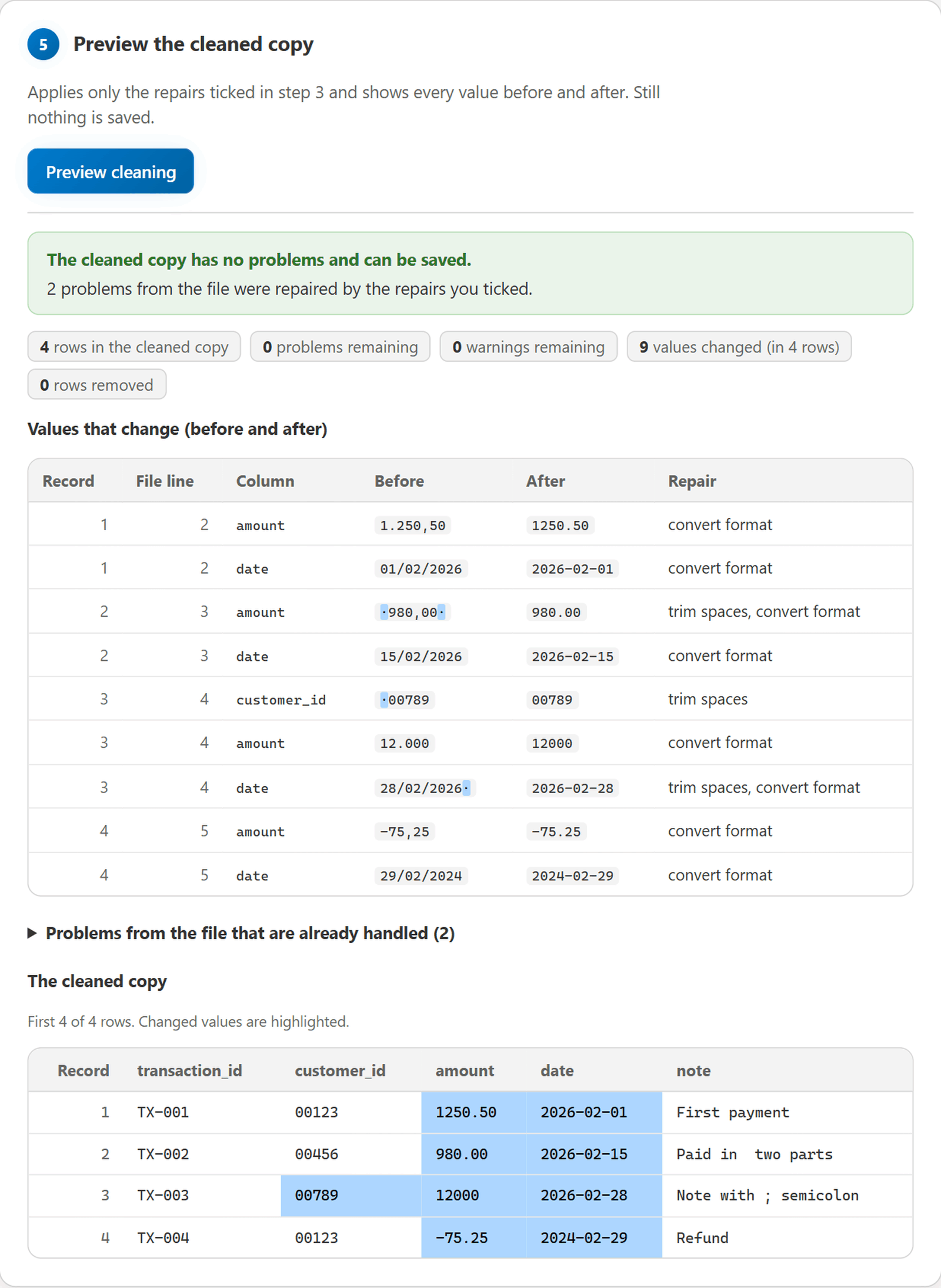
Changes: 9 fields changed in 4 records; 0 records removed; 4 records in the result
  record 1 (line 2), 'amount': '1.250,50' -> '1250.50' [normalize]
  record 2 (line 3), 'amount': ' 980,00 ' -> '980.00' [trim, normalize]
  record 3 (line 4), 'customer_id': ' 00789' -> '00789' [trim]
  ...

Still to fix: nothing; the cleaned result has no errors or warnings.

Repaired by the selected transformations: 2 (no action needed)
  FIXED invalid_number (record 2, line 3, column 'amount')
    Was: ' 980,00 ' is not a valid number: the value has leading or trailing whitespace.
  FIXED invalid_date (record 3, line 4, column 'date')
    Was: '28/02/2026 ' is not a valid date: the value has leading or trailing whitespace.

Source issues before cleaning: 2 errors, 0 warnings (2 resolved, 0 unresolved, 0 removed with records)

Export: ready (run with --apply --output PATH to write it)
Problems that remain are listed first under Still to fix; problems that the selected
transformations repaired are listed separately as FIXED (or REMOVED when the record was
removed as a duplicate), so the report never shows a solved problem as an open error.
3. Apply, and save the output profile
Result of step 3 (customer_id keeps its leading zeros; the untouched note column keeps
its double space):
transaction_id;customer_id;amount;date;note
TX-001;00123;1250.50;2026-02-01;First payment
TX-002;00456;980.00;2026-02-15;Paid in  two parts
TX-003;00789;12000;2026-02-28;"Note with ; semicolon"
TX-004;00123;-75.25;2024-02-29;Refund
4. Re-check
The generated output profile describes the cleaned file, so step 4 reports
Verdict: PASSED - no errors found by the declared rules., and a second clean with it makes
no changes:
.\.venv\Scripts\datakrit.exe clean output\transactions_clean.csv --profile output\transactions.output.toml
Problems that cannot be repaired block the export
.\.venv\Scripts\datakrit.exe clean examples\transactions_unfixable.csv --profile examples\profiles\transactions-id.toml --apply --output output\invalid_result.csv
Verdict: BLOCKED - 3 errors remain in the cleaned result; nothing can be exported.
...
Still to fix: 3 errors, 0 warnings in the cleaned result (0 introduced by transformations)
  ERROR invalid_date (record 1, line 2, column 'date')
    '31/02/2026' is not a valid date: it could not be normalized because it matches DD/MM/YYYY but is not a valid calendar date.
    Suggestion: Correct the date in the source; invalid calendar dates are never guessed.
  ERROR missing_required (record 2, line 3, column 'customer_id')
  ERROR invalid_number (record 3, line 4, column 'amount')
...
Export: blocked by 3 remaining output errors; no CSV is written.
  output CSV: output\invalid_result.csv - not_written (output errors remain)
Other examples: US-format customers (customers-us.toml
with customers_valid.csv, customers_fixable.csv), canonical data
(transactions-canonical.toml), and
customers_trim_duplicates.csv, where trimming creates a duplicate key. That file is blocked
until you add --deduplicate keys.
Create a profile
profile init reads the header of a file and writes a starting profile in which every
column is text. It never guesses types from values or column names; you choose them.
# A template to edit by hand (never prompts; safe in scripts and CI)
.\.venv\Scripts\datakrit.exe profile init examples\transactions_fixable.csv --delimiter ";" --output output\my-profile.toml

# Guided questions: which columns are numbers or dates, required, unique, and what to repair
.\.venv\Scripts\datakrit.exe profile init examples\transactions_fixable.csv --output output\my-profile.toml --interactive

# Everything as options, for automation
.\.venv\Scripts\datakrit.exe profile init examples\transactions_fixable.csv --delimiter ";" --output output\my-profile.toml --decimal amount --date date --number-format id --date-format DD/MM/YYYY --required transaction_id --key transaction_id --trim amount --trim date --normalize amount --normalize date --output-number-format canonical --output-date-format YYYY-MM-DD
A column whose format differs from the rest of the file gets its own with
--column-number-format amount=us or --column-date-format due=MM/DD/YYYY.
The delimiter and encoding you give are written into the profile. An existing profile file is
refused unless --overwrite is given, the input can never be the output, unknown column
names and inconsistent choices are rejected before anything is written, and the guided mode
can be cancelled with q or Ctrl+C (exit code 130, nothing written). Profiles made this way
work with check, clean, batch, and the local interface. Details:
docs/CONFIGURATION.md.
Local interface (for people who prefer forms)
Start it with the Datakrit icon (see Installation), the datakrit-ui
program, or from a command line:
.\.venv\Scripts\datakrit.exe ui
This starts a small web server on this computer only and opens a page in your browser. The page is laid out like a desktop application:
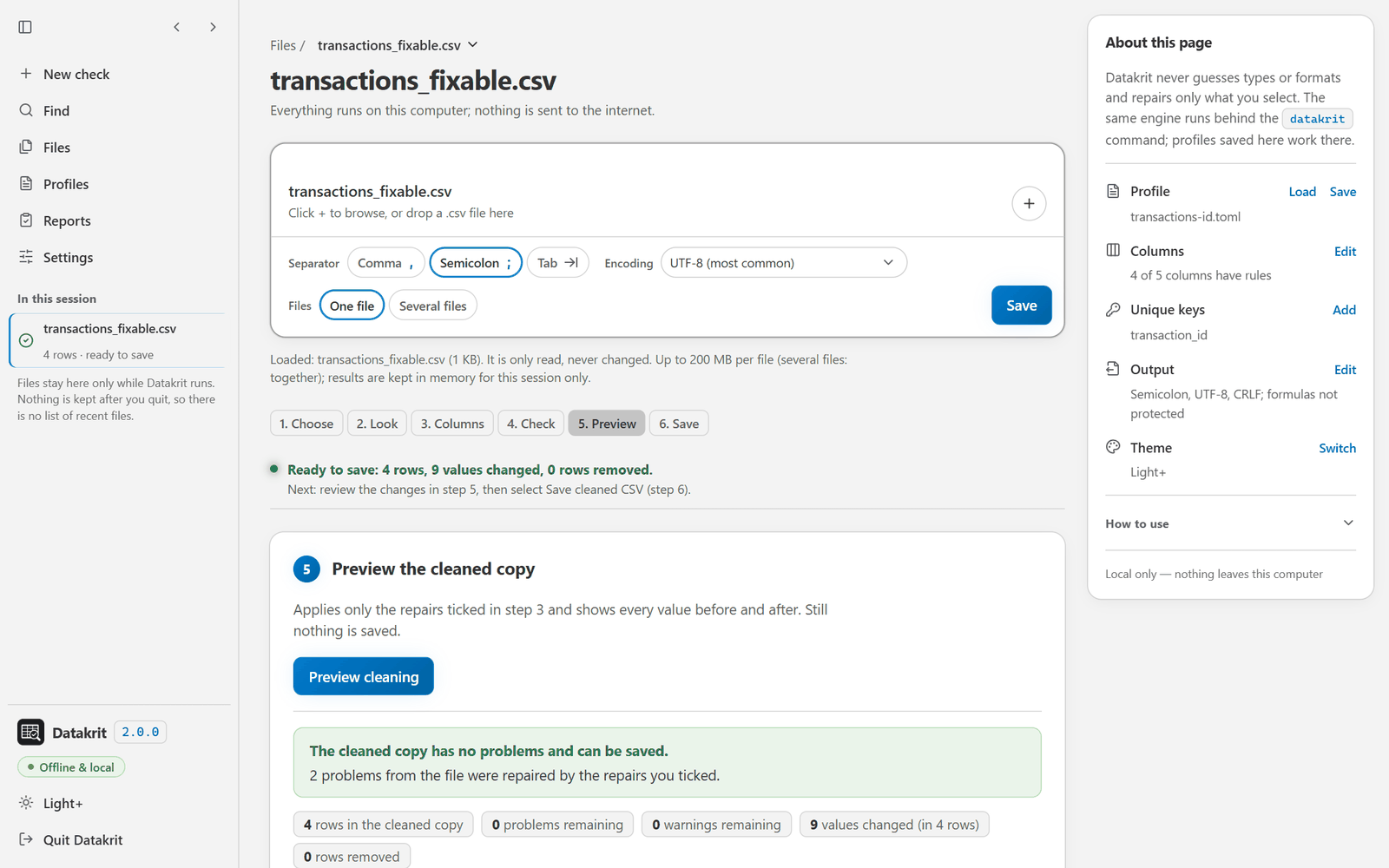
- Side bar (left; it folds to a row of icons, and opens over the page in a phone-sized window): New check (start again with nothing loaded), Find (show only the table rows of the current step that contain a word: a column, a value, or a problem), Files, Profiles, Reports, and Settings (each leads to where that part lives), and In this session: every loaded file with its row count and whether it is not checked yet, has problems, or is fine. Clicking a file opens its latest result. At the bottom: the version, the theme switch (dark and light), and Quit Datakrit.
- Main column: a card takes the file (drop it, or use +) with its separator, encoding, and one file or several files, and one button that does the next thing: Check, then Preview cleaning, then Save. Under it, the steps show one at a time: the one you pick, or the one with the newest result.
- Side panel (right; under the main column in narrower windows): the current Profile (Load, Save), how many Columns have rules (Edit), the Unique keys (Add), and the Output separator, encoding, line ending, and formula protection (Edit). Each action leads to the control in step 3; nothing is changed from the panel itself. Under these rows, How to use opens a short guide: the six steps in one line each (each step name leads to that step) and a tip about reusing profiles. It is closed until you open it, and the page remembers your choice.
The steps:
- Choose one file or several files with the same rules, then the separator (comma semicolon, or tab) and the encoding.
- Look at the first rows exactly as they are stored (with several files, pick which one).
- Describe the columns with drop-downs and checkboxes, or load a profile.
- Check: problems are listed with record, file line, column, and what to do. With several files there is one row per file (No problems, Problems found, Not fully read, Failed) and Details opens the problems of a file.
- Preview the cleaned copy: every changed value is shown before and after. With several files each file is Ready or Blocked (or could not be read), with the reason.
- Save the cleaned CSV, the profile of the cleaned file, the report, and your rules as a profile (through the browser's download folder). With several files: Save CSV per ready file, or Save all results as ZIP: a cleaned CSV and output profile for every ready file, a report for every file, and a batch summary. Files that are blocked or could not be read are never exported; they are in the ZIP as reports only.
Dates are chosen from a list of common formats (with an example such as 31/12/2026), and
Other… accepts any supported format. Suggestions name the page's own controls, for
example Tick "Repair: trim spaces" for "amount" in step 3. Every control works with the
keyboard alone, focus is always visible, the page follows the system's reduced-motion
setting, and text keeps a contrast of at least 4.5:1 in both themes (checked automatically
in a headless browser; a session with a screen reader is planned after 1.0).
More settings also holds the longest allowed value (max_field_chars, saved in profiles)
and how many problems, changed values, and preview rows are listed (counts stay complete;
saved reports use the same limits).
The page always shows the current status and the next step, clears results that no longer
match when the file or a setting changes, and explains why saving is blocked while problems
remain. It uses the same functions as the commands; a profile saved from the page works with
datakrit check, and a profile written for the commands can be loaded into the page.
Privacy and safety: the server listens on 127.0.0.1 only, the page loads nothing from the
internet, and the address contains a one-time key without which other programs and web pages
cannot use it. The chosen files are copied into a private temporary folder that is removed
when you select Quit (or press Ctrl+C in the window that started it). Started from the icon,
without a console window, it also stops by itself 10 minutes after its page was closed
(datakrit ui --idle-minutes N does the same from a command line). Your original files
are never written to. Options: --port N, --no-browser, --max-file-mb N (largest file,
and largest total of several files together; default 200). The limits of the interface are
listed under Supported conventions and limits. A
step-by-step guide for first-time users is in
docs/USER_TESTING.md.
Many files at once
# Preview every transactions_*.csv file directly inside examples\ with one profile
.\.venv\Scripts\datakrit.exe batch clean examples --pattern "transactions_*.csv" --profile examples\profiles\transactions-id.toml

# Write the files that are ready, their output profiles, and one report per file
.\.venv\Scripts\datakrit.exe batch clean examples --pattern "transactions_*.csv" --profile examples\profiles\transactions-id.toml --apply --output-dir output\cleaned --output-profiles --report-dir output\reports --format json
Datakrit 2.2.0 - batch clean (dry run, nothing written)
Verdict: 2 of 4 files need attention (2 with data errors).
Profile: examples\profiles\transactions-id.toml

Files:
  BLOCKED    examples\transactions_canonical.csv: 3 records; 4 errors remaining; 0 fields changed; 0 records removed
  READY      examples\transactions_fixable.csv: 4 records; 0 errors remaining; 9 fields changed; 0 records removed
  BLOCKED    examples\transactions_unfixable.csv: 4 records; 3 errors remaining; 6 fields changed; 0 records removed
  READY      examples\transactions_valid.csv: 4 records; 0 errors remaining; 8 fields changed; 0 records removed

Totals: 4 files: 2 ready, 2 with data errors, 0 failed; 15 records, 7 errors, 1 warning; 23 fields changed, 0 records removed, 0 CSV files written

Status: exit code 1
- Selection: a file is taken as given; a folder selects the files directly inside it that
match
--pattern(default*.csv, case-insensitive), sorted by name;--recursiveadds subfolders. - Outputs:
NAME.csvbecomesNAME.clean.csv(plusNAME.output.tomlandNAME.report.json) in the folders you name. If two inputs would produce the same path, or a path is an input or an existing file, the batch stops before reading anything. - Isolation: every file gets its own result. A file that fails, or stays blocked, is not written and never removes the results of the others.
- Exit code: 2 if any file failed or could not be fully read or written; otherwise 1 if
any file has data errors; otherwise 0.
batch checkworks the same way without writing. - Without a command line: the several-files mode of
datakrit uiruns the same batch function and gives the same status per file.
Options
Command-line options override the profile; omitted options never do. --trim/--normalize
replace the profile list (repeat for several columns); --no-trim/--no-normalize clear it.
| Option | Commands | Meaning |
|---|---|---|
--profile PROFILE |
check, clean, batch | TOML profile |
--delimiter, --encoding, --number-format, --date-format |
check, clean, batch, profile init | source settings |
--output-delimiter, --output-encoding, --output-number-format, --output-date-format, --line-ending |
clean, batch clean | output settings (default: follow the source) |
--trim COL, --normalize COL, --deduplicate off|rows|keys |
clean, batch clean, profile init | explicit transformations |
--neutralize-formulas COL |
clean, batch clean | protect formula-like values in a text column |
--dry-run / --apply, --output PATH, --output-profile PATH |
clean | preview (default) or write |
--apply, --output-dir DIR, --output-profiles, --report-dir DIR, --pattern GLOB, --recursive |
batch | many files |
--format text|json, --report PATH, --max-details N |
check, clean, batch | reports |
--max-examples N |
clean, batch clean | before/after examples listed in reports |
--overwrite |
all writing commands | allow replacing existing output files (never inputs) |
Exit codes: 0 no blocking errors (warnings allowed), 1 data errors (check: in the source;
clean: remaining in the cleaned result), 2 usage, configuration, decoding/parsing, read or
write failure, 130 cancelled by the user. Every command has --help. The full reference is
in docs/CONFIGURATION.md. What stays compatible in 1.x (profiles,
options, exit codes, issue codes, JSON reports, the Python API) is listed in
docs/STABILITY.md.
The 0.x names --schema, --output-schema, and --output-schemas were removed in 2.0.0.
Upgrading from CSV Tidy
Profiles keep working unchanged. The programs, the module, the error class, the shortcuts,
and the repository have the new name, and JSON reports carry schema_version 3 with
tool.name datakrit (nothing else in them changed):
| CSV Tidy 1.x | Datakrit 2.0 |
|---|---|
csv-tidy, csv-tidy-ui, python -m csv_tidy |
datakrit, datakrit-ui, python -m datakrit |
import csv_tidy, CsvTidyError |
import datakrit, DatakritError |
| shortcuts "CSV Tidy" and "Update CSV Tidy" | "Datakrit" and "Update Datakrit" |
https://github.com/JudikaM/csv-tidy |
https://github.com/JudikaM/datakrit |
- From CSV Tidy 1.2.0: run
csv-tidy update(or the Update CSV Tidy entry). It installs Datakrit with the same SHA-256 check, replaces the old shortcuts if you have any, and removes CSV Tidy. On Windows,csv-tidy updatecannot remove its own running program, so it prints the command to run afterwards (python -m pip uninstall -y csv-tidy); the Update CSV Tidy entry does it by itself. Then start Datakrit with the Datakrit icon ordatakrit ui. - From CSV Tidy 1.1.x or older: run
python -m pip install datakrit(or install the wheel from the Releases page), thendatakrit shortcut installif you used the icons (it replaces the old ones), thenpython -m pip uninstall csv-tidy.
The full table, with the removed options and keywords, is in the changelog.
Migrating from 0.x
Profiles need no change. What differs:
| 0.x | 1.0 and later |
|---|---|
--schema, --output-schema, --output-schemas |
--profile, --output-profile, --output-profiles (the old names were removed in 2.0.0) |
JSON reports: schema_version: 1 |
schema_version: 2 |
"mode": "dry-run"; artifact kinds "output CSV", "output profile" |
"mode": "dry_run"; "output_csv", "output_profile" |
a cleaned value longer than max_field_chars: code field_too_large |
output_field_too_large (reading still stops with field_too_large) |
export_clean(output_schema=...), run_batch(output_schemas=...) |
output_profile=..., output_profiles=... (the old names were removed in 2.0.0) |
Programs that read JSON reports should accept schema_version 3 (2.x; 1.x wrote 2); clean
reports also have a top-level artifacts list. The full list, with the reasons, is in the
changelog.
Library
from datakrit import check_file, clean_file, export_clean, load_profile

profile = load_profile("examples/profiles/transactions-id.toml")
check = check_file("examples/transactions_fixable.csv", profile)
print(check.exit_code, [(i.code, i.record, i.column) for i in check.issues])
# 1 [('invalid_number', 2, 'amount'), ('invalid_date', 3, 'date')]

result = clean_file("examples/transactions_fixable.csv", profile)
if result.export_ready:
    export_clean(result, "output/clean.csv", output_profile="output/clean.output.toml")
else:
    print(result.export_blocked_reason)
Many files: run_batch("clean", select_inputs(["exports/"]), profile). A runnable example is
in examples/api_example.py. See
docs/ARCHITECTURE.md for result types and exceptions, and
docs/STABILITY.md for the names that form the public API.
Supported conventions and limits
- Number grammars:
id(1.250,50),us(1,250.50),canonical(1250.50). Optional leading+/-. No currency symbols, scientific notation, NaN/Infinity, or other locales. - Dates: numeric formats built from
YYYY,MM/M,DD/Dand-,/,.separators, or without separators fromYYYY,MM,DD(for exampleYYYYMMDD). No month names or times. - The header row is required. Delimiters are
,,;, or tab (--delimiter tab,"\t"in profiles) and are never auto-detected. - Files are processed in memory, one file at a time. Duplicate detection memory grows with
distinct rows/keys. The default field limit is 131,072 characters (
max_field_chars). Measured times and memory for up to 500,000 rows are in docs/BENCHMARKS.md; larger files have not been measured. - CSV has no column types. Spreadsheet programs may turn
00123into123when opening a CSV directly. Import the file instead and set identifier columns to Text (in Excel: Data > From Text/CSV > Transform Data, then change the column type to Text). - Cells starting with
=,+,-or@may be interpreted as formulas by spreadsheet programs (CSV injection). Datakrit changes such values only when you select--neutralize-formulas COLUMN(orneutralize_formulasin the profile, or Repair: protect formulas in the local interface): it then puts a'in front of them in text columns. Otherwise review untrusted data before opening it in a spreadsheet. - The local interface serves one person on this computer, in one session: files and results
are kept in memory (and in a private temporary folder) only while it runs, nothing is kept
after Quit, and there is no list of recent files. Each file, or several files together,
may be up to 200 MB (
--max-file-mb N). Larger or many files are better handled bydatakrit batch. - Reports include source values. Keep them local if the data is private.
- Not included: Excel (
.xlsx) files, hosted or multi-user web access, accounts, databases, streaming for very large files, delimiter detection. See docs/MAINTENANCE.md for the roadmap.
Feedback and bug reports
Please open an issue using the templates. Use synthetic or anonymized data only, and never attach real personal or customer data. Security issues: see SECURITY.md. If you try Datakrit on real-world exports, the task lists in docs/USER_TESTING.md and the questions in docs/USER_VALIDATION.md describe the feedback that helps most.
Contributing and license
Contributions are welcome; see CONTRIBUTING.md and CHANGELOG.md. Everyone taking part is expected to follow the Code of Conduct. Datakrit is released under the MIT License. The icons of the local interface are covered by the copyright and license notices in NOTICE.md, which the wheel and the sdist include.
1 maintainer

Metadata
1 maintainer
Release files for datakrit 2.2.0
For a detailed explanation of source distributions (sdists) and built distributions (wheels), please see the package formats documentation.
Source distribution (sdist)
| File | Size | Uploaded | Provenance | Actions |
|---|---|---|---|---|
| datakrit-2.2.0.tar.gz | 1.1 MB | With provenance | Details for datakrit-2.2.0.tar.gz |
Built distribution (wheel)
| File | Interpreter | ABI | Platform | Actions Reset |
|---|---|---|---|---|
| datakrit-2.2.0-py3-none-any.whl | Python 3 | none | any | Details for datakrit-2.2.0-py3-none-any.whl |
Total release size: 1.3 MB
Release files / datakrit-2.2.0.tar.gz
| Download URL | datakrit-2.2.0.tar.gz |
|---|---|
| Size | 1.1 MB |
| Tags | Source |
|
SHA-256 checksum How to use checksums |
5bfd30e1e84e78ef23763e1bb7b3192cb338551e87f6ffb8278485250558f2f0
|
|
BLAKE2b-256 checksum How to use checksums |
d95b1eb64323299199488d0004b961ba35f150654dd007360869e4030eb08d3e
|
| Upload date | |
|
Uploaded using Trusted Publishing? What is trusted publishing? |
Yes |
| Uploaded via |
twine/7.0.0 CPython/3.13.16
|
Provenance
Provenance describes where a file came from. On PyPI, provenance is shared via attestations, which provide a verifiable record of the build or publishing details. View details, limitations and caveats.


PyPI Publish Attestation
PyPI verified that this artifact, at this checksum, originated from the publisher listed below.
Signed by GitHub Actions, verified by PyPI on Nov 12, 2026.
Transparency logRelease files / datakrit-2.2.0-py3-none-any.whl
| Download URL | datakrit-2.2.0-py3-none-any.whl |
|---|---|
| Size | 146.3 kB |
| Tags | Python 3 |
|
SHA-256 checksum How to use checksums |
b79cb972740313c115a1fbfdc1ed540a30d4d03b2b7511042adf4e4628f67f3d
|
|
BLAKE2b-256 checksum How to use checksums |
137ea751404c0e1312949f41c4a65fabdc78ff33d9f4ebbecf009a315008c79f
|
| Upload date | |
|
Uploaded using Trusted Publishing? What is trusted publishing? |
Yes |
| Uploaded via |
twine/7.0.0 CPython/3.13.16
|
Provenance
Provenance describes where a file came from. On PyPI, provenance is shared via attestations, which provide a verifiable record of the build or publishing details. View details, limitations and caveats.
PyPI Publish Attestation
PyPI verified that this artifact, at this checksum, originated from the publisher listed below.
Signed by GitHub Actions, verified by PyPI on Nov 12, 2026.
Transparency logSecurity for datakrit 2.2.0
Provenance
Provenance describes where a file came from. On PyPI, provenance is shared via attestations, which provide a verifiable record of the build or publishing details. View details, limitations and caveats.
Full provenance
Both files in this release have been uploaded with provenance metadata.
Attestation for datakrit-2.2.0.tar.gz
PyPI Publish Attestation
PyPI verified that this artifact, at this checksum, originated from the publisher listed below.
Signed by GitHub Actions, verified by PyPI on Nov 12, 2026.
Transparency logA note on package security
PyPI is a repository for distributing packages, not a service for auditing them. While third-party security researchers and our staff do their best to detect and remove malicious packages, PyPI cannot guarantee the quality, security or suitability of any given package.
To learn more about protecting yourself from malicious actors, visit our package security documentation.














