
DataLab is a data processing and analysis software for scientific and industrial applications


Project description






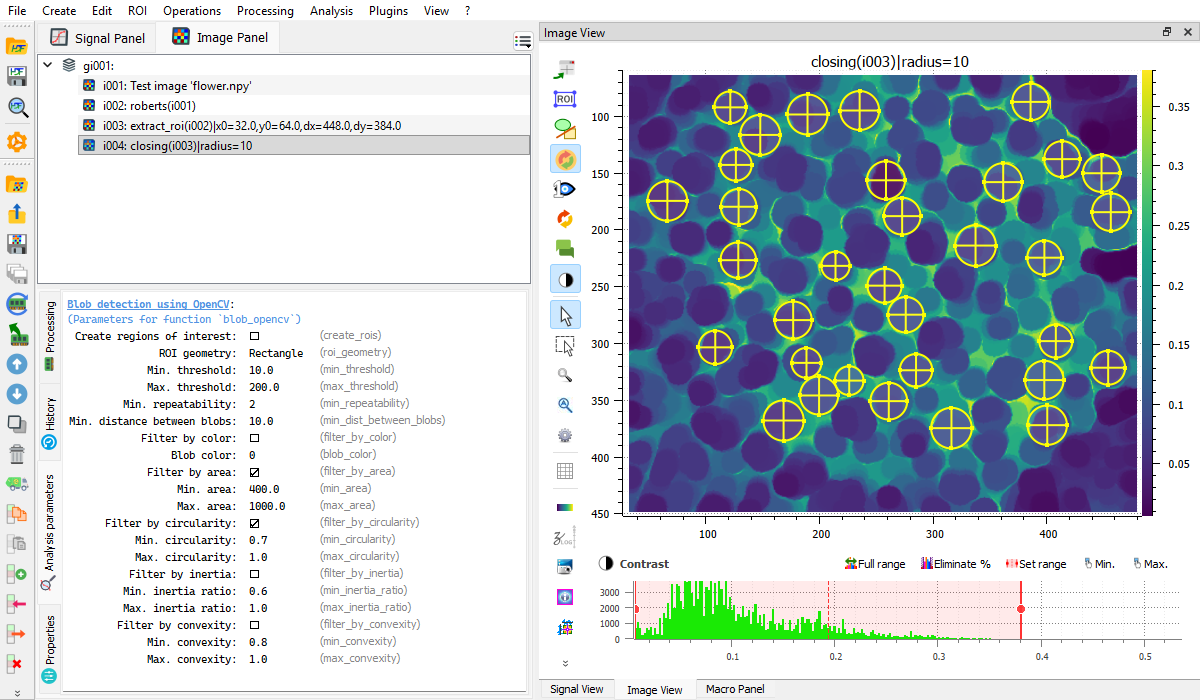
DataLab is an open-source platform for scientific and technical data processing and visualization with unique features designed to meet industrial requirements.
Try DataLab online, without installing anything, using Binder:
See DataLab website for more details.
Note: This project (DataLab Platform) should not be confused with the datalab-org project, which is a separate and unrelated initiative focused on materials science databases and computational tools.
ℹ️ Created by CODRA/Pierre Raybaut in 2023, developed and maintained by DataLab Platform Developers.
🧮 DataLab's processing power comes from the advanced algorithms of the object-oriented signal and image processing library Sigima 🚀 which is part of the DataLab Platform.

ℹ️ DataLab is powered by PlotPyStack 🚀 for curve plotting and fast image visualization.

ℹ️ DataLab is built on Python and scientific libraries.






Key Features
- Signal processing (1D): FFT, filtering, fitting, peak detection, stability analysis, and more
- Image processing (2D): filtering, morphology, edge detection, blob detection, and more
- Extensible plugin system with hot-reload support
- Macro system for Python-based automation
- Remote control via XML-RPC for integration with Jupyter, Spyder, or any IDE
- Web API (HTTP/JSON) for notebook integration and remote control from any HTTP client
- HDF5 support for data import/export
- Batch processing with ROI (Region of Interest) support
✨ Add features to DataLab by writing your own plugin (see plugin examples) or macro (see macro examples)
✨ DataLab may be remotely controlled from a third-party application (such as Jupyter, Spyder or any IDE):
-
Using the integrated remote control feature (this requires to install DataLab as a Python package)
-
Using the Web API (HTTP/JSON server for notebook integration and WASM/Pyodide environments)
-
Using the lightweight client integrated in Sigima (
pip install sigima)
Installation
DataLab requires Python 3.9+.
From PyPI:
pip install datalab-platform
From conda-forge:
conda install -c conda-forge datalab-platform
See the installation guide for more options (standalone installer, WinPython, offline installation, etc.).
Contributing
Contributions are welcome! See the contributing guide or the CONTRIBUTING.md file for details.
Release history Release notifications | RSS feed


Download files
Download the file for your platform. If you're not sure which to choose, learn more about installing packages.
Source Distribution
Built Distribution
Filter files by name, interpreter, ABI, and platform.
If you're not sure about the file name format, learn more about wheel file names.
Copy a direct link to the current filters
File details
Details for the file datalab_platform-1.2.0.tar.gz.
File metadata
- Download URL: datalab_platform-1.2.0.tar.gz
- Upload date:
- Size: 28.6 MB
- Tags: Source
- Uploaded using Trusted Publishing? No
- Uploaded via: twine/6.1.0 CPython/3.11.5
File hashes
| Algorithm | Hash digest | |
|---|---|---|
| SHA256 |
c2d0a15a5a265d165c4f73f44d1f378424558826227952913cc652db0092f452
|
|
| MD5 |
852a3f3a598d540f53ff95ec6a8fa475
|
|
| BLAKE2b-256 |
184accc20ccac96960666d6861d8c8b9360bb84c910744cd10660964fcb24ac5
|
File details
Details for the file datalab_platform-1.2.0-py3-none-any.whl.
File metadata
- Download URL: datalab_platform-1.2.0-py3-none-any.whl
- Upload date:
- Size: 34.3 MB
- Tags: Python 3
- Uploaded using Trusted Publishing? No
- Uploaded via: twine/6.1.0 CPython/3.11.5
File hashes
| Algorithm | Hash digest | |
|---|---|---|
| SHA256 |
50a9215ae4820539894af42322781e7dc047a6cb2ea3bf4b247633e76c2f7f89
|
|
| MD5 |
28848de3e81fce7d4facde908eca2a0d
|
|
| BLAKE2b-256 |
1bdb4b183fc5753385714a4b03a3d7b7f5356d1ab17d11a19a777fafdb9258da
|






