
DataLoom: a lightweight and efficient thread orchestration engine for data pipelines.
Verified details
These details have been verified by PyPIProject links
GitHub Statistics
Maintainers

Project description
🧵 DataLoom
A lightweight, efficient and safe multi-threaded orchestration engine for Python.




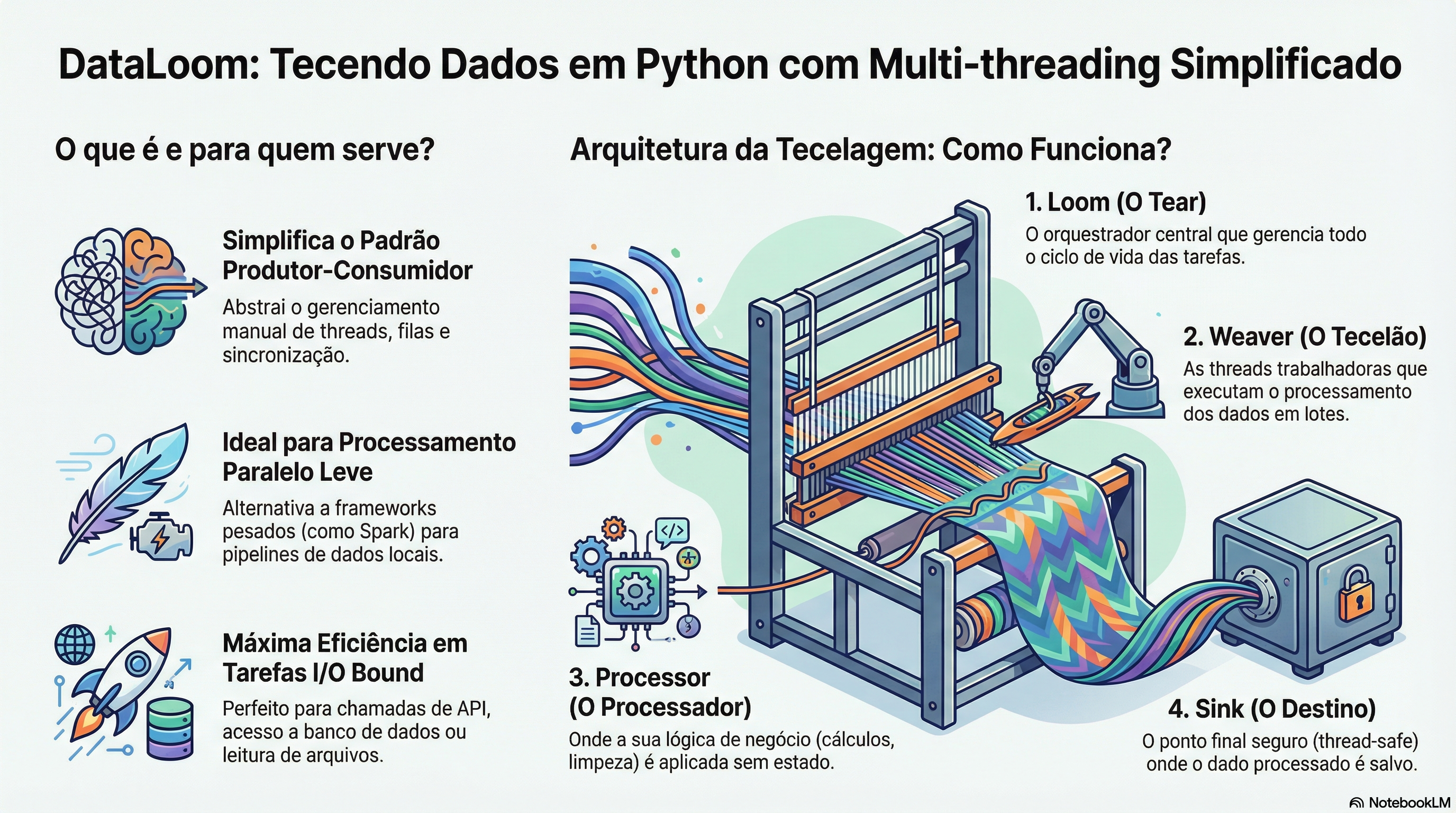
DataLoom is a library designed to process data streams using the Producer-Consumer pattern with multiple threads (Weavers). It abstracts away the complexity of queues, locks and lifecycle management, letting you focus purely on your data transformation logic.
Why DataLoom?
⚡ Performance: real parallel processing for I/O-bound workloads. 🧩 Simplicity: an intuitive API inspired by the weaving metaphor. 🛡️ Safety: thread-safety guaranteed by design across the whole pipeline. 📦 Lightweight: zero-dependency core, ready to run in any Python environment.
Why not just ThreadPoolExecutor?
Fair question — the stdlib solves the parallelism, but not the pipeline.
concurrent.futures gives you a thread pool; everything around it is on you:
| You need... | With the stdlib | With DataLoom |
|---|---|---|
| A continuous producer-consumer flow | Queue + hand-rolled loops |
Loom + Source |
| Backpressure (producer faster than consumers) | Manual Queue(maxsize=...) |
Built-in, configurable |
| Clean shutdown (drain queue, close resources) | Manual sentinels and joins | stop() / with Loom(...) |
| Workers that survive errors and report them | try/except in every worker | Centralized hooks.on_error |
| Per-item processing metrics | Manual instrumentation | hooks.on_batch_processed |
| Safe concurrent file writes | Manual locking | Ready-made sinks (JSON, CSV, callback) |
If your use case is "apply a function to a list and collect the results",
use ThreadPoolExecutor.map — it is the right tool. DataLoom is for
continuous or long-running flows where lifecycle, resilience and
observability matter. And, like every thread-based solution on CPython,
the parallelism gains apply to I/O-bound workloads; for CPU-bound
work, prefer multiprocessing.
✨ Features
- Cohesive API: aligned concepts (
Loom,Weaver,Sink). - Concurrent: automatically manages multiple Weavers (threads) in parallel.
- Safe: built-in sinks are thread-safe and exceptions are typed (
LoomError). - Resilient: processing errors don't kill the Weavers and are reported through hooks.
- Manageable:
Loomis a context manager —with Loom(...) as loom:guarantees automaticstop(). - Backpressure: the task queue is bounded by default (
queue_maxsize), preventing unbounded memory growth. - Observable: lifecycle hooks and per-batch metrics (
on_batch_processedwith result and duration), plus built-in logging.
📦 Installation
pip install dataloom-engine
The engine core has zero dependencies. The demo RandomNumPySource and
StatisticsProcessor (used in the quick start below) need NumPy, which
ships as an optional extra:
pip install "dataloom-engine[numpy]"
⚠️ Mind the name: the package installs the
dataloom_enginemodule (import dataloom_engine). Don't confuse it with thedataloompackage on PyPI, which is an ORM by another author and unrelated to this project.
To develop or use the latest version from the repository:
git clone https://github.com/dionipadilha/dataloom.git
cd dataloom
pip install -e .
🚀 Quick Start
Here is a complete example of weaving a data pipeline:
from pathlib import Path
import numpy as np
from dataloom_engine import (
    Loom,
    LoomConfig,
    LoomLogs,
    Processor,
    JsonFileSink,
    ThreadedBufferedSink
)
from dataloom_engine.sources import RandomNumPySource

# 1. Define your processing logic (stateless)
class MyFilterProcessor(Processor):
    def process(self, batch: np.ndarray) -> dict:
        # 'batch' is a numpy array sized according to the config
        avg = float(batch.mean())
        return {
            "processed_items": len(batch),
            "average_value": avg,
            "status": "high" if avg > 0.5 else "low"
        }

# 2. Initial setup
if __name__ == "__main__":
    # Configure console logging
    LoomLogs.setup()

    # Engine parameters
    config = LoomConfig(
        output_dir=Path("./data_out"),
        batch_size=100,      # Process 100 items at a time
        interval_seconds=1   # Produce a new batch every second
    )

    # 3. Data source
    # Decoupled from the engine, enabling custom sources (DB, CSV, S3)
    source = RandomNumPySource(config)

    # 4. Buffered file sink
    # ThreadedBufferedSink keeps I/O from blocking the processing
    file_sink = JsonFileSink(config.output_dir)
    sink = ThreadedBufferedSink(file_sink)

    # 5. Initialize the Loom (the orchestrator)
    loom = Loom(
        config=config,
        processor=MyFilterProcessor(),
        sink=sink,
        source=source,
        num_weavers=4  # 4 threads working in parallel
    )

    print("🧵 DataLoom started! Press Ctrl+C to stop.")
    try:
        # The context manager guarantees stop() and resource cleanup,
        # even on exceptions or Ctrl+C
        with loom:
            loom.start()
    except KeyboardInterrupt:
        print("\n🛑 Loom stopped.")
More runnable, real-world examples — API enrichment with parallel speedup,
a resilient file-processing pipeline, a buffered sensor stream — live in the
examples/ directory.
🏗️ Architecture
DataLoom is built around a weaving metaphor:
- Loom: the main machine. Manages the task queue and the lifecycle.
- Weaver: the worker threads. They take the raw material (a batch), process it and deliver it.
- Processor: the business logic. Turns raw data into information.
- Sink: the final destination. Where the finished product is deposited (e.g.
JsonFileSink,CsvFileSink, or any destination viaCallbackSink).
🧶 Threading model
Knowing which thread runs each extension point is what makes writing safe Processors, Sinks and Hooks straightforward:
| Your code | Runs on |
|---|---|
Source.__iter__ |
the thread that called loom.start() (producer) |
Processor.process / Sink.send |
the Weaver threads, concurrently |
hooks.on_error / hooks.on_batch_processed |
the Weaver threads, concurrently |
hooks.on_start / hooks.on_stop / Sink.close |
the thread that called start() / stop() |
Practical consequences:
- Processors and Sinks must be thread-safe if they touch shared
state (the built-in sinks are;
CallbackSinkcallables must be). - Hooks run on the hot path: keep
on_batch_processedfast and thread-safe. - Shutdown semantics:
stop()(or leaving thewithblock) drains the items already queued, then joins the Weavers — passstop(timeout=...)to bound the wait. A pipeline whose source was exhausted ends asCOMPLETED; an interrupted one (externalstop(),Ctrl+C) ends asSTOPPED; a source error ends asFAILED.
📊 Benchmarks
Reproducible, zero-dependency benchmarks live in
benchmarks/throughput.py:
python benchmarks/throughput.py
Reference numbers from a 4-vCPU Linux container (treat them as an order of magnitude — run it on your own hardware):
| Scenario | Result |
|---|---|
| I/O-bound, 200 items × 10ms, 8 weavers | 7.8x speedup over sequential |
| No-op processor (pure engine overhead) | ~51,000 items/s (~20µs per item) |
The rule of thumb the second number gives you: if your per-item work costs less than ~20µs, a plain loop beats any orchestration — DataLoom pays off when each item does real I/O or meaningful work.
🛠️ Development and Testing
To contribute to the project or run the test suite:
-
Install the development dependencies:
pip install -e ".[dev]"
-
Run the test suite (via pytest):
pytest
-
Run the linter and type checker:
ruff check .
mypy
📄 License
This project is licensed under the MIT License — see the LICENSE file for details.
🗒️ Version History
Changes in each release are documented in the CHANGELOG.
Project details
Verified details
These details have been verified by PyPIProject links
GitHub Statistics
Maintainers


Download files
Download the file for your platform. If you're not sure which to choose, learn more about installing packages.
Source Distribution
Built Distribution
Filter files by name, interpreter, ABI, and platform.
If you're not sure about the file name format, learn more about wheel file names.
Copy a direct link to the current filters
File details
Details for the file dataloom_engine-0.7.0.tar.gz.
File metadata
- Download URL: dataloom_engine-0.7.0.tar.gz
- Upload date:
- Size: 28.7 kB
- Tags: Source
- Uploaded using Trusted Publishing? Yes
- Uploaded via: twine/6.1.0 CPython/3.13.12
File hashes
| Algorithm | Hash digest | |
|---|---|---|
| SHA256 |
14f2f2d8427348b9554400ad49ec8343a85a34a3947ef2faff0b2a7a889322f1
|
|
| MD5 |
f71fcc62e1d1698918f72de4debd4119
|
|
| BLAKE2b-256 |
04338aa987fe1a2f0952f09fdfffc7a437375f7df486365e7230bd7e2b762f33
|
Provenance
The following attestation bundles were made for dataloom_engine-0.7.0.tar.gz:
Publisher:
publish.yml on dionipadilha/dataloom
-
Statement:
-
Statement type:
https://in-toto.io/Statement/v1 -
Predicate type:
https://docs.pypi.org/attestations/publish/v1 -
Subject name:
dataloom_engine-0.7.0.tar.gz -
Subject digest:
14f2f2d8427348b9554400ad49ec8343a85a34a3947ef2faff0b2a7a889322f1 - Sigstore transparency entry: 2163718603
- Sigstore integration time:
-
Permalink:
dionipadilha/dataloom@8672368d7cf5e23b6495548330d8e1a103ab7333 -
Branch / Tag:
refs/tags/v0.7.0 - Owner: https://github.com/dionipadilha
-
Access:
public
-
Token Issuer:
https://token.actions.githubusercontent.com -
Runner Environment:
github-hosted -
Publication workflow:
publish.yml@8672368d7cf5e23b6495548330d8e1a103ab7333 -
Trigger Event:
release
-
Statement type:
File details
Details for the file dataloom_engine-0.7.0-py3-none-any.whl.
File metadata
- Download URL: dataloom_engine-0.7.0-py3-none-any.whl
- Upload date:
- Size: 20.2 kB
- Tags: Python 3
- Uploaded using Trusted Publishing? Yes
- Uploaded via: twine/6.1.0 CPython/3.13.12
File hashes
| Algorithm | Hash digest | |
|---|---|---|
| SHA256 |
b0a5cda9cd86afde15286250705ebfd2429983a4f1559d9fd0838c10600e3144
|
|
| MD5 |
e12c884ea72cd286ea03e82d5a925977
|
|
| BLAKE2b-256 |
75ee5da7d9753cf37087d35df69623429929a141959c73408dddfad5704fd86f
|
Provenance
The following attestation bundles were made for dataloom_engine-0.7.0-py3-none-any.whl:
Publisher:
publish.yml on dionipadilha/dataloom
-
Statement:
-
Statement type:
https://in-toto.io/Statement/v1 -
Predicate type:
https://docs.pypi.org/attestations/publish/v1 -
Subject name:
dataloom_engine-0.7.0-py3-none-any.whl -
Subject digest:
b0a5cda9cd86afde15286250705ebfd2429983a4f1559d9fd0838c10600e3144 - Sigstore transparency entry: 2163718614
- Sigstore integration time:
-
Permalink:
dionipadilha/dataloom@8672368d7cf5e23b6495548330d8e1a103ab7333 -
Branch / Tag:
refs/tags/v0.7.0 - Owner: https://github.com/dionipadilha
-
Access:
public
-
Token Issuer:
https://token.actions.githubusercontent.com -
Runner Environment:
github-hosted -
Publication workflow:
publish.yml@8672368d7cf5e23b6495548330d8e1a103ab7333 -
Trigger Event:
release
-
Statement type:






