
An AI Data framework to create AI Data Analyst

Project description
Data Neuron
Data Neuron is a powerful AI-driven data framework to create and maintain AI DATA analyst.
Supports SQLite, PostgreSQL, MySQL, MSSQL, CSV files(through duckdb). Works with major LLMs like Claude (default), OpenAI, LLAMA etc(through groq, nvidia, ..), OLLAMA.
https://github.com/user-attachments/assets/ab4d0b69-2ecd-432a-9a2d-b50520325df4
The framework:
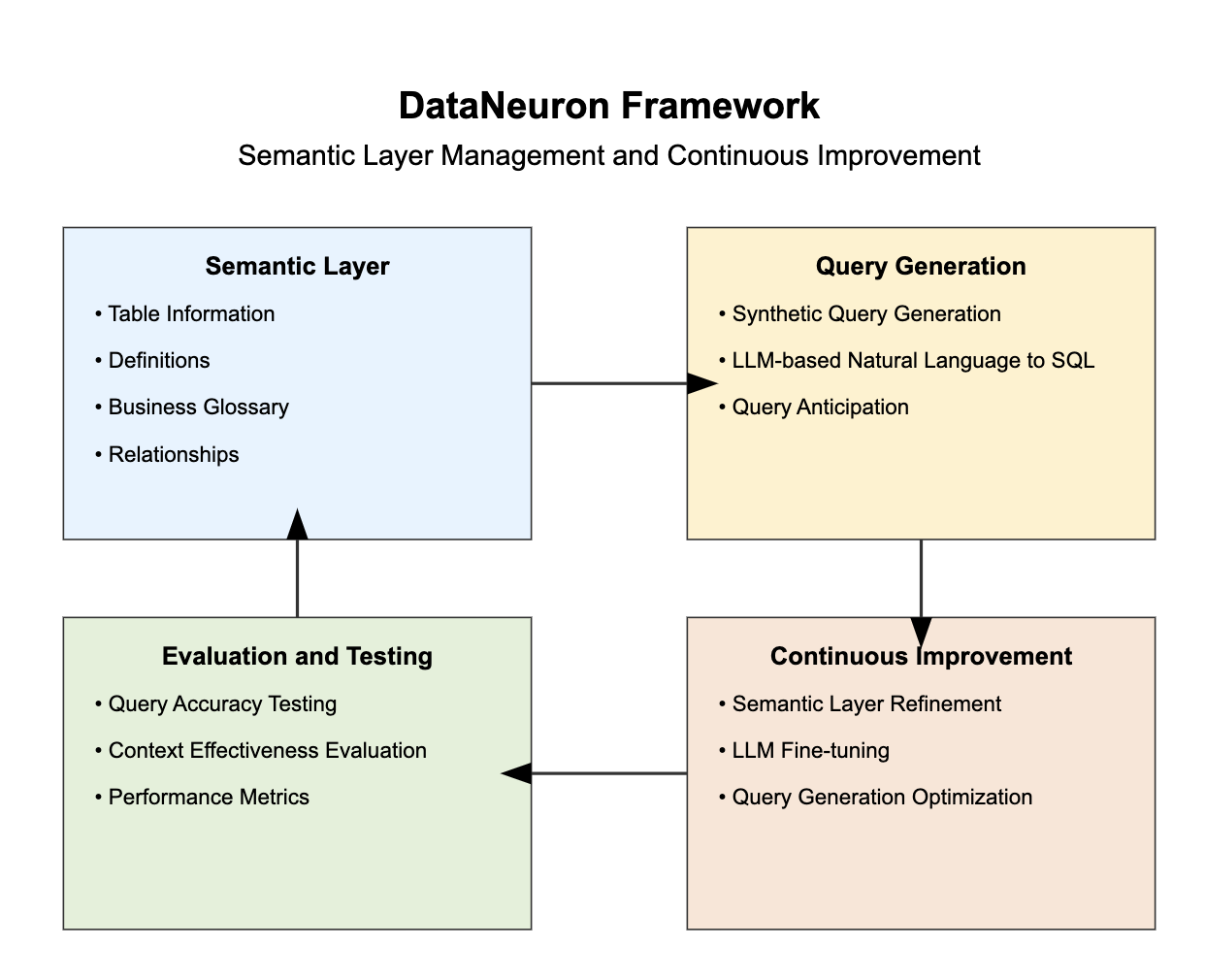
A small framework, Data Neuron is optimized for working with subsets of database, typically handling 10 to 15 tables.
Data Neuron's objective is to give an ability to maintain and improve the semantic layer/knowledge graph, there by letting an AI agent with general intelligence to be Data Intelligent specific to your data.
Features
- Support for multiple database types (SQLite, PostgreSQL, MySQL, MSSQL, CSV files(through duckdb))
- Natural language to SQL query conversion
- Interactive chat mode for continuous database querying
- Automatic context generation from database schema
- Customizable context for improved query accuracy
- Support for various LLM providers (Claude, OpenAI, Azure, Custom, Ollama)
- Optimized for smaller database subsets (up to 10-15 tables)
Installation
Data Neuron can be installed with different database support options:
-
Base package (SQLite support only):
pip install dataneuron -
With PostgreSQL support:
pip install dataneuron[postgres] -
With MySQL support:
pip install dataneuron[mysql] -
With MSSQL support:
pip install dataneuron[mssql] -
With all database supports:
pip install dataneuron[all] -
With CSV support:
pip install dataneuron[csv]
Note: if you use zsh, you might have to use quotes around the package name like. For csv right now it doesn't support nested folder structure just a folder with csv files, each csv will be treated as a table.
pip install "dataneuron[mysql]"
Quick Start
-
Initialize database configuration:
dnn --db-init <database_type>Replace
<database_type>with sqlite, mysql, mssql, or postgres.This will create a database.yaml that will be used by the framework to later connect with your db.
-
Generate context from your database:
dnn --initThis will create YAML files in the
context/directory which will be your semantic layer for your data. You will be told to select couple of tables, so that it can be auto-labelled which you can edit later. -
Ask a question about your database:
dnn --ask "What is the total user count?" -
Or start an interactive chat session:
dnn --chat -
You can generate reports with image as input for your dashboards. You need to have
wkhtmltopdfin your system. For mac
brew install wkhtmltopdf
dnn --report
Configuration
Data Neuron supports various LLM providers. Set the following environment variables based on your chosen provider:
Claude (Default)
CLAUDE_API_KEY=your_claude_api_key_here
OpenAI
DATA_NEURON_LLM=openai
OPENAI_API_KEY=your_openai_api_key_here
OPENAI_MODEL=gpt-4  # Optional, defaults to gpt-4o
Azure OpenAI
DATA_NEURON_LLM=azure
AZURE_OPENAI_API_KEY=your_azure_api_key_here
AZURE_OPENAI_API_VERSION=your_api_version_here
AZURE_OPENAI_ENDPOINT=your_azure_endpoint_here
AZURE_OPENAI_DEPLOYMENT_NAME=your_deployment_name_here
Custom Provider
DATA_NEURON_LLM=custom
DATA_NEURON_LLM_API_KEY=your_custom_api_key_here
DATA_NEURON_LLM_ENDPOINT=your_custom_endpoint_here
DATA_NEURON_LLM_MODEL=your_preferred_model_here
Ollama (for local LLM models)
Note: Doesn't generate good set of results.
DATA_NEURON_LLM=ollama
DATA_NEURON_LLM_MODEL=your_preferred_local_model_here
Usage
- Initialize database config:
dnn --db-init <database_type> - Generate context:
dnn --init - Ask a question:
dnn --ask "Your question here" - Start chat mode:
dnn --chat
Video Examples
With CSV files
In this example there is a folder called dataset-raw with files like events.csv, orders.csv, each csv will be considered as a table
https://github.com/user-attachments/assets/49590442-3942-4d22-ab49-2c847f674f7e
Quick start with SQLITE
To start with sqlite you can just do pip install dataneuron, you don't need any dependencies.
https://github.com/user-attachments/assets/29199b15-b39c-4917-9f8b-9bb6909ac66a
Roadmap
We have exciting plans for the future of Data Neuron:
-
Expanded Database Support:
- Add support for additional databases and data warehouses
- Integrate with popular cloud data platforms
-
API Server Capability:
- Develop an API server mode to respond to queries based on context
- Enable seamless integration with other applications and services
-
Context Marts:
- Implement the concept of context marts (e.g., marketing_context_mart, product_context_mart)
- Allow for more focused and efficient querying within specific domains
-
Synthetic Query Generation:
- Create a system for generating synthetic queries
- Enhance testing and development processes
-
Deterministic Testing:
- Develop a suite of deterministic tests for query accuracy
- Enable easy comparison and evaluation of different LLM models
-
Continuous Improvement Framework:
- Implement mechanisms for ongoing learning and refinement of the AI model
- Incorporate user feedback to enhance query generation accuracy
-
Scalability Enhancements:
- Optimize performance for larger datasets while maintaining focus on subset efficiency
- Explore distributed processing options for more complex queries
-
An Agentic Analyst.
Contributing
We welcome contributions to Data Neuron! Please see our Contributing Guide for more details on how to get started.
Development
To set up Data Neuron for development:
-
Clone the repository:
git clone https://github.com/databrainhq/dataneuron.git cd dataneuron -
Install dependencies using Poetry:
poetry install --all-extrasor
poetry install --extras postgres -
Run tests:
poetry run pytest
Note: Tests are still being added.
License
This project is licensed under the MIT License - see the LICENSE file for details.
Contact
For questions, suggestions, or issues, please open an issue on the GitHub repository or contact the maintainers directly.
Happy querying with Data Neuron!
Release history Release notifications | RSS feed


Download files
Download the file for your platform. If you're not sure which to choose, learn more about installing packages.
Source Distribution
Built Distribution
Filter files by name, interpreter, ABI, and platform.
If you're not sure about the file name format, learn more about wheel file names.
Copy a direct link to the current filters
File details
Details for the file dataneuron-0.1.4.tar.gz.
File metadata
- Download URL: dataneuron-0.1.4.tar.gz
- Upload date:
- Size: 33.3 kB
- Tags: Source
- Uploaded using Trusted Publishing? No
- Uploaded via: poetry/1.8.3 CPython/3.8.19 Darwin/23.5.0
File hashes
| Algorithm | Hash digest | |
|---|---|---|
| SHA256 |
94d01ae49a196461e97538775ce1f602c8a21a4b0a82c4633a492425eb918124
|
|
| MD5 |
7f9addbb849f9acb51b553b99cf12d31
|
|
| BLAKE2b-256 |
47294a32872fa0bb40e4ff53af4270e1416ecf251702b58aeea70d8a5c88340d
|
File details
Details for the file dataneuron-0.1.4-py3-none-any.whl.
File metadata
- Download URL: dataneuron-0.1.4-py3-none-any.whl
- Upload date:
- Size: 43.3 kB
- Tags: Python 3
- Uploaded using Trusted Publishing? No
- Uploaded via: poetry/1.8.3 CPython/3.8.19 Darwin/23.5.0
File hashes
| Algorithm | Hash digest | |
|---|---|---|
| SHA256 |
a741c7925bed58d4f37d023a5faa9e6b6ec27d80ea3bf81bc67e91d71f871f39
|
|
| MD5 |
daae74fafaf9078e1f1a41ed31cc0808
|
|
| BLAKE2b-256 |
26864de0cc69940b0e8e10fdae6c913d3adfa6372dc4f1c33b2c0975a8a90c5a
|






