
This release is a pre-release and may not be stable for production use.
datasette-agent-modeler




3D modelling tools for Datasette Agent - create and edit 3D models from chat
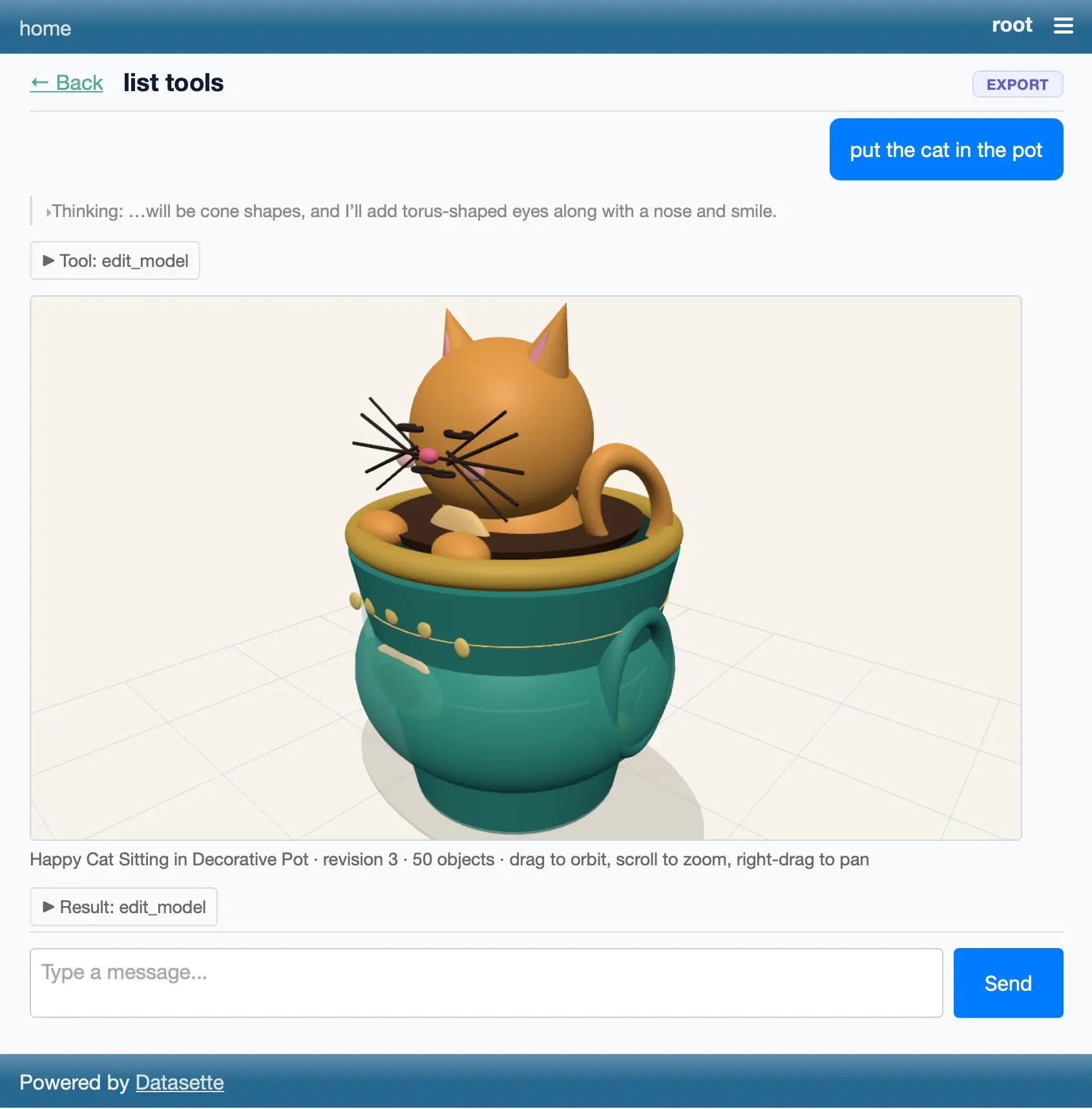
Screenshot
Installation
Install this plugin in the same environment as Datasette.
datasette install datasette-agent-modeler
Usage
This plugin adds 3D modelling tools to Datasette Agent. Ask the agent to build something - "make me a 3D model of a rocket ship" - and it will assemble one from primitive shapes and display it inline in the chat in an interactive viewer (drag to orbit, scroll to zoom, right-drag to pan). Then ask for changes - "make the fins purple and twice as tall" - and the agent edits the stored model and shows the updated result.
Four tools are registered with the agent:
create_model(name, objects, background?)- creates a model from a list of primitive shapes (box,sphere,cylinder,cone,torus,capsule,plane), each with optionalposition,rotation(degrees),scale,colorandopacity. Returns amodel_id.edit_model(model_id, operations)- applies an ordered list of edit operations atomically:add_object,update_object(changed fields only - params are merged),remove_object,set_name,set_background.get_model(model_id)- returns the current JSON document and revision number.list_models()- lists stored models.
Models are stored in Datasette's internal database. Every edit saves a full snapshot as a new revision, and each viewer embedded in the chat transcript shows the model as it was at that revision, so the conversation doubles as a visual edit history.
The viewer is a <datasette-model-3d> custom element that renders with three.js (loaded from esm.sh), so browsing models requires internet access from the browser.
Permissions
The plugin registers a datasette-agent-modeler permission which gates all four tools - actors without it never see them. The --root user holds it by default:
datasette mydata.db --internal internal.db --root
See DESIGN.md for the full design notes, including the model document format and the 3D library research.
Development
To set up this plugin locally, first checkout the code. You can confirm it is available like this:
cd datasette-agent-modeler
# Confirm the plugin is visible
uv run datasette plugins
To run the tests:
uv run pytest
Metadata
Release files for datasette-agent-modeler 0.1a0
For a detailed explanation of source distributions (sdists) and built distributions (wheels), please see the package formats documentation.
Source distribution (sdist)
| File | Size | Uploaded | |
|---|---|---|---|
| datasette_agent_modeler-0.1a0.tar.gz | 18.8 kB | Details |
Built distribution (wheel)
| File | Interpreter | ABI | Platform | Reset |
|---|---|---|---|---|
| datasette_agent_modeler-0.1a0-py3-none-any.whl | Python 3 | none | any | Details |
Total release size: 35.2 kB
Release files / datasette_agent_modeler-0.1a0.tar.gz
| Download URL | datasette_agent_modeler-0.1a0.tar.gz |
|---|---|
| Size | 18.8 kB |
| Tags | Source |
|
SHA-256 checksum How to use checksums |
1bbd5e39c6735fcfe364f02c58cb3aac54e9c5fec3eeea57a61152bc3965f5de
|
|
BLAKE2b-256 checksum How to use checksums |
4761ba64566e5c77688fcd97a983476ceddc2715607ceb87a25cdfb1d78c6fbc
|
| Upload date | |
|
Uploaded using Trusted Publishing? What is trusted publishing? |
Yes |
| Uploaded via |
twine/6.1.0 CPython/3.13.14
|
Provenance
Provenance describes where a file came from. On PyPI, provenance is shared via attestations, which provide a verifiable record of the build or publishing details. View details, limitations and caveats.


PyPI Publish Attestation
PyPI verified that this artifact, at this checksum, originated from the publisher listed below.
Signed by GitHub Actions, verified by PyPI on Jul 29, 2026.
Transparency logRelease files / datasette_agent_modeler-0.1a0-py3-none-any.whl
| Download URL | datasette_agent_modeler-0.1a0-py3-none-any.whl |
|---|---|
| Size | 16.4 kB |
| Tags | Python 3 |
|
SHA-256 checksum How to use checksums |
49f6eb6afa3232c75dd2227702570fefc1bd03ac10a59246aef0ac20b42849f4
|
|
BLAKE2b-256 checksum How to use checksums |
c9f40c11bf40c3f08cab8b5d51c68dc03fc2b2ee6f25b111bd3702052dd4445a
|
| Upload date | |
|
Uploaded using Trusted Publishing? What is trusted publishing? |
Yes |
| Uploaded via |
twine/6.1.0 CPython/3.13.14
|
Provenance
Provenance describes where a file came from. On PyPI, provenance is shared via attestations, which provide a verifiable record of the build or publishing details. View details, limitations and caveats.
PyPI Publish Attestation
PyPI verified that this artifact, at this checksum, originated from the publisher listed below.
Signed by GitHub Actions, verified by PyPI on Jul 29, 2026.
Transparency log












