
Datasette



An instant JSON API for your SQLite databases
Datasette provides an instant, read-only JSON API for any SQLite database. It also provides tools for packaging the database up as a Docker container and deploying that container to hosting providers such as Zeit Now.
Got CSV data? Use csvs-to-sqlite to convert them to SQLite, then publish them with Datasette. Or try Datasette Publish, a web app that lets you upload CSV data and deploy it using Datasette without needing to install any software.
Documentation: http://datasette.readthedocs.io/ Examples: https://github.com/simonw/datasette/wiki/Datasettes
News
- 23rd May 2018: Datasette 0.22.1 bugfix plus we now use versioneer
- 20th May 2018: Datasette 0.22: Datasette Facets
- 5th May 2018: Datasette 0.21: New _shape=, new _size=, search within columns
- 25th April 2018: Exploring the UK Register of Members Interests with SQL and Datasette - a tutorial describing how register-of-members-interests.datasettes.com was built (source code here)
- 20th April 2018: Datasette plugins, and building a clustered map visualization - introducing Datasette's new plugin system and datasette-cluster-map, a plugin for visualizing data on a map
- 20th April 2018: Datasette 0.20: static assets and templates for plugins
- 16th April 2018: Datasette 0.19: plugins preview
- 14th April 2018: Datasette 0.18: units
- 9th April 2018: Datasette 0.15: sort by column
- 28th March 2018: Baltimore Sun Public Salary Records - a data journalism project from the Baltimore Sun powered by Datasette - source code is available here
- 27th March 2018: Cloud-first: Rapid webapp deployment using containers - a tutorial covering deploying Datasette using Microsoft Azure by the Research Software Engineering team at Imperial College London
- 28th January 2018: Analyzing my Twitter followers with Datasette - a tutorial on using Datasette to analyze follower data pulled from the Twitter API
- 17th January 2018: Datasette Publish: a web app for publishing CSV files as an online database
- 12th December 2017: Building a location to time zone API with SpatiaLite, OpenStreetMap and Datasette
- 9th December 2017: Datasette 0.14: customization edition
- 25th November 2017: New in Datasette: filters, foreign keys and search
- 13th November 2017: Datasette: instantly create and publish an API for your SQLite databases
Installation
pip3 install datasette
Datasette requires Python 3.5 or higher.
Basic usage
datasette serve path/to/database.db
This will start a web server on port 8001 - visit http://localhost:8001/ to access the web interface.
serve is the default subcommand, you can omit it if you like.
Use Chrome on OS X? You can run datasette against your browser history like so:
datasette ~/Library/Application\ Support/Google/Chrome/Default/History
Now visiting http://localhost:8001/History/downloads will show you a web interface to browse your downloads data:
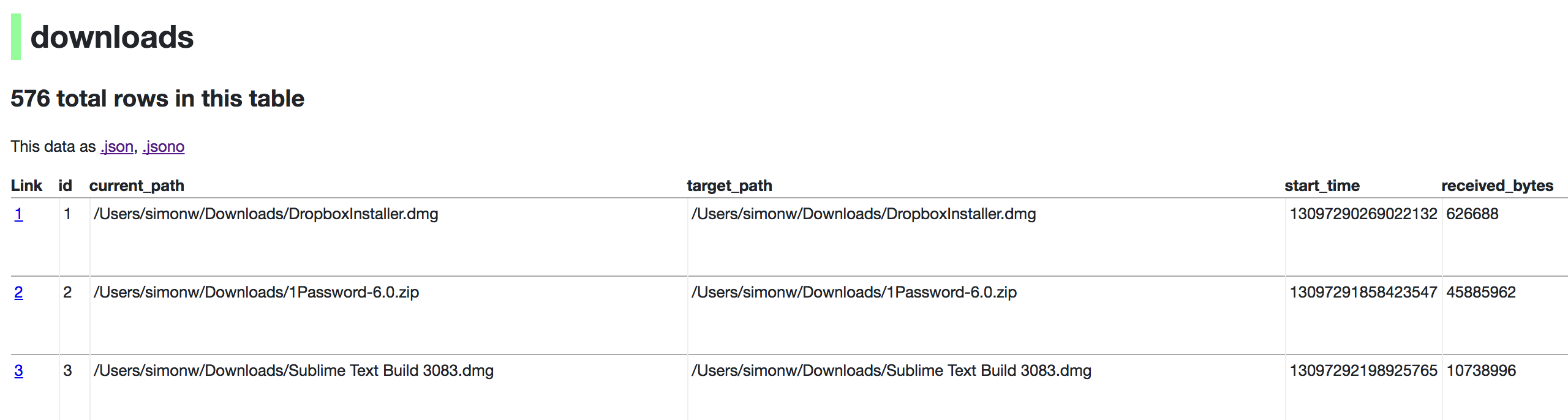
http://localhost:8001/History/downloads.json will return that data as JSON:
{
    "database": "History",
    "columns": [
        "id",
        "current_path",
        "target_path",
        "start_time",
        "received_bytes",
        "total_bytes",
        ...
    ],
    "table_rows_count": 576,
    "rows": [
        [
            1,
            "/Users/simonw/Downloads/DropboxInstaller.dmg",
            "/Users/simonw/Downloads/DropboxInstaller.dmg",
            13097290269022132,
            626688,
            0,
            ...
        ]
    ]
}
http://localhost:8001/History/downloads.json?_shape=objects will return that data as JSON in a more convenient but less efficient format:
{
    ...
    "rows": [
        {
            "start_time": 13097290269022132,
            "interrupt_reason": 0,
            "hash": "",
            "id": 1,
            "site_url": "",
            "referrer": "https://www.dropbox.com/downloading?src=index",
            ...
        }
    ]
}
datasette serve options
$ datasette serve --help
Usage: datasette serve [OPTIONS] [FILES]...

  Serve up specified SQLite database files with a web UI

Options:
  -h, --host TEXT              host for server, defaults to 127.0.0.1
  -p, --port INTEGER           port for server, defaults to 8001
  --debug                      Enable debug mode - useful for development
  --reload                     Automatically reload if code change detected -
                               useful for development
  --cors                       Enable CORS by serving Access-Control-Allow-
                               Origin: *
  --load-extension PATH        Path to a SQLite extension to load
  --inspect-file TEXT          Path to JSON file created using "datasette
                               inspect"
  -m, --metadata FILENAME      Path to JSON file containing license/source
                               metadata
  --template-dir DIRECTORY     Path to directory containing custom templates
  --plugins-dir DIRECTORY      Path to directory containing custom plugins
  --static STATIC MOUNT        mountpoint:path-to-directory for serving static
                               files
  --config CONFIG              Set config option using configname:value
                               datasette.readthedocs.io/en/latest/config.html
  --help-config                Show available config options
  --help                       Show this message and exit.
metadata.json
If you want to include licensing and source information in the generated datasette website you can do so using a JSON file that looks something like this:
{
    "title": "Five Thirty Eight",
    "license": "CC Attribution 4.0 License",
    "license_url": "http://creativecommons.org/licenses/by/4.0/",
    "source": "fivethirtyeight/data on GitHub",
    "source_url": "https://github.com/fivethirtyeight/data"
}
The license and source information will be displayed on the index page and in the footer. They will also be included in the JSON produced by the API.
datasette publish
If you have Zeit Now or Heroku configured, datasette can deploy one or more SQLite databases to the internet with a single command:
datasette publish now database.db
Or:
datasette publish heroku database.db
This will create a docker image containing both the datasette application and the specified SQLite database files. It will then deploy that image to Zeit Now or Heroku and give you a URL to access the API.
$ datasette publish --help
Usage: datasette publish [OPTIONS] PUBLISHER [FILES]...

  Publish specified SQLite database files to the internet along with a
  datasette API.

  Options for PUBLISHER:     * 'now' - You must have Zeit Now installed:
  https://zeit.co/now     * 'heroku' - You must have Heroku installed:
  https://cli.heroku.com/

  Example usage: datasette publish now my-database.db

Options:
  -n, --name TEXT           Application name to use when deploying to Now
                            (ignored for Heroku)
  -m, --metadata FILENAME   Path to JSON file containing metadata to publish
  --extra-options TEXT      Extra options to pass to datasette serve
  --force                   Pass --force option to now
  --branch TEXT             Install datasette from a GitHub branch e.g. master
  --template-dir DIRECTORY  Path to directory containing custom templates
  --plugins-dir DIRECTORY   Path to directory containing custom plugins
  --static STATIC MOUNT     mountpoint:path-to-directory for serving static
                            files
  --install TEXT            Additional packages (e.g. plugins) to install
  --title TEXT              Title for metadata
  --license TEXT            License label for metadata
  --license_url TEXT        License URL for metadata
  --source TEXT             Source label for metadata
  --source_url TEXT         Source URL for metadata
  --help                    Show this message and exit.
datasette package
If you have docker installed you can use datasette package to create a new Docker image in your local repository containing the datasette app and selected SQLite databases:
$ datasette package --help
Usage: datasette package [OPTIONS] FILES...

  Package specified SQLite files into a new datasette Docker container

Options:
  -t, --tag TEXT            Name for the resulting Docker container, can
                            optionally use name:tag format
  -m, --metadata FILENAME   Path to JSON file containing metadata to publish
  --extra-options TEXT      Extra options to pass to datasette serve
  --branch TEXT             Install datasette from a GitHub branch e.g. master
  --template-dir DIRECTORY  Path to directory containing custom templates
  --plugins-dir DIRECTORY   Path to directory containing custom plugins
  --static STATIC MOUNT     mountpoint:path-to-directory for serving static
                            files
  --install TEXT            Additional packages (e.g. plugins) to install
  --title TEXT              Title for metadata
  --license TEXT            License label for metadata
  --license_url TEXT        License URL for metadata
  --source TEXT             Source label for metadata
  --source_url TEXT         Source URL for metadata
  --help                    Show this message and exit.
Both publish and package accept an extra_options argument option, which will affect how the resulting application is executed. For example, say you want to increase the SQL time limit for a particular container:
datasette package parlgov.db \
    --extra-options="--config sql_time_limit_ms:2500 --config default_page_size:10"
The resulting container will run the application with those options.
Here's example output for the package command:
$ datasette package parlgov.db --extra-options="--config sql_time_limit_ms:2500"
Sending build context to Docker daemon  4.459MB
Step 1/7 : FROM python:3
 ---> 79e1dc9af1c1
Step 2/7 : COPY . /app
 ---> Using cache
 ---> cd4ec67de656
Step 3/7 : WORKDIR /app
 ---> Using cache
 ---> 139699e91621
Step 4/7 : RUN pip install datasette
 ---> Using cache
 ---> 340efa82bfd7
Step 5/7 : RUN datasette inspect parlgov.db --inspect-file inspect-data.json
 ---> Using cache
 ---> 5fddbe990314
Step 6/7 : EXPOSE 8001
 ---> Using cache
 ---> 8e83844b0fed
Step 7/7 : CMD datasette serve parlgov.db --port 8001 --inspect-file inspect-data.json --config sql_time_limit_ms:2500
 ---> Using cache
 ---> 1bd380ea8af3
Successfully built 1bd380ea8af3
You can now run the resulting container like so:
docker run -p 8081:8001 1bd380ea8af3
This exposes port 8001 inside the container as port 8081 on your host machine, so you can access the application at http://localhost:8081/


Release files for datasette-core 0.22.1
For a detailed explanation of source distributions (sdists) and built distributions (wheels), please see the package formats documentation.
Source distribution (sdist)
| File | Size | Uploaded | |
|---|---|---|---|
| datasette-core-0.22.1.tar.gz | 183.7 kB | Details |
Built distribution (wheel)
| File | Interpreter | ABI | Platform | Reset |
|---|---|---|---|---|
| datasette_core-0.22.1-py3-none-any.whl | Python 3 | none | any | Details |
Total release size: 363.7 kB
Release files / datasette-core-0.22.1.tar.gz
| Download URL | datasette-core-0.22.1.tar.gz |
|---|---|
| Size | 183.7 kB |
| Tags | Source |
|
SHA-256 checksum How to use checksums |
32aa0a6e1f1532f74c4e4ed7e18271a17d53e332e6c7ea304f2b609055f33d01
|
|
BLAKE2b-256 checksum How to use checksums |
67e918152b058c2ba764bf96c04053367113c15b15e1973fbcdb6f5497e4d27f
|
| Upload date | |
|
Uploaded using Trusted Publishing? What is trusted publishing? |
No |
Release files / datasette_core-0.22.1-py3-none-any.whl
| Download URL | datasette_core-0.22.1-py3-none-any.whl |
|---|---|
| Size | 180.0 kB |
| Tags | Python 3 |
|
SHA-256 checksum How to use checksums |
25ce15ad5cbc6be8dabae619ae2768163377a43e27f6dfee9079975d98708969
|
|
BLAKE2b-256 checksum How to use checksums |
22dcc00c174db9a6241b3206b315b70d7e6c62a14b7199261848cd3adac61caa
|
| Upload date | |
|
Uploaded using Trusted Publishing? What is trusted publishing? |
No |













