
Pin databases, tables, and other items to the Datasette homepage
Verified details
These details have been verified by PyPIProject links
GitHub Statistics
Maintainers

Project description
datasette-pins




Pin databases, tables, queries, and more to the Datasette homepage!

Installation
datasette-pins requires a recent 1.0 alpha version of Datasette to work.
pip install datasette>=1.0a13
Afterwards, install this plugin in the same environment as Datasette.
datasette install datasette-pins
Configuration
datasette-pins stores pins in the internal database. This database runs in-memory by default, which means your pins will be lost if you restart the server. To avoid that, start Datasette with the --internal option to specify where that database should be stored on disk:
datasette mydatabase.db --internal internal.db
datasette-pins has two permissions datasette-pins-write and
datasette-pins-read. Actors with the datasette-pins-write permissions can
pin and reorder items, while actors with datasette-pins-read permissions can
only view pinned items.
Here's an example
datasette.yaml file
where all actors can view pins, but only the root actor can pin items:
permissions:
  datasette-pins-read:
    id: "*"
    unauthenticated: true
  datasette-pins-write:
    id: "root"
Usage
Once logged in, the root use will see new pin/unpin option under the database,
table, and query actions menu:
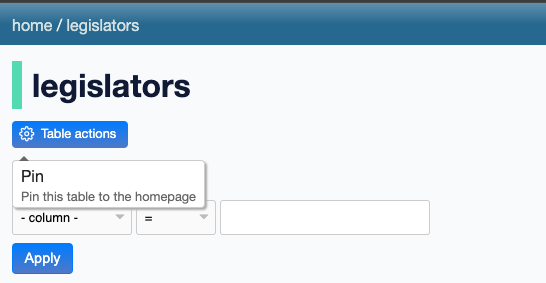
Development
To set up this plugin locally, first checkout the code. Then create a new virtual environment:
cd datasette-pins
python3 -m venv venv
source venv/bin/activate
Now install the dependencies and test dependencies:
pip install -e '.[test]'
To run the tests:
pytest
Building JavaScript from TypeScript
This plugin includes TypeScript/TSX source files in datasette_pins/frontend/ that need to be compiled to JavaScript. If you modify any .ts or .tsx files, you'll need to rebuild the JavaScript.
First install the Node.js dependencies:
npm install
Then build the JavaScript using just:
just js
This uses esbuild to compile and minify the TypeScript files into datasette_pins/static/.
Project details
Verified details
These details have been verified by PyPIProject links
GitHub Statistics
Maintainers
Release history Release notifications | RSS feed


Download files
Download the file for your platform. If you're not sure which to choose, learn more about installing packages.
Source Distribution
Built Distribution
Filter files by name, interpreter, ABI, and platform.
If you're not sure about the file name format, learn more about wheel file names.
Copy a direct link to the current filters
File details
Details for the file datasette_pins-0.1a7.tar.gz.
File metadata
- Download URL: datasette_pins-0.1a7.tar.gz
- Upload date:
- Size: 34.0 kB
- Tags: Source
- Uploaded using Trusted Publishing? Yes
- Uploaded via: twine/6.1.0 CPython/3.13.7
File hashes
| Algorithm | Hash digest | |
|---|---|---|
| SHA256 |
ccff76448c2adf8754f670fc77bdfb5de3903805afcbc9d5f26545b1097c8f5e
|
|
| MD5 |
5d942a30d5f360b96af10ef0f88cc21a
|
|
| BLAKE2b-256 |
ab3466d00c2a458c166ebe0a3b89f54907652e62ad9ebb1e0dd31a90d9e8d1f1
|
Provenance
The following attestation bundles were made for datasette_pins-0.1a7.tar.gz:
Publisher:
publish.yml on datasette/datasette-pins
-
Statement:
-
Statement type:
https://in-toto.io/Statement/v1 -
Predicate type:
https://docs.pypi.org/attestations/publish/v1 -
Subject name:
datasette_pins-0.1a7.tar.gz -
Subject digest:
ccff76448c2adf8754f670fc77bdfb5de3903805afcbc9d5f26545b1097c8f5e - Sigstore transparency entry: 919709899
- Sigstore integration time:
-
Permalink:
datasette/datasette-pins@d865b27098b525ab6f39e8799abdb168428d7ae2 -
Branch / Tag:
refs/tags/0.1a7 - Owner: https://github.com/datasette
-
Access:
public
-
Token Issuer:
https://token.actions.githubusercontent.com -
Runner Environment:
github-hosted -
Publication workflow:
publish.yml@d865b27098b525ab6f39e8799abdb168428d7ae2 -
Trigger Event:
release
-
Statement type:
File details
Details for the file datasette_pins-0.1a7-py3-none-any.whl.
File metadata
- Download URL: datasette_pins-0.1a7-py3-none-any.whl
- Upload date:
- Size: 33.1 kB
- Tags: Python 3
- Uploaded using Trusted Publishing? Yes
- Uploaded via: twine/6.1.0 CPython/3.13.7
File hashes
| Algorithm | Hash digest | |
|---|---|---|
| SHA256 |
edd5f62aa23bafc1b617e6a4e5c281eafd2509fa1d303ff0fa84ca6c96c9ecde
|
|
| MD5 |
cc19f72cc8a655d6d3a18020dc51a8db
|
|
| BLAKE2b-256 |
0ce3a5292cd04d28488a29bcdeeff905020afe5421e04a896d2ad9b76b65e7ff
|
Provenance
The following attestation bundles were made for datasette_pins-0.1a7-py3-none-any.whl:
Publisher:
publish.yml on datasette/datasette-pins
-
Statement:
-
Statement type:
https://in-toto.io/Statement/v1 -
Predicate type:
https://docs.pypi.org/attestations/publish/v1 -
Subject name:
datasette_pins-0.1a7-py3-none-any.whl -
Subject digest:
edd5f62aa23bafc1b617e6a4e5c281eafd2509fa1d303ff0fa84ca6c96c9ecde - Sigstore transparency entry: 919709904
- Sigstore integration time:
-
Permalink:
datasette/datasette-pins@d865b27098b525ab6f39e8799abdb168428d7ae2 -
Branch / Tag:
refs/tags/0.1a7 - Owner: https://github.com/datasette
-
Access:
public
-
Token Issuer:
https://token.actions.githubusercontent.com -
Runner Environment:
github-hosted -
Publication workflow:
publish.yml@d865b27098b525ab6f39e8799abdb168428d7ae2 -
Trigger Event:
release
-
Statement type:






