
This release is a pre-release and may not be stable for production use.
datasette-table-diagram




Show Entity Relationship diagrams of tables in Datasette
Installation
Install this plugin in the same environment as Datasette.
datasette install datasette-table-diagram
Usage
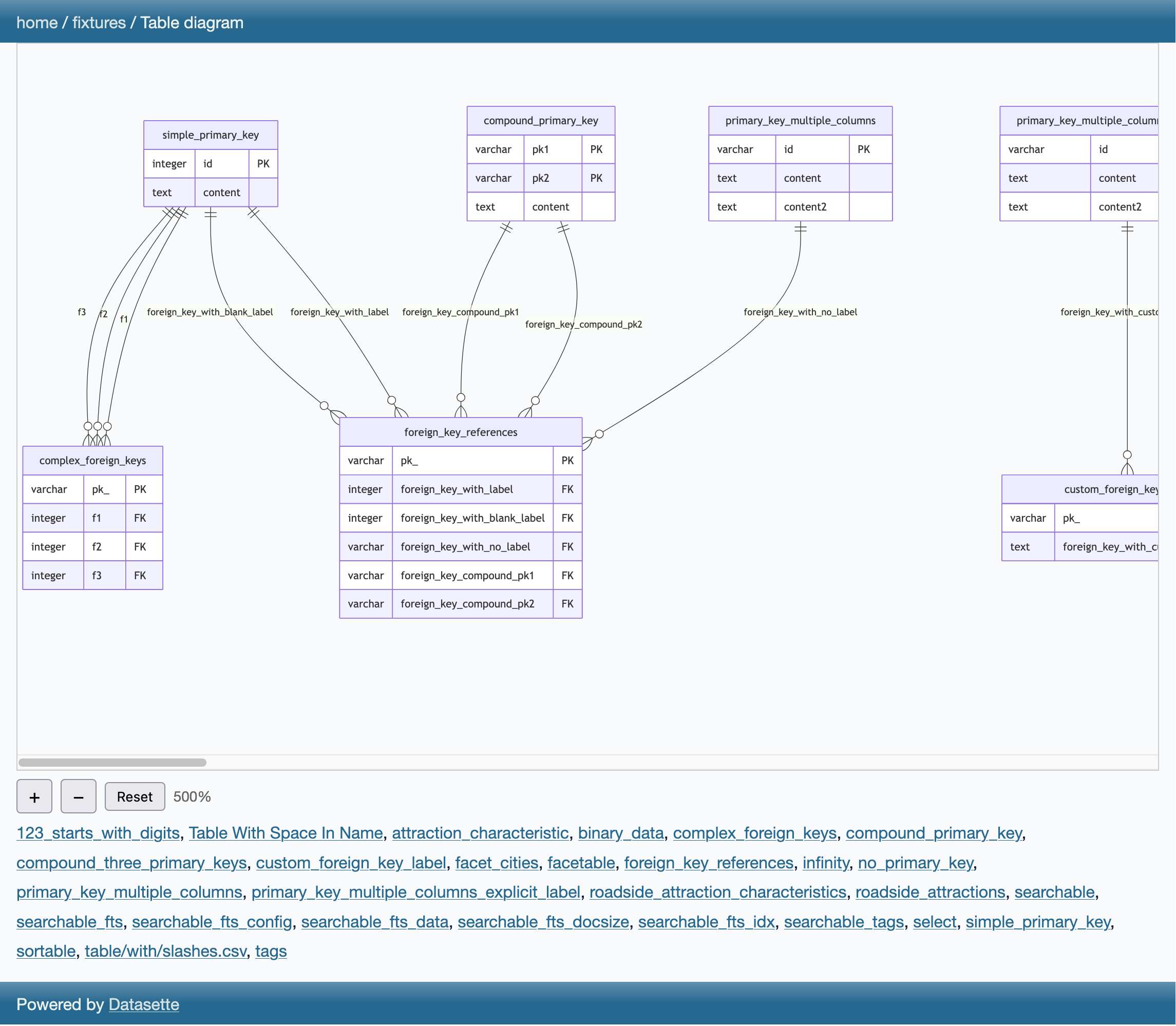
Databases gain a new database action menu item called "Table diagram", which links to a page that displays Mermaid Entity Relationship diagrams of the tables in that database.
These diagrams can be panned and zoomed, or users can click a table name to zoom to that table and its relationships.
Users will only see tables that they have permission to view.
Development
To set up this plugin locally, first checkout the code. You can confirm it is available like this:
cd datasette-table-diagram
# Confirm the plugin is visible
uv run datasette plugins
To run the tests:
uv run pytest
Metadata
Release files for datasette-table-diagram 0.1a0
For a detailed explanation of source distributions (sdists) and built distributions (wheels), please see the package formats documentation.
Source distribution (sdist)
| File | Size | Uploaded | |
|---|---|---|---|
| datasette_table_diagram-0.1a0.tar.gz | 11.8 kB | Details |
Built distribution (wheel)
| File | Interpreter | ABI | Platform | Reset |
|---|---|---|---|---|
| datasette_table_diagram-0.1a0-py3-none-any.whl | Python 3 | none | any | Details |
Total release size: 22.6 kB
Release files / datasette_table_diagram-0.1a0.tar.gz
| Download URL | datasette_table_diagram-0.1a0.tar.gz |
|---|---|
| Size | 11.8 kB |
| Tags | Source |
|
SHA-256 checksum How to use checksums |
8c80fe62cd30833571422082bc16c2d871432c65f27234a72605bd8d73824390
|
|
BLAKE2b-256 checksum How to use checksums |
7cc9d003dee45bf493c87143f9c61afc6e2668c7f965f905bbf54c9b468faeac
|
| Upload date | |
|
Uploaded using Trusted Publishing? What is trusted publishing? |
Yes |
| Uploaded via |
twine/6.1.0 CPython/3.13.7
|
Provenance
Provenance describes where a file came from. On PyPI, provenance is shared via attestations, which provide a verifiable record of the build or publishing details. View details, limitations and caveats.


PyPI Publish Attestation
PyPI verified that this artifact, at this checksum, originated from the publisher listed below.
Signed by GitHub Actions, verified by PyPI on Mar 7, 2026.
Transparency logRelease files / datasette_table_diagram-0.1a0-py3-none-any.whl
| Download URL | datasette_table_diagram-0.1a0-py3-none-any.whl |
|---|---|
| Size | 10.8 kB |
| Tags | Python 3 |
|
SHA-256 checksum How to use checksums |
0530da78e594971220ab0228a73d6e477cdcda987a2906da727c10ac7a29a4ec
|
|
BLAKE2b-256 checksum How to use checksums |
349f8fe6f80aee0c907fee39f56bb0a3b5c065671dbaeb0bafd4cbd19c927e54
|
| Upload date | |
|
Uploaded using Trusted Publishing? What is trusted publishing? |
Yes |
| Uploaded via |
twine/6.1.0 CPython/3.13.7
|
Provenance
Provenance describes where a file came from. On PyPI, provenance is shared via attestations, which provide a verifiable record of the build or publishing details. View details, limitations and caveats.
PyPI Publish Attestation
PyPI verified that this artifact, at this checksum, originated from the publisher listed below.
Signed by GitHub Actions, verified by PyPI on Mar 7, 2026.
Transparency log












