
datasette-upload-dbs




Upload SQLite database files to Datasette
Installation
Install this plugin in the same environment as Datasette.
datasette install datasette-upload-dbs
Configuration
This plugin requires you to configure a directory in which uploaded files will be stored.
On startup, Datasette will automatically load any SQLite files that it finds in that directory. This means it is safe to restart your server in between file uploads.
To configure the directory as /home/datasette/uploads, add this to a metadata.yml configuration file:
plugins:
  datasette-upload-dbs:
    directory: /home/datasette/uploads
Or if you are using metadata.json:
{
  "plugins": {
    "datasette-upload-dbs": {
      "directory": "/home/datasette/uploads"
    }
  }
}
You can use "." for the current folder when the server starts, or "uploads" for a folder relative to that folder. The folder will be created on startup if it does not already exist.
Then start Datasette like this:
datasette -m metadata.yml
The plugin defaults to loading all databases in the configured directory.
You can disable this by adding the following setting:
"skip_startup_scan": true
Usage
Only users with the upload-dbs permission will be able to upload files. The root user has this permission by default - other users can be granted access using permission plugins, see the Permissions documentation for details.
To start Datasette as the root user, run this:
datasette -m metadata.yml --root
And follow the link that is displayd on the console.
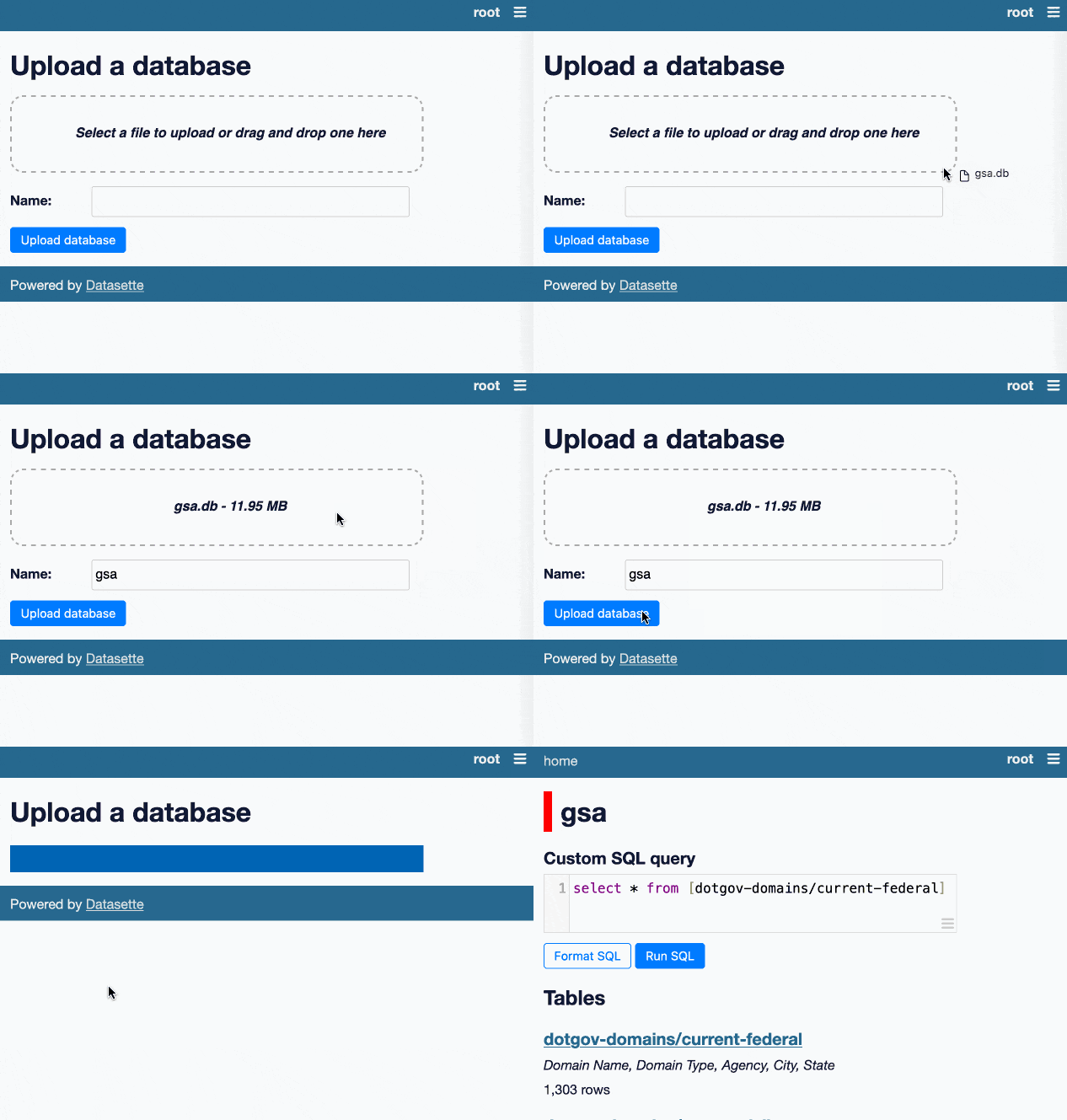
If a user has that permission they will see an "Upload database" link in the navigation menu.
This will take them to /-/upload-dbs where they will be able to upload database files, by selecting them or by dragging them onto the drop area.
Development
To set up this plugin locally, first checkout the code. Then create a new virtual environment:
cd datasette-upload-dbs
python3 -m venv venv
source venv/bin/activate
Now install the dependencies and test dependencies:
pip install -e '.[test]'
To run the tests:
pytest
1 maintainer

Metadata
1 maintainer
Release files for datasette-upload-dbs 0.3.2
For a detailed explanation of source distributions (sdists) and built distributions (wheels), please see the package formats documentation.
Source distribution (sdist)
| File | Size | Uploaded | Provenance | Actions |
|---|---|---|---|---|
| datasette_upload_dbs-0.3.2.tar.gz | 11.5 kB | Without provenance | Details for datasette_upload_dbs-0.3.2.tar.gz |
Built distribution (wheel)
| File | Interpreter | ABI | Platform | Actions Reset |
|---|---|---|---|---|
| datasette_upload_dbs-0.3.2-py3-none-any.whl | Python 3 | none | any | Details for datasette_upload_dbs-0.3.2-py3-none-any.whl |
Total release size: 22.3 kB
Release files / datasette_upload_dbs-0.3.2.tar.gz
| Download URL | datasette_upload_dbs-0.3.2.tar.gz |
|---|---|
| Size | 11.5 kB |
| Tags | Source |
|
SHA-256 checksum How to use checksums |
d12052129b81e8dad2e027e49544b589fac2795e704f090de27b5b75bd54b1d9
|
|
BLAKE2b-256 checksum How to use checksums |
50ce36a5c48ce583978c2e2c8ad5818c78a4372aa3f7f899a9f67d522abf62ad
|
| Upload date | |
|
Uploaded using Trusted Publishing? What is trusted publishing? |
No |
| Uploaded via |
twine/5.0.0 CPython/3.11.9
|
Release files / datasette_upload_dbs-0.3.2-py3-none-any.whl
| Download URL | datasette_upload_dbs-0.3.2-py3-none-any.whl |
|---|---|
| Size | 10.7 kB |
| Tags | Python 3 |
|
SHA-256 checksum How to use checksums |
733d298c068b81a0400d7f6f902037ac1da9a07501ff4370dc364a119aabe557
|
|
BLAKE2b-256 checksum How to use checksums |
f10747c722bec64c5f4ca4dc0f5a20e872d427c5091adf60d32f4d985c65edd1
|
| Upload date | |
|
Uploaded using Trusted Publishing? What is trusted publishing? |
No |
| Uploaded via |
twine/5.0.0 CPython/3.11.9
|
Security for datasette-upload-dbs 0.3.2
Provenance
Provenance describes where a file came from. On PyPI, provenance is shared via attestations, which provide a verifiable record of the build or publishing details. View details, limitations and caveats.
No provenance found
None of the files in this release were uploaded with provenance metadata.
A note on package security
PyPI is a repository for distributing packages, not a service for auditing them. While third-party security researchers and our staff do their best to detect and remove malicious packages, PyPI cannot guarantee the quality, security or suitability of any given package.
To learn more about protecting yourself from malicious actors, visit our package security documentation.














