
This release is a pre-release and may not be stable for production use.
datasette-upload-dbs




Upload SQLite database files to Datasette
Installation
Install this plugin in the same environment as Datasette.
datasette install datasette-upload-dbs
Configuration
This plugin requires Datasette 1.0a38 or higher.
You will need to configure a directory in which uploaded files will be stored.
On startup, Datasette will automatically load any SQLite files that it finds in that directory. This means it is safe to restart your server in between file uploads.
To configure the directory as /home/datasette/uploads, add this to a datasette.yml configuration file:
plugins:
  datasette-upload-dbs:
    directory: /home/datasette/uploads
Or if you are using datasette.json:
{
  "plugins": {
    "datasette-upload-dbs": {
      "directory": "/home/datasette/uploads"
    }
  }
}
You can use "." for the current folder when the server starts, or "uploads" for a folder relative to that folder. The folder will be created on startup if it does not already exist.
Then start Datasette like this:
datasette -c datasette.yml
The plugin defaults to loading all databases in the configured directory.
You can disable this by adding the following setting:
"skip_startup_scan": true
Uploads are unlimited in size by default. To enforce a maximum size, set the max_file_size_mb option - uploads larger than this will be rejected with an HTTP 413 error:
plugins:
  datasette-upload-dbs:
    directory: /home/datasette/uploads
    max_file_size_mb: 100
Usage
Only users with the upload-dbs permission will be able to upload files. The root user has this permission by default - other users can be granted access using permission plugins, see the Permissions documentation for details.
To start Datasette as the root user, run this:
datasette -c datasette.yml --root
And follow the link that is displayed on the console.
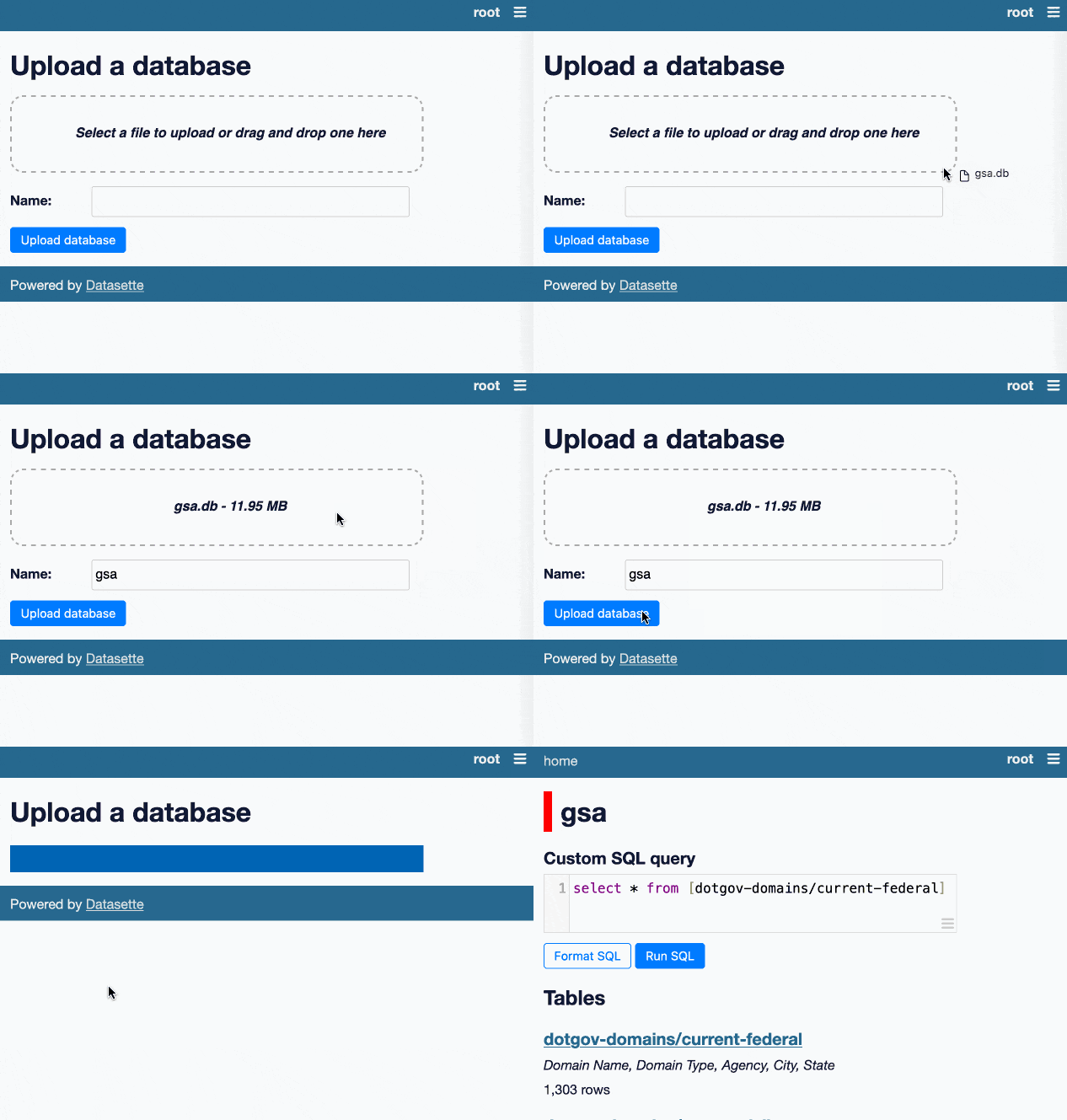
If a user has that permission they will see an "Upload database" link in the navigation menu.
This will take them to /-/upload-dbs where they will be able to upload database files, by selecting them or by dragging them onto the drop area.
API
Databases can also be uploaded programmatically, for example at the end of a script or CI workflow that builds a SQLite file.
First create an API token that is allowed to perform the upload-dbs action. Signed-in users can create one using the form at /-/create-token, or you can use a plugin such as datasette-auth-tokens to issue tokens.
Then send a multipart/form-data POST to /-/upload-dbs with these fields:
db- the SQLite database filedb_name- optional name for the database. If omitted, the name will be derived from the uploaded filename.
Include the token in an Authorization: Bearer header. Requests authenticated with a bearer token are exempt from Datasette's cross-origin (CSRF) protection.
Send an Accept: application/json header to receive JSON responses:
curl -X POST \
  -H "Authorization: Bearer $API_TOKEN" \
  -H "Accept: application/json" \
  -F "db=@fixtures.db" \
  -F "db_name=fixtures" \
  https://your-instance.example.com/-/upload-dbs
A successful upload returns a 200 status with the name Datasette assigned to the database - this may differ from the requested db_name, since invalid characters are replaced:
{
  "ok": true,
  "database": "fixtures",
  "redirect": "/fixtures"
}
Uploading a file with the same name as an existing database will replace that database. Uploads are written to a temporary file and validated before being atomically moved into place, so a failed or invalid upload will never damage the existing database.
Errors return {"ok": false, "error": "..."} with an appropriate status code:
400if the file is missing or not a valid SQLite database403if the request is not authorized to perform theupload-dbsaction413if the file exceeds the configuredmax_file_size_mb
Development
To set up this plugin locally, first checkout the code. Then create a new virtual environment:
cd datasette-upload-dbs
python3 -m venv venv
source venv/bin/activate
Now install the dependencies and test dependencies:
pip install -e '.[test]'
To run the tests:
pytest
1 maintainer

Download files
Download the file for your platform. If you're not sure which to choose, learn more about installing packages.
Source Distribution
Built Distribution
Filter files by name, interpreter, ABI, and platform.
If you're not sure about the file name format, learn more about wheel file names.
Copy a direct link to the current filters
File details
Details for the file datasette_upload_dbs-0.5a0.tar.gz.
File metadata
- Download URL: datasette_upload_dbs-0.5a0.tar.gz
- Upload date:
- Size: 9.1 kB
- Tags: Source
- Uploaded using Trusted Publishing? Yes
- Uploaded via: twine/7.0.0 CPython/3.13.14
File hashes
| Algorithm | Hash digest | |
|---|---|---|
| SHA256 |
88c9b37252d35c0f5cb1bcd48d9395cc520fac1757a6187dfdeaf0dbdab2b97a
|
|
| MD5 |
1d682c2ac247c3722030a30e52b6450d
|
|
| BLAKE2b-256 |
f7e50f94df572f75dd5173548133d00a04ec4b10a3eae38b31529ace5d5d915d
|
Provenance
The following attestation bundles were made for datasette_upload_dbs-0.5a0.tar.gz:
Publisher:
publish.yml on simonw/datasette-upload-dbs
-
Statement:
-
Statement type:
https://in-toto.io/Statement/v1 -
Predicate type:
https://docs.pypi.org/attestations/publish/v1 -
Subject name:
datasette_upload_dbs-0.5a0.tar.gz -
Subject digest:
88c9b37252d35c0f5cb1bcd48d9395cc520fac1757a6187dfdeaf0dbdab2b97a - Sigstore transparency entry: 2425981011
- Sigstore integration time:
-
Permalink:
simonw/datasette-upload-dbs@563cb7896255690c67f898a604f7d53002a26cfd -
Branch / Tag:
refs/tags/0.5a0 - Owner: https://github.com/simonw
-
Access:
public
-
Token Issuer:
https://token.actions.githubusercontent.com -
Runner Environment:
github-hosted -
Publication workflow:
publish.yml@563cb7896255690c67f898a604f7d53002a26cfd -
Trigger Event:
release
-
Statement type:
File details
Details for the file datasette_upload_dbs-0.5a0-py3-none-any.whl.
File metadata
- Download URL: datasette_upload_dbs-0.5a0-py3-none-any.whl
- Upload date:
- Size: 8.0 kB
- Tags: Python 3
- Uploaded using Trusted Publishing? Yes
- Uploaded via: twine/7.0.0 CPython/3.13.14
File hashes
| Algorithm | Hash digest | |
|---|---|---|
| SHA256 |
2e1bca56b1c360fee062799ccf39c50deabcb69704837edb28eb024abb7fc208
|
|
| MD5 |
d8c4200663c7a41a99878ac79181f177
|
|
| BLAKE2b-256 |
48ba5e4892c424da7bf66d39cb16e7dd64395dcc3d69148e9727036982076de2
|
Provenance
The following attestation bundles were made for datasette_upload_dbs-0.5a0-py3-none-any.whl:
Publisher:
publish.yml on simonw/datasette-upload-dbs
-
Statement:
-
Statement type:
https://in-toto.io/Statement/v1 -
Predicate type:
https://docs.pypi.org/attestations/publish/v1 -
Subject name:
datasette_upload_dbs-0.5a0-py3-none-any.whl -
Subject digest:
2e1bca56b1c360fee062799ccf39c50deabcb69704837edb28eb024abb7fc208 - Sigstore transparency entry: 2425981096
- Sigstore integration time:
-
Permalink:
simonw/datasette-upload-dbs@563cb7896255690c67f898a604f7d53002a26cfd -
Branch / Tag:
refs/tags/0.5a0 - Owner: https://github.com/simonw
-
Access:
public
-
Token Issuer:
https://token.actions.githubusercontent.com -
Runner Environment:
github-hosted -
Publication workflow:
publish.yml@563cb7896255690c67f898a604f7d53002a26cfd -
Trigger Event:
release
-
Statement type:







