
datasette-vega-dashboards

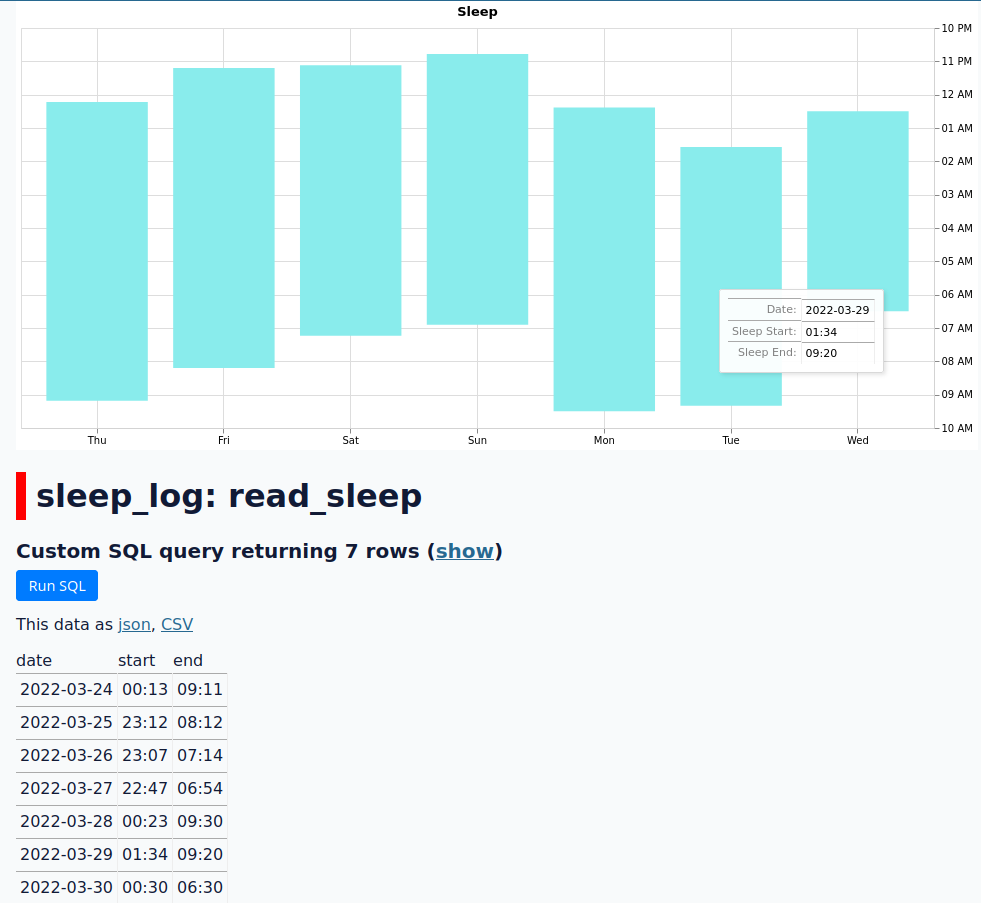
Build custom Vega/Vega-Lite dashboards in Datasette, for presentation-ready plots and visualizations.
Installation
Install this plugin in the same environment as Datasette.
$ datasette install datasette-vega-dashboards
Tutorial
See the example fixture in example_fixture for a minimal example.
You can run the fixture via:
datasette -m metadata.json --template-dir templates/ sleep_log.db
and then open http://127.0.0.1:8001/sleep_log/read_sleep to see the dashboard.
In the minimal example, we create a canned query in metadata.json:
"read_sleep": {
  "hide_sql": true,
  "sql": "SELECT * FROM (SELECT * FROM sleep_log ORDER BY date DESC LIMIT 7) ORDER BY date",
  "write": false
}
The template for this canned query is extended by editing the
templates/query-sleep_log-read_sleep.html file. You can use the
instructions provided in the Datasette custom template
documentation
to determine what the name of the file should be for other resources,
such as dashboards you want to display on a database or table.
Each graph should have a <script> tag wrapped in a <div> tag. The
<script> tag should contain the Vega/Vega-Lite specification, and
must have a type of either application/vnd.vegalite+json (for
Vega-Lite) or application/vnd.vega+json (for Vega). The <div> tag
will be used for rendering the actual graph, and should have whatever
CSS styling you want (such as setting the width or height).
<div style="width: 1000px">
    <script type="application/vnd.vegalite+json">
    /* insert vegalite spec here */
    </script>
</div>
<div style="width: 1000px">
    <script type="application/vnd.vega+json">
    /* or, insert a vega spec here */
    </script>
</div>
Note that the Vega-Lite spec need not contain a data field -- any data
field will be replaced by the plugin based on the data returned by the
canned query. For Vega specs, the data field will be prepended with a
new dataset with the name data.
Development
To set up this plugin locally, first checkout the code. Then create a new virtual environment:
cd datasette-vega-dashboards
python3 -mvenv venv
source venv/bin/activate
Now install the dependencies and test dependencies:
pip install -e '.[test]'
To run the tests:
pytest
1 maintainer

Metadata
1 maintainer
Release files for datasette-vega-dashboards 1.2
For a detailed explanation of source distributions (sdists) and built distributions (wheels), please see the package formats documentation.
Source distribution (sdist)
| File | Size | Uploaded | |
|---|---|---|---|
| datasette-vega-dashboards-1.2.tar.gz | 284.3 kB | Details |
Built distribution (wheel)
| File | Interpreter | ABI | Platform | Reset |
|---|---|---|---|---|
| datasette_vega_dashboards-1.2-py3-none-any.whl | Python 3 | none | any | Details |
Total release size: 569.4 kB
Release files / datasette-vega-dashboards-1.2.tar.gz
| Download URL | datasette-vega-dashboards-1.2.tar.gz |
|---|---|
| Size | 284.3 kB |
| Tags | Source |
|
SHA-256 checksum How to use checksums |
7d420d3cffd1aa6d5889de0ba76e9994ed0ad11379b124c4bcd1550279ba916a
|
|
BLAKE2b-256 checksum How to use checksums |
50a50c3aa80d3f8d8f185ab509bd3956f263729fa778c3f83e75861e05facae3
|
| Upload date | |
|
Uploaded using Trusted Publishing? What is trusted publishing? |
No |
| Uploaded via |
twine/3.8.0 pkginfo/1.8.2 readme-renderer/34.0 requests/2.27.1 requests-toolbelt/0.9.1 urllib3/1.26.9 tqdm/4.63.1 importlib-metadata/4.11.3 keyring/23.5.0 rfc3986/2.0.0 colorama/0.4.4 CPython/3.10.2
|
Release files / datasette_vega_dashboards-1.2-py3-none-any.whl
| Download URL | datasette_vega_dashboards-1.2-py3-none-any.whl |
|---|---|
| Size | 285.0 kB |
| Tags | Python 3 |
|
SHA-256 checksum How to use checksums |
6304483b3c196850e2c2b99134bb5b5c93d80943462cf69169a8ad85b7d5d248
|
|
BLAKE2b-256 checksum How to use checksums |
c7ed53b21c54a82eabfe87ffa519fc8857d5fec96976af19a9b317f2f6a6658f
|
| Upload date | |
|
Uploaded using Trusted Publishing? What is trusted publishing? |
No |
| Uploaded via |
twine/3.8.0 pkginfo/1.8.2 readme-renderer/34.0 requests/2.27.1 requests-toolbelt/0.9.1 urllib3/1.26.9 tqdm/4.63.1 importlib-metadata/4.11.3 keyring/23.5.0 rfc3986/2.0.0 colorama/0.4.4 CPython/3.10.2
|














