









An open source multi-tool for exploring and publishing data
Datasette is a tool for exploring and publishing data. It helps people take data of any shape or size and publish that as an interactive, explorable website and accompanying API.
Datasette is aimed at data journalists, museum curators, archivists, local governments, scientists, researchers and anyone else who has data that they wish to share with the world.
Explore a demo, watch a video about the project or try it out by uploading and publishing your own CSV data.
- datasette.io is the official project website
- Latest Datasette News
- Comprehensive documentation: https://docs.datasette.io/
- Examples: https://datasette.io/examples
- Live demo of current
mainbranch: https://latest.datasette.io/ - Questions, feedback or want to talk about the project? Join our Discord
Want to stay up-to-date with the project? Subscribe to the Datasette newsletter for tips, tricks and news on what's new in the Datasette ecosystem.
Installation
If you are on a Mac, Homebrew is the easiest way to install Datasette:
brew install datasette
You can also install it using pip or pipx:
pip install datasette
Datasette requires Python 3.7 or higher. We also have detailed installation instructions covering other options such as Docker.
Basic usage
datasette serve path/to/database.db
This will start a web server on port 8001 - visit http://localhost:8001/ to access the web interface.
serve is the default subcommand, you can omit it if you like.
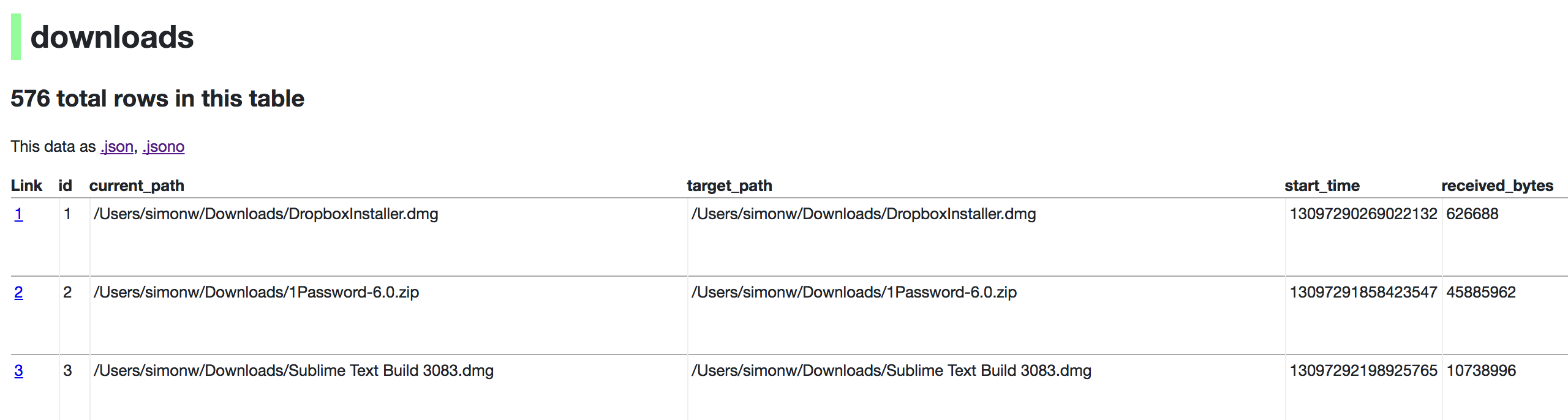
Use Chrome on OS X? You can run datasette against your browser history like so:
datasette ~/Library/Application\ Support/Google/Chrome/Default/History --nolock
Now visiting http://localhost:8001/History/downloads will show you a web interface to browse your downloads data:
metadata.json
If you want to include licensing and source information in the generated datasette website you can do so using a JSON file that looks something like this:
{
    "title": "Five Thirty Eight",
    "license": "CC Attribution 4.0 License",
    "license_url": "http://creativecommons.org/licenses/by/4.0/",
    "source": "fivethirtyeight/data on GitHub",
    "source_url": "https://github.com/fivethirtyeight/data"
}
Save this in metadata.json and run Datasette like so:
datasette serve fivethirtyeight.db -m metadata.json
The license and source information will be displayed on the index page and in the footer. They will also be included in the JSON produced by the API.
datasette publish
If you have Heroku or Google Cloud Run configured, Datasette can deploy one or more SQLite databases to the internet with a single command:
datasette publish heroku database.db
Or:
datasette publish cloudrun database.db
This will create a docker image containing both the datasette application and the specified SQLite database files. It will then deploy that image to Heroku or Cloud Run and give you a URL to access the resulting website and API.
See Publishing data in the documentation for more details.
Datasette Lite
Datasette Lite is Datasette packaged using WebAssembly so that it runs entirely in your browser, no Python web application server required. Read more about that in the Datasette Lite documentation.
1 maintainer

Download files
Download the file for your platform. If you're not sure which to choose, learn more about installing packages.
Source Distribution
Built Distribution
Filter files by name, interpreter, ABI, and platform.
If you're not sure about the file name format, learn more about wheel file names.
Copy a direct link to the current filters
File details
Details for the file datasette-0.65.3.tar.gz.
File metadata
- Download URL: datasette-0.65.3.tar.gz
- Upload date:
- Size: 411.5 kB
- Tags: Source
- Uploaded using Trusted Publishing? No
- Uploaded via: twine/7.0.0 CPython/3.14.3
File hashes
| Algorithm | Hash digest | |
|---|---|---|
| SHA256 |
ad283ea3c7f80423cb8ea5741fb9072878b40aedae3e3b63ab9856d92191582d
|
|
| MD5 |
d722fb986c1bf328f5fe980363d50985
|
|
| BLAKE2b-256 |
6b02d9cbfc8750f490450c0b493fd3790c633dc44587f8b049163913748b1031
|
File details
Details for the file datasette-0.65.3-py3-none-any.whl.
File metadata
- Download URL: datasette-0.65.3-py3-none-any.whl
- Upload date:
- Size: 397.6 kB
- Tags: Python 3
- Uploaded using Trusted Publishing? No
- Uploaded via: twine/7.0.0 CPython/3.14.3
File hashes
| Algorithm | Hash digest | |
|---|---|---|
| SHA256 |
30ea57f672f8c8ee40fc212fd63d1bdc6bb94e5afd733732b19f0c84371483da
|
|
| MD5 |
f58d6d29a2c9977ed3f33544d693f98e
|
|
| BLAKE2b-256 |
9d2e0ae56e4a2645f54d5d6edd7ba44b28f19a8997b4f8ddc69eaea9b15859c6
|







