
 DataSpector






Enterprise data-quality & integrity checks (dataspector) and pure-Python COBOL copybook & mainframe extract conversion (coboller) — audit files, spreadsheets, databases, and legacy extracts with automated Excel reporting, and decode binary EBCDIC, COMP-3 packed decimals, binary integers, IBM HFP floats, and fixed-width files directly into CSV, TSV, JSON/JSONL, Excel, Parquet, or pandas DataFrames.
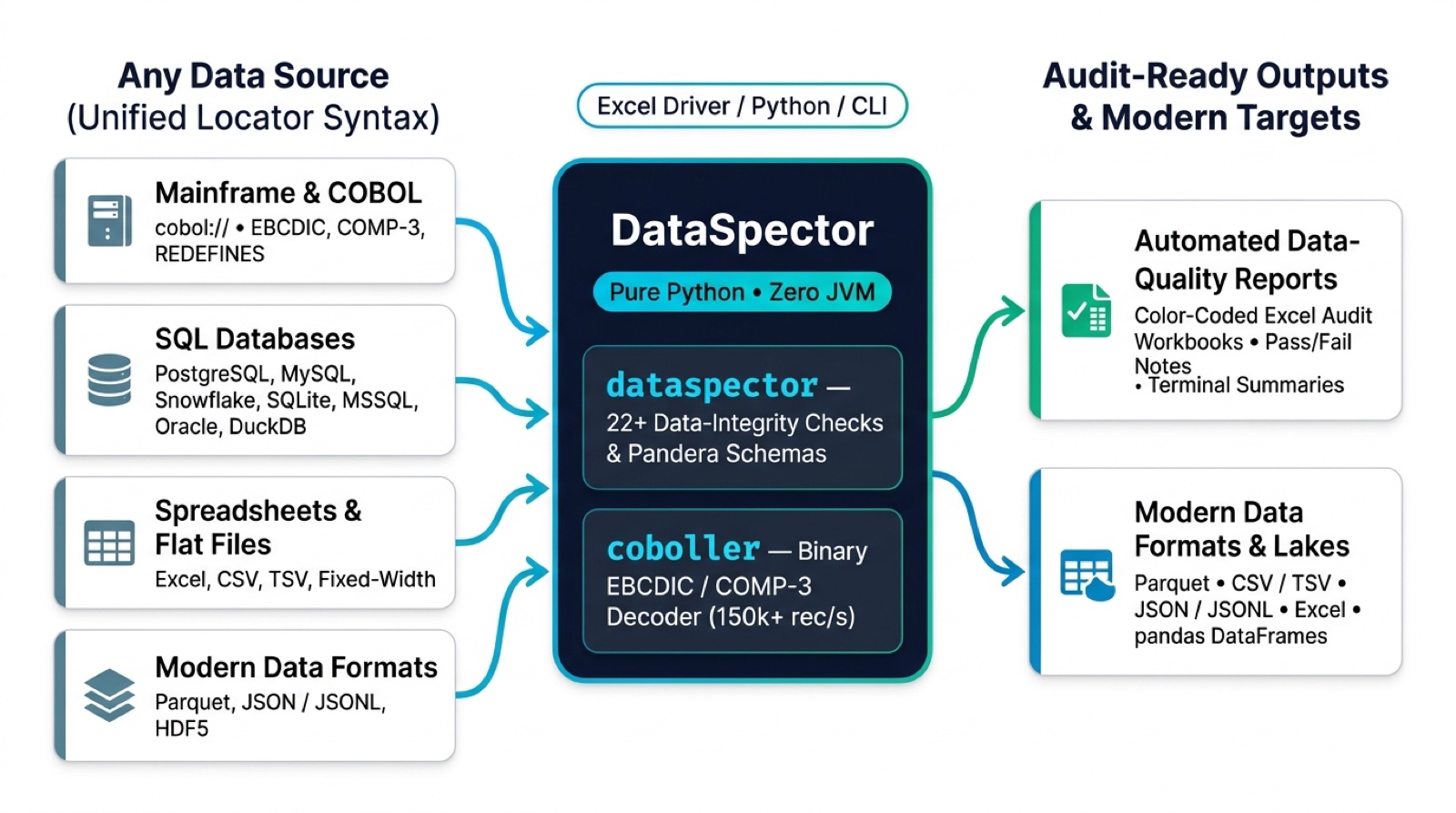
Why DataSpector?
DataSpector combines two complementary pillars in a single, zero-infrastructure Python package:
- Automated Data-Quality, Integrity & Drift Auditing (
dataspector):- Source-level, record-level & cross-source controls: verify file/table existence, modification recency, storage size tolerances, column counts, nullness, uniqueness, numeric/date ranges, conditional field rules, and cross-source schema/row-count consistency across CSV, TSV, Excel, fixed-width text, Parquet, JSON/JSONL, HDF5, COBOL datasets, and SQL databases via SQLAlchemy (SQLite, PostgreSQL, MySQL, MariaDB, SQL Server, Oracle, DuckDB, and MS Access) using a single unified locator syntax.
- Business-friendly Excel driver & executive reporting: define hundreds of checks across dozens of data sources in an Excel workbook (
test_driver.xlsx), execute sequentially or in parallel (--use_multiprocess true), and generate color-coded, timestamped Excel audit reports with pass/fail summaries, diagnostic notes, and severity levels (Error/Warning). - Declarative Pandera schema validation: enforce
pandera.DataFrameSchemarules (record_validate_schema) across streamed chunks — or auto-generate a Pandera schema directly from a COBOL copybook viaCopybook.to_pandera_schema().
- Pure-Python COBOL & Mainframe Extract Conversion (
coboller):- Read COBOL & mainframe extracts with zero external runtime: pure-Python COBOL copybook parser and binary decoder — no JVM, no Spark cluster, no mainframe compiler, no manual byte-slicing scripts.
- Convert legacy mainframe files to modern formats: stream multi-gigabyte fixed-width or binary EBCDIC extracts (
cp500,cp037, ASCII, UTF-8) directly into CSV, TSV, JSONL, JSON, Excel, Parquet, orpandas.DataFramevia a single CLI command (coboller convert) or Python call (Copybook.convert()). - Handles real-world mainframe & COBOL data types:
COMP-3/PACKED-DECIMAL,COMP-6,COMP/COMP-4/COMP-5/COMP-X,BINARY-CHAR/SHORT/LONG/DOUBLE,COMP-1/COMP-2(IEEE 754 & IBM z/Architecture HFP),FLOAT-SHORT/FLOAT-LONG, signed zoned decimals (EBCDIC/ASCII/Micro Focus overpunch & separate signs), numeric-edited (DECIMAL-POINT IS COMMA), external floats,PIC NUTF-16,PIC UUTF-8 +BYTE-LENGTH,PIC GDBCS,PIC 1USAGE BIT,POINTER/INDEX, nestedOCCURS,REDEFINESoverlays, and level-88 condition names.
Background & What DataSpector Replaces
DataSpector was born from two recurring enterprise data problems:
- Replacing million-dollar enterprise data-governance & file-auditing suites: DataSpector's data-quality engine was inspired by watching an IT organization spend millions on commercial data-auditing and governance platforms (such as Varonis) to monitor shared drives, databases, and scheduled data drops — when a fast, open-source Python tool driven by an Excel workbook could verify file arrivals, schema drift, record counts, value ranges, and cross-system consistency for free.
- Unpacking raw mainframe data extracts without a heavy stack: When a mainframe job drops a raw binary extract (
.dat/.bin/ z/OS.PSPhysical Sequential file) and a COBOL copybook (.cbl/.cpy), most tools either focus on static COBOL source-code translation (ignoring binary data files), require a full JVM/Spark runtime, or only handle plain ASCII fixed-width text (read_fwf) and break as soon as a record mixes EBCDIC text with binaryCOMP-3,COMP, IBM HFP floats,LOW-VALUESinitialization, or multi-recordREDEFINESoverlays.
| Capability | DataSpector (dataspector + coboller) |
Enterprise Data-Auditing Suites (e.g. Varonis) | JVM / Spark Mainframe Readers | Basic Fixed-Width / Copybook Scripts |
|---|---|---|---|---|
| Cost & Footprint | Free, open-source (MIT), 100% pure Python | Million-dollar enterprise licensing & agents | Requires JVM / Apache Spark cluster | Custom per-file scripts |
| Multi-Source Data-Integrity & Drift Auditing | Yes (22+ source, record & cross-source checks) | File/permission governance (limited record logic) | No | No |
| Excel Driver Workbook & Color-Coded Audit Reports | Yes (dataspector --driver ... --output ...) |
Proprietary web console | No | No |
| Declarative Pandera Schema Validation | Yes (YAML/JSON/Python or auto-generated from COBOL) | No | No | No |
Binary EBCDIC + COMP-3, COMP, COMP-6, COMP-X |
Yes | No | Yes | Partial / No |
IBM HFP & IEEE Floats (COMP-1/COMP-2), USAGE BIT, DBCS, UTF-8 |
Yes | No | Partial | No |
Multi-Record REDEFINES Overlays & Nested OCCURS |
Yes | No | Yes | Partial |
One-Command Export to CSV, TSV, JSONL, Excel, Parquet & pandas |
Yes (coboller convert / GenericData.convert) |
No | Spark DataFrame | No |
Real-World Mainframe Extract Benchmark (notebooks/validate_mainframe_extracts.ipynb)
To prove dataspector.coboller against production-grade mainframe layouts and binary edge cases, the repository includes an executable validation notebook — notebooks/validate_mainframe_extracts.ipynb — that automatically validates 69 COBOL copybooks and 37 mainframe data extracts (5,863 records) across public enterprise mainframe benchmarks:
| Benchmark Suite | Copybooks Parsed | Data Extracts Decoded | Records Decoded | Highlights Tested |
|---|---|---|---|---|
| Enterprise Mainframe Modernization Suite (AWS CardDemo) | 30 / 30 (100%) | 16 / 16 (100%) | 1,343 | z/OS EBCDIC .PS & ASCII batch extracts, 500-row 5-layout REDEFINES export (CVEXPORT.cpy), COMP, COMP-3, OCCURS, LOW-VALUES |
| Enterprise Financial & Banking Torture Suite | 36 / 36 (100%) | 18 / 18 (100%) | 4,480 | 195-field type matrix (INTEGR.TYPES), 37-digit BINARY & COMP-3, 2,202-byte 247-column financial records (OCCURS 80), wider REDEFINES, P scaling, explicit-decimal overpunch |
DataSpector Built-in Benchmark Suite (tests/data/) |
3 / 3 (100%) | 3 / 3 (100%) | 40 | cp500 EBCDIC, COMP-6, COMP-X, BINARY-*, FLOAT-*, PIC U UTF-8, PIC G DBCS, PIC 1 USAGE BIT, DECIMAL-POINT IS COMMA |
| Total | 69 / 69 (100%) | 37 / 37 (100%) | 5,863 | Zero decoding failures across all 37 extracts |
Performance highlights (pure Python, zero JVM):
- Copybook parsing: all 69 copybooks (3,465 elementary field definitions) parse into full byte-offset layouts in ~26 ms total (~0.38 ms / copybook, >2,500 copybooks/sec).
- Binary EBCDIC +
COMP-3decoding: decodes 100,000 binary EBCDIC +COMP-3mainframe transaction records (4.5 MB, 600,000 field values) into apandas.DataFramein ~0.6s (~150,000+ records/sec, ~1,000,000 decoded fields/sec), with constant-memory chunked streaming viaCopybook.yield_data()andCopybook.convert().
Installation
Install from PyPI:
pip install dataspector
# or with uv
uv add dataspector
Or install from source for local development using uv:
uv sync --all-groups
Optional extras (SQLite works out of the box; other SQL backends connect through SQLAlchemy):
pip install "dataspector[postgres]"  # PostgreSQL (psycopg[binary])
pip install "dataspector[mysql]"     # MySQL / MariaDB (pymysql)
pip install "dataspector[oracle]"    # Oracle thin mode (oracledb)
pip install "dataspector[duckdb]"    # DuckDB (duckdb-engine)
pip install "dataspector[snowflake]" # Snowflake (snowflake-sqlalchemy)
pip install "dataspector[db]"        # All pure-wheel SQL drivers above (postgres, mysql, oracle, duckdb)
pip install "dataspector[odbc]"      # SQL Server / MS Access (pyodbc)
pip install "dataspector[parquet]"   # Apache Parquet (pyarrow)
pip install "dataspector[docs]"      # Sphinx + PyData theme documentation dependencies
Unified Data-Source Locator Syntax
Address any file, Excel sheet, COBOL copybook + extract pair, or SQL database table using one consistent URI syntax (or DataSourceSpec), with ${ENV_VAR} interpolation so secrets never live in Excel driver workbooks:
| Source Type | Unified Locator Examples |
|---|---|
| Single Files | data/accounts.csv (auto), csv://drops/daily.dat, tsv://exports/tab.txt, fwf://fixed.bin?widths=[10,20,15], parquet://lake/events.parquet, jsonl://logs/stream.log |
| Excel Sheets & HDF5 | excel://reports/q1.xlsx#Sheet1 (or reports/q1.xlsx#Sheet1), hdf5://store/data.h5#measurements |
| COBOL Copybook + Data | cobol://layouts/acct.cbl::data/acct.dat?encoding=cp500&include_filler=false |
| SQL Databases (SQLAlchemy) | sqlite:///db.sqlite#Table1, postgresql+psycopg://user:${PG_PASS}@host:5432/db#public.users, mysql+pymysql://user:${DB_PASS}@host:3306/shop#orders, snowflake://user:${SF_PASS}@acct/db/schema?warehouse=WH#fact_sales, duckdb:///warehouse.duckdb#events, mssql+pyodbc://server/db?driver=ODBC+Driver+18+for+SQL+Server#dbo.accounts, oracle+oracledb://user:${ORA_PASS}@host:1521/svc#ledger, access://legacy.accdb#Orders |
(See the Supported Data Sources Guide for full details, DataSourceSpec, and v1.x → v2.0 migration notes.)
Read & Convert COBOL Mainframe Extracts (coboller)
Mainframe extracts are often unreadable binary/EBCDIC blobs packed with COMP-3 decimals, binary COMP integers, and floating-point fields:
b'\xd5\xc1\xf1\xf0\xf0\xf0\xf0\xf0\xf1\xf7@@\xc1\xf2\xf0\xf2\xf4\xf0\xf1\xf1\xf5\xf0\xf0\xf1\xf2\xf5\xf5\xc0\x00$\x00\x0b^(=.\x14{?\xf0'
One-Line CLI Inspection & Conversion
Both coboller and dataspector CLIs are powered by jsonargparse from typed dataclasses in dataspector.settings (supporting --config config.yaml files as well as CLI flags):
# Inspect field layout, byte offsets, PIC clauses, and storage types
uv run coboller inspect tests/data/sample_cobol_mainframe.cbl --omit_filler true

# Preview decoded records directly in the terminal
uv run coboller convert tests/data/sample_cobol_mainframe.cbl tests/data/sample_cobol_mainframe.dat --encoding cp500

# Convert binary EBCDIC/COMP-3 data directly to human-readable CSV, JSONL, JSON, or Excel
uv run coboller convert tests/data/sample_cobol_mainframe.cbl tests/data/sample_cobol_mainframe.dat \
    --encoding cp500 --output accounts.csv
Interactive Python Walkthrough
>>> from dataspector.coboller import Copybook
>>> cbl = Copybook("tests/data/sample_cobol_mainframe.cbl")
>>> cbl.record_length
67

# 1. Inspect the decoded byte layout interactively
>>> cbl.summary(include_filler=False)[["name", "pic", "usage", "offset", "byte_length"]].head(6)
               name      pic   usage  offset  byte_length
0       ACCT-REGION       XX DISPLAY       0            2
1       ACCT-NUMBER     X(7) DISPLAY       2            7
2  ACCT-CHECK-DIGIT        X DISPLAY       9            1
3       ACCT-STATUS        X DISPLAY      12            1
4     ACCT-EFF-DATE     9(8) DISPLAY      13            8
5   ACCT-ADJUSTMENT S9(5)V99 DISPLAY      21            7

# 2. Preview decoded mainframe records as a clean pandas DataFrame
>>> df = cbl.to_dataframe(
...     "tests/data/sample_cobol_mainframe.dat",
...     encoding="cp500",
...     include_filler=False,
...     nrows=5,
... )
>>> df[["ACCT-REGION", "ACCT-NUMBER", "ACCT-STATUS", "ACCT-ADJUSTMENT", "ACCT-BALANCE"]]
  ACCT-REGION ACCT-NUMBER ACCT-STATUS  ACCT-ADJUSTMENT  ACCT-BALANCE
0          NA     1000001           A           125.50     250000.00
1          EU     1000002           A           -42.75     -15000.50
2          AP     1000003           C             0.00          0.00
3          NA     1000004           A          9999.99    1234567.89

# 3. Stream-convert to human-readable CSV, JSONL, JSON, Excel, or Parquet
>>> cbl.convert("tests/data/sample_cobol_mainframe.dat", "accounts.csv", encoding="cp500")
PosixPath('accounts.csv')
>>> cbl.convert("tests/data/sample_cobol_mainframe.dat", "accounts.jsonl", encoding="cp500")
PosixPath('accounts.jsonl')

# 4. Auto-generate a Pandera schema from the copybook and validate the decoded data
>>> schema = cbl.to_pandera_schema(include_filler=False, enforce_conditions=True)
>>> _ = schema.validate(df)
Format-Agnostic Data-Integrity Checks & Automated Reporting (dataspector)
DataSpector provides 22+ built-in data-quality checks across three layers — plus full Pandera schema validation — over any format supported by GenericData (CSV, TSV, Excel, Fixed-Width, Parquet, JSON/JSONL, HDF5, COBOL Copybook + Data Extract, and SQL databases via SQLAlchemy: SQLite, PostgreSQL, MySQL/MariaDB, SQL Server, Oracle, DuckDB, MS Access):
| Check Category | Built-in Controls | What They Audit |
|---|---|---|
Source & Metadata Checks (source_*) |
source_exists, source_fuzzy_find, source_has_N_fields, source_modified_recently, source_modified_on_date, source_storage_size_roughly |
File/table arrival, wildcard discovery, schema column count, freshness SLAs, and file-size anomalies |
Cross-Source Reconciliation (source_source_*) |
source_source_same_fields, source_source_identical, source_source_size_roughly_same, source_source_roughly_same_number_of_records |
Schema drift, byte-for-byte identity, storage volume stability, and row-count reconciliation between staging/production or legacy/modern targets |
Record & Field Quality (record_*) |
record_count, record_count_greater_than, record_contains, record_contains_at_least, record_field_not_null, record_all_data_not_null, record_field_is_unique, record_field_is_numeric, record_field_contains, record_field_contains_at_least, record_field_contains_only, record_field_numeric_value_between, record_field_date_between, record_if_field1_startswith_field2_contains_only |
Completeness, primary-key uniqueness, numeric/date bounds, allowed domain values, and cross-column business rules (streamed chunk-by-chunk for constant memory) |
| Declarative Schema Validation | record_validate_schema (powered by Pandera) |
Column dtypes, regex patterns, range constraints, YAML/JSON schema files, or auto-generated COBOL copybook schemas (Copybook.to_pandera_schema()) |
Python API & Terminal Reporting
from pathlib import Path
import dataspector

results = dataspector.run_checks_on_location(
    Path("tests/data/sample_csv.csv"),
    [
        ("source_exists", {}),
        ("source_has_N_fields", {"n_fields": 5}),
        ("record_count", {"nrows": 31}),
        ("record_field_not_null", {"field": "Cost Center"}),
        ("record_field_numeric_value_between", {"field": "Cost [CAD]", "constraint": (0, 200000)}),
    ],
)
assert results.all_passed

# Print a colorized summary table to the terminal or export an Excel audit report
dataspector.pretty_print_results(results)
dataspector.write_excel_report({"Sample CSV": results}, "audit_report.xlsx")
Batch Auditing & Color-Coded Excel Reports via CLI
Non-technical analysts and data engineers alike can manage enterprise check suites in an Excel driver workbook (see the sample test_driver.xlsx):
Location Detailssheet: maps friendly source names (Source Name) to a unified locator string, along with optionalReader Arguments:- Single files (auto or explicit scheme):
tests/data/sample_csv.csv,csv://drops/daily.dat,tsv://exports/tab.txt,fwf://extracts/fixed.txt?widths=[10,20,15],parquet://lake/part.parquet,jsonl://logs/events.log - Excel sheets & HDF5 keys:
excel://workbook.xlsx#Sheet1(orworkbook.xlsx#Sheet1),hdf5://store.h5#measurements - COBOL copybook + data extract pairs:
cobol://layout.cbl::extract.dat?encoding=cp500 - Embedded & Server SQL Databases (SQLite, Postgres, MySQL, MariaDB, Snowflake, SQL Server, Oracle, DuckDB, MS Access):
sqlite:///path/to/db.sqlite#Table1postgresql+psycopg://user:${DB_PASS}@host:5432/warehouse#public.accountsmysql+pymysql://user:${DB_PASS}@host:3306/shop#orderssnowflake://user:${SF_PASS}@account_id/db/schema?warehouse=COMPUTE_WH#fact_salesmssql+pyodbc://server/db?driver=ODBC+Driver+18+for+SQL+Server#dbo.ledgerduckdb:///analytics.duckdb#events/access://legacy.accdb#Orders
- Single files (auto or explicit scheme):
Checks to Runsheet: lists each check, itsKeyword Arguments, an activeProcesstoggle (Y/N), and aSeveritylevel (ErrororWarning).
Run the entire audit suite from the command line or Python:
# Execute all enabled checks in test_driver.xlsx and generate a formatted Excel report
dataspector --driver test_driver.xlsx --output report.xlsx

# Execute across sources in parallel worker processes
dataspector --driver test_driver.xlsx --output report.xlsx --use_multiprocess true --overwrite true

# Or drive via a YAML/JSON configuration file
dataspector --config run.yaml
The generated Excel report (write_excel_report) replicates the driver layout and appends color-coded Passed (green TRUE / red FALSE), Notes (diagnostic failure details, such as offending row values or mismatched columns), and Exceptions columns for immediate audit sign-off.
Key CLI options (from DataSpectorSettings):
--driver: path to the Excel driver workbook (Location DetailsandChecks to Runsheets).--output: path to write the formatted Excel report (auto-versioned unless--overwrite true).--use_multiprocess true: run location checks in parallel worker processes.--log_level: Loguru verbosity (ERROR,WARNING,INFO,DEBUG,TRACE).--config: optional YAML/JSON configuration file.
Enterprise Support & Consulting Services
Need to migrate hundreds of legacy COBOL copybooks and EBCDIC/VSAM mainframe data drops into Parquet/Snowflake/Databricks, or replace a seven-figure commercial data-auditing platform with an automated, air-gapped Python + Excel-driven data-integrity suite?
Aaron Berndsen (creator of DataSpector) offers enterprise consulting, architecture design, and fixed-scope implementation sprints:
- Turnkey Mainframe & COBOL Data Modernization: Custom streaming pipelines for complex multi-record
REDEFINES,OCCURS DEPENDING ON,COMP-3/COMP-6, IBM HFP floats, and vendor-specific COBOL dialects into cloud data lakes and warehouses — with zero JVM/Spark overhead. - Automated Enterprise Data-Quality & Governance Rollouts: Custom data-integrity checks, self-service Excel driver templates for finance/actuarial/audit teams, Pandera schema enforcement, and compliance reporting (SOX, OSFI, SOC 2, HIPAA).
- Custom Connectors & Priority Support: Bespoke storage connectors, dialect support, and hands-on team workshops.
Get in Touch:
- Consulting & Services Overview: https://aberndsen.github.io/dataspector/consulting.html
- Email: aaron.berndsen@gmail.com
- LinkedIn: https://www.linkedin.com/in/aberndsen/
- GitHub Issues & Discussions: https://github.com/aberndsen/dataspector/issues
AI Assistant & Agent Integration (llms.txt & Agent Skill)
DataSpector publishes standardized context files for AI coding assistants (Claude Code, Cursor, Antigravity, Perplexity, ChatGPT):
llms.txt&llms-full.txt: Machine-readable technical index and complete copy-paste recipe guide hosted on GitHub Pages.skills/dataspector/SKILL.md: Drop-in agent skill definition for AI coding environments.
Development
# Run tests with coverage
uv run pytest

# Lint & format check
uv run ruff check src tests

# Static type checking
uv run ty check src tests

# Build Sphinx HTML documentation (PyData theme)
uv run sphinx-build -b html docs/source docs/build/html
1 maintainer

Metadata
1 maintainer
Release files for dataspector 2.0.0
For a detailed explanation of source distributions (sdists) and built distributions (wheels), please see the package formats documentation.
Source distribution (sdist)
| File | Size | Uploaded | Provenance | Actions |
|---|---|---|---|---|
| dataspector-2.0.0.tar.gz | 742.4 kB | With provenance | Details for dataspector-2.0.0.tar.gz |
Built distribution (wheel)
| File | Interpreter | ABI | Platform | Actions Reset |
|---|---|---|---|---|
| dataspector-2.0.0-py3-none-any.whl | Python 3 | none | any | Details for dataspector-2.0.0-py3-none-any.whl |
Total release size: 812.2 kB
Release files / dataspector-2.0.0.tar.gz
| Download URL | dataspector-2.0.0.tar.gz |
|---|---|
| Size | 742.4 kB |
| Tags | Source |
|
SHA-256 checksum How to use checksums |
5822aa4a08cf539b87b9c24ac8e5f8e18b3c49d1b8d588807cefe586f445567b
|
|
BLAKE2b-256 checksum How to use checksums |
9c4bd30930f9df2f430dd57e00cc7eda026970170d84012e9895eec6f3cfabbf
|
| Upload date | |
|
Uploaded using Trusted Publishing? What is trusted publishing? |
Yes |
| Uploaded via |
twine/7.0.0 CPython/3.13.16
|
Provenance
Provenance describes where a file came from. On PyPI, provenance is shared via attestations, which provide a verifiable record of the build or publishing details. View details, limitations and caveats.


PyPI Publish Attestation
PyPI verified that this artifact, at this checksum, originated from the publisher listed below.
Signed by GitHub Actions, verified by PyPI on Nov 24, 2026.
Transparency logRelease files / dataspector-2.0.0-py3-none-any.whl
| Download URL | dataspector-2.0.0-py3-none-any.whl |
|---|---|
| Size | 69.8 kB |
| Tags | Python 3 |
|
SHA-256 checksum How to use checksums |
210d511e832af8030d31e00f579cf4035f23d13a158a1abec7fb955d13eccd14
|
|
BLAKE2b-256 checksum How to use checksums |
1b9e15c7a8117dd5652656aba35f5f40a184babf31debeabf04085aeb53769d9
|
| Upload date | |
|
Uploaded using Trusted Publishing? What is trusted publishing? |
Yes |
| Uploaded via |
twine/7.0.0 CPython/3.13.16
|
Provenance
Provenance describes where a file came from. On PyPI, provenance is shared via attestations, which provide a verifiable record of the build or publishing details. View details, limitations and caveats.
PyPI Publish Attestation
PyPI verified that this artifact, at this checksum, originated from the publisher listed below.
Signed by GitHub Actions, verified by PyPI on Nov 24, 2026.
Transparency logSecurity for dataspector 2.0.0
Provenance
Provenance describes where a file came from. On PyPI, provenance is shared via attestations, which provide a verifiable record of the build or publishing details. View details, limitations and caveats.
Full provenance
Both files in this release have been uploaded with provenance metadata.
Attestation for dataspector-2.0.0.tar.gz
PyPI Publish Attestation
PyPI verified that this artifact, at this checksum, originated from the publisher listed below.
Signed by GitHub Actions, verified by PyPI on Nov 24, 2026.
Transparency logA note on package security
PyPI is a repository for distributing packages, not a service for auditing them. While third-party security researchers and our staff do their best to detect and remove malicious packages, PyPI cannot guarantee the quality, security or suitability of any given package.
To learn more about protecting yourself from malicious actors, visit our package security documentation.














