
dataviper




dataviper is a SQL-based tool to get the basic data preparation done in easy way, with doing
- Create "Data Profile" report of a table
- One-hot encode for "Categorical Columns" and create a "one-hot" table
- Check "Joinability" between 2 tables
- // TODO: and more
Example
pip install dataviper
Your main.py will look like this
from dataviper import Client
from dataviper.source import MySQL

client = Client(source=MySQL({
    'host': 'localhost',
    'user': 'root',
    'password': 'xxxxxx',
    'database': 'your_database'
}))

with client.connect():
    profile = client.profile('Your_Table')
    profile.to_excel()
python3 main.py
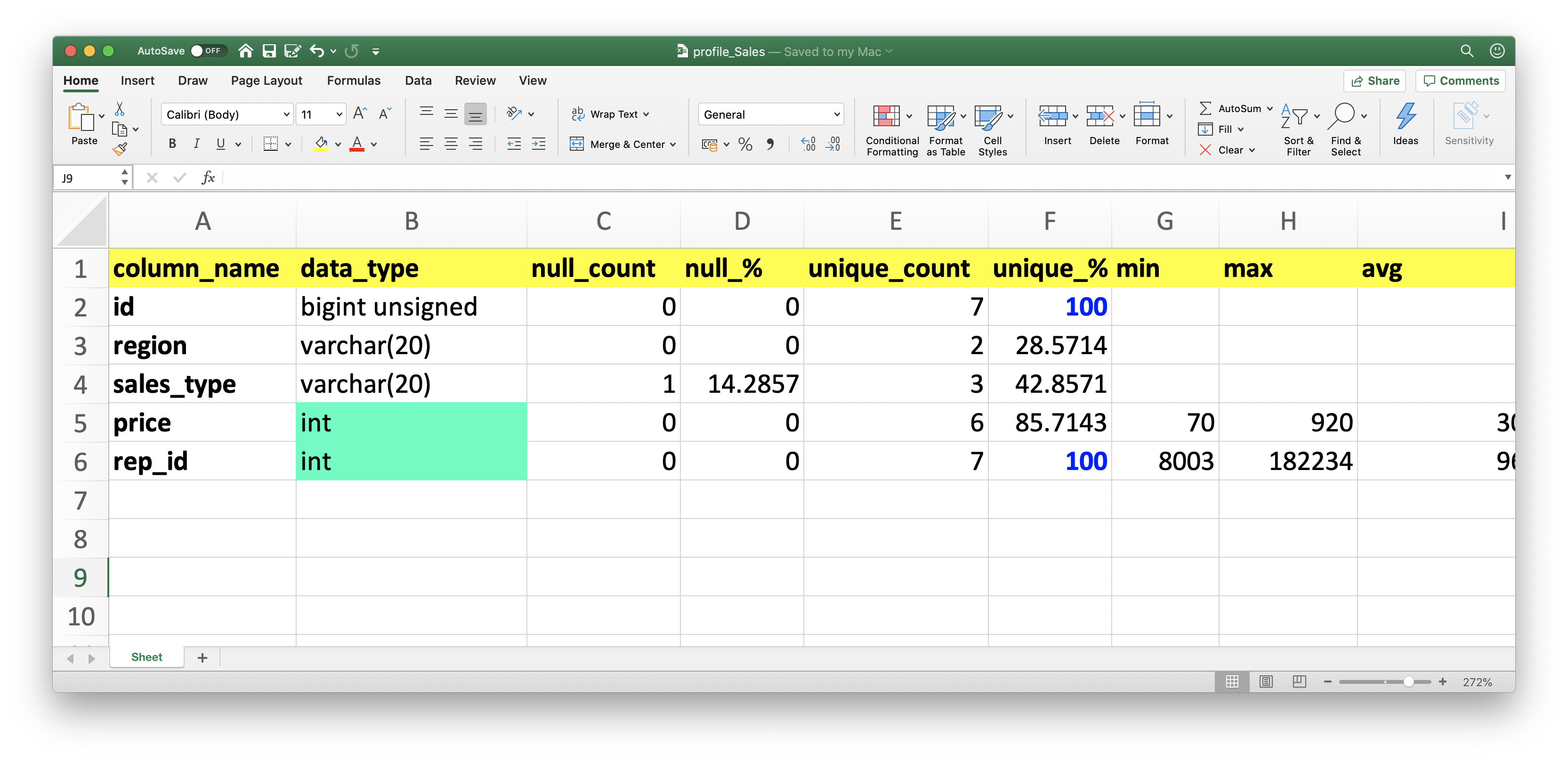
# Then you will get 'profile_Your_Table.xlsx' 🤗
Why?
It's known that "Data Profiling" needs to be done with scanning all the rows in a table. If you try to do this naively by pandas or any libraries which internally use pandas, it's not avoidable to use bunch of memory of your local machine and freeze your work.
dataviper is a SQL-based Data Profiling tool, which simply and dynamically generates SQLs and lets the database machine do the annoying calculation.
With dataviper, you don't have to have massive local computer. All you need are a stable network and reachable SQL db.
Data Sources
You can choose your data source from
- SQL Server
-
profile -
pivot -
joinability -
histogram
-
- MySQL
-
profile -
pivot -
joinability -
histogram
-
- PostgreSQL
- CSV
-
profile -
pivot -
joinability -
histogram
-
- Excel
APIs
profile
Create "Data Profile" excel file of a specified table.
When you have Sales table like this
| id | region | sales_type | price | rep_id |
|---|---|---|---|---|
| 1 | jp | phone | 240 | 115723 |
| 2 | us | web | 90 | 125901 |
| 3 | jp | web | 560 | 8003 |
| 4 | us | shop | 920 | 182234 |
| 5 | jp | NULL | 90 | 92231 |
| 6 | us | shop | 180 | 100425 |
| 7 | us | shop | 70 | 52934 |
do
with client.connect() as conn:
    table_name = 'Sales'
    profile = client.profile(table_name, example_count=3)
    profile.to_excel()
then you will get profile_Sales.xlsx file with
| column_name | data_type | null_count | null_% | unique_count | unique_% | min | max | avg | std | example_top_3 | example_last_3 |
|---|---|---|---|---|---|---|---|---|---|---|---|
| id | bigint | 0 | 0 | 7 | 100.00 | 1 | 7 | 4.0 | 2.0 | [1,2,3] | [5,6,7] |
| region | varchar | 0 | 0 | 2 | 28.57 | [jp,us,jp] | [jp,us,us] | ||||
| sales_type | varchar | 1 | 14.28 | 3 | 42.85 | [phone,web,web] | [None,shop,shop] | ||||
| price | int | 0 | 0 | 6 | 85.71 | 70 | 920 | 307.1428 | 295.379 | [240,90,560] | [90,180,70] |
| rep_id | int | 0 | 0 | 7 | 100.00 | 8003 | 182234 | 96778.7142 | 51195.79065 | [115723,125901,8003] | [92231,100425,52934] |
pivot
Spread categorical columns to N binary columns.
When you have Sales table like above, do
with client.connect() as conn:
    table_name = 'Sales'
    key = 'id'
    categorical_columns = ['region', 'sales_type']
    profile = client.get_schema(table_name)
    client.pivot(profile, key, categorical_columns)
then you will get Sales_PIVOT_YYYYmmddHHMM table with
| id | region_jp | region_us | sales_type_phone | sales_type_web | sales_type_shop |
|---|---|---|---|---|---|
| 1 | 1 | 0 | 1 | 0 | 0 |
| 2 | 0 | 1 | 0 | 1 | 0 |
| 3 | 1 | 0 | 0 | 1 | 0 |
| 4 | 0 | 1 | 0 | 0 | 1 |
| 5 | 1 | 0 | 0 | 0 | 0 |
| 6 | 0 | 1 | 0 | 0 | 1 |
| 7 | 0 | 1 | 0 | 0 | 1 |
joinability
Count how much 2 tables can be joined.
When you have Sales table like above, and Reps table like this
| id | name | tenure |
|---|---|---|
| 8003 | Hiromu | 9 |
| 8972 | Ochiai | 6 |
| 52934 | Taro | 1 |
| 92231 | otiai10 | 2 |
| 100425 | Hanako | 7 |
| 125901 | Chika | 3 |
| 182234 | Mary | 5 |
| 199621 | Jack | 1 |
do
with client.connect() as conn:
    report = client.joinability(on={'Sales': 'rep_id', 'Reps': 'id'})
    report.to_excel()
then you will get join_Sales_Reps.xlsx file with
| table | key | total | match | match_% | drop | drop_% |
|---|---|---|---|---|---|---|
| Sales | [rep_id] | 7 | 6 | 85.714 | 1 | 14.285 |
| Reps | [id] | 8 | 6 | 75.00 | 2 | 25.00 |
Issues and TODOs
1 maintainer

Download files
Download the file for your platform. If you're not sure which to choose, learn more about installing packages.
Source Distribution
File details
Details for the file dataviper-0.1.7.tar.gz.
File metadata
- Download URL: dataviper-0.1.7.tar.gz
- Upload date:
- Size: 14.9 kB
- Tags: Source
- Uploaded using Trusted Publishing? No
- Uploaded via:
twine/3.1.1 pkginfo/1.5.0.1 requests/2.23.0 setuptools/41.2.0 requests-toolbelt/0.9.1 tqdm/4.45.0 CPython/3.8.0
File hashes
| Algorithm | Hash digest | |
|---|---|---|
| SHA256 |
e124f9b64e754f43b5aef7b4c5c04633dd7fe0a8be52ff96889e4b25f87cec3a
|
|
| MD5 |
40afb0831bfecba043f5099001bb6c7d
|
|
| BLAKE2b-256 |
008d9adb64b7157d2e742ccdd125f7c00dec54b00881cb1a01669fba2fc41b25
|














