
Self-healing debug agent powered by Claude Code CLI

Project description
DaveLoop
DaveLoop is a Claude CLI based debug agent designed to solve bugs in cases where Claude Code fails to one-shot them.
It feeds itself bugs iteratively until it resolves them or gets blocked. Each iteration builds on the previous one with
full context thanks to the --continue flag.
How It Works
- You give it a bug description
- It analyzes, makes a hypothesis, and tries a fix
- If not fixed, it loops again with new context
- Keeps going until it outputs
[DAVELOOP:RESOLVED]
Why Use It
- Claude Code sometimes needs multiple attempts to fix complex bugs
- Race conditions, subtle logic errors, multi-file refactors
- You dont want to manually copy-paste context every iteration
- Autonomous operation means you dont need to press enter for permissions all the time
Key Features
- Persistent Context - uses
claude --continueso it remembers everything - Exit Signals - explicitly tells you when done or blocked
- Real-time Streaming - watch it think and debug live
- Pragmatic Exits - if environment is broken, it documents the fix and exits
- 4-Level Reasoning - KNOWN, UNKNOWN, HYPOTHESIS, and WHY
The 4-Level Reasoning Protocol
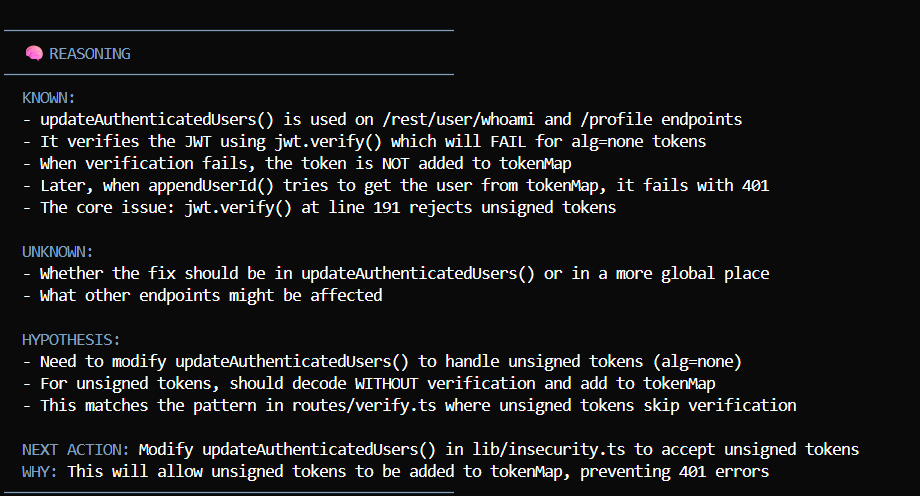
The reasoning protocol forces systematic debugging:
- Prevents random changes - cant just try stuff without stating why
- Builds knowledge incrementally - each iterations KNOWN grows
- Explicit about uncertainty - UNKNOWN list gets smaller or changes focus
- Testable hypotheses - you can verify if the guess matches symptoms
- Clear action items - NEXT ACTION is concrete and measurable
INSTALL
Via pip
pip install daveloop
How to Use
Basic Usage
python daveloop.py "your bug description here"
Example:
python daveloop.py "routes/order.ts has a race condition on wallet balance. two concurrent orders can overdraw the account"
From a File
If you have a detailed bug report:
python daveloop.py --file bug-report.txt
The file should contain the bug description. Can be as detailed as you want - stack traces, error logs, reproduction steps, whatever.
From Claude Code Chat
Just talk naturally to Claude Code:
"daveloop this: mongodb connection error in lookup artist node"
Or:
"run daveloop on the jwt validation bug"
Claude Code will automatically run:
python daveloop.py "mongodb connection error in lookup artist node"
No special commands needed. Just mention "daveloop" and describe the bug.
With Options
# Custom working directory
python daveloop.py "fix the bug" --dir /path/to/your/project

# Limit iterations (default is 20)
python daveloop.py "fix the bug" --max-iterations 10

# All together
python daveloop.py --file bug.txt --dir ./my-app --max-iterations 15
If Claude CLI Not Found
DaveLoop automatically searches for Claude CLI in common locations. But if you get:
ERROR: Claude CLI not found!

Please install Claude Code CLI or set CLAUDE_CLI_PATH environment variable:
  Windows: set CLAUDE_CLI_PATH=C:\path\to\claude.cmd
  Linux/Mac: export CLAUDE_CLI_PATH=/path/to/claude

Install from: https://github.com/anthropics/claude-code
Option 1: Set Environment Variable (Recommended)
Find where Claude CLI is installed:
Windows:
where claude.cmd
Linux/Mac:
which claude
Then set the path:
Windows (temporary - current session):
set CLAUDE_CLI_PATH=C:\Users\YourName\AppData\Roaming\npm\claude.cmd
Windows (permanent):
setx CLAUDE_CLI_PATH "C:\Users\YourName\AppData\Roaming\npm\claude.cmd"
Linux/Mac (add to ~/.bashrc or ~/.zshrc):
export CLAUDE_CLI_PATH=/usr/local/bin/claude
Option 2: Add to PATH
Windows:
- Search for "environment variables" in start menu
- Click "Environment Variables" button
- Under "User variables", find "Path"
- Add the directory containing claude.cmd
- Restart terminal
Linux/Mac:
# Add to ~/.bashrc or ~/.zshrc
export PATH="$PATH:/path/to/claude/directory"
Option 3: Install/Reinstall Claude CLI
If Claude CLI isnt installed:
npm install -g @anthropics/claude-code
After setting the path, run DaveLoop again.
What Happens When You Run It
- Banner shows up - you see the DAVELOOP ASCII art
- Session info - working dir, max iterations, prompt loaded
- Bug report - your description echoed back
- Iteration 1 starts - progress bar shows up
- You see the reasoning - KNOWN, UNKNOWN, HYPOTHESIS, NEXT ACTION
- You see the actions - file reads, edits, bash commands
- Iteration completes - either continues or exits
Reading the Output
Output is color coded:
- Blue - reasoning blocks and actions
- White - normal text and code
- Dim - less important details
- Green - success messages
- Red - errors
- Yellow - warnings
Key things to watch for:
- Reasoning blocks - shows how its thinking through the problem
- Tool usage - what files its reading/editing
- Exit signals -
[Exit signal detected: RESOLVED]means its done
When It Finishes
Three Possible Outcomes:
1. Success - Bug is Fixed
★ ★ ★ BUG SUCCESSFULLY RESOLVED ★ ★ ★
Bug fixed in 3 iteration(s)!
**2. Blocked - Needs Human Help**
ERROR: Claude is blocked - needs human help
Check the logs to see what it tried. Usually means:
- Environment issues (missing dependencies)
- Need clarification on requirements
- Need access to external systems

**3. Max Iterations - Ran Out of Attempts**
WARNING: Max iterations (20) reached without resolution
Check logs in `logs/` directory. Either:
- Increase max iterations
- Provide more context about the bug
- Manually help it past a blocker

---

## Logs Location

Every session creates logs:
logs/ 20240127_143022_iteration_01.log <- first attempt 20240127_143022_iteration_02.log <- second attempt 20240127_143022_summary.md <- overview
Session ID format: `YYYYMMDD_HHMMSS`

Useful for:
- Seeing what the agent tried
- Debugging why it got stuck
- Understanding its reasoning process
- Proving to your team that the AI actually fixed the bug

---

## Tips for Good Bug Descriptions

**Bad:**
```bash
python daveloop.py "fix the bug"
Too vague. What bug? Where?
Better:
python daveloop.py "wallet balance goes negative when two users checkout simultaneously"
Has symptom and context.
Best:
python daveloop.py "RACE CONDITION: routes/order.ts wallet payment (lines 139-148). Balance check at line 141 happens BEFORE decrement
at line 142. Two concurrent $100 orders both pass the check and overdraw wallet to -$100. Need atomic check+decrement."
Has:
- Bug type (race condition)
- Location (file and lines)
- Reproduction (concurrent orders)
- Root cause (non-atomic operations)
- Suggested fix direction (atomic operation)
More context = faster resolution = fewer iterations
Interrupting the Agent
If you need to stop it:
- Press
Ctrl+Conce - graceful shutdown - Press
Ctrl+Ctwice - force kill
Logs are saved even if interrupted.
Testing Before Production
Run on test bugs first:
# Simple test
python daveloop.py "create a file test.txt with 'hello world' and output [DAVELOOP:RESOLVED]"
Should resolve in 1-2 iterations. If it works, youre good to go.
Using with SWE-bench
For testing against real-world benchmark bugs:
python daveloop_swebench.py --file django_hash_task.json --max-iterations 15
Comes with pre-configured bugs from:
- Django ORM
- Pytest AST rewriting
- SymPy code generation
- Sklearn edge cases
Tested On
- Juice-Shop security vulnerabilities (race conditions, NoSQL injection, ReDoS, path traversal)
- SWE-bench real-world bugs (Django ORM, Pytest AST, SymPy C-code generation)
- Production n8n workflow errors (MongoDB connection, webhook failures)
Success rate significantly higher than one-shot attempts because of the iterative + reasoning approach
Release history Release notifications | RSS feed


Download files
Download the file for your platform. If you're not sure which to choose, learn more about installing packages.
Source Distribution
Built Distribution
Filter files by name, interpreter, ABI, and platform.
If you're not sure about the file name format, learn more about wheel file names.
Copy a direct link to the current filters
File details
Details for the file daveloop-1.1.0.tar.gz.
File metadata
- Download URL: daveloop-1.1.0.tar.gz
- Upload date:
- Size: 21.9 kB
- Tags: Source
- Uploaded using Trusted Publishing? No
- Uploaded via: twine/6.2.0 CPython/3.13.3
File hashes
| Algorithm | Hash digest | |
|---|---|---|
| SHA256 |
0bf81d0368e8a2b918e46b2a86d7014ee333b9ccbc73b9d8f9d2ee61688eb1a7
|
|
| MD5 |
24f40700a2bce17dbfd7095560369d74
|
|
| BLAKE2b-256 |
7386768b0e9076709309b3c2d16f80b213e59ab664263a5a11a5838ee8c921f7
|
File details
Details for the file daveloop-1.1.0-py3-none-any.whl.
File metadata
- Download URL: daveloop-1.1.0-py3-none-any.whl
- Upload date:
- Size: 17.4 kB
- Tags: Python 3
- Uploaded using Trusted Publishing? No
- Uploaded via: twine/6.2.0 CPython/3.13.3
File hashes
| Algorithm | Hash digest | |
|---|---|---|
| SHA256 |
3d2e73339a396b9e1fc682f78e3e08dde2533675d57ad3620e525c066460b4a4
|
|
| MD5 |
1dfdf1867ad5917b4f64cd58896f8f59
|
|
| BLAKE2b-256 |
e54b5acf39bcf466fa121b57925857e094e598da17949bb2e4d5d16f18325e54
|






