
base module for the DAVE debugger extension

Project description
Base python module for the DAVE project
Important: It is not recommended to install DAVE directly from pypi, you should rather use the install script as show in the "Project Setup" section.
Debugger Audio Visualization Extension

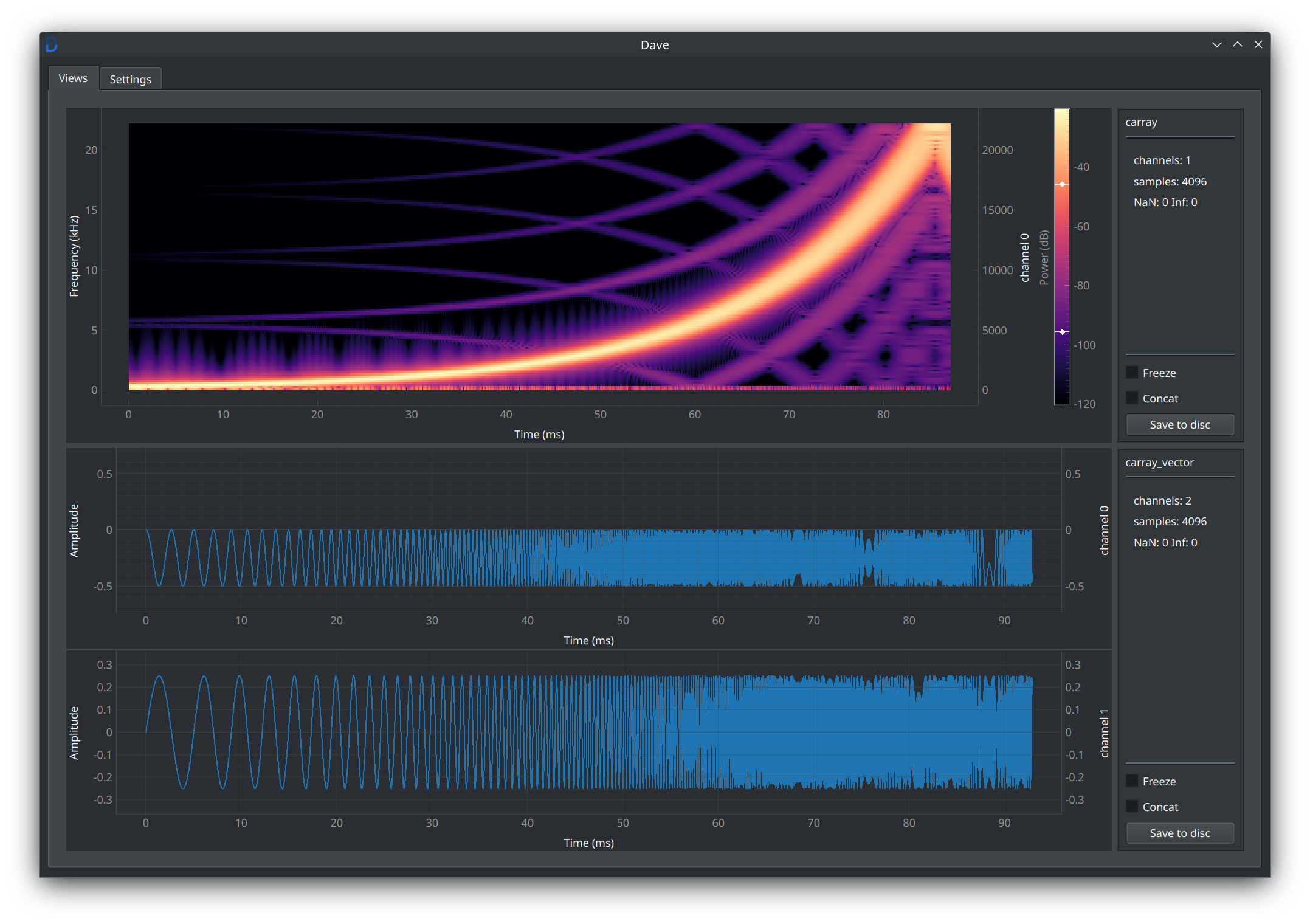
DAVE is a GDB & LLDB extension which provide commands to visualize audio related data directly from your process's memory. No need to recompile your code and/or instrument it with nasty macros or fancy libs, just start your debugger !
The DAVE GUI
The DAVE ascii formatters
2 channels 256 samples, min -9.9998E-01, max 1.0000E+00 {
  dSparkline[0] = "[0⎻⎺‾⎺⎻x⎼_⎽⎼x⎺‾⎺⎻x⎽_⎽—x⎺‾⎺⎻x⎽_⎽⎼x⎺‾⎺⎻x⎽_⎽—x⎺‾⎺⎻x⎽_⎼x⎺‾⎺—x_⎽—x⎺‾⎺⎻x⎽_⎽⎼x⎺‾⎺⎻x⎽_⎽—x⎺‾⎺—x_⎼x⎺‾⎺⎻x⎽_⎽⎼x⎺‾⎺x⎽_⎽⎼x⎺‾⎺—x_⎽⎼x⎺‾⎻x⎽_⎽—x‾⎺⎻x⎽_⎼x⎺‾⎺—x_⎽—x‾⎺⎻x_⎽⎼x‾⎺⎻x_⎽⎼x‾⎺⎻x_⎽—x‾⎺—x_]"
  dSparkline[1] = "[0⎻⎺‾⎺⎻x⎼_⎽⎼x⎺‾⎺⎻x⎽_⎽—x⎺‾⎺⎻x⎽_⎽⎼x⎺‾⎺⎻x⎽_⎽—x⎺‾⎺⎻x⎽_⎼x⎺‾⎺—x_⎽—x⎺‾⎺⎻x⎽_⎽⎼x⎺‾⎺⎻x⎽_⎽—x⎺‾⎺—x_⎼x⎺‾⎺⎻x⎽_⎽⎼x⎺‾⎺x⎽_⎽⎼x⎺‾⎺—x_⎽⎼x⎺‾⎻x⎽_⎽—x‾⎺⎻x⎽_⎼x⎺‾⎺—x_⎽—x‾⎺⎻x_⎽⎼x‾⎺⎻x_⎽⎼x‾⎺⎻x_⎽—x‾⎺—x_]"
  [...]
}
DAVE supports plotting for different types of audio "entities" that might live in your program's memory :
- audio sample containers (amplitude or spectral)
- IIR filters
Currently supported audio containers (both in float and double) are :
1D (mono) containers:
std::arraystd::vectorstd::span- Microsoft's
gsl::span C arraypointerchoc::buffer::MonoViewchoc::buffer::MonoVBuffer
2D (multichannel) containers:
- Any nesting of C/C++ standards 1D containers
juce::AudioBufferjuce::dsp::AudioBlockchoc::buffer::InterleavedViewchoc::buffer::InterleavedBufferchoc::buffer::ChannelArrayViewchoc::buffer::ChannelArrayBuffer
Currently supported IIR filter/coefficients are :
juce::dsp::IIR::Filterjuce::dsp::IIR:Coefficientsjuce::dsp::StateVariableTPTFilterjuce::dsp::StateVariableFilter::Filterjuce::dsp::StateVariableFilter::Parameters
You can also add supports for your own entity classes
Current support
| Operating System | Status |
|---|---|
| Linux | ✅ |
| MacOS | ✅ |
| Windows | ❌ |
| Debugger platform | GDB | LLDB |
|---|---|---|
| CLI | ✅ | ✅ |
| VSCode | ✅ (*) | ❓ need testing |
| CLion | ✅ (*) | ✅ (*) |
| XCode | N/A | ✅ (*) |
| Visual Studio | ❌ | ❌ |
(*) - DAVE is not able to react when you go up/down in the stack using the IDE ui.
To get started first follow the Project Setup guide below, then you can read
the User Guide to get familiar with DAVE.
If you want to develop/experiment with dave, follow the Development Guide
Project setup
Requirements
DAVE requires a python >= 3.10 installation with a working venv module
Installation
The simplest way to install dave and its bindings is to use the install script :
# via the install script
## using curl
bash -c "$(curl -fsSL https://raw.githubusercontent.com/maxmarsc/dave/refs/heads/main/dave/assets/dave_install.sh)"

## using wget
bash -c "$(wget https://raw.githubusercontent.com/maxmarsc/dave/refs/heads/main/dave/assets/dave_install.sh -O -)"
It will install the python dave modules, the debuggers bindings, and the dave
cli tool to help manage your dave installation.
You don't trust the script ? Check the Manual Installation Guide
Python : Python support is limited, deprecated and requires a different installation method, see the section below
After binding, starts your debugger, you should see the following message :
[dave] Successfully loaded
And the dave debugger commands should be available :
dave showdave deletedave freezedave concat
See the User Guide on how to use these.
Update
If you want/need to update dave, you can use the dave cli tool :
# Update dave
dave update
Uninstallation
If you just want to remove the dave bindings run
dave unbind
If you want to completely remove dave from your system run
dave uninstall
Python support
Python support is limited because both python debuggers I have investigated (pdb and debugpy) does not provide an API complete enough to provide full DAVE support. Most importantly Python debugger does not provide automatic update on breakpoints.
To install DAVE for python, install the davext pypi package in your environment.
Only 1D and 2D numpy tensors are supported, and you need to manually import dave from the debugger CLI, like this:
import dave.debuggers.pdb as pydave
Then you can use the following commands :
pydave.showanalog todave showpydave.concatanalog todave concatpydave.freezeanalog todave freezepydave.deleteanalog todave deletepydave.updatewhich forces the update of the containers data
Licensing
This project is licensed under GPLv3.0. The goal is for you to be able to use it to debug any project, open or proprietary, but to prevent anyone from making a proprietary project out of DAVE's code.
If you have any question or request about licensing, don't hesitate to ask !
Wikipedia: Software under the GPL may be run for all purposes, including commercial purposes and even as a tool for creating proprietary software, such as when using GPL-licensed compilers.
Troubleshooting
Set logging level
When running into an issue, please activate the debug log level, by setting
the env variable DAVE_LOGLEVEL to debug before starting the debugger.
LLDB on Ubuntu 24.04
When starting lldb on ubuntu 24.04 you might get this error :
Traceback (most recent call last):
  File "<string>", line 1, in <module>
ModuleNotFoundError: No module named 'lldb'
This is a known bug. In the meantime you can fix these using a symbolic link :
sudo mkdir -p /usr/lib/local/lib/python3.12/
sudo ln -s /usr/lib/llvm-${VERSION}/lib/python3.12/dist-packages /usr/lib/local/lib/python3.12/dist-packages
LLDB init
To always load the .lldbinit file in the current working directory, add the following command to ~/.lldbinit:
settings set target.load-cwd-lldbinit true
LLDB python module linting
for .venv
PYTHON_VERSION="3.12"
LLDB_VERSION="14"
touch .venv/lib64/python${PYTHON_VERSION}/site-packages/lldb.pth
echo "/usr/lib/llvm-${LLDB_VERSION}/lib/python${PYTHON_VERSION}/site-packages/" > .venv/lib64/python${PYTHON_VERSION}/site-packages/lldb.pth
Release history Release notifications | RSS feed


Download files
Download the file for your platform. If you're not sure which to choose, learn more about installing packages.
Source Distributions
Built Distribution
Filter files by name, interpreter, ABI, and platform.
If you're not sure about the file name format, learn more about wheel file names.
Copy a direct link to the current filters
File details
Details for the file davext-0.12.1-py3-none-any.whl.
File metadata
- Download URL: davext-0.12.1-py3-none-any.whl
- Upload date:
- Size: 121.5 kB
- Tags: Python 3
- Uploaded using Trusted Publishing? No
- Uploaded via: twine/6.2.0 CPython/3.12.3
File hashes
| Algorithm | Hash digest | |
|---|---|---|
| SHA256 |
9522147a12e773c3e50cd37611e322a1e752e9f1273de868e7efe4b77a503a9d
|
|
| MD5 |
d8b019783bf747f8920b6e8ed174ea36
|
|
| BLAKE2b-256 |
8e5652c809bafec525be0f2244d2d288dfec63bddedc8387e94973578ba4825c
|






