

The easiest way to build apps from your Python code
⚠️ UNMAINTAINED PROJECT
This project is no longer actively maintained. While the code remains available for reference and use, no updates, bug fixes, or new features will be provided. Users are encouraged to seek alternative solutions for their needs.




Davia
Davia empowers Python developers to transform their applications, especially AI agents and data-driven internal tools, into interactive web applications with minimal effort. Say goodbye to frontend complexities and hello to rapid development and deployment. With Davia, you define your logic in Python, and Davia generates the user interface, handles real-time updates, and manages the backend.
- ✨ Create complete apps in minutes, not weeks.
- ✨ Focus on your Python logic; Davia handles the UI.
- ✨ Real-time streaming and output updates, out-of-the-box.
- ✨ Visually design your app without writing frontend code.
- ✨ Works with any Python application, including LangGraph agents.
🔧 FastAPI Integration
Think Lovable but wired straight into your Python backend, with a dev mode made for Python folks like us. Davia is built on top of FastAPI and works perfectly with it. All FastAPI best practices you're familiar with remain applicable when using Davia. You can seamlessly add Davia-specific functionality to your existing FastAPI applications or extend your Davia apps with custom FastAPI endpoints.
🚀 Quickstart
Get started in minutes by following our Quickstart Guide.
📚 Documentation
For detailed information, visit our Documentation.
Installation
pip install davia
For LangGraph specific features (requires Python 3.11 or higher), install the optional dependencies:
pip install davia langgraph "langgraph-api==0.0.38"
Usage
Davia helps you run your Python applications with an automatically generated UI.
Running a Davia App
Let's say you have a Python file my_app.py with a Davia application instance named app:
# my_app.py
from davia import Davia

app = Davia()

# Define your tasks and AI agents here
# For example:
@app.task
def my_python_function(name: str) -> str:
  return f"Hello, {name}!"
You can run this application using the Davia CLI:
davia run my_app.py
This command will start a local server, and Davia will typically open a browser window pointing to the application's UI, often hosted on a development dashboard like https://davia.ai/dashboard.
Best Practices for Function Declarations
When working with Davia, it's recommended to explicitly declare input and output types for your functions as well as providing a clear docstring. This practice not only improves code clarity but also ensures smooth integration with the TypeScript frontend that Davia generates. Here's an example:
from pydantic import BaseModel

class UserInput(BaseModel):
    name: str
    age: int
    preferences: List[str]

@app.task
def calculate_user_score(input_data: UserInput) -> int:
    """
    Calculate a user's score based on their profile information.

    The score is computed using the following formula:
    - Base score: 10 points per character in the name
    - Age bonus: 2 points per year of age
    - Preferences bonus: 5 points per preference

    Args:
        input_data (UserInput): User profile containing name, age, and preferences

    Returns:
        int: The calculated user score
    """
    # Example calculation based on user data
    base_score = len(input_data.name) * 10
    age_bonus = input_data.age * 2
    preferences_bonus = len(input_data.preferences) * 5
    return base_score + age_bonus + preferences_bonus
For more detailed examples, please refer to our Documentation and the examples provided there.
🎨 Beautiful UI Components
Davia provides a modern and beautiful user interface out of the box. Our UI is built using shadcn/ui, a collection of reusable components that follow best practices and are built on top of Radix UI. The components are styled using Tailwind CSS, giving you access to a comprehensive color palette.
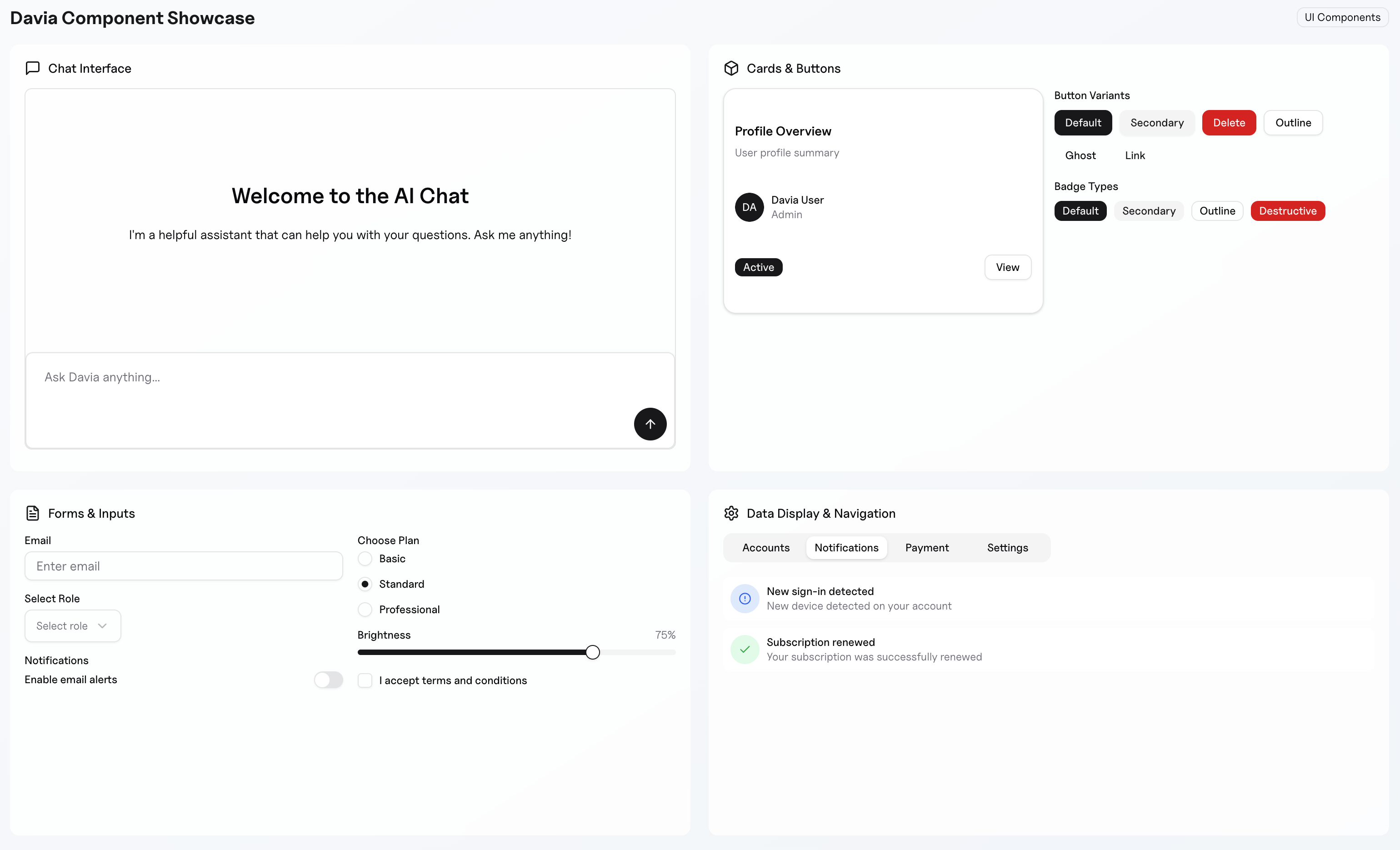
The UI components are:
- Fully accessible
- Customizable with Tailwind's colours
- Responsive and mobile-friendly
- Dark mode ready
- Built with performance in mind
🤝 Connect with Us
- LinkedIn: Davia on LinkedIn
- X (Twitter): @DaviaLabs
- YouTube: DaviaLabs on YouTube
- GitHub Issues: Report a bug or request a feature
- Feature Requests: Suggest a new feature
🛠️ Next Steps
- Explore the Docs: Dive deeper into Defining Tasks and Adding AI Agents (LangGraph).
- Build your first App: Follow the Quickstart guide to get your first Davia app running.
- Watch the Walkthrough: Check out our detailed walkthrough video to see Davia in action.
- Join the Community: Stay tuned for community channels.
Davia: From Python to App in seconds.
1 maintainer

Metadata
1 maintainer
Release files for davia 0.1.18
For a detailed explanation of source distributions (sdists) and built distributions (wheels), please see the package formats documentation.
Source distribution (sdist)
| File | Size | Uploaded | |
|---|---|---|---|
| davia-0.1.18.tar.gz | 166.8 kB | Details |
Built distribution (wheel)
| File | Interpreter | ABI | Platform | Reset |
|---|---|---|---|---|
| davia-0.1.18-py3-none-any.whl | Python 3 | none | any | Details |
Total release size: 183.3 kB
Release files / davia-0.1.18.tar.gz
| Download URL | davia-0.1.18.tar.gz |
|---|---|
| Size | 166.8 kB |
| Tags | Source |
|
SHA-256 checksum How to use checksums |
f34831c53ceeb222fedef74a52cb9940bdcf449dc54ec39a0371ad90d981a5ba
|
|
BLAKE2b-256 checksum How to use checksums |
d3c3fd950b5550fd64a29e242dd421b73bb4e17f563a85616152a8fe7a869fc3
|
| Upload date | |
|
Uploaded using Trusted Publishing? What is trusted publishing? |
No |
| Uploaded via |
uv/0.7.2
|
Release files / davia-0.1.18-py3-none-any.whl
| Download URL | davia-0.1.18-py3-none-any.whl |
|---|---|
| Size | 16.4 kB |
| Tags | Python 3 |
|
SHA-256 checksum How to use checksums |
3b2b2aa9a295b51d778c215fc56b569cce7e4befd1cdb3d9979344955f5fd48c
|
|
BLAKE2b-256 checksum How to use checksums |
21d3ee5f87570dce7f758da156f0a0a76345ff63ceda7e4ce7a4d741d45d0520
|
| Upload date | |
|
Uploaded using Trusted Publishing? What is trusted publishing? |
No |
| Uploaded via |
uv/0.7.2
|














