






Let an AI agent edit, grade and deliver in DaVinci Resolve, with every change checked.
davinci-mcp is an MCP server for DaVinci Resolve. It gives AI agents such as Claude access to the whole Resolve scripting API: 299 typed actions across 17 domains. Every change is verified against Resolve itself before it is reported as done.
It is built for editors and colorists who want an assistant that does the clicking, and for developers who want a dependable bridge between an agent and Resolve.
See it work
A real Claude agent, given four plain messages, cut this 52-second action trailer from the open movie Tears of Steel. It imported the footage, laid out 33 shots on the beat, added the title cards, graded teal and orange, and rendered it. Nothing in the run was staged; the video below is sped up 4×.
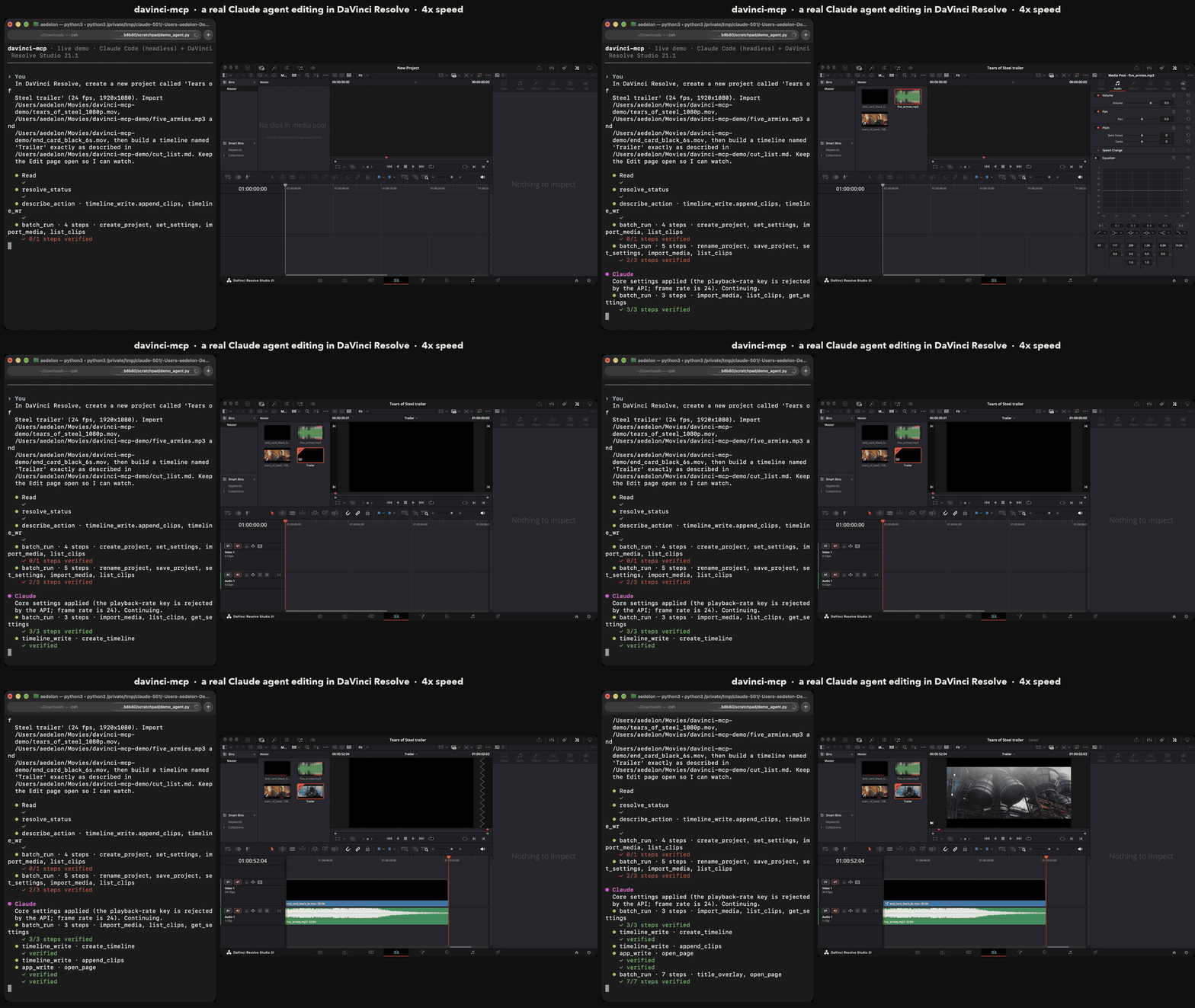
▶ Watch the full demo on YouTube (39 s)

▶ Watch the trailer the agent cut on YouTube (52 s)
Why davinci-mcp
Verified, not hopeful
- Every write is read back from Resolve, and its receipt says
verified: trueorfalse. An agent can't claim a change that didn't happen. dry_runpreviews any write without applying it.- Deletes need consent: the first call returns a plan and a
confirm_token, and nothing is removed until the same call comes back with the token. - Destructive edits take a safety snapshot of the timeline first.
- Every call is written to a JSONL audit log.
Reliable
- In the benchmark below, 20 of 20 jobs passed. The community MCP server passed 13 of 20.
- Near-miss parameters are repaired instead of refused (
fade_out→FadeOut, a bare clip name → a selector), and every rewrite is reported. - Errors are actionable: they suggest the right field ("did you mean"), name the right tool, and say which render setting Resolve rejected.
Economical
batch_runchains a whole sequence server-side in one call, for example 18 steps from timeline to render.- Clients defer the tools, so the first turn costs about 32k tokens of context.
- Replies and schemas are compact. Against the community server: 31 % cheaper and 60 % fewer calls.
Exhaustive and extensible
- 17 domains: project, media, timeline, item, color, Fusion, gallery, audio, render, interchange, AI tools, UI, app and more.
- One-call workflows:
conform_from_edl,deliver,build_vertical_reel,apply_look,title_overlay. - Your own recipes: YAML templates, plus Python when you opt in.
Safe by default
- File access is limited to the folders you allow.
- The server's own state, its configuration and your Claude configuration files are always off-limits.
- Symlinks are never followed when importing a folder.
Benchmarks
Headless Claude agents (Sonnet) ran four post-production jobs on a live Resolve Studio 21.1, five runs each. An agent that never saw the server's code wrote the jobs:
- dailies: log and organise a day of footage;
- promo: build a promo with a music bed;
- look: grade with versions and a still;
- spot QC: duplicate, export interchange files and render a range.
Each check reads Resolve directly, never through the server under test. Every agent ran under the same isolated harness. Full method and history →
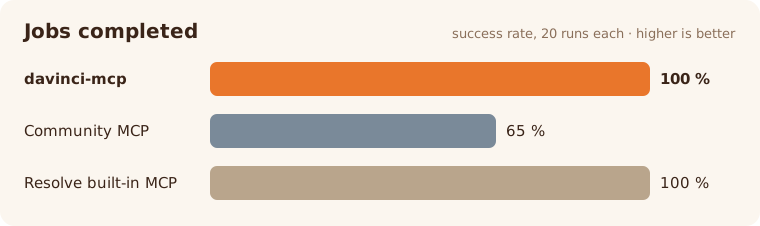
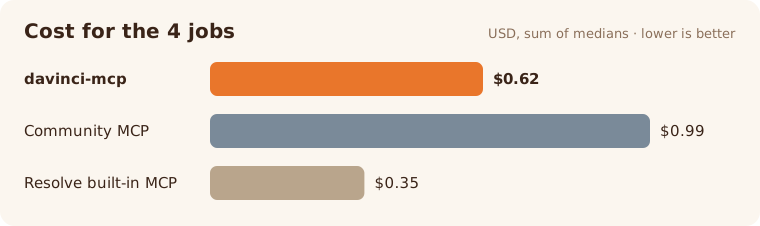
| Server | Jobs passed | Tool calls | Cost (4 jobs) |
|---|---|---|---|
| davinci-mcp | 20 / 20 | 35 | $0.62 |
| Community MCP (samuelgursky/davinci-resolve-mcp) | 13 / 20 | 90 | $0.99 |
| Resolve's built-in MCP | 20 / 20 | 17 | $0.35 |
About the built-in server. Resolve 21.1 ships its own MCP server, which is cheaper because it hands the agent one tool, run_script_unsafe, to run arbitrary Python inside Resolve. That makes for short runs, but nothing is validated, read back, audited, snapshotted or confirmed before a delete. In our scale test (160 clips, 4 timelines) it once put a marker at the wrong frame, then reported the job done. davinci-mcp trades a little cost for changes you can trust.
Talk to it like an editor
Import the clips in ~/Footage/day03, sort interviews and B-roll into bins, and colour the circled takes green.
Build a 9:16 reel from these three shots, add subtitles from the audio, and render it for Instagram.
Conform this EDL against the media in ~/Rushes and deliver a ProRes master and an H.264 proxy.
Apply the show LUT to every shot of the timeline except the end card, and grab a still of the first shot.
Add a red marker at the start of every shot named "broll_" in Edit_03.
Duplicate the approved cut as "QC", export it as FCPXML and OTIO, and render 01:00:02:00 to 01:00:07:24.
How it works
flowchart LR
    A["AI agent<br/>Claude, Cursor…"] -->|MCP call| V["Validate<br/>+ repair"]
    V --> C["Consent<br/>deletes only"]
    C --> N["Snapshot<br/>destructive only"]
    N --> X["Call Resolve<br/>one thread"]
    X <-->|scripting API| D[("DaVinci<br/>Resolve")]
    X --> R["Read back<br/>→ receipt"]
    R --> L["Audit log"]
    R -->|"verified: true / false"| A
- Validate. The agent calls a domain tool such as
timeline_writewith{"op": {"action": ..., ...}}, and the parameters are checked against a typed schema. Almost-right parameters are repaired, and each repair is reported. - Consent and snapshot. Deletes stop at a plan until they are confirmed, and destructive edits take a snapshot first.
- Call Resolve. The call runs on a single executor thread, the only place Resolve is ever called from.
- Read back. The server reads the result back from Resolve and returns a receipt with
verified. Long renders become jobs that the agent can wait on.
Install
Requirements
- DaVinci Resolve Studio 21.1 or later. In Preferences → General → External scripting using, choose Local.
- The free edition is reachable through the in-app bridge: run
davinci-mcp install --bridge, then start the bridge from Workspace → Scripts. - Python 3.13+ and uv.
uv tool install davinci-mcp
davinci-mcp doctor
doctor checks that Resolve is reachable and reports its version, edition and channel.
Claude Code
davinci-mcp install --target claude-code
Or add it by hand:
claude mcp add davinci-mcp -- davinci-mcp serve
Claude Desktop
davinci-mcp install --target claude-desktop
This adds the server to claude_desktop_config.json. Restart Claude Desktop to load it. To do it by hand:
{
  "mcpServers": {
    "davinci-mcp": { "command": "davinci-mcp", "args": ["serve"] }
  }
}
If Claude Desktop can't find the command, use its absolute path (which davinci-mcp).
Cursor
In ~/.cursor/mcp.json:
{
  "mcpServers": {
    "davinci-mcp": { "command": "davinci-mcp", "args": ["serve"] }
  }
}
VS Code
In .vscode/mcp.json:
{
  "servers": {
    "davinci-mcp": { "type": "stdio", "command": "davinci-mcp", "args": ["serve"] }
  }
}
Any other MCP client
Run davinci-mcp serve over stdio. Use davinci-mcp serve --transport http for Streamable HTTP; it binds to loopback and needs a bearer token for any other host. The server also exposes a davinci://status resource.
Configure
The optional file ~/.config/davinci-mcp/config.toml holds the settings. Any key can be overridden with a DAVINCI_MCP_<SECTION>__<KEY> environment variable.
[safety]
allowed_roots = ["~/Movies", "~/Projects"]  # files outside these are refused (default: your home)
auto_snapshot = "destructive"               # "off" | "destructive" | "all"

[recipes]
allow_python = false                        # Python recipes run arbitrary code: opt in
FAQ
The agent says it cannot reach Resolve
Check three things:
- Resolve is running;
- in Studio, External scripting using is set to Local;
- no dialog is open in Resolve, such as an update prompt or a project manager.
Then run davinci-mcp doctor.
Does it work with the free edition?
Yes, through the in-app bridge (davinci-mcp install --bridge). Resolve 21.1 removed external scripting from the free edition, so the bridge runs inside Resolve instead.
Can it delete my work?
Not without consent. Every delete returns a plan first and needs a matching confirm_token. Destructive edits snapshot the timeline, and every call is logged.
Will it touch files outside my projects?
Only inside allowed_roots. The server's own state, its configuration and your Claude configuration files are always refused, whatever you allow.
Why is the built-in Resolve MCP cheaper?
It runs one unchecked Python script per job. davinci-mcp makes typed, verified calls, so it uses a few more steps. batch_run and the one-call workflows keep that overhead small.
Contributing
Issues and pull requests are welcome. docs/domain-guide.md shows how to add an action: a parameter model, a handler, a read-back check and a test. The rest is generated from there.
uv sync
uv run pytest
uv run ruff check . && uv run pyright
Credits
- Demo footage: Tears of Steel, © Blender Foundation | mango.blender.org, CC-BY 3.0.
- Demo music: Five Armies by Kevin MacLeod (incompetech.com), CC-BY 4.0.
davinci-mcp is an independent project. It is not affiliated with, endorsed by or sponsored by Blackmagic Design. DaVinci Resolve is a trademark of Blackmagic Design Pty. Ltd.
Support
davinci-mcp is free and open source. If it saves you time in the edit, you can buy me a coffee:

Made by Delanoe Pirard (Aedelon) · Apache 2.0
1 maintainer

Metadata
1 maintainer
Release files for davinci-mcp 1.0.0
For a detailed explanation of source distributions (sdists) and built distributions (wheels), please see the package formats documentation.
Source distribution (sdist)
| File | Size | Uploaded | Provenance | Actions |
|---|---|---|---|---|
| davinci_mcp-1.0.0.tar.gz | 250.6 kB | Without provenance | Details for davinci_mcp-1.0.0.tar.gz |
Built distribution (wheel)
| File | Interpreter | ABI | Platform | Actions Reset |
|---|---|---|---|---|
| davinci_mcp-1.0.0-py3-none-any.whl | Python 3 | none | any | Details for davinci_mcp-1.0.0-py3-none-any.whl |
Total release size: 531.3 kB
Release files / davinci_mcp-1.0.0.tar.gz
| Download URL | davinci_mcp-1.0.0.tar.gz |
|---|---|
| Size | 250.6 kB |
| Tags | Source |
|
SHA-256 checksum How to use checksums |
e305f66b47dac5c8ccdd3081db9628939d7f410efddd0e972d4e517d04fd2a23
|
|
BLAKE2b-256 checksum How to use checksums |
7d2ce027cd9227db06fb68e0d93cd62b2f16133abefb50dca0053500329982da
|
| Upload date | |
|
Uploaded using Trusted Publishing? What is trusted publishing? |
Yes |
| Uploaded via |
uv/0.13.6 {"installer":{"name":"uv","version":"0.13.6","subcommand":["publish"]},"python":null,"implementation":{"name":null,"version":null},"distro":{"name":"Ubuntu","version":"24.04","id":"noble","libc":null},"system":{"name":null,"release":null},"cpu":null,"openssl_version":null,"setuptools_version":null,"rustc_version":null,"ci":true}
|
Release files / davinci_mcp-1.0.0-py3-none-any.whl
| Download URL | davinci_mcp-1.0.0-py3-none-any.whl |
|---|---|
| Size | 280.7 kB |
| Tags | Python 3 |
|
SHA-256 checksum How to use checksums |
c98cc6cf818814c50a146cb9484e4651419eead93be462c7128404cd521e15fe
|
|
BLAKE2b-256 checksum How to use checksums |
dace898abe94bdef6afb04f471c19eb0f075fc4ff15d9a10b8a7701a46cb2041
|
| Upload date | |
|
Uploaded using Trusted Publishing? What is trusted publishing? |
Yes |
| Uploaded via |
uv/0.13.6 {"installer":{"name":"uv","version":"0.13.6","subcommand":["publish"]},"python":null,"implementation":{"name":null,"version":null},"distro":{"name":"Ubuntu","version":"24.04","id":"noble","libc":null},"system":{"name":null,"release":null},"cpu":null,"openssl_version":null,"setuptools_version":null,"rustc_version":null,"ci":true}
|
Security for davinci-mcp 1.0.0
Provenance
Provenance describes where a file came from. On PyPI, provenance is shared via attestations, which provide a verifiable record of the build or publishing details. View details, limitations and caveats.
No provenance found
None of the files in this release were uploaded with provenance metadata.
A note on package security
PyPI is a repository for distributing packages, not a service for auditing them. While third-party security researchers and our staff do their best to detect and remove malicious packages, PyPI cannot guarantee the quality, security or suitability of any given package.
To learn more about protecting yourself from malicious actors, visit our package security documentation.














