

dayfile
A personal, append-only event log exposed as feed views (JSON Feed, Atom, CloudEvents).
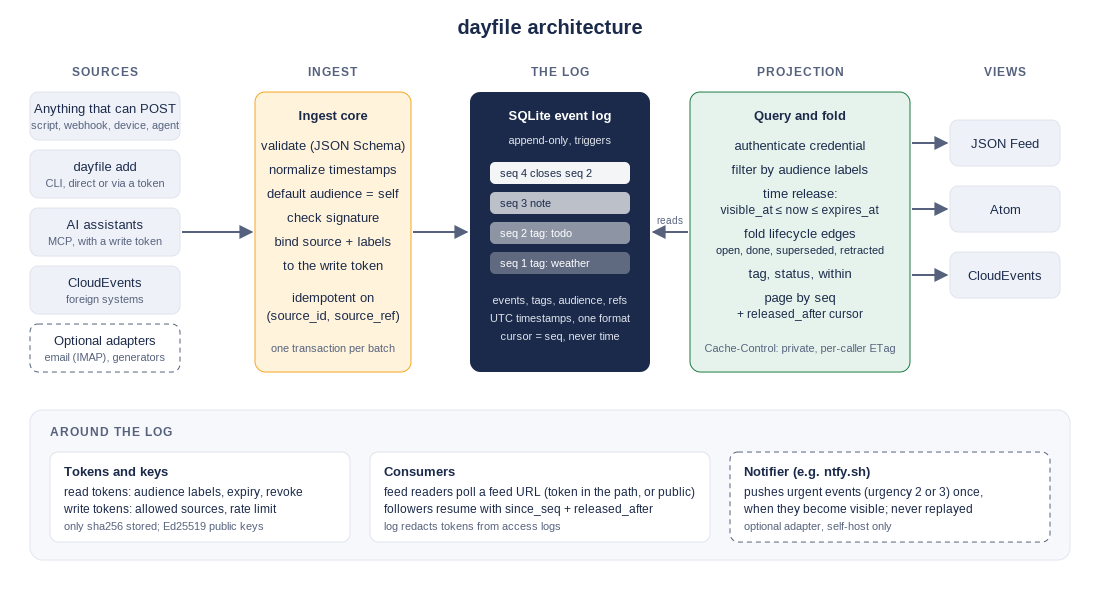
Events arrive from email, SMS, webhooks, cron generators and agents. The log is the source
of truth; feeds are projections of it, addressed by URL queries such as
/feed.json?tag=todo&status=open&within=7d.
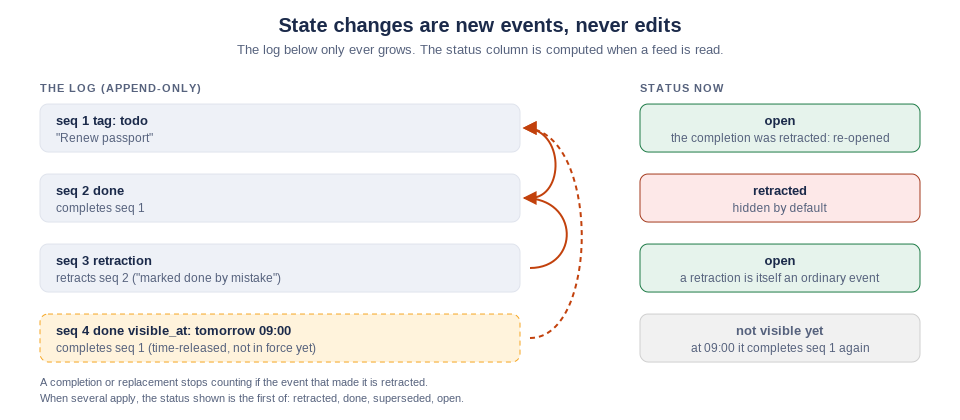
- Append-only SQLite log, enforced by triggers. State changes are new events that point back at the original (close it, replace it, retract it); the status of an event is worked out from that chain.
- Time release (
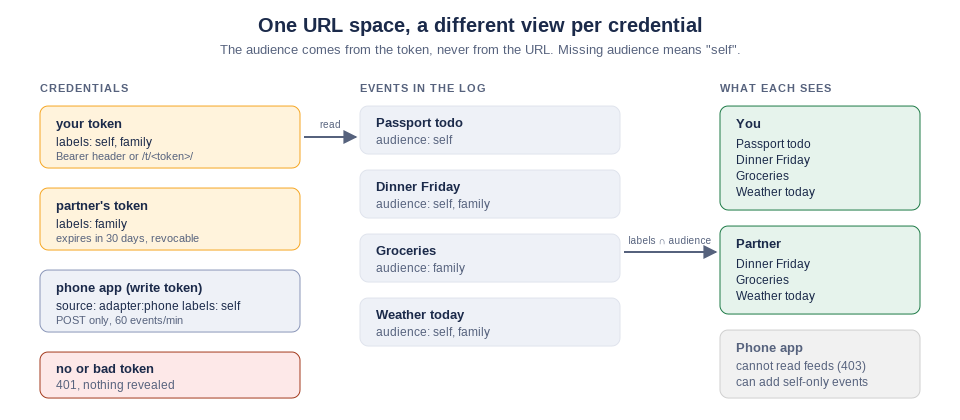
visible_at,expires_at), idempotent ingest, deny-by-default audiences. - A JSON API (
GET /events, long-poll, live SSE stream) next to the feeds. - Per-credential feeds: read tokens (Bearer header or
/t/<token>/path) and write-only tokens. - Push to ntfy, Ed25519 signed events, CloudEvents import/export, Gmail/Google Voice SMS ingest (IMAP IDLE).
- A web app (
dayfile[web]): sign in with GitHub, a log you can read and post to, tokens, feeds (private or public) and settings. It is the managed service at dayfile.app; see below for what runs where.
Design: docs/SPEC.md. Milestones and status: docs/ROADMAP.md. Contributor rules: CLAUDE.md.
How it fits together
State changes are new events, never edits:
One URL space, a different view per credential:
Quick start
Requires Python 3.11 or newer.
pip install dayfile            # or: uv tool install dayfile  /  pipx install dayfile
export DAYFILE_DB=~/dayfile.db

dayfile add "buy milk" --tag todo --db "$DAYFILE_DB"     # write straight into the local log
dayfile token create --labels self                         # read token: prints the feed URLs once
dayfile token create --labels self --write-source adapter:cli   # write token, for remote clients
uvicorn dayfile.app:app                                    # serve on 127.0.0.1:8000
Open the feed URL that token create printed (http://127.0.0.1:8000/t/<read token>/feed.json, or
feed.atom) in a browser or a feed reader. Add events from another machine with
DAYFILE_WRITE_TOKEN=<write token> dayfile --url http://127.0.0.1:8000 add "buy milk" --tag todo.
For a server that stays up, use Docker or systemd: deploy/selfhost.
Extras: pip install "dayfile[mcp]" for the assistant (MCP) server, "dayfile[web]" for the dayfile.app web app.
JSON API
curl -H "Authorization: Bearer $READ_TOKEN" 'http://127.0.0.1:8000/events?tag=todo&status=open'
curl -H "Authorization: Bearer $READ_TOKEN" 'http://127.0.0.1:8000/events?since_seq=42&wait=25'   # long-poll
curl -N -H "Authorization: Bearer $READ_TOKEN" http://127.0.0.1:8000/events/stream               # live, SSE
curl -H "Authorization: Bearer $WRITE_TOKEN" -d @event.json -H 'content-type: application/json' http://127.0.0.1:8000/events
See the JSON API section of docs/SPEC.md.
Commands
| Command | Purpose |
|---|---|
dayfile add |
append an event: with --db PATH straight into the database (operator mode), otherwise POST to --url using a write token in $DAYFILE_WRITE_TOKEN |
dayfile token create|list|revoke |
manage read and write tokens |
dayfile poll-email |
ingest a Gmail folder (default SMS) using GMAIL_USER / GMAIL_APP_PASSWORD from env or .env |
dayfile notify |
publish urgent events to ntfy ($NTFY_URL) as they become visible |
dayfile gen weather|digest |
generators that write ordinary events back to the log |
dayfile key create|list|import |
signing keys (add --sign) |
dayfile mcp |
MCP server on stdio for AI assistants (pip install dayfile[mcp]); see below |
dayfile backup DEST |
consistent online copy of the database |
dayfile tenant ... |
managed-service operations: create, suspend, limit, usage (see docs/CLOUD.md) |
MCP server
Let an assistant such as Claude read and write your log. Both ways use the same five tools (dayfile_list_events, dayfile_get_event, dayfile_add_event, dayfile_close_todo, dayfile_retract_event) and can do only what their tokens allow.
Hosted (dayfile.cloud). Every log has an MCP address, https://<you>.dayfile.cloud/mcp. In Claude, open Customize, then Connectors, then Add custom connector, paste that address and press Connect: you sign in with GitHub and choose read and write or read only. Claude Code can use it too: claude mcp add --transport http dayfile https://<you>.dayfile.cloud/mcp, then /mcp to sign in. To skip the sign-in, send a read token and a write token joined with ~ as Authorization: Bearer <read>~<write> (read only: the read token alone). Disconnect any time under Tokens.
Local, over stdio. dayfile mcp (pip install "dayfile[mcp]") calls the API at $DAYFILE_URL with a read token in $DAYFILE_READ_TOKEN and a write token in $DAYFILE_WRITE_TOKEN; leave the write token out for a read-only assistant. This is the way to use a self-hosted server without OAuth.
{"mcpServers": {"dayfile": {
  "command": "uvx", "args": ["--from", "dayfile[mcp]", "dayfile", "mcp"],
  "env": {"DAYFILE_URL": "https://you.dayfile.cloud",
          "DAYFILE_READ_TOKEN": "...", "DAYFILE_WRITE_TOKEN": "..."}}}}
Self-hosting the hosted endpoint: set DAYFILE_MCP=1 (needs dayfile[mcp]) and, to offer the sign-in button, DAYFILE_OAUTH_ISSUER to the address of a dayfile web app that has accounts.
Two ways to run it
The same code serves both; the difference is configuration.
Self-hosted (deploy/selfhost) |
Managed-service profile (deploy/cloud) |
|
|---|---|---|
| Logs | one, in $DAYFILE_DB |
one SQLite file per tenant at <slug>.<your-domain> |
| Setup | docker compose up or systemd |
same image with DAYFILE_TENANTS_DIR + DAYFILE_BASE_DOMAIN |
| Extras | none | suspension, quotas, per-tenant limits, tenant backups, Litestream, on-demand TLS |
The web app (src/dayfile/web, install with pip install "dayfile[web]") is a separate process that talks to the API over HTTP and has no access to tenant files. Accounts, GitHub sign-in, invite codes and the dashboard need the cloud profile (they create tenants through an admin API); the self-hosted profile runs the API, CLI and feeds, and the web app is not part of its compose file yet. Billing is not built. docs/CLOUD.md describes the hooks.
Security notes
- Keep the server on localhost or behind a trusted TLS proxy; tokens in URL paths are a compatibility layer for feed readers.
- Only token hashes are stored; token values are redacted from logs.
.envis gitignored.
Contributing
Want to change dayfile itself? Setup, tests and the rules for changes are in CONTRIBUTING.md.
License
dayfile is free software under the GNU Affero General Public License v3 (AGPL-3.0-only). You may use, modify and self-host it freely. If you run a modified version as a network service, section 13 requires you to offer its users the corresponding source code.
2 maintainers


Metadata
2 maintainers
Release files for dayfile 0.1.2
For a detailed explanation of source distributions (sdists) and built distributions (wheels), please see the package formats documentation.
Source distribution (sdist)
| File | Size | Uploaded | Provenance | Actions |
|---|---|---|---|---|
| dayfile-0.1.2.tar.gz | 501.4 kB | Without provenance | Details for dayfile-0.1.2.tar.gz |
Built distribution (wheel)
| File | Interpreter | ABI | Platform | Actions Reset |
|---|---|---|---|---|
| dayfile-0.1.2-py3-none-any.whl | Python 3 | none | any | Details for dayfile-0.1.2-py3-none-any.whl |
Total release size: 793.6 kB
Release files / dayfile-0.1.2.tar.gz
| Download URL | dayfile-0.1.2.tar.gz |
|---|---|
| Size | 501.4 kB |
| Tags | Source |
|
SHA-256 checksum How to use checksums |
3c0c6f5793b90de68be231b4aea9a360128b31dd70d1dd4d28960503ded4f984
|
|
BLAKE2b-256 checksum How to use checksums |
d5b2b1e39de6a08a51329af7372aed70d76af70685a54c61d7ee68156596ba8a
|
| Upload date | |
|
Uploaded using Trusted Publishing? What is trusted publishing? |
Yes |
| Uploaded via |
uv/0.13.9 {"installer":{"name":"uv","version":"0.13.9","subcommand":["publish"]},"python":null,"implementation":{"name":null,"version":null},"distro":{"name":"Ubuntu","version":"26.04","id":"resolute","libc":null},"system":{"name":null,"release":null},"cpu":null,"openssl_version":null,"setuptools_version":null,"rustc_version":null,"ci":true}
|
Release files / dayfile-0.1.2-py3-none-any.whl
| Download URL | dayfile-0.1.2-py3-none-any.whl |
|---|---|
| Size | 292.2 kB |
| Tags | Python 3 |
|
SHA-256 checksum How to use checksums |
470dba3a6c0758e35683104626cb55e4810253abe369a85fde27731973621354
|
|
BLAKE2b-256 checksum How to use checksums |
20df11765b37e3edbfb6ca48a05e1fe6978dd83c3e0b3f06c3efac1a1678f633
|
| Upload date | |
|
Uploaded using Trusted Publishing? What is trusted publishing? |
Yes |
| Uploaded via |
uv/0.13.9 {"installer":{"name":"uv","version":"0.13.9","subcommand":["publish"]},"python":null,"implementation":{"name":null,"version":null},"distro":{"name":"Ubuntu","version":"26.04","id":"resolute","libc":null},"system":{"name":null,"release":null},"cpu":null,"openssl_version":null,"setuptools_version":null,"rustc_version":null,"ci":true}
|
Security for dayfile 0.1.2
Provenance
Provenance describes where a file came from. On PyPI, provenance is shared via attestations, which provide a verifiable record of the build or publishing details. View details, limitations and caveats.
No provenance found
None of the files in this release were uploaded with provenance metadata.
A note on package security
PyPI is a repository for distributing packages, not a service for auditing them. While third-party security researchers and our staff do their best to detect and remove malicious packages, PyPI cannot guarantee the quality, security or suitability of any given package.
To learn more about protecting yourself from malicious actors, visit our package security documentation.














