
DbCls
DbCls is a terminal database client in which a SQL editor and visidata work as one thing: you write the query in an editor with syntax highlighting and schema-aware autocomplete, and its result opens straight away as an interactive table you can filter, sort, pivot, reshape, chart and drill into. On top of that sits a pipeline language that turns the editor into the place multi-step work happens — "collect ids from one query, run them against every shard, show progress" — right inside the .sql file, instead of in a throwaway Python script.
Key capabilities
Editor
- SQL editor with syntax highlighting,
>>> ... <<<block folding, search, undo/redo and a command palette - Schema-aware autocomplete ranked by SQL context: tables, columns, table aliases, functions, keywords
- Beautify SQL (
Ctrl+B), read-only mode, remappable key codes and a tmux-styleCtrl+Xprefix
Pipelines
- Steps chained with
|right in the editor: SQL, Python, regex filters, loops, functions, variables - Prompts mid-run (
choose/select/input/ask) — a pipeline becomes a small tool a colleague can use without knowing the schema - A pipeline is just text in your
.sqlfile: save it, version it, re-run it
LLM chat (optional)
Ctrl+L— a model writes and fixes queries, reading your schema through read-only tools- Any OpenAI-compatible endpoint (Ollama, vLLM, OpenRouter, a corporate proxy); nothing to install
Data
- The whole of visidata: filtering, sorting, pivots, frequency tables, joins between sheets
- DB-aware extensions: cross-sheet references, in-terminal charts (plotext), export to SQL
INSERT, and table editing that shows you the SQL before anything is committed
Connecting and extending
- MySQL, PostgreSQL, ClickHouse, SQLite — and Cassandra / ScyllaDB through the driver plugin in
plugins/cassandra - With no connection arguments it starts on an in-memory SQLite — just open a file and type
- Unix sockets (including ones forwarded over SSH), JSON config, inactivity screen lock
- Plugin API: your own editor commands, pipeline commands, syntax highlighters, LLM tools and full-screen windows
Documentation
This page is the short version. The details live in docs/:
| Page | What is in it |
|---|---|
| Configuration and connections | Command line options, the config file, several connections and tabs, describing a connection in the editor, Unix sockets and SSH tunnels, logging |
| Editor | Hotkeys, fold blocks, syntax highlighting, key remapping and Alt on macOS, the Ctrl+X prefix, autocomplete, beautify, browsing and editing tables |
| Results in VisiData | Sheets, DB-aware hotkeys, JSON / URL / size column types, aggregators, charts, exporting, cross-sheet references, expression functions |
| Pipelines | The language: steps, control flow, functions, live sheets (.WATCH), prompts, helpers, templates, examples |
| LLM chat | Setup, the chat window, questions from the model, approving tool calls, how the answer arrives |
| Plugins | Writing a plugin, where plugins are loaded from, settings, the plugin API, the bundled plugins |
| Screen lock and password safety | Locking the terminal after inactivity, keeping passwords off disk |
Demo
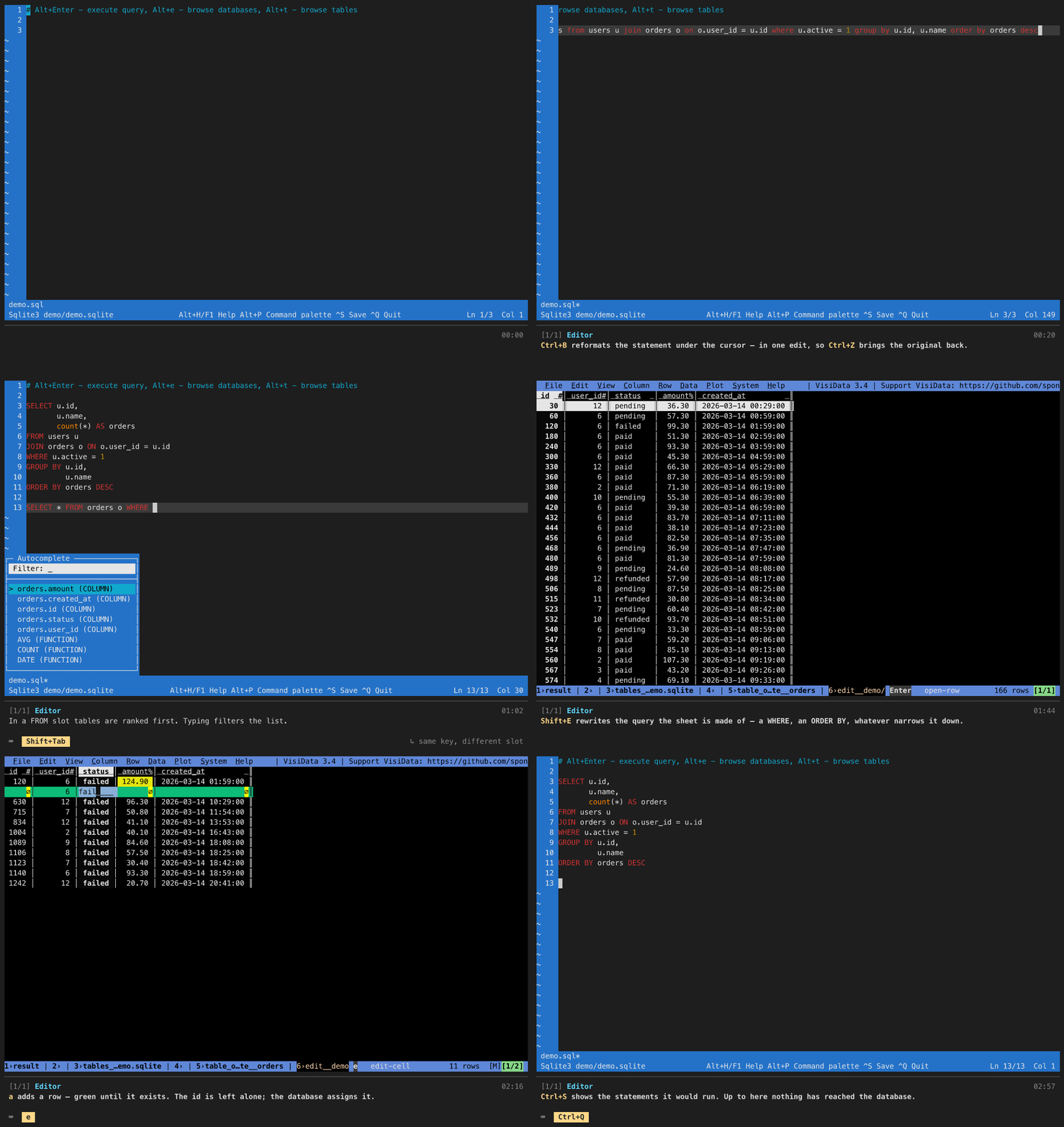
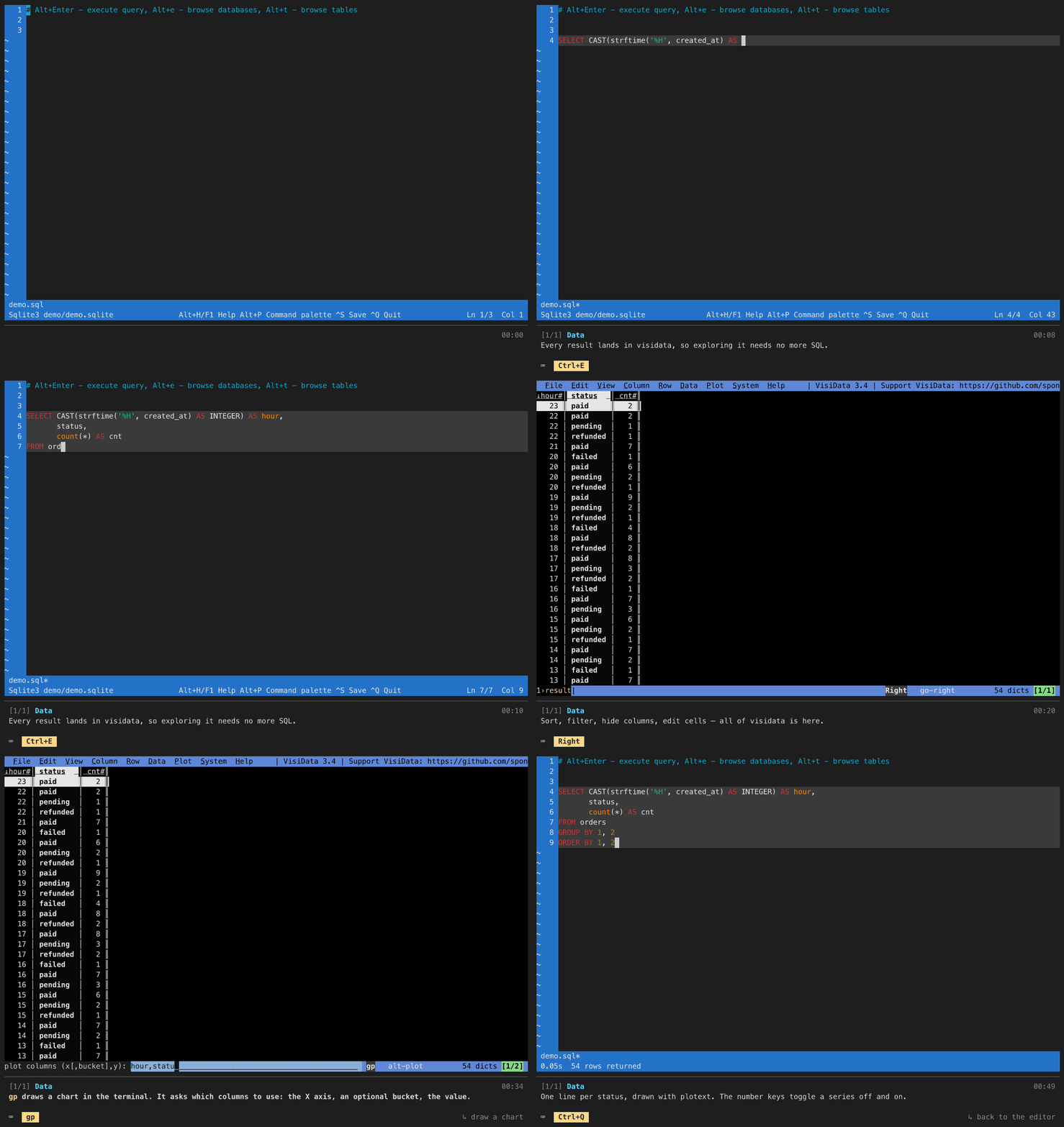
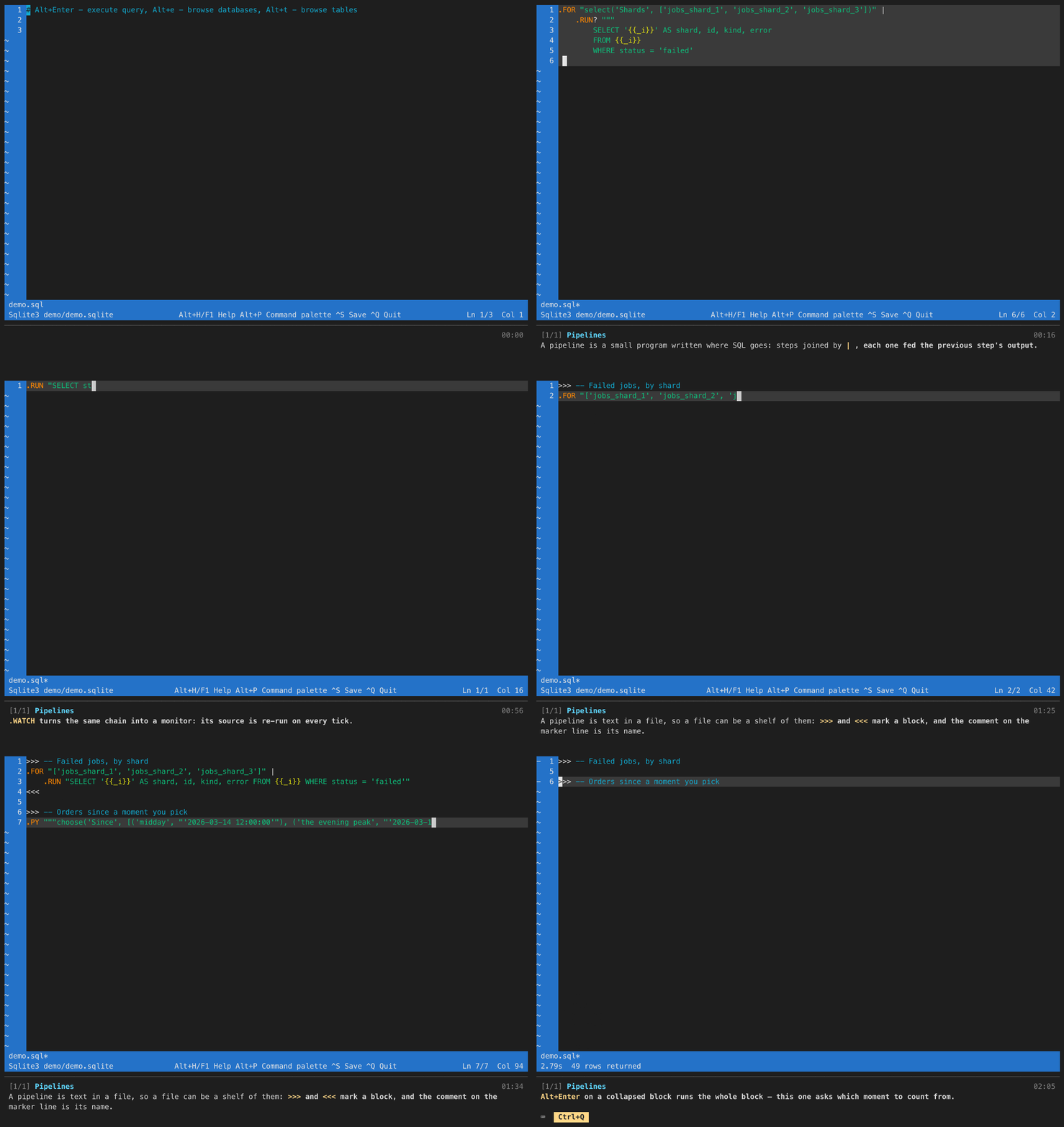
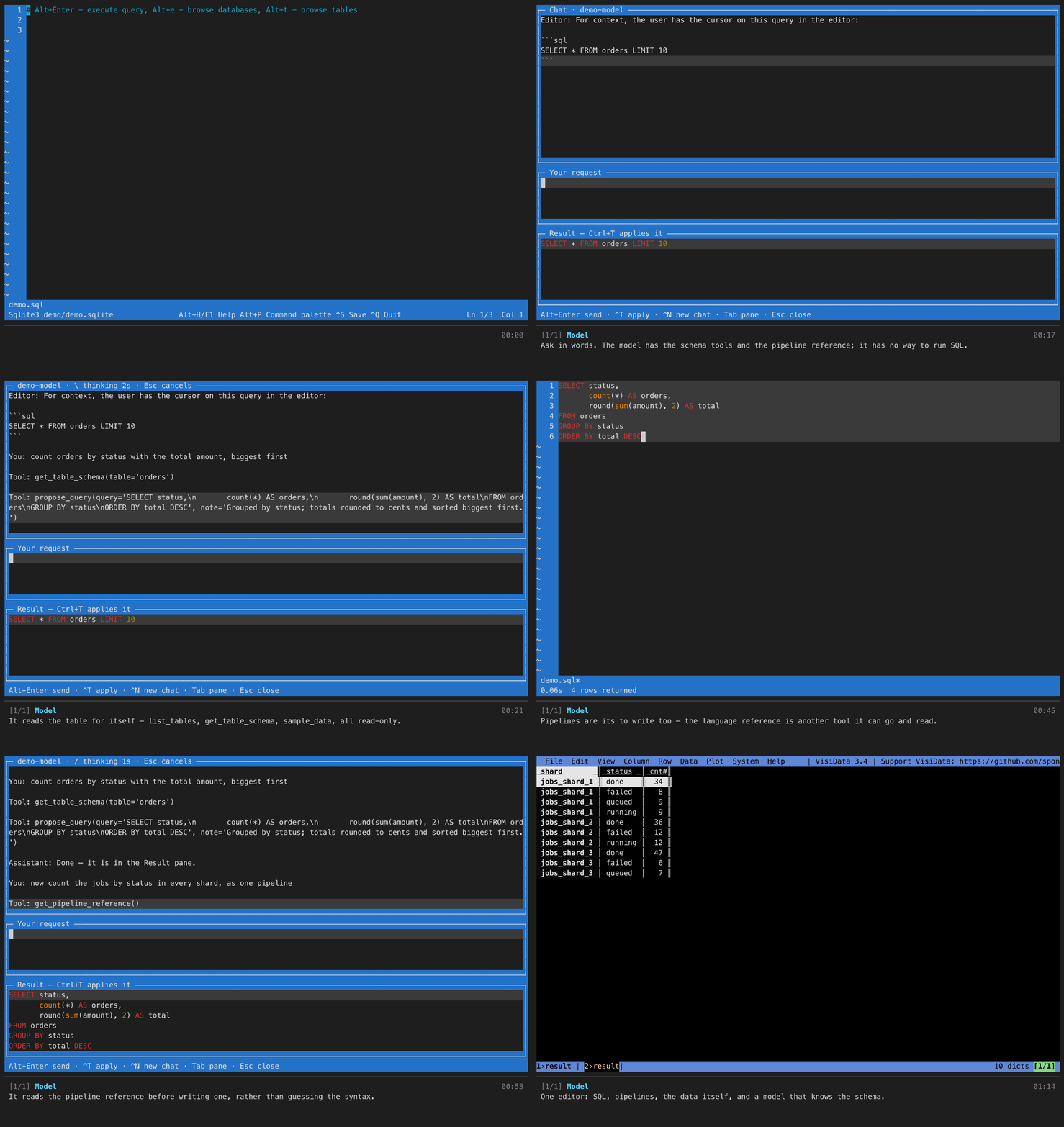
Four recordings of a real session — the captions under the terminal say what is happening and which key was pressed.
The editor
Syntax highlighting, Ctrl+B to beautify, schema-aware autocomplete, the
database and table browsers, and editing table data with the SQL shown before
anything is committed. See Editor Commands.
The result
Every query opens as a visidata sheet: sorting, a frequency table, key columns and an in-terminal chart. See Data Visualization.
Pipelines in the editor
A chain of steps in the editor: a prompt in the middle of a run, a fan-out over shards, a live monitor, and a file of named blocks used as a menu. See Pipelines.
The model
Ctrl+L — the model reads the schema through read-only tools and hands back a
query, then a pipeline. See LLM Chat.
Installation
pip install dbcls
Cassandra / ScyllaDB is not part of the package: it is a driver plugin in this repository, loaded from a checkout.
pip install scylla-driver
dbcls --plugin-dir ./plugins -E cassandra -H node1 -P 9042 -u admin -d my_keyspace
The LLM chat needs nothing installed — it talks to the endpoint over the standard library and is switched on by configuration alone.
Quick Start
With no connection arguments at all, dbcls opens the file on an in-memory SQLite database —
enough to try the editor, the pipelines and the visidata integration on CREATE TABLE /
INSERT of your own:
dbcls scratch.sql
Basic usage with command line arguments:
dbcls -H 127.0.0.1 -u user -p mypasswd -E mysql -d mydb mydb.sql
A JSON config file does the same job as the options, and holds several connections at once — one tab each:
dbcls -c config.json mydb.sql
{
    "connections": {
        "mysql01": {"engine": "mysql", "host": "127.0.0.1", "username": "user",
                    "ask_password": true, "dbname": "shop", "filename": "mysql.sql"},
        "local":   {"engine": "sqlite3", "dbfilepath": "test.sqlite", "filename": "local.sql"}
    }
}
Every option, the config file keys, tabs and the in-editor connection form are
in Configuration and connections; F1 inside dbcls
opens the same help.
Supported Database Engines
- MySQL
- PostgreSQL
- ClickHouse
- SQLite
- Cassandra / ScyllaDB — as a driver plugin:
pip install scylla-driverand start with--plugin-dir ./plugins
A database not on this list is added from outside, without touching dbcls: a plugin registers its own engine with setup.add_engine(...), and it is then a --engine, an "engine" in the config file and an entry in the connection form like any other. plugins/cassandra is the worked example.
Contributing
Contributions are welcome! Please feel free to submit a Pull Request or submit an issue on GitHub Issues
License
1 maintainer

Metadata
1 maintainer
Release files for dbcls 1.4.13
For a detailed explanation of source distributions (sdists) and built distributions (wheels), please see the package formats documentation.
Source distribution (sdist)
| File | Size | Uploaded | Provenance | Actions |
|---|---|---|---|---|
| dbcls-1.4.13.tar.gz | 363.2 kB | Without provenance | Details for dbcls-1.4.13.tar.gz |
Built distribution (wheel)
| File | Interpreter | ABI | Platform | Actions Reset |
|---|---|---|---|---|
| dbcls-1.4.13-py3-none-any.whl | Python 3 | none | any | Details for dbcls-1.4.13-py3-none-any.whl |
Total release size: 754.9 kB
Release files / dbcls-1.4.13.tar.gz
| Download URL | dbcls-1.4.13.tar.gz |
|---|---|
| Size | 363.2 kB |
| Tags | Source |
|
SHA-256 checksum How to use checksums |
849d48104710b7a1f7ffc6085b870b96e9c2923ec9836f44f03c24acfb9ba845
|
|
BLAKE2b-256 checksum How to use checksums |
5b2b27d3557aabc6f22149287adfdf923e5e6dcc56a0f71a6d4a1d960dbb088b
|
| Upload date | |
|
Uploaded using Trusted Publishing? What is trusted publishing? |
No |
| Uploaded via |
twine/6.2.0 CPython/3.9.6
|
Release files / dbcls-1.4.13-py3-none-any.whl
| Download URL | dbcls-1.4.13-py3-none-any.whl |
|---|---|
| Size | 391.7 kB |
| Tags | Python 3 |
|
SHA-256 checksum How to use checksums |
4bb043ffb7c57b695b20cd0066707f2fa0e082ef304fa5b3ef45ec5745522dcc
|
|
BLAKE2b-256 checksum How to use checksums |
1342d39d6604f0a5eb3cb8b03bb50e8a2c1e917ba842968e89bbcf5d14d76ce7
|
| Upload date | |
|
Uploaded using Trusted Publishing? What is trusted publishing? |
No |
| Uploaded via |
twine/6.2.0 CPython/3.9.6
|
Security for dbcls 1.4.13
Provenance
Provenance describes where a file came from. On PyPI, provenance is shared via attestations, which provide a verifiable record of the build or publishing details. View details, limitations and caveats.
No provenance found
None of the files in this release were uploaded with provenance metadata.
A note on package security
PyPI is a repository for distributing packages, not a service for auditing them. While third-party security researchers and our staff do their best to detect and remove malicious packages, PyPI cannot guarantee the quality, security or suitability of any given package.
To learn more about protecting yourself from malicious actors, visit our package security documentation.














