
DBMS-Benchmarker is a Python-based application-level blackbox benchmark tool for Database Management Systems (DBMS). It connects to a given list of DBMS (via JDBC) and runs a given list of parametrized and randomized (SQL) benchmark queries. Evaluations are available via Python interface, in reports and at an interactive multi-dimensional dashboard.

Project description


DBMS-Benchmarker
DBMS-Benchmarker is a Python-based application-level blackbox benchmark tool for Database Management Systems (DBMS). It aims at reproducible measuring and easy evaluation of the performance the user receives even in complex benchmark situations. It connects to a given list of DBMS (via JDBC) and runs a given list of (SQL) benchmark queries. Queries can be parametrized and randomized. Results and evaluations are available via a Python interface. Optionally some reports are generated. An interactive dashboard assists in multi-dimensional analysis of the results.
See the homepage and the documentation.
Key Features
DBMS-Benchmarker
- is Python3-based
- connects to all DBMS having a JDBC interface - including GPU-enhanced DBMS
- requires only JDBC - no vendor specific supplements are used
- benchmarks arbitrary SQL queries - in all dialects
- allows planning of complex test scenarios - to simulate realistic or revealing use cases
- allows easy repetition of benchmarks in varying settings - different hardware, DBMS, DBMS configurations, DB settings etc
- investigates a number of timing aspects - connection, execution, data transfer, in total, per session etc
- investigates a number of other aspects - received result sets, precision, number of clients
- collects hardware metrics from a Grafana server - hardware utilization, energy consumption etc
- helps to evaluate results - by providing
- standard Python data structures
- predefined evaluations like statistics, plots, Latex reporting
- an inspection tool
- an interactive dashboard
In the end this tool provides metrics that can be analyzed by aggregation in multi-dimensions, like maximum throughput per DBMS, average CPU utilization per query or geometric mean of run latency per workload.
For more informations, see a basic example, take a look at help for a full list of options or take a look at a demo report.
The code uses several Python modules, in particular jaydebeapi for handling DBMS. This module has been tested with Brytlyt, Citus, Clickhouse, DB2, Exasol, Kinetica, MariaDB, MariaDB Columnstore, MemSQL, Mariadb, MonetDB, MySQL, OmniSci, Oracle DB, PostgreSQL, SingleStore, SQL Server and SAP HANA.
Installation
Run pip install dbmsbenchmarker
Basic Usage
The following very simple use case runs the query SELECT COUNT(*) FROM test 10 times against one local MySQL installation.
As a result we obtain an interactive dashboard to inspect timing aspects.
Configuration
We need to provide
- a DBMS configuration file, e.g. in
./config/connections.config
[
  {
    'name': "MySQL",
    'active': True,
    'JDBC': {
      'driver': "com.mysql.cj.jdbc.Driver",
      'url': "jdbc:mysql://localhost:3306/database",
      'auth': ["username", "password"],
      'jar': "mysql-connector-java-8.0.13.jar"
    }
  }
]
- the required JDBC driver, e.g.
mysql-connector-java-8.0.13.jar - a Queries configuration file, e.g. in
./config/queries.config
{
  'name': 'Some simple queries',
  'connectionmanagement': {
        'timeout': 5 # in seconds
    },
  'queries':
  [
    {
      'title': "Count all rows in test",
      'query': "SELECT COUNT(*) FROM test",
      'numRun': 10
    }
  ]
}
Perform Benchmark
Run the CLI command:
dbmsbenchmarker run -e yes -b -f ./config
-e yes: This will precompile some evaluations and generate the timer cube.-b: This will suppress some output-f: This points to a folder having the configuration files.
This is equivalent to python benchmark.py run -e yes -b -f ./config
For more options, see the documentation
After benchmarking has been finished we will see a message like
Experiment <code> has been finished
The script has created a result folder in the current directory containing the results. <code> is the name of the folder.
Evaluate Results in Dashboard
Run the command:
dbmsdashboard
This will start the evaluation dashboard at localhost:8050.
Visit the address in a browser and select the experiment <code>.
This is equivalent to python dashboard.py.
Alternatively you may use a Jupyter notebook.
Benchmarking in a Kubernetes Cloud
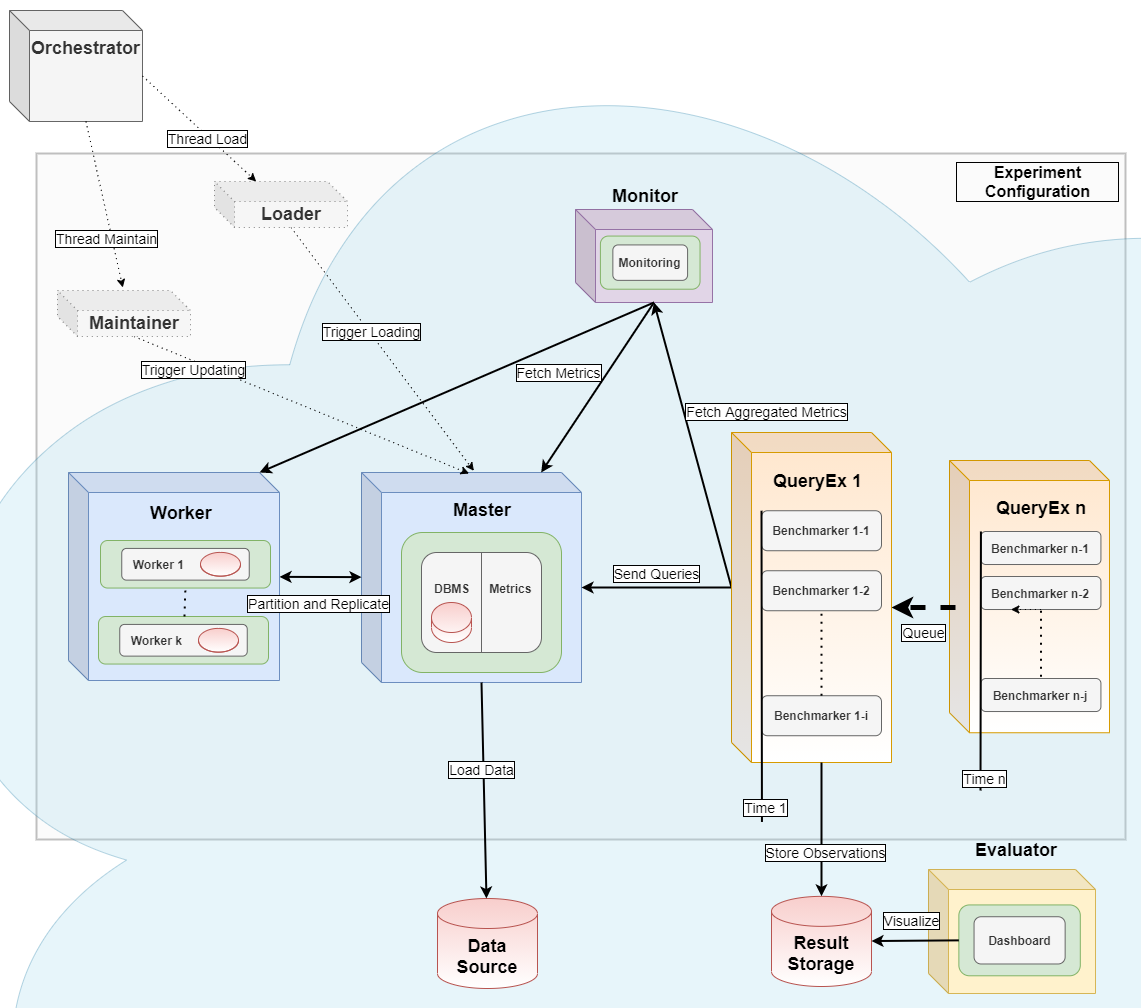
This module can serve as the query executor [2] and evaluator [1] for distributed parallel benchmarking experiments in a Kubernetes Cloud, see the orchestrator for more details.
Limitations
Limitations are:
- strict black box perspective - may not use all tricks available for a DBMS
- strict JDBC perspective - depends on a JVM and provided drivers
- strict user perspective - client system, network connection and other host workloads may affect performance
- not officially applicable for well known benchmark standards - partially, but not fully complying with TPC-H and TPC-DS
- hardware metrics are collected from a monitoring system - not as precise as profiling
- no GUI for configuration
- strictly Python - a very good and widely used language, but maybe not your choice
Other comparable products you might like
- Apache JMeter - Java-based performance measure tool, including a configuration GUI and reporting to HTML
- HammerDB - industry accepted benchmark tool, but limited to some DBMS
- Sysbench - a scriptable multi-threaded benchmark tool based on LuaJIT
- OLTPBench -Java-based performance measure tool, using JDBC and including a lot of predefined benchmarks
References
Erdelt P.K. (2021) A Framework for Supporting Repetition and Evaluation in the Process of Cloud-Based DBMS Performance Benchmarking. In: Nambiar R., Poess M. (eds) Performance Evaluation and Benchmarking. TPCTC 2020. Lecture Notes in Computer Science, vol 12752. Springer, Cham. https://doi.org/10.1007/978-3-030-84924-5_6
[2] Orchestrating DBMS Benchmarking in the Cloud with Kubernetes
(old, slightly outdated docs)
Release history Release notifications | RSS feed


Download files
Download the file for your platform. If you're not sure which to choose, learn more about installing packages.
Source Distribution
Built Distribution
Filter files by name, interpreter, ABI, and platform.
If you're not sure about the file name format, learn more about wheel file names.
Copy a direct link to the current filters
File details
Details for the file dbmsbenchmarker-0.11.16.tar.gz.
File metadata
- Download URL: dbmsbenchmarker-0.11.16.tar.gz
- Upload date:
- Size: 117.6 kB
- Tags: Source
- Uploaded using Trusted Publishing? No
- Uploaded via: twine/3.4.2 importlib_metadata/4.8.1 pkginfo/1.7.1 requests/2.26.0 requests-toolbelt/0.9.1 tqdm/4.62.3 CPython/3.9.7
File hashes
| Algorithm | Hash digest | |
|---|---|---|
| SHA256 |
7c2e012cdae814109e2fab4118b38ed895d3ed2c3ac94cabfc0488023f7eb5eb
|
|
| MD5 |
5a1a0ef0fbf74653dabad2b87fc2e9c3
|
|
| BLAKE2b-256 |
0e3552eddb45a655fe856ce9a2ab735e35dc8df963adcad77b8e32215a2f8e81
|
File details
Details for the file dbmsbenchmarker-0.11.16-py3-none-any.whl.
File metadata
- Download URL: dbmsbenchmarker-0.11.16-py3-none-any.whl
- Upload date:
- Size: 127.3 kB
- Tags: Python 3
- Uploaded using Trusted Publishing? No
- Uploaded via: twine/3.4.2 importlib_metadata/4.8.1 pkginfo/1.7.1 requests/2.26.0 requests-toolbelt/0.9.1 tqdm/4.62.3 CPython/3.9.7
File hashes
| Algorithm | Hash digest | |
|---|---|---|
| SHA256 |
320502b973da13103dba4d1002e6cd06ec664488e71f14565811e13ebfd4ded5
|
|
| MD5 |
a32a45da33999ccc0b00572d66261cc6
|
|
| BLAKE2b-256 |
e550f52f5cf8cde3c1b4178df25b08133f16f74febd014e570bf0e206f6fc5b7
|






